Use a different phone number that its owner agrees you may use to receive the verification code. Google’s official guidance recommends that remedy for the message “This phone number has been used too many times for verification” and says a family member’s or friend’s number may be used. Google does not state the usage limit or a reset period in its help article.
Why does YouTube say this?
Google says it limits how many times a phone number can be used for verification to protect users from abuse. The error means that the number has reached a limit for verification use; it does not tell you exactly how many times the number was used or when it may be eligible again.
As an Amazon Associate I earn from qualifying purchases.
A number may also have been used before its current owner had it. A Google Account Product Expert has raised number recycling as a possible explanation in a community discussion, but that is not official diagnostic guidance and cannot establish why a particular number was rejected.
What to do next
- Use another number. Google’s recommended response is to try a different number. Its help page says you may use a family member’s or friend’s number. Ask first, and make sure the person can receive and share the code with you.
- Enter the code only in Google’s verification flow. Follow the instructions on the screen where you are trying to verify the account.
- If you do not have another number available, consult Google’s account-verification help page for current guidance. The page does not give a timetable for this error, so it cannot tell you when your number might work again.
Does waiting reset the limit?
Google’s official help article does not say that waiting a particular number of hours or days clears this restriction. It also does not publish a reset interval, a fixed annual allowance, or a precise number of verification attempts permitted per phone number. Treat claims about a specific quota or guaranteed wait time as unconfirmed unless Google publishes that information.
#1 Best Overall

- EXPAND YOUR STORAGE. Easily move files off your device, freeing up valuable space so you can store your favorite photos, movies, music, games, and more.
- Say goodbye to emailing photos between devices. Once they’re on your SanDisk Phone Drive, read speeds up to 100MB/s let you transfer files fast. (1 MB/s = 1 million bytes per second. Based on internal testing; performance may vary depending upon host device, usage conditions, drive capacity, and other factors. USB Type-C port with USB 3.2 Gen 1 support required.)
- AUTOMATIC BACKUP. Automatically back up your latest photos, videos, music, documents, and contacts with the SanDisk Memory Zone app. (Download and installation required. Set up automatic backup within app settings. See official SanDisk website for Memory Zone details.)
- DATA RECOVERY. Recover deleted files with the included RescuePRO Deluxe software.(Registration and download required; terms and conditions apply. See RescuePRO page on SanDisk site.)
- CONVENIENT DESIGN. Attach your drive to your keyring to help keep it secure so you can have storage wherever you are, whenever you need it.
Is this the same as “This phone number cannot be used for verification”?
No. They are different error messages. Google’s help page addresses both and recommends using a different number for each. If your screen says “This phone number has been used too many times for verification,” the documented explanation is a limit on how often the number has been used; do not assume that another error has the same cause.
What not to assume
- A particular quota: Google’s official article does not say “two accounts per year” or give another numeric threshold. Such figures in community replies are not established as Google policy.
- A guaranteed fix through waiting or repeated attempts: the official guidance reviewed does not promise that either will remove this error.
- That a new owner’s number has no prior history: a number may have been used before it was assigned to its current owner, though that possibility does not diagnose an individual rejection.
Changing devices, buying a SIM, or using a virtual-number service is not presented by Google’s cited help article as a remedy for this specific message.
Rank #2

- Recover Existing Android Data - Retrieve text messages, call logs, contacts, calendar entries, notes, photos, videos, and more from supported Android phones and tablets. Designed to help access important files and information quickly through an easy-to-use recovery process. Ideal for personal, business, or technical data recovery needs.
- Advanced Search & Data Review Tools - Built-in search functions help locate keywords, symbols, names, and specific records across extracted device data. Review messages, browsing history, app data, media files, and timelines more efficiently without manually sorting large amounts of content. Helps streamline file discovery and organization.
- Runs Directly from the Stick, No Installation Required - The software operates directly from the included recovery device, so no installation is required on your Windows computer. Simple plug-and-use setup makes operation fast and straightforward.
- Unlimited Use with Lifetime License & Updates - Use the Phone Recovery Stick across multiple supported devices with no per-phone usage limits. Includes lifetime license access with software updates to help maintain compatibility over time. A cost-effective solution for ongoing recovery and device access needs.
- Windows Compatible for Supported Android Devices - Compatible with Windows systems and designed to work with many supported Android phones and tablets using a standard data cable. Access available device data through a simple connection process with user-friendly recovery software. For advanced recovery options that may require root access, third-party rooting solutions can be used separately.
StreamNeo is unrelated to phone verification
StreamNeo is a cloud service for keeping uploaded videos live on YouTube; it does not verify Google accounts or fix phone-number errors. If you came here to solve this verification message, use the steps above. For its separate streaming service details, visit StreamNeo or start a StreamNeo trial.
Outdated Drivers Are Slowing You Down
One free scan finds every outdated or missing driver and matches the right update for your exact hardware.Free scan · exact hardware matchWindows Errors? Fix Them Before They Spread
Repair common Windows errors and clear accumulated junk for a smoother, more stable PC - no reinstall needed.Free scan · no reinstallQuick Recap
Best Value

- Target Applications - Desktop PC security, Mobile PCs, Custom applications
- Indoor, home and office use
- Blue LED - soft, cool blue glow fits into any environment; doesn't compete in low light environments
- Small form factor - conserves valuable desk space
- Rugged construction - high-quality metal casing weighted to resist unintentional movement
Rank #4
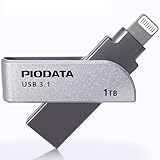
- KEEP THE MOMENTS YOU CAN NEVER RECREATE - First steps, family trips and once-in-a-lifetime clips should never be left behind because your iPhone is full. The iXflash App automatically backs up newly added photos and videos to your 1TB iXflash, helping avoid duplicate copies while preserving original quality, filenames, dates and available metadata. You can keep more memories without relying on a monthly cloud-storage subscription for additional space
- THE IXFLASH APP IS THE HEART OF THE EXPERIENCE - Connect through the built-in Lightning connector to unlock automatic backup, iCloud Photos backup, restore, file management and media playback on supported iPhone and iPad devices. The included USB-A to USB-C adapter also supports the same iXflash App workflow on compatible USB-C iPhone and iPad models, while the Piodata Android App delivers full automatic backup and picture management on supported Android devices
- CREATE BEFORE THE MOMENT PASSES - On compatible iPhone 7 and later models, record directly to iXflash in available 4K or 1080p modes. Picture-in-Picture Dual-Camera Recording captures front and rear views together for reactions, interviews, tutorials and creator content. Store and play MP3 music or MP4 videos directly from iXflash. Live Recording and dual-camera PIP are not supported by the Piodata Android App at this time
- AES-256 SECURITY THAT FEELS NATURAL - Unlock through supported Apple ID or Google ID authentication instead of remembering another password. On iPhone, use Face ID, Touch ID or passcode verification. Trust Circle lets the owner authorize up to 16 trusted users, each using their own ID, without exposing the owner password or surrendering permanent control. Read-Only mode helps prevent accidental deletion and unwanted changes
- LIGHTNING FIRST, THREE CONNECTIONS WHEN YOU NEED THEM - Apple MFi certification supports compatible iPhone and iPad devices, while the extended Lightning connector fits most protective cases. Native USB-A supports USB 3.2 Gen 1 speeds up to 5Gbps and remains backward compatible with USB 2.0. The included USB-A to USB-C adapter extends access to supported USB-C iPhone, iPad, Android, Mac and PC devices, giving one drive broad reach across the devices you already own
Rank #3

- [2-in-1 CAC & NFC Smart Card Reader] This smart card reader supports both contact chip cards and contactless NFC cards(for ID cards only), simply insert or tap to read CAC, PIV, military ID, access badges, debit/credit, ID cards, and driver licenses. Built-in USB-A & USB-C dual‑head cable – no detachable adapter to lose. One nfc reader instantly connects to legacy USB‑A laptops and modern USB‑C MacBooks, tablets, and phones.
- [Trusted for Military & Government CAC/DOD] This NFC reader and CAC reader design for DOD Common Access Card login, military identity verification, and high‑security authentication. A true cac card reader military professionals can trust. The CAC contact smart card reader interface meets PC/SC and ISO7816 Class A (5V) / Class B (3.3V), T=0, T=1. NFC contactless smart card reader interface supports ISO14443 A&B, , ISO14443-4 compatible card T=CL, and MIFARE. FCC, CE, VCCI, CCID, and Microsoft WHQL certified for secure transactions in government, banking, enterprise, and field use.
- [NFC ID Card Reader] This USB NFC id card reader is ideal for contactless verification with NFC-enabled ID cards, as well as for identity verification applications such as tax returns, pension insurance, vehicle registration, and criminal records. NOTE: 1.Applications for tax returns, credit card payments, etc., are not included; 2.Does not include third-party card editing software. 3.Not compatible with health insurance cards. Health insurance cards cannot be used with health apps.
- [Broad Card & System Compatibility] Our NFC CAC reader supports T0 and T1 protocols. Supports Class A, B, and C cards (5V/3V/1.8V) compliant with ISO7816, PC/SC 2.0, Microsoft WHQL, EMV, and USB-IF CCID standards. Recognized by Windows 11/10/8/7/XP, macOS 11.1+, Linux Fedora Core 8+, and Android with zero driver installation for the reader itself. CCID‑compliant, works seamlessly on USB‑A and USB‑C ports. (Note: Some secure cards or portals require your agency’s middleware; the cac reader acts as a transparent bridge.)
- [Portable, Rugged & Workspace‑Ready] This Military USB C CAC Card Reader features an extra‑long 3ft (95 cm) reinforced cable gives you freedom to position the reader away from crowded ports. Compact, lightweight, and travel‑ready – ideal for military personnel, field agents, and remote workers. The integrated strain‑relief and tough housing stand up to daily on‑the‑go use. Use only one connector at a time.
Product prices and availability are accurate as of the date/time indicated and are subject to change. Any price and availability information displayed on Amazon at the time of purchase will apply.

