Free tools Windows power users keep installed
One-click scans. No signup required.
Usually, a carrying case is removed before you dock the console. The real compatibility question concerns a protective shell that stays attached to the Nintendo Switch 2. Nintendo publishes the console’s outside measurements and the dock’s outside size, but not the dock’s internal clearance or a certification for third-party shells. Treat dimensions as a screening check, look for a model-specific “dock compatible” claim, and never force a cased console into the dock.
First identify which kind of case you are buying
Listings use “case” for two very different products. Confusing them is the most common reason a buyer expects the wrong thing from a dock.
As an Amazon Associate I earn from qualifying purchases.
Carrying cases are removed for play
A Nintendo Switch 2 carrying case is a storage and travel container. The console goes inside the case when it is not being played, then comes out before handheld use or docking. Nintendo’s carrying-case guidance describes transport and storage, warns that the product cannot completely prevent screen damage, and says not to leave the console switched on while it is stored. That guidance does not say the carrying case can remain around the console in the dock.
Crashes, No Sound, or Screen Glitches?
Random freezes, missing sound and display glitches usually trace back to one bad driver. Find and replace yours safely.Free scan · under a minutePC Slower Than It Used to Be?
A free scan shows the junk files, broken settings and background clutter dragging Windows down - then fixes them in one click.Free scan · Windows 10 & 11Protective shells may stay attached
A shell, bumper, or protective cover is fitted directly to the console and may be intended to remain on during handheld play. Only this category creates a “can I dock with the case on?” problem. A shell can add material at the back, edges, control sticks, shoulder buttons, ports, or bottom of the console. A listing that says “for Switch 2” is not automatically saying “fits in the Switch 2 dock with the shell installed.”
#1 Best Overall

- Travel case
- Protection Library holds 12 game cards and offers full screen and analog stick protection
- microSD Card Case 2pcs, each holds 2 microSD Cards
- Comfortable carrying handle and soft cleaning cloth
Nintendo’s published measurements—and what they do not prove
Nintendo’s Australia technical specifications, accessed October 13, 2026, list the Nintendo Switch 2 console at approximately 116 mm × 272 mm × 13.9 mm with Joy-Con 2 attached. Nintendo also lists a maximum thickness of 30.7 mm, measured from the control-stick tips to the protruding ZL/ZR button parts. That maximum is more useful for case screening than the 13.9 mm body thickness because it includes the console’s highest controls.
Nintendo’s South Africa specifications, also accessed October 13, 2026, list the dock at approximately 115 mm × 201 mm × 51.2 mm. The 51.2 mm figure includes 2 mm added by the dock’s feet. It is the dock’s overall outside size, not the width, depth, or height of the slot where the console sits.
| Item | Nintendo-published measurement | How to use it |
|---|---|---|
| Switch 2 with Joy-Con 2 attached | Approximately 116 mm × 272 mm × 13.9 mm | Confirms the model and gives the console’s basic outside envelope. |
| Maximum console thickness | 30.7 mm, from control-stick tips to protruding ZL/ZR button parts | Use as a conservative screening reference for the shell’s thickest assembled points. |
| Switch 2 dock | Approximately 115 mm × 201 mm × 51.2 mm, including 2 mm feet | Describes the dock’s exterior; it does not reveal internal clearance. |
These numbers cannot certify a third-party shell. A shell maker must account for the dock’s internal opening, lining, rails, connector alignment, and any pressure points. Because Nintendo does not publish that internal clearance in the cited specifications, a shell that appears smaller than the dock externally can still fail to seat.
Recommended Free Tools
Rank #2

- NINTENDO CASE - SWITCH 2 COMPATIBLE: Our premium Nintendo Switch case is custom fit for your Switch 2, shielding your console with anti scratch velvet lining and shock absorbing materials—perfect for daily storage, commutes, or long travel days
- TRAVEL READY DESIGN: This compact portable Nintendo Switch 2 carrying case fits easily in a backpack or carry-on or can simply be carried by itself with a wristlet handle for secure handling without risk of drops—great for on-the-go everyday players
- CONVENIENT GAME & AIRTAG STORAGE: Whether at school, traveling or on the go, you can organize up to 12 game cards in a dedicated slot system and track your Case for Nintendo Switch 2 accessories using a hidden AirTag compartment, so it's never lost
- DURABLE & STYLISH: Crafted with an abrasion- and water-resistant polyester exterior and brushed velvet interior lining, plus hidden, no-snag zippers, this Nintendo Switch 2 travel case protector resists wear and tear for lasting device protection
- SUSTAINABLY MADE + 2-YEAR COVERAGE: This durable Belkin Switch 2 Case comes in 100% plastic-free packaging. Plus, you can purchase the Nintendo Switch carrying case with peace of mind knowing that it comes with 2-year coverage
How to check a listing before ordering
- Read the product category. Decide whether the item is a travel case, a removable pouch, or a permanently fitted shell. A travel case is not evidence of dock compatibility.
- Confirm the console generation. The listing should name Nintendo Switch 2 specifically. “Switch,” “original Switch,” or “Switch OLED” compatibility is not interchangeable. The original Nintendo Switch dock is not compatible with Nintendo Switch 2, according to Nintendo Support.
- Find the exact shell model. Compatibility should apply to the particular shell revision, not merely to a product family with several sizes or bundles. Check whether detachable grips, thumb-stick caps, kickstand pieces, or button covers are included in the stated dimensions.
- Look for a dock-specific statement. The strongest listing language identifies the Nintendo Switch 2 dock and says the console can remain docked with that exact shell installed. “Slim,” “low profile,” or “docking friendly” is marketing language unless the seller explains what dock was tested.
- Locate dimensions or a fit diagram. Prefer a drawing or specification that gives the shell’s outside dimensions at its thickest points. If the seller provides only the bare console dimensions, it has not measured the finished, cased setup.
- Check openings and ventilation. The shell should leave the game-card area, charging connection, speakers, buttons, and cooling openings usable. Nintendo’s troubleshooting guidance recommends keeping dock vents unobstructed and using an open, ventilated area; that is a ventilation precaution, not a published shell-fit guarantee.
- Review the return terms. If internal clearance is not documented, a returnable purchase is safer than relying on photographs or a generic “compatible” badge.
How to compare the shell with the 30.7 mm reference
The 30.7 mm figure is a useful upper-envelope check, but it is not a dock-slot specification. Use it to identify obvious problems rather than to declare a fit.
Measure the assembled shell, not the bare console
- Attach every part you intend to leave installed: the back shell, front frame, grip pieces, shoulder-button covers, thumb-stick caps, and any decorative inserts.
- Place the assembled console on a flat surface in the same orientation used for docking.
- Measure the thickest distance from the lowest rear contact area to the highest control, stick, or button cover. A digital caliper is ideal; a ruler can identify a clearly oversized shell but is less precise.
- Repeat the measurement near both upper corners and around the ZL/ZR and stick areas. A single raised corner can stop insertion even when the center measurement looks acceptable.
- Record whether the measurement includes Joy-Con 2 and every accessory that remains attached. Do not compare a shell-only measurement with Nintendo’s 30.7 mm maximum if the listing’s sticks or buttons are taller than the stock parts.
If the shell’s thickest assembled point is already greater than the console’s 30.7 mm maximum envelope, it deserves extra scrutiny: it adds height beyond Nintendo’s published control profile and is more likely to meet an internal dock surface. A measurement below 30.7 mm still does not prove fit because the dock’s usable opening may be narrower or shaped differently.
Do not subtract the dock’s outside dimensions
It is not valid to compare a shell’s thickness with the dock’s 51.2 mm outside height and assume the remaining space is available. The dock contains walls, guides, the connector, and other internal structures. The published 51.2 mm dimension also includes the feet, so it cannot be treated as the slot’s clearance.
Rank #3

- Hard shell case protects & is compatible with Nintendo Switch 2, Nintendo Switch OLED, Nintendo Switch system
- Protection Library holds 12 game cards and offers full screen and analog stick protection
- MicroSD Card Case 2pcs, each holds 2 microSD Cards
- Comfortable carrying handle
How to interpret compatibility language
| Listing wording | What it establishes | What remains unknown |
|---|---|---|
| “Nintendo Switch 2 carrying case” | The product is intended to hold the console during storage or travel. | Whether the console can be docked without removing it. |
| “Nintendo Switch 2 case” | At most, the intended console model. | Whether it is a pouch or a fitted shell, and whether it fits the dock. |
| “Dock compatible” | A claim that the seller believes the shell can remain installed while docking. | Which dock was tested, which shell configuration was used, and whether vents and connectors remain clear. |
| “Fits the dock” with no model named | A vague fit assertion. | Whether it refers to the Nintendo Switch 2 dock, an original Switch dock, or another accessory. |
| Exact dimensions plus a Nintendo Switch 2 dock test | The most useful available evidence for that shell. | Normal manufacturing variation and the condition of your own dock and accessories. |
Ask the seller for the exact dock model and the shell configuration used in the test. A shell that fits without thumb-stick caps may not fit with them installed. A shell that works with Joy-Con 2 removed may not work with them attached. The claim needs to match how you intend to use the system.
Do these 3 things before closing this tab:
1Clear out junk files and repair common Windows errors2Scan for outdated or missing drivers - takes under a minute3Repair Windows errors before they cause bigger problemsSafe fit-check procedure after delivery
When the listing does not provide convincing internal-clearance evidence, perform a gentle check before committing to regular use. Keep the console powered down or awake only as needed for a brief connection test, and stop at the first sign of resistance.
- Place the dock on a stable, open surface with its vents unobstructed. Do not test inside a tight shelf or against fabric.
- Remove any separate travel pouch. Leave only the fitted shell and the accessories you plan to keep attached.
- Inspect the shell’s bottom edge and the dock opening for trapped plastic, fabric, grit, or a misaligned insert.
- Lower the console straight into the dock without rocking it side to side. Use only the weight of the console; never press down on the top edge.
- Check that the console reaches its normal seated position without a gap, scraping, or visible bowing of the shell.
- Verify that the dock connection behaves normally and that the shell is not pressing against a port or control. If the console does not seat fully, remove it and stop using that combination.
- After removal, look for shiny rub marks, compressed material, or scratches. These are signs of contact even if the first connection appeared to work.
A successful brief fit check is practical evidence for your particular shell and dock, not a universal certification. Keep the purchase returnable until you have checked every configuration you plan to use.
Rank #4

- Hard and High Quality: Designed to make your new Switch 2 Console even more portable & travel friendly. High quality hard shell case protects Switch from drops and scratches. Not for the switch 1st 2017 and switch oled model.
- Perfect carry case for keeping your Switch 2 securely stored when travelling or when not in use.
- Hard EVA shell keeps your device protected while the soft inner material keeps your device free from scratches.
- Large Storage: A mesh pocket provides secure storage room for some small accessories like charging cable, ear buds, and 2 extra JoyCons.
- Compatibe with Nintendo Switch 2 console with both its Joy-Con controllers attached to it, and the upper section features a separate inner pocket which can fit extra JoyCons, Cables, Games, and other smaller but essential accessories. (Please note this cannot accommodate larger items like the dock or pro-controllers)
What to do when the cased console will not seat
Resistance starts at the top
Raised thumb-stick caps, shoulder-button covers, or a thick upper frame are likely contact points. Remove detachable caps or covers and test only if the shell maker says that configuration is supported. Do not shave, bend, or compress the shell to make it fit; altering it can leave controls or ports unprotected.
Resistance starts at the bottom
Inspect the shell’s lower lip, charging-port cutout, and any attached grip. A bottom edge that is slightly too deep can interfere with the dock before the connector aligns. Confirm that the shell was designed for the Nintendo Switch 2 rather than an earlier model.
The console sits but the connection is intermittent
Remove the shell and test the console by itself. If the bare console connects normally, the shell may be preventing full seating or applying pressure near the connector. Stop using the shell in that dock and contact the seller rather than repeatedly forcing the connection.
Best Value
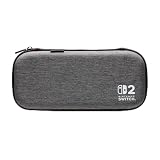
- Structured Protection: Molded interior with soft fabric lining
- Game Storage: Securely holds up to 10 game cards*
- Integrated Play Stand: unfold the convenient play stand and enjoy tabletop mode with ease
- Padded Screen Protector: The play stand doubles as a padded screen protector when the system is inside the case
- Compatibility: Compatible with Nintendo Switch 2
The shell blocks openings or the dock runs in a confined space
Move the dock to an open, ventilated area and remove any accessory that covers a vent. Nintendo’s guidance to keep vents unobstructed is a reason to reject a shell that closes over the dock-facing openings, even if it physically fits.
Why an original Switch dock is not a fallback
Nintendo Support states: “The Nintendo Switch dock is not compatible with Nintendo Switch 2.” That means a shell advertised for the original Switch dock cannot be treated as a substitute test for the Switch 2 dock. Check the dock generation in every compatibility claim, photograph, and customer question before ordering.
Use these criteria when comparing two shells
When two products appear similar, score each one against the same questions instead of choosing from photographs alone.
What’s actually slowing this PC down?
Pick the symptom - the matching free tool is one click away.
| Comparison point | Questions to ask |
|---|---|
| Exact console model | Does the maker name Nintendo Switch 2, including Joy-Con 2 compatibility where relevant? |
| Maximum added thickness | What is the thickest assembled point at the sticks, ZL/ZR buttons, grips, and rear shell? |
| Dock claim | Does the maker explicitly say the shell stays on in the Nintendo Switch 2 dock? |
| Configuration tested | Were thumb-stick caps, grips, Joy-Con 2, and other included pieces attached during the test? |
| Ports and controls | Are the charging connection, game-card area, speakers, buttons, and kickstand accessible? |
| Ventilation | Does the shell avoid covering openings, and does your dock remain in an open, ventilated location? |
| Seller support | Can the seller identify the dock model and accept a return if the exact setup does not fit? |
Nintendo’s console and dock measurements help you reject obviously oversized designs, while the shell maker’s model-specific test is the evidence that matters for final selection. No exact third-party shell model is established here, so an unnamed product should not be assumed to fit.
A practical buy-or-remove decision
- Choose a carrying case when your priority is travel or storage protection and you are comfortable removing the console before docking.
- Choose a fitted shell only when you want continuous protection during handheld use and the listing clearly addresses the Nintendo Switch 2 dock.
- Plan to remove the shell when dimensions are missing, the dock model is not named, the claim is limited to “Switch compatible,” or the seller cannot explain the tested configuration.
- Return or replace the shell if the console needs force, fails to seat fully, shows rubbing, loses a stable connection, or obstructs ventilation.
The safest purchase decision is therefore conditional: buy a shell with a documented Nintendo Switch 2 dock claim, verify its thickest assembled dimensions, and perform a gentle fit check on your own equipment. Without those pieces of evidence, treat the case as removable before docking rather than assuming it will fit.
Quick Recap
Product prices and availability are accurate as of the date/time indicated and are subject to change. Any price and availability information displayed on Amazon at the time of purchase will apply.

