The Tool Desk
Outbyte Driver Updater FREEScan for outdated or missing drivers - takes under a minuteDriver Scan →Outbyte PC Repair FREEClear out junk files and repair common Windows errorsFree Scan →A quiet turntable usually has a signal-path mismatch: the turntable is set to PHONO when the amplifier needs LINE, or it needs a phono stage that is missing or incompatible. Distortion more often points to a dirty, worn or damaged stylus, a dirty record, incorrect tracking force, cartridge misalignment, poor contacts, or a mechanical problem. Diagnose the symptom in that order rather than immediately buying a new cartridge.
First identify which problem you have
Low volume and distortion are different symptoms, so start by describing what you hear across several records. A quiet signal is consistently too soft but may otherwise be clear. Distortion can sound like crackle, harsh sibilance, fuzziness, mistracking, or loss of clarity. Pitch that wavers or sounds wrong is a speed or drive-system issue rather than a phono-level problem.
As an Amazon Associate I earn from qualifying purchases.
| What you notice | Check first | Likely action |
|---|---|---|
| Low volume on every record | Output mode, receiver input, phono stage and cartridge compatibility | Match the turntable’s PHONO or LINE output to the correct amplifier input and confirm the required phono gain |
| Crackle, sibilance or generally blurred sound | Stylus condition and debris on the stylus or record | Clean gently; replace the stylus only with a part compatible with the installed cartridge if it is worn or damaged |
| Distortion in both channels, especially on loud passages | Tracking force and cartridge alignment | Verify the cartridge’s own specification and align it for the tonearm’s geometry |
| One channel weak or noisy | Cartridge pins, headshell leads, cables and balance setting | Reseat and inspect connections carefully, then use the amplifier’s balance control to isolate the channel |
| Pitch is wrong or unstable | Selected RPM and belt or platter drive | Select the intended speed and inspect the drive system only as the turntable manual permits |
How the turntable signal reaches your speakers
A cartridge produces a very small phono-level signal. A phono preamplifier (phono stage) boosts it and applies the required equalization so a normal amplifier can use it. Some turntables include that preamp and provide a switch marked PHONO/LINE; others provide only a phono-level output and require an external phono stage or an amplifier input specifically marked PHONO.
Before changing the volume or tracking force, identify all four pieces in the path: cartridge, turntable output setting, phono stage, and amplifier input. The receiving input must match the output mode. Sending a PHONO output to a line input produces very low volume. Sending a LINE output into a phono input can overload the input and sound distorted.
#1 Best Overall

- Converts phono signals: a turntable preamp that converts phono signals to line level signals. This state-of-the-art circuitry phono preamp can accommodate magnetic pickups with an input sensitivity of 3mV at 50K ohms
- Low noise operation: offers outstanding performance with it’s low-noise Audio operational amplifiers. The output is 2V max (p-p) at 10K ohms. It’s better to position the preamp close to the source to reduce unwanted noise and interference
- Connects to turntables: connect any Turntable to modern sound equipment without specialized phono input for amplifying music. For the receiver, This can be connected to speakers, computers, laptops and more
- Simple plug & play: This mini preamp has stereo RCA inputs and stereo RCA outputs. Connect the Turntable to the RCA inputs and ground. Then, connect the amplifier Receiver to the RCA outputs
Moving-magnet and moving-coil cartridges
Moving-magnet (MM) and moving-coil (MC) cartridges do not have the same output. MC cartridges generally produce less signal and need a phono stage with higher gain and the appropriate loading. If an MC cartridge is connected to an MM-only setting, playback may be abnormally quiet even though the wiring is correct. Confirm the cartridge type and the phono stage’s supported gain and loading in both manuals.
Connections and grounding
Turn off the amplifier before reseating audio plugs. Push the left and right RCA connectors fully into the intended sockets and connect the turntable’s separate ground wire to the amplifier or phono preamp ground terminal when the equipment provides one. A loose plug, cartridge pin or headshell lead can reduce a channel or introduce noise. Do not pull on the thin cartridge wires; hold the connector when checking it.
Fix a turntable that is too quiet
- Confirm playback and the selected amplifier input. Make sure the record is turning, the stylus is lowered, the amplifier is on, and its input selector is on the sockets used by the turntable.
- Find the turntable’s output mode. If it has a PHONO/LINE switch, note its current position. A LINE setting uses the built-in preamp; a PHONO setting bypasses it and requires a suitable phono input or external phono stage.
- Match the receiving input. Connect LINE output to a normal line-level input such as AUX, CD or an equivalent input. Connect PHONO output to a phono input or to an external phono stage whose output then goes to a line input. Follow the device manuals where labels differ.
- Verify MM or MC compatibility. For an MC cartridge, select an MC-capable phono stage and its specified gain/loading. Do not assume that an input labelled PHONO supports both cartridge types.
- Check every plug and the ground connection. A partially inserted RCA plug or loose cartridge contact can make a correct setup sound extremely faint or unbalanced.
- Only then adjust listening volume. A higher volume setting compensates for normal recording differences, but it cannot correct a missing or mismatched phono stage. If the signal remains faint on several records after these checks, stop increasing the volume and seek the turntable, cartridge or phono-stage manufacturer’s support.
Do not infer that the cartridge is defective solely because the output is quiet. A configuration mismatch is a more direct explanation until the output mode, input type and cartridge compatibility have been verified.
Do these 3 things before closing this tab:
1Scan for outdated or missing drivers - takes under a minute2Repair Windows errors before they cause bigger problems3Fix the driver behind crashes, sound loss and screen glitchesFix distortion, harshness or mistracking
Use a second, clean record for comparison before making adjustments. If only one record is affected, damage or contamination on that record is more likely than a system-wide setup fault. If every record is affected, continue through the checks below.
1. Inspect the stylus without touching the cantilever
Lower the tonearm lift, switch off the turntable, and use bright light and magnification if available. Look for a visibly bent cantilever, a chipped or misshapen tip, or a wad of fibers around the stylus. Never touch or bend the cantilever. A worn or damaged stylus can mistrack and permanently wear records, so stop playback if it appears damaged.
Replace only the stylus assembly specified for the exact cartridge model installed on the tonearm. Cartridge families can use different replacement shapes and mounting systems; a part that looks similar may not fit or may track at the wrong force.
Rank #2

- High Performance: The BOX X5 phono preamp is compatible with both MM and MC cartridges, featuring 4 gain settings and an excellent precise RIAA equalization to provide a clean, direct pass-through of a signal when paired with your turntable(Input voltage 120V)
- Audiophile-Grade Components: This preamp utilizes a variety of materials such as 2% Precision Polyester Film Capacitors, Green Sleeve Copper Lead Audio Capacitors, 0.1% High-Precision Film Resistors, OPA1612 Op-Amp, Gold-Plated RCA Jacks, and more. It picks up subtle and finite detail produced from it and delivers a truly warm and inviting sound
- Multiple Gain Settings: With 4-Level gain adjustment settings of 38/48/56/66dB, the preamplifier accommodates both MM & MC cartridge types, meeting a variety of needs. This enhances your phono stage and helps in rebuilding the vintage stereo sound
- Mini and Exquisite: It's built around a minimalist yet functional design featuring an all-aluminum alloy chassis. When paired with the V3 stereo amplifier, the BOX X5 can bring out the best in your vinyl playback, enhancing its frequency response and dynamic performance
- User Friendly Design: It has an easy-to-use one-touch power button, gain control, and a convenient toggle switch to switch between MC and MM cartridges. In addition, the grounding port ensures that the connection is secure
2. Remove dust from the record and stylus
Dust on either surface can create crackle and fuzzy high frequencies. Use a suitable dry stylus brush with the stroke direction recommended by the cartridge maker, generally moving from the rear of the stylus toward the front so you do not pull the cantilever sideways. Handle records by their edges and label, and use a record brush appropriate to the medium. The Ortofon troubleshooting guidance specifically advises against putting liquids on the stylus or records; follow the care instructions supplied with your equipment instead of improvising a fluid treatment.
3. Verify tracking force for the installed cartridge
Tracking force is the downward force the stylus applies to the groove. Too little force can make the stylus lose contact on loud passages; too much can accelerate wear. Use the recommended range for the exact cartridge, not a value copied from another model.
Some turntables provide a counterweight and a marked dial; others use a supplied gauge. The Pro-Ject E1 / Phono / BT manual, revision 2022-04-06, demonstrates a model-specific procedure that uses the supplied gauge and requires confirming the exact cartridge weight. That procedure illustrates why the manual for your particular tonearm takes precedence: counterweight scales, zeroing steps and allowable ranges differ between models.
- Remove the stylus guard only if the manual says it is safe to do so, and protect the stylus while balancing the arm.
- Set the arm’s tracking-force mechanism to zero as instructed, balance the arm, and then dial in the cartridge’s specified force. Do not force a counterweight or skip the model’s zeroing step.
- Use a calibrated stylus-pressure gauge at record height when the built-in scale is uncertain. Place the gauge where the stylus normally contacts the record and adjust in small increments.
- Recheck the setting after securing the counterweight. A loose lock or accidental movement can change the force.
4. Check cartridge alignment
Alignment controls the angle at which the stylus sits in the groove. An offset that is visibly wrong can cause channel imbalance, sibilance and distortion that becomes more obvious toward the record’s inner grooves. Use the alignment geometry specified for the tonearm and an appropriate protractor or alignment tool; do not assume that a protractor supplied for a different arm is correct.
With the cartridge secured but still adjustable, follow the tool’s reference points and check the cantilever itself, not merely the cartridge body. The cantilever should meet the alignment references at the prescribed points. Tighten the screws gradually while preventing the cartridge from twisting, then recheck both points. Ortofon’s alignment instructions emphasize checking the cantilever at the reference positions because cartridge bodies are not always perfectly parallel to the stylus.
Crashes, No Sound, or Screen Glitches?
Random freezes, missing sound and display glitches usually trace back to one bad driver. Find and replace yours safely.Free scan · under a minutePC Slower Than It Used to Be?
A free scan shows the junk files, broken settings and background clutter dragging Windows down - then fixes them in one click.Free scan · Windows 10 & 115. Check contacts and channel behavior
Turn the amplifier off before touching cartridge connections. Inspect the headshell leads, cartridge pins and RCA plugs for looseness or oxidation, and reseat only what your equipment manual identifies as user-serviceable. If one channel is weak or noisy, use the amplifier’s balance control to determine whether the fault follows the left or right channel. You can also swap channels only when the equipment documentation permits it; never short outputs together.
Rank #3

- Tube MM Phono Preamplifier: This Fosi Audio phono preamplifier removes low-frequency noise and ensures clear sound quality by converting phono signals to line-level signals using high-quality components and low-noise integrated circuits. It is designed to safeguard your turntable thanks to its grounding post
- 3 Switchable Gain Modes: You can switch between 3 modes: 39, 42, or 45 dB. High compatibility and customizable control are provided by the adjustable gain levels. Also, it has very good circuitry and entry-level, high-end analog sound
- Tube Preamplifier: With a 3.5mm AUX input, it's also a tube preamp. Fosi Audio used high-quality component parts for the design and assemblage of this phono preamplifier. You can enjoy a very warm and smooth sound
- Applicable Vacuum Tube Model: The compatible vacuum tube models are 6K4, 6J1, 6J4, GE5654, 6AK5, 66, etc. To make changes to your stereo system yourself, simply swap out the vacuum tubes. Consider that distinct tubes produce various sounds
- Package Content: You will get 1 x Box X2 phono preamp, 2 x vacuum tubes, 1 x RCA cable, 1 x power adaptor, and 1 x user manual
Channel-specific distortion narrows the investigation but does not prove one cause. A loose contact, damaged channel in the cartridge, alignment error or a defect on the record can all produce an apparently one-sided symptom.
6. Compare inner and outer grooves
Distortion that appears mainly near the end of a side is often called inner-groove distortion. The groove geometry leaves less linear space for the same musical information as the stylus travels inward, so alignment and tracking become especially revealing there. Compare a clean record with demanding vocals or cymbals near both the outer and inner grooves. If the same passages distort on multiple records, revisit alignment and tracking force; if only one pressing does, inspect that record for damage or contamination.
Check speed and mechanical drive problems
Incorrect speed normally presents as a pitch that is consistently too high or low; unstable speed produces audible wow or flutter. Confirm that the selected control is the intended 33⅓, 45 or other speed for the record. A belt that is stretched, slipping or incorrectly fitted can cause speed errors, while a contaminated or poorly supported platter bearing can create drag and noise.
Inspect the belt, pulley and bearing only to the extent described in the turntable manual. Do not oil a bearing, stretch a belt, or disassemble the platter assembly based on a generic video: the wrong lubricant or adjustment can damage the mechanism. If the manual calls for service, or the platter feels rough, binds, or has unusual play, stop playback and contact the manufacturer or a qualified repair shop.
Use a controlled test instead of guessing
Change one variable at a time and write down what you hear. Start with a record known to be clean and undamaged. Listen to the same passage with the balance control centered, then briefly move the balance left and right. If the defect follows one channel, concentrate on that channel’s cartridge lead, pin, RCA plug and amplifier input. If both channels change together, prioritize stylus condition, tracking force, alignment and the phono path.
Try the same record on the correct speed and then a second record with strong vocals or cymbals. A fault that appears at the same musical passage on several records is more significant than a click occurring once on one pressing. Test at moderate volume; excessive amplifier volume can make a normal record seem harsh and can hide the original symptom.
Rank #4
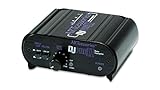
- RCA-type input R/L
- RCA-type output R/L
- Ground terminal
- Power Adapter Included
A dedicated test record can help reveal channel balance, tracking behavior and frequency-response changes, but it is not required for basic troubleshooting. Ortofon’s test-record guidance uses test signals to expose channel-specific behavior and other factors that affect frequency response. Follow the test record’s instructions and treat the result as a clue, not a replacement for inspecting the stylus and confirming the cartridge setup.
What’s actually slowing this PC down?
Pick the symptom - the matching free tool is one click away.
Common mistakes that make the problem worse
- Changing several settings at once: If you alter gain, tracking force and alignment together, you will not know which change helped or created a new fault.
- Copying another cartridge’s force: Even cartridges that look alike can have different recommended tracking-force ranges and different replacement styli.
- Aligning the cartridge body by eye: The cantilever is the functional reference, and the body may not be perfectly parallel to it.
- Using a random cleaning fluid: Manufacturer care instructions take priority; Ortofon’s FAQ advises against liquids on the stylus or records.
- Playing through a visibly bent stylus: Continued mistracking can damage both the stylus and groove walls.
- Forcing mechanical repairs: Belts, bearings and pulleys vary by model. Unapproved oil, stretching or disassembly can turn a simple service issue into a damaged drive system.
When to replace the stylus or seek service
- Replace the stylus: the cantilever is bent, the tip is visibly damaged, the stylus no longer seats correctly, or persistent mistracking remains after cleaning and correct setup. Identify the cartridge model before ordering; compatibility is not universal.
- Use a gauge or protractor: the built-in tracking-force scale is uncertain, or alignment cannot be confirmed from the cartridge body. These are diagnostic tools, not mandatory purchases for a correctly set-up system.
- Seek service: distortion continues with a known-clean record after the signal path, contacts, stylus, force and alignment are correct; the platter speed is unstable; the cantilever or tonearm is damaged; or mechanical work is required.
Stop playing records when a stylus is visibly damaged or when the tonearm is mistracking severely. Continuing can damage both the stylus and records, turning a setup problem into a more expensive repair.
A repeatable maintenance routine
- Keep records in clean sleeves and brush loose dust before each play.
- Keep the stylus guard fitted whenever the stylus is not over a record.
- Check tracking force and alignment after moving the turntable, replacing a cartridge, or changing the headshell.
- Verify the PHONO/LINE switch and amplifier input after reconnecting equipment.
- Inspect the belt and speed according to the manufacturer’s maintenance schedule rather than waiting for obvious pitch errors.
These checks separate an input-level problem from a groove-tracking problem and protect records while you troubleshoot. Exact settings remain equipment-specific: the cartridge, tonearm, turntable, phono stage and amplifier manuals are the authoritative sources for values and service procedures.
Frequently Asked Questions
Why is my turntable suddenly very quiet?
Check the amplifier input and the turntable’s PHONO/LINE switch first. PHONO output needs a phono input or external phono stage; LINE output needs a normal line input such as AUX or CD. An MC cartridge also needs an MC-capable phono stage with suitable gain and loading.
Why does a turntable sound distorted on every record?
Inspect the stylus for wear, damage or fibers, then verify the cartridge’s tracking force and alignment. Also check cartridge contacts, RCA plugs and the selected phono mode. Stop playback if the cantilever is bent or the stylus tip is visibly damaged.
Quick wins for a faster PC:
Fix the driver behind crashes, sound loss and screen glitchesFind Drivers →Clear out junk files and repair common Windows errorsFree Scan →Why does distortion occur only near the end of a record?
Inner-groove distortion can reveal incorrect cartridge alignment or tracking force. Compare the same passage on more than one clean record; if only one pressing is affected, inspect that record for damage or contamination.
Best Value

- UNCOMPROMISED PHONO AMPLIFICATION AND EQUALIZATION - Precisely converts the turntable phono signal to line level, featuring an ultra high-accuracy frequency response to faithfully reproduce the original recording to the RIAA standard
- SOPHISTICATED CIRCUIT DESIGN ENGINEERED WITH PREMIUM COMPONENTS - High accuracy components, low noise power supply, and low impedance output stage achieve greater RIAA specification, gain performance and lower distortion
- VIVID STEREO SOUNDSTAGE - Utilizing individual left and right channel OP amps provide optimal channel separation and virtually no crosstalk during signal reproduction and amplification stages
- LOW FREQUENCY RUMBLE FILTERING - This selectable high pass filter rolls off the low end frequencies below 20Hz. This slow gentle roll off is helpful to reduce subsonic resonant feedback and noise when listening at loud volumes
- PROTECTED FROM ANY ELECTRONIC INTERFERENCE - Internal metal shielding enclosure to block electro-magnetic interference and electronic noise
Can dust alone make records sound distorted?
Yes. Dust on the stylus or record can add crackle and fuzzy high frequencies. Clean gently with tools and methods approved for your equipment, and do not put unapproved liquids on the stylus or record.
What tracking force should I use?
Use the recommended range for the exact cartridge installed. Do not copy a number from another model. Follow the tonearm manual’s balancing procedure and verify the result with a stylus-pressure gauge when the built-in scale is uncertain.
Do I need a stylus gauge or alignment protractor?
They are useful diagnostic and setup tools but are not compulsory purchases for every system. A gauge helps verify tracking force; a protractor helps confirm the tonearm’s specified alignment geometry.
How do I tell whether one channel is causing the problem?
Use the amplifier’s balance control while playing a clean record. A weak or noisy side points you toward that channel’s cartridge pin, headshell lead, RCA connection or cartridge channel. The balance test narrows the checks but does not identify a single cause by itself.
Should I replace the whole cartridge when the stylus is worn?
Not necessarily. Many cartridges accept a compatible replacement stylus, but compatibility depends on the exact cartridge model and stylus assembly. Identify the model before ordering and seek manufacturer or repair-shop advice if the cartridge or cantilever is damaged.
What if the pitch is wrong rather than the volume?
Confirm the record’s intended RPM and inspect the belt or platter drive only as the turntable manual permits. A stretched belt, slipping drive or bearing problem can cause incorrect or unstable speed and may require service.
The Bottom Line
For low volume, trace the signal from cartridge to output mode, phono stage and amplifier input, including MM/MC compatibility. For distortion, compare a clean record, inspect and gently clean the stylus, then verify the exact cartridge’s tracking force, alignment and contacts. Check speed and mechanical parts only under the turntable maker’s instructions. Replace a damaged stylus and stop playback when mistracking or mechanical damage persists.
Quick Recap
Product prices and availability are accurate as of the date/time indicated and are subject to change. Any price and availability information displayed on Amazon at the time of purchase will apply.

