Crashes, No Sound, or Screen Glitches?
Random freezes, missing sound and display glitches usually trace back to one bad driver. Find and replace yours safely.Free scan · under a minutePC Slower Than It Used to Be?
A free scan shows the junk files, broken settings and background clutter dragging Windows down - then fixes them in one click.Free scan · Windows 10 & 11If your MagSafe wallet keeps sliding or falling off, first check that both the wallet and the phone case are designed for MagSafe. Then clear anything between them, clean the contact surfaces, and reattach the wallet centered over the magnetic ring. If it still feels insecure, test the wallet on another compatible iPhone if possible; the issue may be the wallet, case, phone combination, or the weight of its contents.
1. Check that the wallet and case are MagSafe-compatible
Magnetic accessories can use different magnetic strengths and alignment systems, so a wallet that attaches to a phone magnetically is not necessarily designed to stay securely on a MagSafe setup. Confirm the wallet is marked MagSafe-compatible or Made for MagSafe, and check that the case is designed for MagSafe too. Apple says MagSafe accessories snap to supported iPhone models or their MagSafe cases and sleeves. Apple’s iPhone User Guide describes supported accessories and devices.
As an Amazon Associate I earn from qualifying purchases.
If you can, attach the wallet to another MagSafe-compatible iPhone. If it holds there but not on your phone, that helps isolate the problem to your phone-and-case combination rather than the wallet alone. Belkin recommends this comparison as part of troubleshooting. Belkin’s connection troubleshooting guide also notes that accessories can differ in magnetic strength and alignment.
2. Remove anything between the wallet and phone
The wallet needs a clear contact area. Take it off and inspect both the wallet and the outside of the case. Remove any sticker, protective film, paper insert, extra card holder, or other add-on that sits between the wallet and the magnetic surface. Clear away dust and debris as well. These obstructions can interfere with the magnetic connection, according to Belkin.
#1 Best Overall

- 5 Card Storage: minimalist MagSafe wallet with expanded storage for up to 5 cards or 4 cards and 3 banknotes to suit any occasion. Product dimensions: 3.74 x 2.57 x 0.44 inches. What's in the box: 1*Magnetic Wallet, 2*Metal Sticker, 1*Instruction Manual
- Strong Magnetic Lock: Engineered with 20 powerful N52 magnets delivering 3,200 g of holding force with a magnetic case, our MagSafe wallet has 4x the magnetic strength of the official MagSafe wallet. Stay confident knowing your wallet stays securely in place—no slips, no drops
- Effortless Card Access: A specially designed 20 mm slot at the bottom lets you quickly slide cards in and out—no fumbling, no hassle
- Enhance Security: Our upgraded Magnetic wallet features built-in RFID-blocking technology, creating a secure shield around your cards to block unauthorized scans. Keep your credit cards, IDs, and personal data safe from digital theft—wherever you go
- Compatibility: for iPhone 18 Pro Max/18 Pro/17e/17 Pro Max/17 Pro/17/Air, 16 Pro Max/16 Pro/16 Plus/16, 15 Pro Max/15 Pro/15 Plus/15, 14 Pro Max/14 Pro/14 Plus/14, 13 Pro Max/13 Pro/13, 12 Pro Max/12 Pro/12, and MagSafe-compatible phone cases; also for non-MagSafe phones and phone cases using the included magnetic rings, such as Samsung Galaxy S26 Plus/S26 Ultra/S25 Plus/S25 Ultra/S24 Plus/S24 Ultra/S23 Plus/S23 Ultra and Google Pixel 7-11 Series; But Not for iPhone 13/12 mini, Samsung S26/S25/S24/S23
3. Clean the surfaces and recenter the wallet
- Wipe the case’s contact area with a soft microfiber cloth.
- Clean the wallet’s contact surface only as its manufacturer recommends.
- Place the wallet at the center of the case’s magnetic ring area, then check that it snaps securely into place.
Misalignment or dirt can make an otherwise compatible wallet feel loose. Avoid cleaning products or methods the wallet maker does not recommend.
4. Reduce the wallet’s load
A wallet’s design, weight, and capacity affect how secure it feels when attached. Remove the cards and inserts, then try the wallet with fewer contents. Belkin notes that multiple cards can make an accessory feel less secure than one or two cards. It does not specify a universal safe card limit, so follow the wallet maker’s capacity guidance rather than relying on a general number.
Rank #2

- Upgraded Magnetic Lock: Delivers 5000g holding force—5X stronger than the official magnetic wallet. Seamlessly integrate the magnetic phone wallet onto your Magnetic case or iPhone. Keep your ID, credit cards, and other essentials firmly and feel secure with the ultra-strong built-in magnets that lock the wallet into place
- Ultra-Slim Profile for Effortless Portability: Measuring a mere 0.15 inches thick (just 3.8mm), this MagSafe Wallet slips into your pocket, jacket interior, or even the smallest bag compartment without adding bulk. No more bulky, uncomfortable protrusions—carry your essential cards (IDs, credit cards) with a "barely-there" feel that keeps your daily carry sleek and light.
- Effortless Card Access: A specially designed 20 mm slot at the bottom lets you quickly slide cards in and out—no fumbling, no hassle
- Dual-Protection Magnetic Wallet: Blocks RFID scanning and prevents card demagnetization. Safeguards credit cards & IDs from digital theft and magnetic damage. Secures identity + property with military-grade shielding
- Compatibility: Only compatible with iPhone 18 Pro Max/18 Pro/ iPhone 17/17 Air/17 Pro/17 Pro Max/iPhone 16/16 e/16 Plus/16 Pro/16 Pro Max/15/15 Plus/15 Pro/15 Pro Max/14/14 Plus/14 Pro/14 Pro Max/13/13 Pro/13 Pro Max/12/12 Pro/12 Pro Max, official magnetic case
5. Isolate the problem before replacing anything
If the checks above do not help, look for visible damage and test the parts separately where possible: try the wallet on another compatible iPhone, or try a known-compatible MagSafe wallet with your phone and case. These comparisons can help identify which part of the setup is involved, but there is no published universal attachment-strength threshold or definitive failure test in the cited guidance. Contact the wallet or case maker if the accessory appears damaged or remains insecure.
The Tool Desk
Outbyte PC Repair FREERepair Windows errors before they cause bigger problemsFix Now →Outbyte Driver Updater FREEScan for outdated or missing drivers - takes under a minuteDriver Scan →Replace the wallet only if the checks suggest it is unsuitable for your setup or faulty. When comparing alternatives, confirm compatibility with your phone and case, consider how many cards you need to carry and the resulting weight, and check any desired feature such as Find My support or a stand. Apple’s MagSafe wallet listings include its iPhone FineWoven Wallet with MagSafe and products from MOFT and Native Union. The listing does not establish that one has stronger magnets than another.
Rank #3

- Upgraded Magnetic Lock: Delivers 5000g holding force—5X stronger than the official magnetic wallet. Seamlessly integrate the magnetic phone wallet onto your Magnetic case or iPhone. Keep your ID, credit cards, and other essentials firmly and feel secure with the ultra-strong built-in magnets that lock the wallet into place
- Adjustable Stand: Find your perfect viewing angle! Effortlessly tilt between 15° and 175° and switch between portrait or landscape. Ideal for watching shows, FaceTiming, or browsing in total comfort
- Smart Card Storage: This phone wallet magnetic has 3 independent card slots,which holds 5 cards + clear ID window for instant access to your most-used card
- Dual-Protection Magnetic Wallet: Blocks RFID scanning and prevents card demagnetization. Safeguards credit cards & IDs from digital theft and magnetic damage. Secures identity + property with military-grade shielding
- Compatibility: Only compatible with for iPhone 18 Pro Max/18 Pro/iPhone 17/17 Air/17 Pro/17 Pro Max/iPhone 16/16 e/16 Plus/16 Pro/16 Pro Max/15/15 Plus/15 Pro/15 Pro Max/14/14 Plus/14 Pro/14 Pro Max/13/13 Pro/13 Pro Max/12/12 Pro/12 Pro Max, official magnetic case; not compatible with iPhone 13/12 mini
6. Know what Find My can—and cannot—do
For supported wallet and iPhone models, Apple Find My can show a wallet’s last known location and notify you if it detaches. This can help you locate a wallet after it comes off, but it does not improve the magnetic attachment. See Apple’s instructions for adding a MagSafe wallet to Find My and check that your specific wallet model supports the feature.
Independent reader supportYour contribution helps us test, update, and keep practical guides available for everyone.MagSafe charging guidance is a separate issue
Apple’s iOS 26 guide says to remove the wallet before placing an iPhone on specified MagSafe chargers, a MagSafe Duo Charger, or a MagSafe Battery. That is charging guidance; it is not evidence that a charger is causing an ordinary wallet to detach. See Apple’s MagSafe accessory guidance for the relevant instructions.
Quick Recap
Best Value

- Designed with both style and function in mind, the new iPhone FineWoven Wallet with MagSafe is the perfect way to keep your ID and credit cards close at hand.
- It supports Find My, so you can be notified of your wallet’s last known location if it gets separated from your phone.
- Made from durable micro-twill, the material has a smooth and seamless feel.
- The FineWoven material in this accessory is made from 100 per cent post-consumer recycled content and significantly reduces carbon emissions compared to leather.
- The wallet features strong built-in magnets that allow it to effortlessly snap into place on the back of your iPhone.
Rank #4
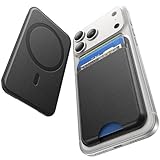
- 5 Card Storage: This magnetic phone wallet has 1 independent card slot and 1 cash slot, which hold up to 5 cards or 4 cards and 3 banknotes securely
- Strong Magnetic Lock: built-in N52 magnets provide 5000 g of holding force with a MagSafe case—up to 500% stronger than official wallets—so your cards stay secure, even on the go
- Ultra-Slim Profile for Effortless Portability: Measuring a mere 0.25 inches thick, this MagSafe Wallet slips into your pocket, jacket interior, Boys' Coin Purses & Pouches,or even the smallest bag compartment without adding bulk
- Effortless Card Access: A specially designed 20 mm slot at the bottom lets you quickly slide cards in and out—no fumbling, no hassle
- Compatibility: for iPhone 18 Pro/Pro Max,iPhone 17 Pro Max/17 Pro/17/Air, 16 Pro Max/16 Pro/16 Plus/16, 15 Pro Max/15 Pro/15 Plus/15, 14 Pro Max/14 Pro/14 Plus/14, 13 Pro Max/13 Pro/13, 12 Pro Max/12 Pro/12, and MagSafe-compatible phone cases
Product prices and availability are accurate as of the date/time indicated and are subject to change. Any price and availability information displayed on Amazon at the time of purchase will apply.

