Free tools Windows power users keep installed
One-click scans. No signup required.
If AI spend is rising but the team cannot explain which work produced value, start by identifying the billable unit. A token charge, a fixed-credit plan, allocated capacity and a cloud-marketplace charge can measure different things—and put costs in different places. Compare them against the same useful, accepted work rather than assuming any one billing model is automatically cheaper.
First, find the unit that drives the bill
Read the current rate card and agreement, then identify what triggers a charge. Look for whether the provider bills for input and output tokens, cached input, fixed credits, reserved capacity, or usage routed through a cloud marketplace. Also note where each charge appears: a provider console, a cloud invoice, or both.
As an Amazon Associate I earn from qualifying purchases.
- Token usage: charges vary with the model and the number and type of tokens processed.
- Credits: a stated number of credits may be consumed per message, task, generation or minute—or credits may map back to token usage.
- Allocated capacity: charges may begin when capacity is allocated, whether or not every available unit is used.
- Marketplace usage: a cloud provider may meter the service and include the charge on its invoice.
Check how tools, retries, cached input and output are treated, and whether your terms include negotiated discounts. Geography, product eligibility and model selection can also change the calculation.
Crashes, No Sound, or Screen Glitches?
Random freezes, missing sound and display glitches usually trace back to one bad driver. Find and replace yours safely.Free scan · under a minutePC Slower Than It Used to Be?
A free scan shows the junk files, broken settings and background clutter dragging Windows down - then fixes them in one click.Free scan · Windows 10 & 11How the billing models affect what you see
Token-based billing: distinguish input, cached input and output
OpenAI’s enterprise rate card calculates a request using separate input-token, cached-input-token and output-token rates. The total depends on the model, task size and token mix; documented cost drivers also include automations, mode and concurrent instances. That means two workloads with the same number of requests can cost different amounts if their models or input/output patterns differ. OpenAI’s API pricing page publishes rates per million tokens, but rates and model availability change. Check the live rate card for the relevant product and geography rather than relying on a remembered price.
#1 Best Overall

- An intelligent fan system designed for cooling audio video, DJ, server, network, and IT equipment racks.
- Protects rack-mount equipment from overheating, performance issues, and shortened lifespans.
- Programmable thermostat controller with automated speed control, alarm warnings, and backup memory.
- Premium anodized aluminum construction with CNC-machined detailing for a professional appearance.
- Size: 2U Rack Space | Design: Exhaust | Airflow: 50 to 220 CFM | Noise: 10 to 36 dBA | Bearings: Dual Ball
Credit plans: the word “credit” does not define the meter
OpenAI’s business and enterprise/education credit rate card describes certain experiences that consume fixed credits per message, task, generation or minute. It also says agentic products and Codex are billed according to input, cached-input and output tokens, with a direct mapping to credit consumption. These are product-specific rules, not a universal definition of credit billing. Check the exact product rate card and agreement to learn what consumes credits and how usage is converted. OpenAI’s business pricing documentation provides the relevant credit-rate information.
Allocated capacity: account for unused allocation
With capacity-based terms, review the allocation as well as request volume. OpenAI’s Scale Tier documentation says billing begins when token units are first allocated and describes throughput measured in 15-minute intervals. If demand is uneven, compare allocated capacity with utilization over time; actual request totals alone may not explain the bill. OpenAI’s Scale Tier documentation describes its allocation and throughput mechanics.
Rank #2
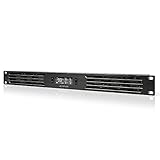
- An intelligent fan system designed for cooling audio video, DJ, server, network, and IT equipment racks.
- Protects rack-mount equipment from overheating, performance issues, and shortened lifespans.
- Programmable thermostat controller with automated speed control, alarm warnings, and backup memory.
- Premium anodized aluminum construction with CNC-machined detailing for a professional appearance.
- Size: 1U Rack Space | Design: Intake | Airflow: 20 to 60 CFM | Noise: 8 to 28 dBA | Bearings: Dual Ball
Cloud marketplace billing: follow the charge to the invoice
For the Claude Platform integration described in Anthropic’s documentation, usage is metered hourly through AWS Marketplace, and AWS issues monthly invoices on the customer’s existing AWS bill. Anthropic says token usage in USD is converted to CCUs for marketplace reporting, gives a CCU price of $0.01, and notes that negotiated discounts apply at token-to-CCU conversion. These mechanics apply to that integration; verify current terms before using them to interpret a bill. Anthropic’s AWS documentation explains the integration, while Anthropic’s pricing documentation covers its pricing details.
Compare cost per useful outcome, not just price per unit
A low token rate or a large credit allowance does not establish that a plan is the lowest-cost choice for your work. Define one useful outcome—for example, a response accepted under your quality criteria—and calculate all-in cost per accepted outcome. Include the charges associated with retries and tools, plus human review and any work that failed to meet the quality or latency you require. This is a comparison framework for your team, not a universal provider metric.
Rank #3

- An intelligent fan system designed for cooling audio video, DJ, server, network, and IT equipment racks.
- Protects rack-mount equipment from overheating, performance issues, and shortened lifespans.
- Programmable thermostat controller with automated speed control, alarm warnings, and backup memory.
- Premium anodized aluminum construction with CNC-machined detailing for a professional appearance.
- Size: 2U Rack Space | Design: Intake | Airflow: 50 to 220 CFM | Noise: 10 to 36 dBA | Bearings: Dual Ball
Use the same workload and acceptance criteria when comparing options. Record the billing unit and relevant input, cached-input, output, credit or capacity amounts; include any marketplace charge and applicable discount; then compare the resulting cost per accepted outcome. A hypothetical comparison is only useful if its workload and arithmetic are explicit, so do not treat an assumed example as evidence of provider usage or savings.
Independent reader supportYour contribution helps us test, update, and keep practical guides available for everyone.Run a repeatable billing review
- Choose the work unit. Define the outcome your team needs and how it will judge completion and quality.
- Trace each charge. Match provider-console usage and cloud invoices to the applicable rate card, agreement and billing unit.
- Measure the workload. Record model, input and output mix, cached input, tools, retries, completed work and review effort. For allocated capacity, also track utilization over time.
- Compare on equal terms. Evaluate token, credit, capacity or marketplace arrangements against the same workload, quality threshold and latency requirement, including discounts and all related charges.
- Recheck current terms. Rates, eligible products, model catalogs, discounts and marketplace details can change; confirm the current documentation and your contract before making a decision.
List prices are not a guarantee of total cost. The right comparison is the amount your organization pays for work it actually accepts, under its own usage pattern and contract.
Quick Recap
Best Value

- An intelligent fan system designed for cooling audio video, DJ, server, network, and IT equipment racks.
- Protects rack-mount equipment from overheating, performance issues, and shortened lifespans.
- Programmable thermostat controller with automated speed control, alarm warnings, and backup memory.
- Premium anodized aluminum construction with CNC-machined detailing for a professional appearance.
- Size: 3U Rack Space | Design: Intake | Airflow: 60 to 300 CFM | Noise: 12 to 38 dBA | Bearings: Dual Ball
Rank #4

- Adjustable temperature control helps ensure optimal performance for rackmount such as network, server, music, and AV cabinets
- Noise controlled fans makes the cooling system useful for a quiet office or business space
- Compact design mounts to any 19" inch cabinet and takes up only 1 unit of space
- Simple and easy to use LCD display allows user to control temperature
- Air pumped through to the top exhaust system of the fan
Product prices and availability are accurate as of the date/time indicated and are subject to change. Any price and availability information displayed on Amazon at the time of purchase will apply.

