Free tools Windows power users keep installed
One-click scans. No signup required.
Short answer: a scroll wheel puts fast, continuous navigation under your finger. It lets you move through long documents, spreadsheets, file lists and web pages without steering the pointer to a scrollbar. Pressing the wheel usually adds a middle-click, while software can map it to zooming, panning, auto-scroll or other commands.
Microsoft’s IntelliMouse did not demonstrably invent the wheel. Its importance was making the control familiar and useful by pairing the hardware with Windows and major applications. Microsoft announced the original IntelliMouse on July 22, 1996, with planned U.S. availability in November at approximately $84.95. That makes 2021 the 25th anniversary of the announcement (or roughly November 2021 for planned retail availability), not 2024.
The problem the wheel solved
Before wheel mice, scrolling meant interacting with a scrollbar. You had to move the pointer away from the document, target a narrow arrow or thumb, and then return to your work. Arrow clicks advanced in small, discrete increments; dragging the thumb demanded visual precision and did not always give the exact context you wanted.
The friction was especially obvious in large Excel sheets and long Word documents. Microsoft designer Carl Ledbetter recalled that Excel users were working with sheets that could not fit on one screen and were repeatedly switching between scrollbars and zoom controls. A wheel allowed the hand to stay on the mouse and the pointer to remain over the working area. Microsoft’s design account describes that spreadsheet problem directly.
#1 Best Overall
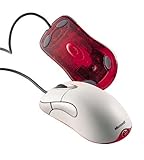
- Optical pointing device for right- or left-handed users
- 5 programmable buttons
- Provides more control and accuracy than trackball mice can
- Requires no cleaning or mouse pad
- IntelliPoint software included
Why a wheel beat another button
A button produces a fixed command or step. Rotation provides a continuous input that maps naturally to movement through a page: turn forward to move down, turn back to move up. Small mechanical detents give the finger tactile feedback, so you can scroll without watching the control.
The wheel also fits the mouse’s centerline between the two primary buttons. It can be rolled without changing your grip, then pressed to provide a second input. That combination—continuous rotation plus a clickable control—delivered more capability without adding a large cluster of buttons.
What Microsoft actually announced in 1996
Microsoft’s July 22, 1996 announcement presented IntelliMouse as more than a web-page accessory. It listed support for scrolling, zooming, data zooming and hands-free AutoScroll in Office 97, Internet Explorer 3.0 and Windows 95 Explorer. Pressing the wheel and moving the mouse activated AutoScroll in supported software.
| Detail | What Microsoft said |
|---|---|
| Announcement | July 22, 1996 |
| Planned availability | November 1996 |
| Announced U.S. price | Approximately $84.95 |
| Named software | Office 97, Internet Explorer 3.0 and Windows 95 Explorer |
| Promoted functions | Scrolling, zooming, data zooming and AutoScroll |
The wheel’s usefulness therefore began with office productivity and file navigation as much as with browsing.
What’s actually slowing this PC down?
Pick the symptom - the matching free tool is one click away.
Rank #2

- Five programmable buttons
- Microsoft Optical Technology
- Wheel scrolling
- Comfortable ergonomic design
- PC and Mac compatible
What a scroll wheel does today
Vertical scrolling
This remains the basic, widely supported behavior for pages, documents, lists and timelines. Scroll speed and acceleration are controlled partly by the operating system and partly by the application.
Middle-click
Pressing the wheel commonly acts as a middle mouse button. In many browsers it opens a link in a new tab; in some applications it activates panning or another context-specific command. The exact action is software-dependent.
Zooming and panning
Many desktop programs use Ctrl-plus-wheel for zooming, while design and mapping tools may assign the wheel or wheel button to zoom or pan. These are conventions, not guarantees that every program implements identically.
AutoScroll
IntelliMouse software popularized a mode in which clicking the wheel and moving the pointer controls hands-free scrolling. Modern applications may omit it or offer a different equivalent.
Rank #3

- Scroll Wheel - Move through your documents quickly without having to click the on-screen scroll bar.
- Comfort - Get a grip with a comfortable design created for either hand.
- Easy to Set Up and Use - No software to install, no feature setup required.
- Microsoft Optical Technology - High Performance Optical Technology - no mouse ball. Optical sensor delivers greater accuracy and control.
Horizontal and custom input
Tilt wheels can send left-right scrolling, and some programs interpret Shift-plus-wheel the same way. Productivity software and mouse drivers can assign wheel presses, tilt actions or scroll gestures to custom shortcuts.
Did Microsoft invent the scroll wheel?
That claim is not established. Earlier prototypes, patent work and commercial wheel mice existed before or around IntelliMouse. A secondary historical account at Thaiware discusses several pre-Microsoft efforts, but its chronology is not complete enough to prove a single inventor or priority date. Logitech was also selling wheel-equipped MouseMan products by the mid-1990s; a period product listing preserved by GameSurge documents a later 2000 optical MouseMan Wheel.
The defensible historical distinction is between inventing the physical idea and making it a standard convention. Microsoft’s contribution was integrating the wheel with Windows and widely used applications so an ordinary PC owner could buy one mouse and encounter the same behavior in documents, spreadsheets, Explorer and the browser.
Why IntelliMouse made the wheel stick
Microsoft controlled a major desktop operating system and a large suite of business software. That created a network effect:
Rank #4

- IntelliPoint software included
- Requires no cleaning or mouse pad
- 5 programmable buttons
- Optical pointing device for right- or left-handed users
- Provides more control and accuracy than trackball mice
- Users met the wheel in several familiar programs instead of one niche utility.
- Developers gained a predictable input convention to support.
- Competing mouse makers could add a feature customers already understood.
- The mechanism was compact, inexpensive and easy to demonstrate.
- After users adapted to fingertip scrolling, a two-button mouse without a wheel felt incomplete.
Microsoft later described 1996 as the year it integrated its first mouse scroll wheel with desktop software. That software-and-hardware pairing, rather than an uncontested invention claim, explains IntelliMouse’s influence. Microsoft’s 2003 hardware history records that milestone.
From office accessory to enthusiast hardware
The IntelliMouse name continued to evolve after the original model.
| Year | Milestone |
|---|---|
| 1996 | Original IntelliMouse announced with the wheel between the primary buttons. |
| 1997–1998 | Microsoft extended the concept to trackballs, IntelliMouse Pro and lower-priced Wheel Mouse models. |
| 1998 | IntelliMouse Pro added broader scrolling and zooming features with IntelliPoint 2.2. Microsoft also announced a lower-cost Wheel Mouse, planned for June availability at an estimated $34.95. |
| 1999 | Microsoft announced a Cordless Wheel Mouse, with broad availability planned for October 1 at an estimated $44.95. |
| 2003 | IntelliMouse Explorer 3.0 became a notable gaming and enthusiast model. |
| 2018 | Microsoft relaunched the shape as the Classic IntelliMouse with updated tracking and a wheel button. |
The 1998 Pro announcement is documented at Microsoft News; the Wheel Mouse and cordless announcements are documented here and here. Microsoft’s retrospective on the Classic IntelliMouse identifies the first IntelliMouse as a 1996 product.
Independent reader supportYour contribution helps us test, update, and keep practical guides available for everyone.Why wheels remain useful—and when they are not
A wheel is still efficient for routine vertical navigation because it minimizes pointer travel and scrollbar targeting while providing tactile control. It is less universally ideal, however:
Quick wins for a faster PC:
Scan for outdated or missing drivers - takes under a minuteDriver Scan →Clear out junk files and repair common Windows errorsFree Scan →Fix the driver behind crashes, sound loss and screen glitchesFind Drivers →Best Value

- Scroll wheel move through your documents quickly without having to click the on screen scroll bar.
- Comfort Get a grip with a comfortable design Created for either hand.
- Easy to set up and use no software to install, no feature setup required.
- Microsoft Optical technology High performance optical technology no mouse ball. Optical sensor delivers greater accuracy and control.
- Touchpads offer two-finger scrolling, inertia and gesture support.
- Trackballs keep the device stationary and can suit small desks or some mobility needs.
- Styluses and tablets can be better for drawing and precision work.
- Horizontal-heavy workflows may benefit from a tilt wheel or thumb control.
- People with limited finger mobility may prefer touch surfaces, trackballs or adaptive devices.
“Ergonomic” is not automatic: comfort depends on the mouse’s shape, grip, hand size, required force and duration of use.
Common wheel problems
The wheel is mechanically simple, but it is often the mouse’s failure point. Dust can contaminate the encoder; worn components can cause reverse, intermittent or jumping scrolls; and the wheel button can fail while rotation still works. On wireless models, batteries, pairing, drivers or application settings can mimic a hardware fault. Different programs may also interpret middle-click and horizontal scrolling differently.
Cleaning or encoder replacement is model-specific, and opening a mouse can void its warranty. Diagnose the behavior in more than one application and check connection, battery and driver settings before assuming the mechanism is worn.
What “turns 25” should mean
The original IntelliMouse was announced on July 22, 1996, so its 25th announcement anniversary fell on July 22, 2021. Planned retail availability was November 1996, making November 2021 the approximate 25-year retail milestone. A 2024 article that calls the 1996 product 25 years old is using an incorrect or recycled date; 2024 was 28 years after the announcement.
Windows Errors? Fix Them Before They Spread
Repair common Windows errors and clear accumulated junk for a smoother, more stable PC - no reinstall needed.Free scan · no reinstallCrashes, No Sound, or Screen Glitches?
Random freezes, missing sound and display glitches usually trace back to one bad driver. Find and replace yours safely.Free scan · under a minuteThe lasting story is not a single anniversary number. It is how a modest rotating control solved a daily interface problem, then became standard because Microsoft connected it to the operating system and software people already used.
Frequently Asked Questions
Does every mouse wheel support middle-click and zoom?
No. Middle-click is common, but zooming, AutoScroll, tilt and custom mappings depend on the operating system, driver and application.
Is the mouse wheel the same thing as a trackball?
No. A scroll wheel is a small rotating input control. A trackball is a pointing device whose larger ball is rotated directly to move the pointer.
Quick Recap
Product prices and availability are accurate as of the date/time indicated and are subject to change. Any price and availability information displayed on Amazon at the time of purchase will apply.
Recommended Free Tools




