What’s actually slowing this PC down?
Pick the symptom - the matching free tool is one click away.
For most turntables, set-up is the first upgrade, a replacement stylus is the safest hardware purchase, a cartridge comes next, and platter or power-supply changes are problem-specific. Level the deck, set tracking force to the cartridge maker’s specification, clean the stylus and records, and diagnose any hum, skipping or speed fault before spending money.
The upgrade order that fits most turntables
Turntable upgrades are not interchangeable fixes. Each part addresses a different mechanical or electrical condition, and compatibility matters more than the price or reputation of the part. The practical order is:
As an Amazon Associate I earn from qualifying purchases.
- Correct the existing setup. Level the turntable, set tracking force and anti-skate as specified for the installed cartridge, confirm the arm is balanced, clean the stylus, and clean the records.
- Replace the stylus when it is worn and the cartridge body accepts interchangeable styli.
- Replace the complete cartridge when you want a broader change and the arm, mounting and alignment geometry support it.
- Change the mat or platter only when the record-to-platter interface, damping, thickness or resonance presents a defined problem.
- Add an external power supply only when your turntable was designed for a compatible supply and you have verified the voltage, connector and motor architecture.
This ordering follows the guidance in Stephen V.’s 2026 Platter & Plinth guide, which puts setup ahead of stylus, cartridge, phono stage, mats, isolation and speakers. It is a priority list, not a promise that every deck will improve in exactly the same way. There is no controlled, cross-brand published statistic that ranks these upgrades on one common performance scale; available evidence is mainly compatibility information and qualitative manufacturer or specialist advice.
Do the free checks before buying anything
A replacement part cannot correct a basic setup error. Work through these checks with the current cartridge installed:
#1 Best Overall

- NEW: Update of the venerable ATN3600L conical replacement stylus, which has sold by the millions
- COMPATIBLE MODELS: AT-LP60X series, AT-LP60 series, AT-LP2D series, AT-PL300 series, AT-SB727, AT-SB2022, AT-LPGO-BT, AT-PL50
- SUPERIOR SOUND: The ATN36000LC stylus' reliability and sound quality have made it the replacement stylus for many turntables
- EASY TO INSTALL: Simply snap the replacement stylus onto the cartridge
- STYLUS LIFE: Approx. 300 - 500 hours
- Place a spirit level on the plinth and adjust the feet until the deck is level.
- Balance the tonearm and set tracking force to the cartridge manufacturer’s stated value, not to a guess based on the arm’s appearance.
- Set anti-skate according to the cartridge and tonearm instructions.
- Inspect the stylus under magnification if possible; remove dust with a stylus brush using the manufacturer’s recommended direction.
- Wet-clean dirty records and remove surface debris before judging a new part.
- Check that the cartridge screws are secure, the headshell or cartridge carrier is seated, and the signal leads are firmly attached.
- Confirm the turntable is on a stable, suitable surface and that cables are not pulling on the deck or tonearm.
If the symptom is a loud hum, repeated skipping or unstable speed, treat it as a fault to diagnose rather than as evidence that you need a different cartridge or mat.
Replacement stylus: usually the lowest-risk upgrade
A stylus replacement keeps the existing cartridge body and its alignment in place. That makes it the simplest hardware change when the body is designed for a removable stylus and the present stylus is worn or damaged. You normally remove the old stylus assembly, slide the replacement into the cartridge body and then recheck tracking force and playback.
When a stylus makes the most sense
- The stylus has reached the end of its service life, sounds distorted or has been damaged.
- The cartridge body is compatible with a better stylus in the same family.
- You want to avoid loosening cartridge screws and repeating alignment.
- Your tonearm is fixed or has limited cartridge-adjustment range.
Fluance’s support guidance gives a clear example of this approach: a 2M Blue stylus can be used on the same cartridge engine as a 2M Red. That kind of swap is only valid within a documented cartridge family; a stylus from a visually similar model is not automatically compatible.
Rank #2
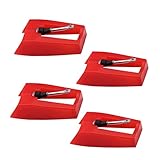
- 1: Ruby Ceramic Record player needle: Compatible with most record player in the markets now. like:Crosley,ION,Victrola,1byone,Jenson,Innovative-Technology, Boytone, TechPlay,Capehart and more
- 2: Easy to Install: No tools required, you can install the record needle easily by your hand. Plays 33 1/3, 45, 78PRM records player.
- 3.Upgraded Material: High-Grade ABS Plastic and Aluminum arm,With conical diamond Ceramic needle design for long playing life and great rendition of voice and music.
- 4: High Sound Quality: Strong tracking ability. Channel balance (at 1kHz): below 2 dB : Two-channel (stereo) , Step up cartridge, with an conical stylus, giving better bass response and greater realism.
- 5: Well Packed Turntable Needle Stylus: Protective form protect turntable needle from damaged ,Check your turntable cartridge first before order..
How long should a stylus last?
Life depends on the stylus profile, record cleanliness, tracking force and wear. Platter & Plinth cites approximately 300–500 hours for the conical Audio-Technica ATN3600LC and about 300 hours for the elliptical ATN3600LE. Those figures apply to the cited models and conditions, not to every stylus. Track your listening time, watch for increasing sibilance or distortion, and replace a stylus that has been bent or mishandled immediately.
Stylus replacement procedure
- Switch off the turntable and secure the tonearm in its rest.
- Remove the stylus guard, if supplied, and pull the old stylus assembly straight out as the cartridge maker directs.
- Insert the exact replacement model until it is fully seated; do not force it at an angle.
- Reinstall the guard, unlock the arm and verify tracking force and anti-skate.
- Play a clean, familiar record at a moderate level and listen for channel balance, mistracking and sibilance.
The installation risk is generally lower than with a complete cartridge because you are not changing overhang or azimuth. It is still possible to damage the cantilever by touching or twisting it, so use the supplied guard during handling.
Complete cartridge: a larger change with more conditions
A cartridge changes the generator, cantilever and stylus assembly together. It can produce a broader sonic difference than a stylus swap, but it also changes the mechanical load and requires alignment. Buy one only after confirming that the tonearm can physically and electrically accommodate it.
Rank #3
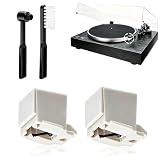
- 【Universal Compatibility: Fits 20+ Models & More】This ATN3600L replacement stylus is the OEM-compatible needle for AT3600L cartridges, fully matching Audio-Technica cartridges including AT3600, AT3600L, AT3601, AT3650, AT3651, and AT3626. It fits perfectly with Audio-Technica turntables such as the AT-LP60/60X series (AT-LP60, AT-LP60-USB, AT-LP60BT, AT-LP60X, AT-LP60XBT, AT-LP60XBT-USB), AT-LP2D series, AT-PL300 series, AT-SB727/AT-SB2022 Sound Burger portable turntables, and AT-LPGO-BT. For the AT-LP60X and Sound Burger series, this stylus is the manufacturer-recommended replacement for optimal performance and longevity
- 【Diamond Stylus for Exceptional Sound】Genuine conical diamond tip offers distortion-free sound and steady smooth playback. Compatible with Denon DP-300F/DP-450USB, Sony PS-LX310BT/PS-LX350H, Pioneer PL-2200, PL-J2500, PL-S30, PL-X500, PL-Z series, FiiO TT13, TEAC, Technics and Marantz turntables with 1/2" P-mount MM tonearm, 3.0-4.0g tracking force. Comes with 2 free cleaning brushes to prolong service life.
- 【Precise Tracking for 33&45 RPM Records】High-precision stylus accurately reads record grooves to reduce skipping and noise. Perfectly reproduces rich, original vinyl sound with clear details, ideal for replacing your old or worn needle.
- 【Tool-Free & Perfect Fit Installation】Plug-and-play design allows fast, tool-free installation—just align and press. This replacement stylus fits precisely and securely, greatly reducing issues caused by improper mounting.
- 【Standard Specification & Premium Listening Experience】 It features easy plug-and-play installation to replace worn original needle directly. Restoring original clear and warm vinyl sound details effectively, it owns long service life up to 300-500 hours. Cost-effective and durable, it is an ideal spare replacement part for daily vinyl playing.
Compatibility checklist
Audur Audio recommends checking all of the following before purchase:
- Platter and mat height: the final arm height affects vertical tracking geometry.
- Spindle and mounting dimensions: the cartridge must clear the headshell and accept the available screws.
- Cartridge mounting method: standard half-inch mounts, integrated bodies and proprietary carriers are not interchangeable.
- Tonearm geometry: overhang, offset angle, effective length and available adjustment determine whether the cartridge can be aligned.
- Tracking-force range: the arm’s counterweight and adjustment must cover the cartridge maker’s specification.
- Available adjustment range: you need enough movement to set alignment, azimuth and vertical tracking angle where the design allows it.
As one concrete mass check, Fluance lists compatible cartridges in the 5.0–7.5 gram range for its listed models. That is a model-specific range, not a universal limit. Always combine cartridge mass with the tonearm’s effective mass and the cartridge’s compliance rather than using weight alone.
Installing and aligning a cartridge
NAD’s 2020 setup instructions describe the essential sequence: remove the old cartridge, wire the replacement and use the supplied alignment tool. The exact screw and lead layout varies, so follow the cartridge and turntable manuals.
Rank #4

- CHECK COMPATIBILITY BEFORE YOU BUY: Please match your cartridge to our listing images; this needle fits ceramic cartridges only and is NOT compatible with common Audio-Technica or other moving-magnet (MM) cartridges
- Universal Fit: Compatible with Crosley, Victrola and most turntable cartridge styles; snaps in securely within seconds
- 4-Pack Value: Budget-friendly record player needles replacement set; swap often without harming vinyl records; clear storage box keeps spares organized
- Fresh Sound: New ruby turntable stylus revives dull records; improves clarity; safe tracking force preserves vinyl record accessories for longer life
- Aluminum Cantilever: Precision lightweight center rod tracks grooves accurately; reduces skips; delivers cleaner highs on every vinyl record
- Disconnect the turntable from power and secure the arm.
- Remove the stylus guard and old cartridge, supporting the delicate signal clips instead of pulling the wires.
- Attach the new cartridge loosely enough that it can slide in the headshell slots.
- Connect the left, right, and return leads to the marked pins; force or reversed clips can cause channel loss or hum.
- Install the stylus guard, balance the arm and set the manufacturer’s tracking force.
- Use the supplied alignment gauge or the turntable maker’s specified geometry to set overhang and offset. Tighten the screws gradually while keeping the cartridge square to the gauge.
- Set anti-skate, check that the stylus sits centrally in the groove and verify channel balance with a familiar record.
A cartridge is less reversible than a stylus swap because a mistake in alignment can cause mistracking, uneven channel balance or accelerated record and stylus wear. Keep the original cartridge and record its original alignment before dismantling so you can restore it if needed.
Mat and platter changes: solve an interface or damping problem
A mat sits between the record and platter; a platter is the rotating support itself. These parts can matter when the existing interface slips, rings, couples poorly to the record or places the arm at an unsuitable height. They are not universal “detail” upgrades.
The Tool Desk
Outbyte Driver Updater FREEFix the driver behind crashes, sound loss and screen glitchesFind Drivers →Outbyte PC Repair FREEClear out junk files and repair common Windows errorsFree Scan →What to verify before changing a mat
- Diameter and spindle hole: the mat must sit flat without fouling the spindle or lifting the record edge.
- Thickness: changing thickness changes the stylus-to-record angle and may require arm-height or tracking-angle adjustment.
- Surface and damping: cork, cork-rubber and leather use different friction and damping characteristics. Pro-Ject’s catalog lists all three types for compatible decks.
- Record and platter material: a mat that works on bare metal may behave differently on acrylic, glass or composite platters.
If records are slipping, the mat is visibly warped, or a known resonance is being transmitted through the record, a correctly fitted mat is a logical intervention. If the deck is already stable and quiet, a mat change may be difficult to distinguish from a setup change and should not displace a worn-stylus replacement.
Best Value
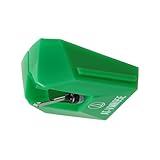
- REPLACEMENT STYLUS: For the AT-VM95E cartridge
- COMPATIBLE WITH: AT-LP120X Series, AT-LP3XBT, AT-LPW30, AT-LPW40, AT-LPW50, AT-LP5X, AT-LP8X
- INTERCHANGEABLE: Swap or upgrade any VM95 Series cartridge with any VM95 Series stylus
- EASY TO INSTALL: Simply snap the replacement stylus onto the cartridge
- 0.3 x 0.7 mil elliptical stylus with bonded shank construction
When a platter change is justified
A replacement platter can alter mass, rotational inertia, resonance and the record interface. It must also match the spindle, belt or drive arrangement, height and motor’s load capability. A heavier platter is not automatically better: extra mass can stress a motor or change start-up behavior, while a different height can invalidate the existing arm setup. Pro-Ject’s catalog includes sub-platter options as well as mats and record pucks, but each is listed for compatible platforms rather than as a universal part.
Mat or platter installation checks
- Measure the original mat or platter and note its thickness before removal.
- Confirm spindle diameter, platter seating and drive interface against the turntable manual.
- Fit the new part without forcing it and rotate the platter by hand to check for rubbing or wobble.
- Recheck arm height, tracking force and cartridge alignment after any thickness change.
- Listen for the specific problem you intended to address instead of assuming a general improvement.
External power supply: only for designed-for-it turntables
An external supply can reduce motor-drive noise or provide a different regulated supply on a turntable designed to accept one. It is not a generic accessory that can be added safely to any DC or AC deck.
Compatibility checks
- Match the manufacturer-specified voltage and polarity.
- Match the connector size and wiring; a plug that fits mechanically can still be electrically wrong.
- Confirm the motor architecture and whether speed control is inside the turntable or the supply.
- Verify that the manufacturer names the supply as compatible with your exact model or platform.
Vertere’s 2024 DG-X guide calls its LunA Dedicated DC Power Supply a “great first upgrade” for that turntable platform, then places isolation and cartridge or cabling changes later in its route. That is a model-specific recommendation, not evidence that an external supply should precede a stylus replacement on another deck.
Windows Errors? Fix Them Before They Spread
Repair common Windows errors and clear accumulated junk for a smoother, more stable PC - no reinstall needed.Free scan · no reinstallOutdated Drivers Are Slowing You Down
One free scan finds every outdated or missing driver and matches the right update for your exact hardware.Free scan · exact hardware matchInstalling and evaluating a supply
- Unplug the original supply and confirm the turntable is switched off.
- Compare the replacement’s printed voltage, polarity and connector with the turntable specification.
- Connect the approved supply without adapters unless the manufacturer explicitly permits them.
- Run the deck at each supported speed and check start-up, steady speed and motor noise.
- Keep the original supply so you can restore the system if the new unit causes instability.
Choose by symptom, not by upgrade category
| Observed need | Most relevant first action | Compatibility risk | Installation or alignment work | Reversibility |
|---|---|---|---|---|
| Worn, bent or distorted stylus | Documented replacement stylus | Low when the cartridge body is designed for that stylus | Low; recheck tracking force | High |
| Desire for a different cartridge design or generator | Compatible complete cartridge | Higher; mass, mount, geometry and tracking range must match | High; wiring and alignment required | Moderate |
| Slipping, poor coupling or known record/platter resonance | Correctly sized mat or platter solution | High; diameter, spindle, thickness and drive fit matter | Moderate; arm setup may change | High if the original part is retained |
| Motor noise or supply issue on a platform with an approved option | Model-specific external power supply | High; voltage, connector and motor architecture are decisive | Low mechanically, high electrically if mismatched | High if the original supply is retained |
| Hum, skipping or unstable speed | Fault diagnosis and repair before upgrading | Depends on the fault | Depends on the fault | Depends on the repair |
A practical decision path
- If the stylus is worn or its history is unknown, identify the cartridge body and buy its documented replacement stylus. This avoids introducing alignment variables.
- If the stylus is healthy but you want a different presentation, evaluate a complete cartridge against the arm’s mass, geometry, mounting and tracking-force limits.
- If the record interface is the problem, measure mat thickness and platter dimensions before choosing cork, cork-rubber, leather or another specified option.
- If speed or motor noise is the problem, test the existing belt, motor, bearings, grounding and power connection first. Add a supply only when the maker specifies one for your model.
- After every mechanical change, repeat level, tracking-force, anti-skate and alignment checks before comparing sound.
This sequence protects the parts you already own and makes each change easier to evaluate. It also prevents a mat, platter or power-supply purchase from masking a worn stylus or a basic setup error.
Quick Recap
Product prices and availability are accurate as of the date/time indicated and are subject to change. Any price and availability information displayed on Amazon at the time of purchase will apply.

