Template elements that can change dynamically include text, images, reusable blocks, data fields, styles, links, and sometimes entire sections or layouts. The exact list depends on the template system. “Dynamic” can mean a person edits a defined region in a visual editor, or software substitutes data and applies logic when a template is rendered or sent. Treat those as separate capabilities, then verify the platform’s documented fields, syntax, scope rules, and safety behavior.
What “dynamic” means in a template
Template systems use the word dynamic in two related ways:


- Editor-controlled changes: a template author exposes regions, variables, modules, or styles that another person can change without editing the underlying code.
- Runtime changes: an application supplies data while rendering or sending. Placeholders are replaced, lists are repeated, and conditional sections are included or omitted.
These meanings can coexist. A marketing team might edit an image region in an email editor, while a sending service inserts each recipient’s name and conditionally displays a discount block. No universal element list exists; every platform defines its own editable regions and template language.
Template elements commonly made dynamic
Text and rich content
Editable text is the most common dynamic element. Systems may expose headings, paragraphs, buttons, captions, email subject lines, and preheaders. Runtime variables can replace a name, order number, date, or other supplied value. Rich-text regions may permit formatting, links, lists, and embedded HTML, while a plain string variable may accept only text.
#1 Best Overall

- Premium Quality : Made From Flexible, Yet Sturdy Material. Resilient and Convenient to Use
- Set of 3 Architect Drawing And Interior Design Template Set (Scale: 1/4 Inch = 1 Ft): House Plan Template, Furniture Template, And Kitchen, Bed & Bath Template. Perfect For Architects, Builders, And Contractors
- House Plan Template: Kitchen Appliances, Door And Electric Symbols, Plumbing Fixtures, And Roof Pitch Gauge
- Furniture Template: Living Room, Dining Room, Bedroom, And Office Area Furnishings
- Kitchen, Bed & Bath Template: Cabinets, Appliances, Beds, And Dressers
Images, video, and media
Image regions can usually receive a selected asset or URL. Some systems also expose video fields. Marketo’s Email Editor 2.0, for example, documents a video region that accepts a YouTube or Vimeo URL and displays a thumbnail. Image behavior is platform-specific: confirm whether the value must be an uploaded asset, an absolute URL, or a platform media ID.
Reusable blocks and modules
Snippets, modules, and prebuilt content blocks let an editor swap approved content without changing layout code. Marketo identifies Rich Text, Images, Snippets, and Videos as editable element categories. A rich-text element can be converted to a snippet in its editor, but a region defined specifically as a snippet cannot be converted back to rich text. That one-way rule illustrates why a template’s schema matters.
Data fields and choices
Template variables may represent strings, lists, numbers, colors, Boolean on/off values, HTML blocks, and image references. A list can drive a selection menu; a Boolean can show or hide a section; a number can control a count or spacing value. Define validation and defaults so missing or malformed data does not produce broken output.
Presentation settings
Some editors expose fonts, colors, content width, and background colors as global styles. SendGrid’s Design Editor documents controls for email body colors and fonts, content-container width, and the background outside that container. Marketo also documents color and number variables usable in template code. A style marked global normally affects every instance, so distinguish it from a local module setting.
Free tools Windows power users keep installed
One-click scans. No signup required.
Links and destinations
URLs may be editable fields, generated from data, or managed through a platform’s redirect system. Do not assume every visible link is dynamically configurable. Check whether the platform supports URL variables, tracking parameters, validation, and safe protocols, and whether a link value is escaped or sanitized.
Structure, repetition, and conditional logic
More capable template languages can vary whole sections, repeat a block for each item in an array, or render different layouts for different conditions. Website templates may control page layouts, headers, and footers. Email and message systems often support conditional content and loops, but the syntax and available data differ.
How major template systems expose dynamic elements
Marketo Engage Email Editor 2.0
Adobe describes Marketo’s new Email 2.0 templates as combinations of Elements, Variables, Modules, and Containers (Adobe Experience League documentation). Its documented editable elements are Rich Text, Images, Snippets, and Videos. Template variables include String, List, Number, Color, Boolean, HTML Block, and Image Variable. A variable can be used more than once.
Scope matters inside modules. A local variable keeps an independent value when a module is duplicated; a global variable applies across duplicated modules. Use local scope for per-card or per-section differences and global scope for coordinated branding.
Outdated Drivers Are Slowing You Down
One free scan finds every outdated or missing driver and matches the right update for your exact hardware.Free scan · exact hardware matchPC Slower Than It Used to Be?
A free scan shows the junk files, broken settings and background clutter dragging Windows down - then fixes them in one click.Free scan · Windows 10 & 11Twilio SendGrid Dynamic Templates
SendGrid supports the Handlebars templating language in text, HTML, and subject lines (Twilio SendGrid documentation). The Design Editor provides draggable modules and global styles. At send time, dynamic values are passed as JSON under personalizations.dynamic_template_data. A subject and preheader can be set on a template version or during sending.
This creates a clear boundary: the editor defines the structure and styles, while the API request supplies recipient-specific values. Test both the saved template version and the JSON payload you actually send.
Rank #3
Microsoft Power Pages
Power Pages web templates generally contain Liquid for dynamic rendering. A template can combine with other templates, act as a page layout, or be assigned as a site header or footer (Microsoft documentation). A custom header that overrides the site header assumes responsibility for interface features such as navigation, sign-in/sign-out, and search that the default header would otherwise render.
Postman Flows
Postman’s Template block substitutes assigned values into predefined text or JSON. Mustache syntax supports formatting data, iterating through arrays, and conditional display (Postman documentation). Variables created in Flows are scoped to Flows; they are not available to post-response scripts or unrelated features. Keep that boundary in mind when a later step appears unable to read a value.
EmailJS
EmailJS permits dynamic variables in every template field except Settings (EmailJS documentation). Missing values become empty strings. Double braces escape a value by default; triple braces insert it unescaped, which the documentation warns is unsafe. Its templates also support conditional sections and loops over list values. Use unescaped insertion only for trusted, sanitized HTML.
Designing a safe dynamic template
- Define the contract. List each variable, its type, whether it is required, its default, and where it may appear.
- Separate content from control. Let editors change approved text, images, and modules; keep security-sensitive markup and application logic outside editable fields.
- Choose scope deliberately. Use local values for one module instance and global values for coordinated changes.
- Specify escaping. Confirm whether the engine escapes HTML, URLs, and text by default. Treat triple-brace or raw HTML output as a security boundary.
- Handle absence and invalid data. Decide whether a missing value should become an empty string, a default, or an omitted section. Validate URLs, colors, numbers, and list lengths before rendering.
- Preview representative cases. Test a normal record, missing fields, long text, an empty list, special characters, and the largest supported list.
- Version and publish deliberately. Save a template version, test it, and ensure the sending or rendering request points to that version.
Common failure modes and fixes
A value appears blank
Check the variable name, case, JSON nesting, and template version. Some systems intentionally turn missing values into empty strings, so inspect the payload rather than assuming the renderer failed.
HTML displays as text—or creates unsafe markup
Escaping rules differ. Double-brace syntax commonly escapes values; triple braces may insert raw HTML. Use escaped output for user-supplied text and sanitize any HTML before allowing it into a raw block.
Rank #4

- Scattered Books Stencil: You will receive a delicate painting stencil with beautiful patterns and a plastic paint brush. There are 6 scattered books patterns on the stencil. This daily theme template is suitable for you to make decorations at home.
- Size Reference: The scattered books stencil is about 8.3x11.7inch/21x29.7cm and it will help you create beautiful works by yourself. The paint brush in the package is about 6.3x0.27x0.2inch/160x7x5mm which you can use it to draw.
- Plastic PET Material: Our stencil is made of plastic PET material which is lightweight, durable, reusable, not easy to break and easy to wash. This stencil has delicate craftsmanship and smooth surface so you can use it for a long time.
- How to Use: Firstly, put the stencil on the place where you need to paint. Then you can use the tape to fix the surrounding a little bit, don't need to stick too firmly for easy to reuse. Then use paintbrush, spray paint, crayon, watercolor pen, marker or other drawing pen to draw the pattern you need.
- Wide Applications: The reusable template is suitable for DIY crafts projects including painting, home decoration and handmade crafts. Our plastic PET stencil can be applied to most flat surfaces like wood, canvas, fabric, rocks, cards, furniture, floor, wall and so on.
A duplicated module changes every copy
The variable is probably global. Change it to a local module variable when each duplicate needs its own value.
Recommended Free Tools
A loop or condition never renders
Verify the data type and the engine’s exact syntax. An empty array, a misspelled property, or a variable created in a different scope can all produce no output.
A custom header loses navigation or search
In Power Pages, replacing the default header transfers responsibility for those interface features to the custom template. Recreate the required controls or retain the default header.
Links break after substitution
Validate absolute URLs, escaping, allowed protocols, and any redirect or tracking requirements. Never concatenate untrusted input into a URL without validation.
Independent reader supportYour contribution helps us test, update, and keep practical guides available for everyone.Preview dynamic templates as images or PDFs
When a template changes by recipient, locale, theme, or data set, generate previews for each important state. A browser-based workflow can load the rendered page, wait for its content, and capture an image or PDF. Test lazy-loaded media, consent dialogs, popups, and authenticated pages rather than assuming the first viewport represents the final output.
Best Value
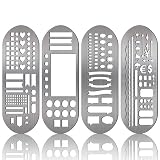
- What You Will Get: package includes 4 pieces of stainless steel stencil bookmarks in different patterns and designs, each measures 7.9 x 2.4 Inches/ 20 x 6 cm, which are convenient for daily use and will not occupy much space
- Quality Material: these stencil bookmarks are made of quality stainless steel material, which are sturdy and reliable, flexible and not easy to bend or deform, can serve you for a long time and without worrying about being broken; This product has sharp edges, so be careful with your fingers when using it to avoid scratches
- Practical and Multi-purpose Tool: these journal templates can be applied as stencils, rulers, and bookmarks; There are clear calibration in inch or centimeter, which are ideal rulers for daily use and precision measurement tasks; Moreover, delicate stencils are suitable for journaling, planning, and more; Bookmark effect helps you tag your pages
- Multiple Design: adopting lots of DIY elements such as alphabet, arrows, weather, punctuation, shapes and much more, these metal notebook stencils allow you to DIY your own diary, journal, scrapbook supplies, notebooks, etc.; It is recommended that you can use a fine pen such as thin pencils, ballpoint pens to draw in order to get clearer notes
- Practical Gifts: these stainless steel stencils are useful tools in a variety of occasions and situations, they can be served as exquisite gifts for your kids, friends, relatives, etc., they will be cheerful to receive such practical tools
Or skip the browser setup
ScreenshotNeo provides a website screenshot API and MCP server. Send one GET request to capture a PNG, JPEG, WebP, or PDF. It accepts cookie and consent banners as a visitor and removes more than 60 known consent platforms, newsletter popups, and chat widgets; each cleanup step can be disabled. Bot checks or CAPTCHAs, blank pages, timeouts, failed loads, and cache hits are not billed, and response headers identify the page verdict and billing result.
Use the documented options when previews need full-page lazy-image loading, a CSS-selected element, dark mode, device or custom viewport, retina scale, PDF paper and page settings, custom CSS or JavaScript, clicks, selector or network-idle waits, blocked resources, headers, cookies, user agents, authorization, timezone, geolocation, transparent backgrounds, resizing, TTL caching, signed image links, asynchronous webhooks, bulk capture of up to 100 URLs per call, usage data, or an OpenAPI specification. An MCP server exposes take_screenshot, get_page_info, and capture_pdf to Claude, Cursor, and other MCP clients.
cURL (see the ScreenshotNeo API documentation):
curl -G "https://api.screenshotneo.com/v1/shot" -d access_key=YOUR_API_KEY --data-urlencode url=https://stripe.com -o shot.webpPython:
import requests
r = requests.get("https://api.screenshotneo.com/v1/shot", params={"access_key": "YOUR_API_KEY", "url": "https://stripe.com"}, timeout=90)
open("shot.webp", "wb").write(r.content)
Node.js:
const q = new URLSearchParams({ access_key: 'YOUR_API_KEY', url: 'https://stripe.com' });
const res = await fetch(`https://api.screenshotneo.com/v1/shot?${q}`);
The Free plan includes 1,000 shots each month with no card. Paid plans start at $5 for 3,000 shots; every feature is included on every plan, and yearly billing provides two months free. Create a free ScreenshotNeo account to preview your dynamic templates.
Decision checklist
- Is the change made by an editor, at render time, or both?
- Which fields are supported: text, rich text, media, lists, numbers, colors, Boolean values, HTML, or links?
- Can sections repeat or appear conditionally?
- Are variables local or global when modules are duplicated?
- What happens when data is missing, empty, oversized, or malformed?
- Are values escaped, sanitized, and validated?
- Which template version and data scope does the renderer actually use?
Frequently Asked Questions
Can every part of a template be made dynamic?
No. Platforms expose only the regions, variables, and logic their template model supports. Fixed markup and unsupported settings remain static.
Quick wins for a faster PC:
Fix the driver behind crashes, sound loss and screen glitchesFind Drivers →Clear out junk files and repair common Windows errorsFree Scan →What is the difference between a variable and a module?
A variable supplies a value such as text, color, or a Boolean. A module is a reusable structural block that can contain multiple elements and variables.
Should user-provided HTML use raw template output?
Only after strict sanitization and validation. Escaped output is safer for ordinary user text.
Why should dynamic previews include more than one screenshot?
Different data, themes, locales, and list lengths can change wrapping, visibility, and layout; one representative record cannot expose every failure.
Quick Recap
Product prices and availability are accurate as of the date/time indicated and are subject to change. Any price and availability information displayed on Amazon at the time of purchase will apply.
Do these 3 things before closing this tab:
1Scan for outdated or missing drivers - takes under a minute2Clear out junk files and repair common Windows errors3Fix the driver behind crashes, sound loss and screen glitches



