The Tool Desk
Outbyte PC Repair FREEClear out junk files and repair common Windows errorsFree Scan →Outbyte Driver Updater FREEScan for outdated or missing drivers - takes under a minuteDriver Scan →The best phone for LineageOS is the one with a current official build for your exact model and variant. Start with the official LineageOS device directory, verify the maintenance status and installation guide, then check bootloader eligibility, required stock firmware, carrier support, condition and price in your market. A familiar retail name is not enough: regional and carrier variants can require different files or have no build at all.
The Google Pixel 6 (codename oriole) and Google Pixel 4a (codename sunfish) are useful official examples because LineageOS documentation surfaced for version 22.2. They are candidates to investigate, not a universal ranking. The evidence available for this guide does not establish that either is the fastest, cheapest or best-supported phone everywhere.
| # | Preview | Product | Price | |
|---|---|---|---|---|
| 1 |
|
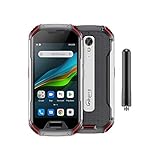
Unihertz Atom XL, The Smallest DMR Walkie-Talkie Rugged Smartphone Android 11 Unlocked 6GB+128GB... | $765.00 | Buy on Amazon |
As an Amazon Associate I earn from qualifying purchases.
What “best” means for a LineageOS phone
LineageOS replaces the manufacturer’s Android software. That can give an older phone a maintained operating system after its original update window, but the experience depends on more than the phone’s processor or camera. The decisive question is whether the project publishes and maintains a build for your precise device.
Free tools Windows power users keep installed
One-click scans. No signup required.
Use these filters in order:
- Official support: the exact model appears in the official LineageOS device directory.
- Maintenance: the device page shows current builds or updater instructions rather than only an old, archived guide.
- Variant match: the model, codename, storage configuration and regional or carrier variant match the guide.
- Installation feasibility: your bootloader can be unlocked, the required stock firmware is available, and you have the required computer tools.
- Daily-use fit: calls, SMS, LTE, Wi-Fi calling, bands, battery condition and replacement cost work for your location and budget.
A phone that scores highly on specifications but fails the first three checks is a poor LineageOS purchase. Conversely, a modest older phone can be a sensible choice when its official page is actively maintained and its hardware meets your needs.
#1 Best Overall
- US Carrier Support: Compatible with T-Mobile & Verizon networks only.
- Verizon Activation: For instructions on setting up on the Verizon network, please refer to our forum, Facebook page, or contact customer support.
- Walkie-Talkie Connectivity: Unihertz Atom XL features an integrated walkie-talkie function with an impressive 8-kilometer range, allowing you to stay connected in diverse environments.
- Walkie-Talkie Connectivity: Unihertz Atom XL features an integrated walkie-talkie function with an impressive 8-kilometer range, allowing you to stay connected in diverse environments.
- Versatile Connectivity: Dual SIM card support, NFC for contactless transactions, and an infrared feature, potentially for remote control functionality.
Start with the official device directory
Search by exact model, not retail name
Open the official LineageOS device directory and search for the manufacturer model. Then open the device page and record its codename. The codename is the safest identifier when comparing listings or downloading files. Two phones sold under nearly identical names may use different hardware, firmware and installation procedures.
Do not assume that a listing labelled “global,” “unlocked” or “dual-SIM” corresponds to the build you found. Compare the model number printed in the seller’s description, the phone’s settings page and, when possible, the label on the device or box. If any identifier is missing, treat compatibility as unconfirmed until you can verify it.
Follow the variant selector on the Wiki
The LineageOS Wiki groups some related variants on one page but explicitly instructs readers to select their variant and follow the corresponding guide. Use that selector rather than applying instructions from the first model shown. A guide for one variant can require different firmware or partition steps from another.
Check maintenance, not just historical availability
An old forum post, download mirror or video can prove only that a build existed at some point. It does not prove that official updates are still published. Look for a current device page, recent build or updater instructions and note the LineageOS version named there.
The official moto g5 page is an instructive warning: it labels the device “no longer maintained.” That status means a historical installation guide should not be treated as evidence of current official support. Apply the same check to every phone you consider, including models that appear frequently in older recommendations.
What the Pixel examples establish
The official Google Pixel 6 page (codename oriole) includes updater instructions referring to LineageOS 22.2. That makes the Pixel 6 a reasonable model to investigate, provided your exact variant matches the page and the instructions remain current when you buy.
The Google Pixel 4a page (codename sunfish) includes installation instructions for LineageOS 22.2. Its guide also demonstrates why support alone is not a buying verdict: it specifies stock firmware, an unlocked bootloader and computer-based tools, all of which affect the practical difficulty of the installation.
Do these 3 things before closing this tab:
1Clear out junk files and repair common Windows errors2Fix the driver behind crashes, sound loss and screen glitches3Repair Windows errors before they cause bigger problemsNeither page establishes a universal ranking, current market price, battery health of used units, regional carrier compatibility or superior performance. Treat both as evidence-backed examples, not automatic recommendations.
Compare candidates with the right criteria
When two or more phones have official pages, compare the information that can actually change your outcome. The table below is a decision framework; fill each row from the live device page and your local carrier requirements.
| Criterion | What to verify | Why it matters |
|---|---|---|
| Official maintenance | Current device page, build availability and updater status | Determines whether security and bug-fix updates are still available through the project |
| Exact variant | Model number, codename, region and carrier edition | Prevents flashing incompatible images or following the wrong procedure |
| Bootloader eligibility | Whether the bootloader can be unlocked for your edition and carrier | A locked or restricted bootloader can stop installation before it begins |
| Required firmware | Stock firmware version named in the device guide | Incorrect firmware can cause installation failure or unexpected crashes |
| Installation tools | Computer, ADB, fastboot, USB debugging and any device-specific utilities | Shows whether you can complete the process and recover from an error |
| Network functions | Local bands, calls, SMS, LTE, VoLTE and Wi-Fi calling | A successful flash is not useful if essential carrier services do not work |
| Physical condition | Battery health, screen, ports, cameras and water damage | Software support cannot repair worn hardware |
| Total cost | Purchase price, shipping, replacement battery and repair risk | The cheapest supported handset may not be the cheapest reliable daily phone |
The available official pages do not provide comparative scores for these criteria. Do not turn the Pixel examples into a ranked list without checking the target market and the current pages yourself.
Why exact firmware matters
Some device guides require a particular stock firmware version before LineageOS can be installed. Read that requirement before buying, because an older or carrier-specific phone may not be able to reach the required version through normal updates.
Windows Errors? Fix Them Before They Spread
Repair common Windows errors and clear accumulated junk for a smoother, more stable PC - no reinstall needed.Free scan · no reinstallCrashes, No Sound, or Screen Glitches?
Random freezes, missing sound and display glitches usually trace back to one bad driver. Find and replace yours safely.Free scan · under a minuteThe Wiki warns that incorrect firmware can lead to installation failure or unexpected crashes. “It boots” is not a sufficient test: a mismatched firmware package can leave radio, camera or other components unreliable. Download only the firmware named by the device-specific guide, and confirm its model and region labels before applying it.
Record the requirements before you purchase
- Write down the exact stock firmware version requested by the guide.
- Check whether the seller’s model can run that version.
- Confirm that the guide’s recovery, bootloader and partition instructions match the device codename.
- Save the stock recovery path or factory image information so you have a way back if the installation fails.
Plan for bootloader unlocking and data loss
Unlocking the bootloader erases the phone. Back up photos, messages, authenticator data, contacts and any files stored locally before starting. A cloud sync is not enough if an app keeps data only on the handset; export or copy those records separately.
Do not begin the process on a phone that contains the only copy of work files or recovery codes. After unlocking, the device may reboot and display a warning screen on every startup. That behavior is a consequence of the unlocked state, not proof that LineageOS is broken.
Computer and phone prerequisites
The Pixel 4a installation guide requires a computer with ADB and fastboot and USB debugging enabled on the phone. Other devices can require additional tools, but the principle is the same: prepare the computer and cable before wiping the handset.
Preparation checklist
- Use a computer on which you can install and run the versions of ADB and fastboot named by the guide.
- Use a reliable USB data connection; a charge-only cable cannot transfer commands or files.
- Charge the phone sufficiently to complete bootloader, firmware and first-boot steps without interruption.
- Enable USB debugging only after the phone is backed up and you are ready to follow the guide.
- Download files from the official device page and verify that every filename matches the model and release instructions.
If the computer does not detect the phone, stop and fix the connection or driver problem rather than improvising with a different device guide.
Test the phone on stock software first
Official installation guidance recommends booting the stock operating system and checking the device’s functions before flashing. This separates pre-existing hardware or carrier problems from LineageOS problems.
Functions to test
- Place and receive a call.
- Send and receive SMS.
- Connect to Wi-Fi and mobile data.
- Confirm that the phone recognizes its SIM or eSIM as applicable.
- Check cameras, speakers, microphones, charging, fingerprint or other biometric hardware and the display.
- Test LTE calling and Wi-Fi calling when your carrier offers them.
Some devices need VoLTE or VoWiFi provisioning while still running stock software. If the guide or carrier indicates that requirement, complete it before unlocking and flashing. Otherwise, the phone can appear to install correctly yet lose calling functionality on the carrier network.
Carrier and regional compatibility can change the answer
LineageOS support is separate from carrier approval. A build may install successfully while a particular regional model lacks the bands or IMS configuration needed for reliable calls. Check your carrier’s supported bands and device policies against the exact model number, not just the family name.
Quick wins for a faster PC:
Scan for outdated or missing drivers - takes under a minuteDriver Scan →Repair Windows errors before they cause bigger problemsFix Now →Fix the driver behind crashes, sound loss and screen glitchesFind Drivers →Ask the carrier whether an unlocked bootloader or non-stock software affects activation, VoLTE, Wi-Fi calling or support. The answer can vary by country, network and SIM type. If you rely on emergency calling, work authentication or dual-SIM features, test those functions with your own SIM before retiring the stock setup.
Independent reader supportYour contribution helps us test, update, and keep practical guides available for everyone.Pixel 6 and Pixel 4a: what you can responsibly conclude
| Phone | Official evidence surfaced | What still needs verification |
|---|---|---|
Google Pixel 6 (oriole) |
Official updater instructions refer to LineageOS 22.2 | Current maintenance, exact regional variant, bootloader eligibility, carrier functions, condition and local price |
Google Pixel 4a (sunfish) |
Official LineageOS 22.2 installation guide | Required stock firmware for the handset, current build status, bootloader eligibility, carrier functions, battery condition and local price |
The table deliberately does not declare a winner. The cited documentation supports investigating both models, but it does not measure performance, battery life, camera quality, resale value or network coverage. Your decision should follow the verification steps rather than a generic “best phone” label.
A safe buying workflow
- Define your non-negotiables. Note your country, carrier, required bands, number of SIMs, storage needs, camera or gaming expectations and maximum budget.
- Shortlist only official device pages. Exclude phones that appear only in forum posts or unofficial build lists.
- Confirm the codename and variant. Match the listing’s model number to the device page and its variant selector.
- Read the complete installation guide. Record the required stock firmware, recovery, bootloader and computer steps before placing an order.
- Check maintenance status. Reject a phone marked no longer maintained unless you knowingly accept an unofficial or frozen installation.
- Verify carrier behavior. Confirm calls, SMS, LTE, VoLTE and Wi-Fi calling for your network and region.
- Inspect the used handset. Check battery condition, screen, charging port, cameras, biometric hardware and signs of water or repair damage.
- Back up and test stock functionality. Perform the call, SMS and data checks while the phone is still recoverable.
- Unlock and install only with the exact guide. Expect a data wipe and keep the stock recovery path available.
- Re-test every essential function. After installation, repeat network, calling, messaging and hardware checks before transferring all your data.
Common mistakes and how to avoid them
Buying by family name
“Pixel 4a,” “Moto” or another family label does not identify a build by itself. Require the codename and model number shown on the official page.
Using instructions from a similar phone
Installation procedures are device- and version-specific. A recovery image or firmware package for a related model can fail or cause crashes. Return to the exact page for your codename.
Skipping the stock-firmware requirement
Do not assume the newest file is always correct. Use the version named by the guide, and update the stock phone first if necessary.
Unlocking before backing up
The wipe is expected. If you cannot restore your data, postpone unlocking until you can create and verify a backup.
Assuming installation proves phone service
Booting to the home screen does not confirm calls, SMS or IMS services. Test those functions with your SIM, especially where VoLTE or Wi-Fi calling is important.
Trusting an old recommendation
Maintenance changes. The moto g5 “no longer maintained” label illustrates why a once-popular model can stop being a sensible official LineageOS choice.
How to handle a failed installation
- Stop repeating commands and note the exact error, device mode and file used.
- Confirm the codename, model number and regional variant again.
- Re-read the current guide for the required stock firmware and partition or recovery sequence.
- Check the USB cable, port, computer detection and ADB or fastboot connection.
- If the guide provides a stock restoration path, use only the matching factory files.
- Do not substitute a guide for a similar device; seek device-specific support only after verifying the identifiers.
If the phone crashes after installation, suspect an incorrect firmware version or mismatched image before assuming the hardware is defective. Restore the matching stock software where the official instructions allow it, then reassess whether the device is a suitable project.
When an older supported phone is the right choice
An older handset can make sense when the official build is maintained, the battery is healthy or replaceable, the price leaves room for repairs and the carrier features you need are confirmed. It is a poor bargain when a low purchase price hides a worn battery, damaged port, incompatible regional model or unsupported maintenance status.
For a used phone, ask the seller for the exact model number and proof that the device boots normally. Avoid listings that obscure the carrier edition or refuse returns; a software project cannot compensate for a phone you cannot unlock or test.
Bottom line for choosing a LineageOS phone
There is no evidence-backed universal winner in the available documentation. Begin with the official LineageOS directory, choose a currently maintained page for the exact model and variant, and read its installation guide before buying. The Pixel 6 (oriole) and Pixel 4a (sunfish) are concrete official examples tied to LineageOS 22.2 documentation, while the moto g5 shows why maintenance status matters. Your best choice is the candidate that passes those checks and works on your carrier—not the phone with the most impressive name or an old forum recommendation.
Recommended Free Tools
Quick Recap
Product prices and availability are accurate as of the date/time indicated and are subject to change. Any price and availability information displayed on Amazon at the time of purchase will apply.

