You need Nintendo Switch Sports, a supported Nintendo Switch system, and compatible Joy-Con controllers. You do not need the Leg Strap for most play, and you do not need Nintendo Switch Online for local multiplayer. Online play does require a membership, an internet connection, and a Nintendo Account.
What you need to get started
- Game: Nintendo Switch Sports, available as a physical or digital edition. Nintendo’s US store listing names eight sports: Basketball, Golf, Soccer, Volleyball, Bowling, Tennis, Badminton, and Chambara. Golf and Basketball availability may depend on the required software update, as indicated by the listing.
- System: Nintendo Switch, Nintendo Switch – OLED Model, or Nintendo Switch 2, according to Nintendo’s current Americas FAQ. On Switch 2, Nintendo says the game is supported with behavior consistent with Nintendo Switch.
- Controllers: Compatible Joy-Con controllers. The supported configuration depends on the sport and play style; some use one Joy-Con per player, while others use a pair. Nintendo Switch Pro Controllers and Nintendo Switch 2 Pro Controllers are not compatible.
The game does not support handheld mode. Nintendo recommends TV mode for the best experience, so plan to play with the system connected to a TV rather than using it as a handheld.
As an Amazon Associate I earn from qualifying purchases.
Do you need the Leg Strap?
No, not for the game as a whole. The Nintendo Switch Leg Strap is needed only for Soccer’s leg-strap play style. The physical edition includes one; with the digital edition, you can buy the strap separately if you want to use that mode. Check your regional store listing, since product contents can vary by market.
Windows Errors? Fix Them Before They Spread
Repair common Windows errors and clear accumulated junk for a smoother, more stable PC - no reinstall needed.Free scan · no reinstallCrashes, No Sound, or Screen Glitches?
Random freezes, missing sound and display glitches usually trace back to one bad driver. Find and replace yours safely.Free scan · under a minuteHow to use it for Soccer
Nintendo’s Leg Strap instructions say to insert a left Joy-Con. For Nintendo Switch Sports, place the strap at the center of either thigh and tighten it enough to stay in position without making it uncomfortably tight. The strap is designed for Ring Fit Adventure and Nintendo Switch Sports, but it is incompatible with Joy-Con 2.
#1 Best Overall
![[2 Pack] Leg Strap for Nintendo Switch/Switch 2 - Sports Play Soccer](https://m.media-amazon.com/images/I/41K89txo47L._SL160_.jpg)
- Unique Design: The Leg Strap was specially designed for Nintendo Switch 2/Nintendo Switch 1/Switch OLED Model Compatible with Joycons for game---- Sports Play Soccer/ Ring Fit Adventure, used for the most popular swith game. Comfortable Wear & Easy to maintain.
- Fit most leg sizes: It has adjustable Velcro strap so you can adjust the length according to the size of your leg for adults and children. Simple and convenient.
- Release your hand: The product combines controller grip and Leg to release your hands. It can help you concentrate on the moves. Freely and enjoyable rather than tired during the game. Just insert the compatible with Joy Cons in the grip, and tighten according to your leg, then start your game freely.
- Through many reliability tests [Strap tension test, Hand washing test, Sweat test, Aging test, Material chemical environmental test], can protect your skin and Compatible with Joy Con well. Soft, breathable, and lightweight, no buckle, no snagging and no scratching.
- The Leg Strap accessories respond to your real-world movements, allowing the game to turn them into in-game actions. Perfect for the Ring Fit Adventure.it can release your hands in the game process, let you experience the joy of the game and make the controller so much easier to use for switch game. You can play with your friends together. Awesome Present for your friends and family.
Local multiplayer: check the sport and player count
Nintendo’s US listing gives a range of one to four players on one system and one to two players online. Those figures are not a promise that every sport supports the same number of simultaneous players: Nintendo says the number varies by sport, and additional accessories may be required for multiplayer. Check the requirements for your chosen sport and group size before buying extra controllers.
Local play does not require Nintendo Switch Online. Depending on the sport and how many people are playing, you may need additional Joy-Con controllers. Not every player necessarily needs a pair, so use the specific sport’s controller setup rather than assuming one pair per person.
Rank #2
![[4 Pack] Leg Straps for Nintendo Switch 2 & Switch OLED](https://m.media-amazon.com/images/I/51yZtHeEK+L._SL160_.jpg)
- Two Sizes Available:Our leg straps for Nintendo Switch come in two sizes, ensuring a perfect fit for everyone. Whether you have a slender or more athletic build, you can enjoy a comfortable and secure experience while using the leg straps during your gaming sessions. This thoughtful sizing option caters to a wide range of users, from kids to adults, making it a versatile addition to your gaming setup.
- Compatible with Multiple Switch Games:These leg straps are designed to be highly compatible with a plethora of Switch games. From the energetic and movement - based games like "Ring - Fit Adventure" to other action - packed titles that encourage physical interaction, the leg straps enhance your gaming experience. They seamlessly integrate with the Switch's motion - sensing technology, allowing you to fully immerse yourself in the game world and add a new dimension to your gameplay.
- Soft, Skin - friendly, and Breathable:Crafted with the utmost care for your comfort, our leg straps are made of soft materials that are gentle on the skin. They are skin - friendly, reducing the risk of irritation even during extended use. Moreover, the design of the straps is breathable, preventing sweat from building up. This means you can play for hours without feeling uncomfortable or sticky, ensuring a pleasant and uninterrupted gaming experience.
- Durable and Sturdy:Built to last, our leg straps for Nintendo Switch are extremely durable. They are made from high - quality materials that can withstand the rigors of enthusiastic gaming. Whether you're making energetic jumps, quick twists, or sudden movements during gameplay, these straps won't easily break or wear out. Their robust construction ensures that you can enjoy countless gaming sessions without having to worry about replacing them frequently, providing excellent value for your money.
- Ideal for Family - friendly Play:The leg straps for Nintendo Switch are perfect for family - centered play. They encourage active participation from all family members, regardless of age or gaming experience. Whether it's a friendly competition during a family game night or a collaborative adventure, the leg straps make the gaming experience more engaging and interactive. They help create lasting memories as you bond with your family over exciting and active gaming sessions, turning ordinary moments into extraordinary ones.
Online play: membership, internet, and account
To play online, you need an active Nintendo Switch Online membership, an internet connection, and a Nintendo Account, according to Nintendo’s online-play support page. Without a membership, choosing Play Globally lets you try a competition against computer-controlled competitors; it is not full online play against other players.
Quick wins for a faster PC:
Scan for outdated or missing drivers - takes under a minuteDriver Scan →Clear out junk files and repair common Windows errorsFree Scan →Fix the driver behind crashes, sound loss and screen glitchesFind Drivers →Set up safely
Nintendo advises players to attach the Joy-Con wrist straps, stay aware of their surroundings, and leave adequate room to move. Before starting, clear the area around you and anyone else playing so controllers and arm movements do not strike people or objects.
Quick Recap
Best Value

- 【Anti-slip strips】: All 4 Pack Joy Con leg straps feature silicone non-slip strips, ensuring a secure fit even during intense movement while gaming
- 【Large Size】: 4 independent straps can be attached to each other to extend the length, making them suitable for adults of any thigh size
- 【Small Size】: Straps and slot design allow for wrapping in the opposite direction, making them suitable for use whether on kids or around the wrist
- 【Universal Compatibility】: Our products is compatible with Switch 1, OLED model, and Switch 2 controllers
- 【Compatible Games】: Nintendo Switch Ring Fit Adventure, Sports: Soccer, Family Trainer, Just Dance, Zumba: Burn It Up
Rank #4
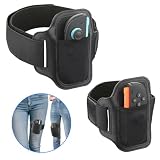
- 【Specially designed for Switch 2】Gamorek Leg Strap is specially designed for Switch 2 Joy-Con, firmly securing the controller to the strap. It can provide an immersive experience while playing sports games like Ring Fit Adventure & Switch Sports Soccer,.
- 【Fit Most Leg Sizes】Gamorek Switch 2 Leg Strap comes in two sizes of straps: 43cm and 70cm. Suitable for both adults and children. You can also adjust the length of the straps according to your needs to make it fit your legs better.
- 【Hands-Free Gaming】 Gamorek Switch 2 Leg Strap can connect the controller to your legs, freeing up your hands and providing you with a more relaxed experience.
- 【Breathable&Durable Material】 It is made of breathable and durable materials, reducing the feeling of stuffiness in the legs when playing sports games.
- 【Play with Your Family】This leg strap can respond to your actions in the real world, allowing the game to transform them into in-game actions. This is a fun way to enjoy gaming with family and the perfect gift for Switch gamers.
Rank #3

- Leg Strap
Quick setup checklist
- Install or insert Nintendo Switch Sports on a supported Nintendo Switch system.
- Use compatible Joy-Con controllers and choose TV mode for the recommended experience.
- For Soccer leg-strap play, use the included strap from the physical edition or obtain one separately; do not use Joy-Con 2 with the strap.
- For local multiplayer, check the chosen sport’s player and controller requirements.
- For online play, make sure you have Nintendo Switch Online, an internet connection, and a Nintendo Account.
- Attach wrist straps and make enough clear space before playing.
Product prices and availability are accurate as of the date/time indicated and are subject to change. Any price and availability information displayed on Amazon at the time of purchase will apply.

