Quick wins for a faster PC:
Clear out junk files and repair common Windows errorsFree Scan →Fix the driver behind crashes, sound loss and screen glitchesFind Drivers →To play Nintendo Switch Sports, you need the game, a compatible Nintendo Switch-family console, and compatible Joy-Con controllers. Nintendo says the game does not support Handheld Mode and recommends TV Mode. A Leg Strap is optional for general play and used for supported Soccer play; online play additionally requires internet access, a Nintendo Account, and Nintendo Switch Online membership.
What equipment do you need?
- The game: Nintendo Switch Sports, either physical or download software.
- A compatible console: Nintendo Switch, Nintendo Switch – OLED Model, or Nintendo Switch 2. Nintendo lists these systems as supported in its Nintendo Switch Sports FAQ.
- Compatible Joy-Con: The supported arrangement depends on the sport and play configuration. The game does not support Nintendo Switch Pro Controllers or Nintendo Switch 2 Pro Controllers.
- TV and display setup: Use TV Mode for Nintendo’s recommended experience. The game does not support Handheld Mode.
There is no single controller-count rule that applies to every sport and number of local players. Check the setup shown for the sport and mode you plan to play rather than assuming every player needs a separate pair.
As an Amazon Associate I earn from qualifying purchases.
Which Joy-Con arrangements work?
Nintendo lists paired Joy-Con, a single Joy-Con for some configurations, and Joy-Con with a Leg Strap for applicable Soccer play. The correct arrangement varies by sport and mode, so follow the controller prompts shown when you select a sport.
| Arrangement | When it is relevant |
|---|---|
| Paired Joy-Con | Supported in configurations that use a pair; the specific sports and player setups vary. |
| Single Joy-Con | Supported for some sport configurations, not as a universal setup for every sport. |
| Joy-Con with Leg Strap | Used for supported Soccer Leg-Strap Mode. |
| Nintendo Switch Pro Controller or Nintendo Switch 2 Pro Controller | Not compatible with the game. |
For local multiplayer, the game’s requirements can change with the sport, mode, and number of players. Nintendo’s FAQ does not provide a complete sport-by-sport controller-count matrix, so use the in-game prompts to confirm whether you need additional Joy-Con.
#1 Best Overall

- Introducing Joy-Con, controllers that make new kinds of gaming possible, for use with Nintendo Switch.
- The versatile Joy-Con offer multiple surprising new ways for players to have fun.
- Two Joy-Con can be used independently in each hand, or together as one game controller when attached to the Joy-Con grip.
- They can also attach to the main console for use in handheld mode, or be shared with friends to enjoy two-player action in supported games.
- Each Joy-Con has a full set of buttons and can act as a standalone controller, and each includes an accelerometer and gyro-sensor, making independent left and right motion control possible.
Do you need the Leg Strap?
No—not to play the game generally. The Leg Strap is for a supported Soccer mode, so you can skip it if you do not plan to use that option. Nintendo’s retrieved official information does not establish that every physical edition or regional package includes the strap; check the specific listing if you are buying a physical copy.
To enter Leg-Strap Mode, Nintendo says to highlight Soccer and press X in Play Globally, or press + on the controller-holding screen in Play Locally or Play with Friends. See Nintendo’s Leg Strap attachment instructions for fitting a Joy-Con. Joy-Con 2 controllers are not compatible with the Leg Strap, according to Nintendo’s FAQ.
Rank #2
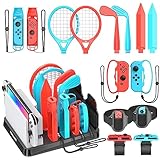
- All-in-One Storage Solution: Upgraded with a dedicated organizer station, this kit keeps all your Switch Sports accessories in order, with designated slots (marked with accessory names) for easy access and display, eliminating desktop clutter. Nintendo Switch Interactive Gaming Figures
- Full Game Compatibility: Includes 2 Joy-Con shared grips, 2 golf clubs, 2 tennis/badminton rackets, 2 wrist straps, 2 leg straps, 2 swords, 2 bowling grips, and fits Switch/OLED console & 2 game cards (console, Joy-Cons and game cards not included), covering all Switch Sports games like golf, tennis, badminton, soccer, volleyball, bowling and chambara.Nintendo Switch Interactive Gaming Figures
- Fitness & Fun Combined: Turn game time into workout sessions! Enjoy immersive sports gameplay while staying active at home, no need for outdoor exercise. Nintendo Switch Interactive Gaming Figures
- Easy to Use & Ergonomic: Accessories snap seamlessly onto Joy-Cons without force; adjustable velcro design for soccer leg straps and volleyball wristbands; lightweight, ergonomic build delivers realistic gaming feel. Nintendo Switch Interactive Gaming Figures
- Perfect for Family & Friends: Boosts game realism and competitive fun, making it ideal for family gatherings and friend hangouts, a must-have for Switch enthusiasts! Nintendo Switch Interactive Gaming Figures
Can you play without internet or Nintendo Switch Online?
You do not need a Nintendo Switch Online membership for every local or offline activity. You do need internet access, a Nintendo Account, and an active Nintendo Switch Online membership for online play. If you select Play Globally without a membership, Nintendo says the game offers a trial competition against computer competitors rather than full online play.
The Tool Desk
Outbyte PC Repair FREERepair Windows errors before they cause bigger problemsFix Now →Outbyte Driver Updater FREEFix the driver behind crashes, sound loss and screen glitchesFind Drivers →Nintendo documents smartphone-app voice chat for Play with Friends; it requires Nintendo Switch Online. Accounts for users under 13 cannot use that voice chat. See the Nintendo Switch Sports FAQ for Nintendo’s online and voice-chat conditions.
Rank #3

- Two Joy Con can be used independently in each hand, or together as 1 game controller when attached to the Joy Con grip
- They can also attach to the main console for use in handheld mode, or be shared with friends to enjoy two player action in supported games
- Each Joy Con has a full set of buttons and can act as a standalone controller, and each includes an accelerometer and gyro sensor, making independent left and right motion control possible
What is needed for optional wired LAN play?
LAN play is a specialized option for connecting separate consoles over a wired network; it is not required for ordinary local play or online play. Nintendo’s LAN play instructions specify the following limits and setup:
- Up to four consoles can be connected.
- Up to two players can play on each console, for up to eight players overall.
- How many players can participate simultaneously depends on the sport.
- Each console needs Nintendo Switch Sports, either as physical or download software.
Nintendo notes that Switch Lite requires a licensed accessory, such as HORI’s Dual USB PlayStand, to connect a USB LAN adapter. This LAN note does not make Handheld Mode compatible with the game; Nintendo’s FAQ says Handheld Mode is unsupported.
Rank #4

- 【Designed for Nintendo Switch / OLED Joy-Cons】Perfect for Switch/ OLED Joy-Cons, enhancing your experience with Mario Golf: Super Rush and other Switch sports golf games (Not for Switch 2)
- 【Realistic Gaming Experience】This compact device transforms your Joy-Cons into a premium controller, elevating your virtual golf gameplay
- 【Easy to Use】Simply slide your Joy-Cons into place and secure them with wrist straps to prevent accidental drops
- 【Perfect for Family and Party Play】Supports up to 4 players simultaneously, making it ideal for family bonding and social gatherings
- 【Durable and Comfortable】Made from lightweight, durable ABS plastic for a comfortable grip during extended gameplay. [Note: Joy-Cons not included]
Set up safely
Nintendo advises wearing the Joy-Con wrist straps, leaving enough room to move, and staying aware of people and objects around you. Follow the safety guidance on the official Nintendo Switch Sports page before playing.
Quick Recap
Best Value

- Can be connected to the main console for use in the handheld mode, or shared with friends to enjoy two-player action in supported games.One controller or two, vertical or sideways, motion controls or buttons…Joy‑Con and Nintendo Switch give you total gameplay flexibility.Includes one Neon Red right Joy-Con and one Black Joy-Con Strap.
- Each Joy-Con has a full set of buttons and can act as a stand-alone controller
- Joy-Con controllers boast an accelerometer and gyro sensor, making independent left and right motion control possible
- Control the action from almost anywhere in your room without cords
Product prices and availability are accurate as of the date/time indicated and are subject to change. Any price and availability information displayed on Amazon at the time of purchase will apply.

