What’s actually slowing this PC down?
Pick the symptom - the matching free tool is one click away.
Use guest Wi-Fi for visitors—and consider moving some internet-connected devices there too. Smart devices that mainly need an internet connection, rather than access to phones or computers on your main network, may benefit from being separated. Whether they will still work as expected depends on your router’s guest-network controls and the way each device is used.
What guest Wi-Fi can do
A guest network gives visitors a separate way to connect without sharing your primary Wi-Fi password. The Federal Trade Commission says this can reduce how often you share that password and help keep a visitor’s potentially malware-infected phone or tablet off devices on your main network. That is a risk reduction, not a guarantee that your home network is safe. The FTC’s home Wi-Fi guidance explains the benefit.
As an Amazon Associate I earn from qualifying purchases.
The same separation can be useful for some non-essential smart devices. Microsoft recommends guest Wi-Fi for such devices, while the Canadian Centre for Cyber Security includes guest networks for guests and IoT devices among its router-security practices. Microsoft’s wireless-safety guidance and the Canadian Centre’s router best practices support this as an option, not a rule for every device or router.
Quick wins for a faster PC:
Clear out junk files and repair common Windows errorsFree Scan →Fix the driver behind crashes, sound loss and screen glitchesFind Drivers →Which devices might belong there?
Consider guest Wi-Fi for devices that mainly need to reach online services and do not need to be discovered or controlled locally by devices on your primary network. The point is to limit which devices share a network, not to assume that every smart device needs the same treatment.
#1 Best Overall
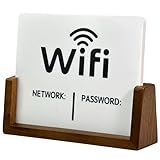
- Stylish & Functional Display: Impress your guests with this guest Wifi password sign featuring a sleek acrylic board and wooden base – perfect for home, office, or small business use.
- Easy to Customize: Write or update your Wifi network name and password with dry erase. To remove the writing, wipe it with a damp cloth or paper towel.
- Premium Quality Materials: This wifi board for guests is made from high-quality, durable acrylic and a solid wood base for a sturdy, long-lasting display that complements any décor.
- Wifi Password Sign for Business: Ideal for hosts, cafes, waiting rooms, or reception areas – give your visitors convenient access to your network without having to repeat it.
- Minimalist Design: Blends seamlessly with modern, rustic, farmhouse, or industrial interiors – functional signage that doubles as décor.
- Potential candidates: non-essential connected devices whose everyday functions rely on internet access and do not depend on local communication with your phone, computer, or other home equipment.
- Check before moving: devices you set up, control, or use through a phone or computer on the main network. Their apps or features may depend on local discovery or access.
CISA describes network segmentation as separating groups such as guests, IoT devices, and personal computers; guest Wi-Fi can be a simple way to do some of that separation. It is not necessarily equivalent to a dedicated IoT VLAN, and routers do not all enforce the same access rules. CISA’s segmentation guidance discusses the broader concept.
Why some smart devices may stop working normally
Guest networks often restrict communication between connected clients or prevent them from reaching devices on the primary network. That can help create separation, but it can also interfere with local discovery, control, or sharing. Microsoft notes that most guest networks isolate devices from each other, while some allow selected devices to be shared.
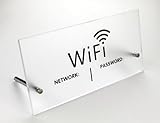
Rank #2

- MULTIPLE USES: Wifi passwords signs perfect for your conference room, hotel, shopping mall, cafebar, famliy, restroom, school, councilors, lawyers office, museums, dorm room or any room that needs WIFI sign in sign out.
- Vertical desktop design: Leave WiFi login information in plain sight in your guest bedrooms or living room. Type your wireless network name and WiFi password in the printable sign for use by your visitors.
- Minimalism: FIREFLYWEB wifi signs will capture the timeless essence of the home and office decorin.
Those controls are router-specific. For example, Google documents selected shared-device access on its guest Wi-Fi, with examples including a streaming device, smart TV, wireless speaker, or printer. That describes Google’s documented setup; it is not a feature to expect from every router. Google’s Guest Wi-Fi instructions explain its sharing options.
Recommended Free Tools
Check your router before changing networks
- Open your router’s app or administration interface and find its guest Wi-Fi controls. Menu names and available settings vary, so use the model-specific manual rather than assuming a universal path.
- Look for whether guest clients can reach the primary network, whether they can communicate with one another, and whether you can allow selected devices to be shared.
- For a device you are considering moving, check its documentation and the router manual for any local-network requirements. Do not assume its app or every feature will continue to work on guest Wi-Fi.
- After moving it, try the ordinary tasks you rely on. If control, discovery, or sharing no longer works, check the router’s isolation and sharing settings or return the device to its previous network.
Guest Wi-Fi is one security measure, not a complete fix
Separating devices does not correct outdated router firmware, weak passwords, insecure device accounts, or vulnerabilities in the devices themselves. The FTC also advises changing default router administrator credentials and the network name, enabling encryption, checking for updates, and making sure the firewall is on. Its Wi-Fi security checklist covers these protections, and its guidance for internet-connected devices addresses keeping devices and router software current.
Rank #3
- Worth the purchase:Solid stainless steel back support so it can tip over easily. Solid Thickened Acrylic panel Enough space to write necessary information.
- Cute and sturdy:Great, Decorative Way to Share Your Guest WiFi.Clever and helpful addition to guest room hotel or vacation home.
- Material: Solid Acrylic ,Stainless steel.
- FIREFLYWEB---Tabletop Decor something to be proud of wifi signs.
NIST’s 2024 publication record sets out recommended cybersecurity requirements for consumer-grade router products, underscoring that router security involves more than a guest network. NIST IR 8425A is the official publication record.
Quick Recap
Best Value
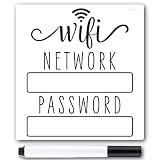
- Make Guests Feel Instantly Welcome - Give visitors easy access to your WiFi without awkwardly repeating passwords—perfect for house guests, gatherings, and vacation rentals.
- Reusable & Easy to Update - the wifi password magnet comes with a black wet erasable pen so you can update the wifi sign as needed. General accidental bumps into the wifi password sign won't smudge or smear the writing, it needs to be wiped with a wet towel.
- Strong Magnetic Backing for Easy Placement - the 5 x 4.75 inch wifi fridge magnet will stay securely in place for years to improve home organization. It is durable and easy to clean.
- Clean, Modern Design - the minimalistic network password sign style blends seamlessly into kitchens, entryways, offices, and rental properties without looking cluttered. Looks great with any decor from rustic farmhouse to sleek modern.
- Perfectly Compatible with Airbnb Rental Properties - A simple upgrade that improves guest experience, reduces interruptions, and adds a thoughtful, professional touch. Compatible with Airbnb essentials for hosts.
Rank #4

- Convenient: Wifi password sign allows easy sharing of your home wifi network credentials with guests.The sign has clear, easy-to-read text displaying the WiFi network name and password.It is an essentials for hosts.
- Stylish Design: Sleek and modern look complements any home decor.A design that fits your home decor or personal style, perhaps matching it with your interior color scheme or aesthetic.
- High Quality Material: Made from high-quality wood for long-lasting use, withstand handling and can be easily cleaned if necessary.
- Easy Setup: Simply write your wifi password on the provided space and display the sign.Easy to update in case you change your WiFi network or password without reprinting.
- Versatile: Suitable for use in living rooms, guest rooms, or any area where visitors may need wifi access.
Product prices and availability are accurate as of the date/time indicated and are subject to change. Any price and availability information displayed on Amazon at the time of purchase will apply.

