Recommended Free Tools
If your UK household energy supplier stops trading, your gas and electricity should keep flowing while Ofgem arranges a replacement supplier. Take a meter reading, keep your old bills and account records, then check the new supplier’s tariff and the balance it transfers to your account. You do not automatically keep your old fixed deal.
First, check what “taken over” means
A supplier stopping trading because of financial problems is different from an ordinary sale or commercial transfer. Ofgem’s safety net applies when a supplier goes out of business; if your supplier is being sold or your account is moving as part of a normal transaction, follow the specific transfer notice you receive.
As an Amazon Associate I earn from qualifying purchases.
When a supplier fails, Ofgem normally appoints a Supplier of Last Resort (SoLR). It selects a company through a bidding process and considers whether it can take on the extra customers without harming its existing customers. Ofgem says the appointment usually takes a few days, though its detailed guidance says it could take up to 14 days. Follow Ofgem’s announcements and messages from the incoming supplier during the transfer. Ofgem’s household guidance
The Tool Desk
Outbyte Driver Updater FREEScan for outdated or missing drivers - takes under a minuteDriver Scan →Outbyte PC Repair FREEClear out junk files and repair common Windows errorsFree Scan →Ofgem’s instruction to household customers is: “You do not need to do anything. We will choose a new supplier for you.” You do not need to arrange a new contract before the replacement is appointed.
#1 Best Overall

- Various Monitoring Parameters: The power meter plug can monitor the power (W), energy (kWh), volts, amps, hertz, power factor, cost, minimum and maximum power (W), cumulative days and time of your appliances. By switching 7 display modes, you can easily know the various parameters while the appliance is working. The home energy monitor can also calculate and display how much power your appliance uses and how much electricity bill it cost in cumulative time
- Upgraded LCD Display: With large screen size 2.36 inch x 1.85 inch, clearer monitor backlit, our electrical usage monitor can display the data clearer and more visible no matter day or night. 180°full wide viewing angles is great for reading and recording the data in any angles. No need to stand on the front of the display and bend over to read the numbers
- Adjustable Backlight Time: Our upgraded watt meter has 5 options of backlight time. The default backlight time duration is 10 minutes(bL-0). If you want to change the backlight time, you can press and hold "UP" and "DOWN" button at the same time to enter backlight time setting, then press "UP" and "DOWN" to select the backlight time (bL-0 =10 minutes, bL-1=1 hour, bL-2=4 hours, bL-3=8 hours, bL-4=always on), finally press the "COST" to save the backlight time settings
- Overload protection: When the power of the appliance exceeds the overload power, the LCD will display “OVERLOAD” to warn the user. All the buttons will quit working and can only be workable when you lower or remove the load power. The default overload power is 3680W and is adjustable from 0 to 3680W. In general, you need to set the overload power to 1800W before using. Just press the "function" button for more than 3 seconds to enter the setting
- Data Memory Function: The wattage meter will record your power consumption data when you remove it from socket, or remove appliances from the electricity monitor. You can directly see the last data when you use it next time. This function can also automatically save the data when there is a sudden power failure
If Ofgem cannot use the SoLR process, it may seek an Energy Supply Administration Order under the Special Administration Regime. An administrator then runs the existing supplier while it is rescued, sold or its customers are transferred. Customers continue receiving and paying for energy, and household credit remains protected.
What to do while your account transfers
- Take a meter reading as soon as practical. Photograph the meter or note the reading and date. Keep the record so you can check the opening reading on your new account.
- Save your account information. Keep previous bills, statements, payment records and any meter photos. Your former supplier’s online account may become unavailable.
- Wait for the new supplier’s contact. It will explain how to set up your account and how Direct Debit payments will be handled. Do not assume that the old payment arrangement carries over unchanged.
- Check the opening account details. Compare the new account’s opening reading and balance with your records, and query discrepancies with the new supplier.
A smart meter may lose its smart functionality when your supplier changes. It should still work as a traditional meter, but you may need to submit readings manually. Smart mode may return with a later tariff or supplier; check with your supplier rather than assuming it will work remotely.
Rank #2

- Multi-function power monitor: Our electric usage monitor can monitor the power (W), electricity(kWh), voltage(V), frequency(Hz), current(A), power factor(PF), unit price($/kWh), total cost($) of your appliances. By switching 8 display modes, you can easily know the various parameters while the appliance is working. The “electricity” mode can calculate and display how much power your appliance uses. And the “total cost” mode will show how much electricity bill it cost in cumulative time
- Overload protection: When the loading power of the appliance is over the default overload threshold 1800W, the whole display with backlight and the word “OVERLOAD” will keep flashing to warn the users. Please turn off the appliance for safety concern
- Premium Material: The whole body of our energy meter is made of high-quality ABS material. It makes our home electricity usage monitor more long lasting, fireproof and anti-drop. The standard US socket and plug is suitable for all US standard appliances
- Backlight Display: With white backlight and black words, the LCD display of our home power monitor can display the data clearer and help you to read the data easier no matter day or night. The backlight will only lights up when the device is connected to AC power. If no button is pressed, the backlight turns off automatically after 10 minutes. You can also press the "UP" button to turn off the backlight manually, and press any button to turn on backlight again
- Easy to reset: No reset tool needed, our appliance power usage meter is easy to reset. You can press the “M” button for 5 seconds directly to reset the device. After reset, all cumulative data (electricity quantity, cost) will be cleared, and all settings will be restored to factory settings
If you use a prepayment meter, you should be able to keep topping up as usual while Ofgem appoints a supplier. After the appointment, ask the new supplier whether you need a replacement key card or token. These are supplier-specific, so do not buy a generic one.
Check the new tariff and decide whether to switch
If you do not agree to a different contract, the incoming supplier puts you on a deemed contract. Ofgem says it will try to find a contract similar to your old one, but your old fixed deal does not automatically continue. The price cap applies to the deemed contract; that does not mean it will cost the same as your previous tariff. Check the actual rates and terms with the new supplier. Ofgem’s guidance on deemed contracts
Rank #3
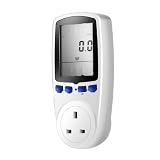
- UK Plug Electricity Power Consumption Meter Energy Monitor KWH Calculator Usage
Ofgem’s current household supplier-failure guidance says the deemed contract lasts six months, after which it must return to its normal rate unless you agree another contract. Check the information supplied with your own contract, because its terms and the guidance may change.
You can ask the new supplier to move you to its cheapest available tariff, or switch to another supplier without an exit fee. Compare offers using your household’s usage and the details that determine the total cost:
Rank #4

- Various Monitoring Parameters: The power energy meter can monitor the power (W), energy (kWh), volts, amps, hertz, power factor, cost, minimum and maximum power (W), cumulative days and time of your appliances. By switching 7 display modes, you can easily know the various parameters while the appliance is working. The home energy monitor can also calculate and display how much power your appliance uses and how much electricity bill it cost in cumulative time
- Upgraded LCD Display: With large screen size 2.36 inch x 1.85 inch, clearer monitor backlit, our electrical usage monitor can display the data clearer and more visible no matter day or night. 180°full wide viewing angles is great for reading and recording the data in any angles. No need to stand on the front of the display and bend over to read the numbers
- Adjustable Backlight Time: Our upgraded watt meter has 5 options of backlight time. The default backlight time duration is 10 minutes(bL-0). If you want to change the backlight time, you can press and hold "UP" and "DOWN" button at the same time to enter backlight time setting, then press "UP" and "DOWN" to select the backlight time (bL-0 =10 minutes, bL-1=1 hour, bL-2=4 hours, bL-3=8 hours, bL-4=always on), finally press the "COST" to save the backlight time settings
- Overload Protection: When the power of the appliance exceeds the overload power, the LCD will display “OVERLOAD” to warn the user. All the buttons will quit working and can only be workable when you lower or remove the load power. The default overload power is 3680W and is adjustable from 0 to 3680W. In general, you need to set the overload power to 1800W before using. Just press the "function" button for more than 3 seconds to enter the setting
- Data Memory Function: The wattage meter will record your power consumption data when you remove it from socket, or remove appliances from the electricity monitor. You can directly see the last data when you use it next time. This function can also automatically save the data when there is a sudden power failure
- unit rates and standing charges;
- whether the tariff is fixed or variable, and any exit fee;
- payment method and any meter requirements; and
- estimated annual cost based on your usage.
A comparison website is one way to check alternatives, but the best option may be a tariff from your current supplier. If you had already started switching when your former supplier stopped trading, Ofgem says you will still move to the supplier you chose. Ofgem’s switching guidance
Crashes, No Sound, or Screen Glitches?
Random freezes, missing sound and display glitches usually trace back to one bad driver. Find and replace yours safely.Free scan · under a minuteWindows Errors? Fix Them Before They Spread
Repair common Windows errors and clear accumulated junk for a smoother, more stable PC - no reinstall needed.Free scan · no reinstallCheck credit and debt separately
If your account was in credit
For household customers in the SoLR process, Ofgem’s rules protect credit balances. Your details pass to the new supplier, which should contact you about the balance and any refund. The final bill and account closure may affect the amount refunded. Keep statements and payment records until the balance has been reconciled. Ofgem’s credit-balance guidance
Best Value

- Intuitive Electric Usage Monitoring: Measure power (W), volts, amps, frequency, power factor, max/min power (W), cumulative time, and energy (kWh) with this watt meter; Automatically calculate costs based on set prices and track home energy usage for efficient electricity savings; This watt hour meter makes managing your energy consumption easy
- 90-250 V Wide Voltage Range: The amp draw meter measures 90-250 Vac, 0-16 AMP, and 0-3680 Watt, with overload indication adjustable from 680 to 3680 W; Adhering to Class 1.0 accuracy standard with 0.1 W, 0.1 V, 0.001 A, and 0.001 kWh resolution, this watt power meter ensures precise readings
- Clear LCD Display with Backlight: The energy monitor plug features a wide-angle, clear-digit LCD display with backlight for easy reading and operation in dark environments; This wattage meter plug in provides excellent visibility
- 90 Days Long-Term Data Hold Memory: Equipped with a built-in rechargeable battery backup, this appliance power usage meter stores data for up to 90 days during power outages or when unplugged; The reset button restores all data to zero, making it a reliable wattage meter for long-term use
- Space-Saving Design: The compact design of this measure power usage device leaves the lower wall outlet accessible when plugged into the upper outlet; Made of high-quality fire-resistant material, this watt meter plug in is both safe and efficient; Ideal for those looking for a power meter plug, watt meter, or outlet meter
If you owed money
Whether your debt transfers depends on whether the incoming supplier agrees to take it on. If it does, you will need to repay that supplier, which will usually contact you about a payment plan. If it does not, you may still owe the former supplier or its administrator. Ask for written confirmation of who holds the debt and how the amount was calculated. Ofgem’s debt guidance
If you are a business customer
Household credit protection should not be assumed to apply to business accounts. Ofgem may try to appoint a supplier that covers some or all outstanding business credit, but repayment is not guaranteed. Use Ofgem’s separate business guidance and keep your account and payment records.
Quick Recap
Product prices and availability are accurate as of the date/time indicated and are subject to change. Any price and availability information displayed on Amazon at the time of purchase will apply.
Quick wins for a faster PC:
Scan for outdated or missing drivers - takes under a minuteDriver Scan →Repair Windows errors before they cause bigger problemsFix Now →Fix the driver behind crashes, sound loss and screen glitchesFind Drivers →
