Free tools Windows power users keep installed
One-click scans. No signup required.
First, identify the message on your Samsung phone: a network-unlock prompt, a SIM PIN/PUK prompt, and “No SIM” point to different problems. If the phone is carrier-locked, request an unlock from the carrier or retailer that originally supplied it. If the SIM is not detected, troubleshoot the card, tray, activation, and phone settings instead; that message alone does not prove the phone is locked.
Identify what the phone is asking for
| Message or symptom | What it usually means | Who to contact or what to try |
|---|---|---|
| “SIM network unlock PIN,” “Network unlock code,” or a message that the SIM is incompatible with the network | The phone may be locked to the carrier that supplied it. AT&T, for example, says a SIM incompatibility message can indicate that a device is still locked. | Contact the original carrier or retailer and request an unlock. AT&T’s unlock page |
| SIM PIN or PUK | The SIM card itself is PIN-protected or blocked; this is different from a phone’s carrier lock. | Ask the carrier for that SIM’s correct PIN or PUK. Samsung says the default PIN may depend on the provider and may be printed on the SIM packaging. Do not guess repeatedly. |
| “No SIM,” “No SIM card detected,” or unavailable SIM status | The phone is not detecting the card, or there may be a SIM activation, carrier setting, or software issue. This does not establish that the phone is carrier-locked. | Check SIM status, reseat and test the card, then contact the SIM’s carrier or Samsung service as appropriate. |
Samsung UK says it does not lock devices to a particular network; a network provider that supplied a device may have locked it. Samsung directs owners to the original service provider or retailer for an unlock code. Samsung UK: How do I unlock my Samsung Galaxy device?
As an Amazon Associate I earn from qualifying purchases.
If the phone is carrier-locked, request an unlock
- Identify who supplied the phone. Check the purchase record, account, or paperwork to find the original carrier or retailer. Samsung directs unlock requests to that provider or retailer, not automatically to the carrier for your new SIM.
- Ask that provider to check this device’s eligibility. Give them the IMEI and ask for the current requirements for your country, account, and purchase or financing situation. Policies differ; AT&T’s request, for example, is subject to its eligibility requirements. AT&T device unlock
- Follow the provider’s completion instructions. Keep any request number and confirmation. If the new SIM still does not work after the original provider confirms the unlock, ask the new carrier to check activation and whether it supports your exact phone model. An unlock by itself does not establish that every carrier supports every model.
- Be cautious about third-party unlock offers. Samsung’s guidance supports contacting the original provider or retailer; it does not verify third-party code sellers or guarantee their results.
Do not assume an eligibility rule, fee, or waiting period from another carrier or country applies to you. Samsung notes that provider terms vary: an unlock may be free or fee-based, and some providers may not permit it. T-Mobile’s Consumer Code says that within two business days after receiving an unlock request, carriers will unlock eligible devices, initiate an OEM unlock request, explain why a device does not qualify, or explain why more time is reasonably needed. That is T-Mobile’s stated policy, not a universal rule for all carriers or locations. T-Mobile Consumer Code for Wireless Service
What’s actually slowing this PC down?
Pick the symptom - the matching free tool is one click away.
If the phone says “No SIM” or does not detect the card
Check the SIM status
On many Samsung phones, open Settings → About phone → Status information → SIM card status and check whether the carrier name appears under Network. Menu names can vary by model and software version. Samsung also notes that some carriers offer a SIM-protection feature that can prevent activation on a new device; ask the carrier whether it applies to your account or card. Samsung U.S.: SIM card is not detected
#1 Best Overall

- Compatibility: Compatible for Samsung Galaxy A16 5G SIM card tray Replacement SM-A166U card slot replacement(Not for A16 4G!!!). Please be sure to confirm the phone model before place the order(Setting, General, About the Phone).
- Scope of Application: The damaged/Brokon SIM Card tray will caused internal hardware damage/signal and network issues/data may be lost. It will be a good choice to replace a new SIM Card slot for Samsung Galaxy A16 5G.
- Easy to Install: Do not need complicated tools required for removal and installation, comes with Open Eject Pin help to instal the SIM card tray for Galaxy A16 5G.
- Quality Guarantee:All for Samsung A16 5G SIM Card tray have passed strictly QC double tested and 100% in good condition before shipment.
- Tips: Please turn on the phone before install the SIM card holder for Samsung Galaxy A16 5G , and Keep it vertical when inserting, and stop applying force after hearing a "click" sound. Avoid inserting the card ejector pin at an angle or shaking it, which may cause deformation of the card hole.
Restart and reseat the physical SIM
- Restart the phone, then remove and reinsert the SIM tray carefully. Make sure the card is correctly seated, inspect it for damage, and keep the tray dry. Do not force the tray or SIM.
- Samsung says physical-SIM Galaxy devices support Nano-SIM cards. If the card is dirty, gently wipe its contacts with a soft, dry cloth; do not touch the metal contacts with your hands or a metal object.
- If the phone still does not recognize the card, test the current SIM in another phone or try another active SIM in the Samsung, if available. If the problem follows the SIM, contact its carrier about activation or replacement. If a known-good active SIM also goes undetected, the issue may be with the phone.
Reset mobile-network settings only if needed
If network settings may be incorrect, Samsung lists Settings → General management → Reset → Reset mobile network settings. This removes saved mobile-network configuration information and reconnects using defaults. Read the on-screen notice before confirming. Samsung’s India guidance also lists temporary software problems, SIM damage or incorrect insertion, and carrier settings among possible causes of detection problems. Samsung India: How to fix “No SIM card detected”
Run diagnostics or get service help
If basic checks fail with a known-good active SIM, open Samsung Members and, where available, select Support → Get started → SIM to run diagnostics. Contact Samsung service if the phone still cannot detect a working SIM. If the SIM is detected but will not activate, contact the carrier that issued it.
Rank #2
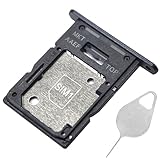
- ★ Compatible Phone Models --- (Only for Dual Sim Card Tray Version A15 5G 6.5")The Galaxy A15 5G Sim Card Tray Replacement A156U Sim Card Holder For Samsung Galaxy A15 5G SM-A156B SM-A156B/DS SM-A156P SM-A156P/DS SM-A156U SM-A156U1 SM-A156U1/DS SM-A156W M-A156P SM-S156VL SM-A156M SM-A156E.Please Double Make Sure Your Phone Model Version Before Buy The Galaxy A15 5G Sim Tray) .
- ★ High Quality --- The Galaxy A15 5G Sim Card Tray is 100% New And Tested Well Before Shipping Out .Very Durable Perfect Fit For Samsung Galaxy A15 5G 2023 6.5" SM-A156 Sim Tray.Only Fit For Samsung Galaxy A15 5G Dual Sim Tray.Don't Fit for Single Sim Card Version A15 5G SIM Tray !!!!!
- ★ What You Get --- 1 X Galaxy A15 5G Sim Card Tray Replacement Dual Sim Card Tray For Samsung Galaxy A15 5G A156.1 X SIM Card Tray Holder Opening Eject Pin Needle for Galaxy A15 5G A156 Sim Tray.
- ★ Easy To Use --- You Just Need Use The New Galaxy A15 5G A156U Sim Card Tray Holder To Replace You Old,Broken or Lost A15 5G SIM Card Holder With The Opening Needle For Samsung Galaxy A15 5G Sim Card Tray Repair Part.
- ★ NOTE --- The Replacement Galaxy A15 5G A156 Card Tray is Only Fit For A15 5G Dual Sim Card Version !!! Not For Single Card Version,Please Feel Free To Contact With Us if You Have Any Questions and Doubts for Samsung Galaxy A15 5G Dual SIM Card Tray. We Will Offer The Best Service For You.
Keep the unlock, SIM security, and compatibility questions separate
- Carrier lock: ask the original provider or retailer to unlock the phone.
- SIM PIN/PUK: ask the SIM’s carrier for the correct code; do not treat it as a network-unlock code.
- Detection or activation problem: test the SIM and phone, then contact the carrier that issued the SIM or Samsung service based on what the tests show.
- Destination-carrier support: after an unlock, have the new carrier confirm compatibility and activation for your exact model.
The right fix depends on the exact error, the original carrier, the SIM type, and the phone’s purchase and account history. The instructions above for reseating a card apply to physical SIMs; if you use an eSIM, contact the carrier about its activation rather than trying to remove a tray.
Recommended Free Tools
Quick Recap
Best Value

- ONLY For Single Sim Version; When Ordering ; Please Confirm Carefully.
- We offer the buyer gift Eject Pin Tool to replace the sim card tray easily.
- Package includes: 1 * Blue Color Samsung Galaxy Note9 Micro SD Single Sim Card Tray ; 1 * Eject Pin Tool .
- Compatible With: Samsung Galaxy Note9 SM-N960U (Single SIM); Samsung Galaxy Note9 SM-N960F (Single SIM),N960U1,N960W.
Rank #4
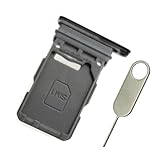
- Replacement single sim card holder slot tray socket for Samsung Galaxy S21 5G G991 G991U / S21 Plus 5G G996 G996U / S21 Ultra 5G G998 G998U smartphone
- Brand new. Repair replacement parts. Phantom Black color
- Compatible with: Samsung Galaxy S21 5G G991 G991U / S21 Plus 5G G996 G996U / S21 Ultra 5G G998 G998U. Single sim version
- Easy Installation: Just simply pop in and ready to go. Exactly same quality as OEM
- Contents: sim tray x 1 ; eject pin x 1
Rank #3

- Precise Compatibility: Tailored to fit the U.S carrier version Samsung Galaxy A14 5G (model number: SM-A146U, A146U1 and S146VL), this replacement SIM card tray ensures a perfect and secure fit. To ensure it's the correct part for your phone, before making the purchase, please check your phone model at: Settings --> About Phone
- Enhanced Water Protection: Equipped with a waterproof rubber seal, this replacement SIM card tray provides an additional layer of protection, safeguarding your device from potential water damage and ensuring the integrity of your SIM card and device's functionality
- Easy Installation: Facilitate a hassle-free replacement process with this SIM card tray, allowing you to effortlessly swap out your old tray for the new one, ensuring a snug fit and reliable SIM card functionality in no time
- Content: sim card tray x 1; eject pin x 1. Replacement Sim Card Tray/SD Card Holder for Samsung Galaxy A14 5G (model# SM-A146U, A146U1, S146VL)
- One Year Warranty: We offer a One-Year warranty for this product, giving you peace of mind and ensuring that you have a reliable replacement part.
Product prices and availability are accurate as of the date/time indicated and are subject to change. Any price and availability information displayed on Amazon at the time of purchase will apply.

