Quick wins for a faster PC:
Repair Windows errors before they cause bigger problemsFix Now →Fix the driver behind crashes, sound loss and screen glitchesFind Drivers →Clear out junk files and repair common Windows errorsFree Scan →Before buying, verify that the exact phone model can record your intended resolution, frame rate, lens, and Log profile together in the mode you plan to use. “4K” and “slow motion” listed separately do not prove the phone records 4K slow motion. Then check codecs, storage and editing compatibility: high-bitrate formats such as ProRes may require an external drive.
How to verify that a phone really records 4K slow motion
Frame rate, measured in frames per second (fps), is the number of video frames captured each second. Higher capture rates can be played back more slowly, but the phone may offer them only at a lower resolution or in a dedicated slow-motion mode. Slowing ordinary 4K footage in an editor is not the same as capturing 4K at a high frame rate.
As an Amazon Associate I earn from qualifying purchases.
Look up the precise model’s specifications and confirm the combination you need: resolution, fps, capture mode, camera lens, stabilization and any recording limit. Apple’s iPhone 18 Pro specifications list 4K Dolby Vision up to 120 fps and 4K slow motion up to 120 fps on the Fusion Main camera; those details are specific to that camera and model (Apple iPhone 18 Pro technical specifications). By contrast, Google’s Pixel specifications list 4K at 24, 30 or 60 fps and slow motion up to 240 fps as separate capabilities. Those separate entries do not establish that the Pixel records 4K slow motion (Google Pixel phone hardware tech specs; Google Pixel Camera: Record a video).
Do these 3 things before closing this tab:
1Repair Windows errors before they cause bigger problems2Scan for outdated or missing drivers - takes under a minute3Clear out junk files and repair common Windows errors- Check whether the high-frame-rate mode is actually 4K, not 1080p or another resolution.
- Confirm which lens supports it; a mode available on the main camera may not work on ultrawide or telephoto cameras.
- Check whether stabilization, HDR or other processing changes the available resolution or fps.
- Look for maximum clip length and any other mode-specific restrictions in the current documentation.
Check Log support in the modes you will use
Log is a video profile designed to preserve flexibility for color correction during editing. Its footage can look flat or dull before grading, so it is most useful if you have an editor that supports the phone’s profile and codec and are prepared to correct the color.
#1 Best Overall

- 【The Latest WIFI 6 Technology And Bluetooth 5.3】This projector with Wi-Fi and Bluetooth is equipped with the latest Wi-Fi 6 technology, compatible with Wi-Fi 6, 5G and 2.4G, offering faster connection speed and stronger stability, eliminating buffering and disconnection issues, and ensuring smoother online content playback. Additionally, it is fitted with the latest Bluetooth 5.3 chip, allowing for easy connection to Bluetooth speakers, headphones or other Bluetooth audio devices, providing a more efficient and stable transmission channel, and enabling users to enjoy higher audio quality with ease
- 【Built-in Streaming Media APP】Without any additional equipment,The YGSKK Wi-Fi projector supports streaming apps such as Prime Video, YouTube, and Hulu.The built-in applications allow you to easily enjoy a wide variety of movies, popular TV series and millions of other contents. Moreover, it also has an app store where you can download more applications. Whether it's a shared movie night or personal entertainment, this smart projector is very suitable
- 【Native 1080P High Definition,Compatible 4K】The native 1080P resolution presents you with clear and sharp full HD picture quality, with a brightness of up to 300 ANSI lumens, offering you images that are 50% brighter than those of similar projectors on the market. Whether you are watching movies, TV series, playing games or browsing photos, it will bring you astonishing clarity. Moreover, this movie projector is compatible with 4K, allowing you to enjoy the perfect experience of 4K picture quality. Note: Please ensure to connect 4K devices (such as TV sticks or USB drives) via HDMI to play 4K videos
- 【Wirelessly Connect to a Smart Phone, 50-200‘’ Large Screens】This is an amazing projector for iPhone. It is equipped with the "J-Share" setting, which enables wireless connection with smartphones. Both the phone and the projector need to be in the same network environment. Android phones need to download a program to connect, while iPhones do not need to download any applications (connect through the iPhone's screen mirroring function). In addition, this portable projector can project a large screen of 50 to 200 inches. You can adjust the screen size according to your personal preference to better enjoy the perfect experience of a large screen
- 【Strong Compatibility And Built-in Speakers】YGSKK projector for bedroom is equipped with three interfaces: HDMI, USB and audio (with an HDMI cable included). It is compatible with TV sticks, TV boxes, DVD players, laptops, USB flash drives, Switch/PS5, PC and other devices. The projector is built with high-fidelity stereo speakers, providing excellent and clear audio quality for an outstanding audio experience. It is also an excellent mini projector suitable for both indoor and outdoor activities
Do not assume that a phone with Log supports it in every resolution, frame rate, lens or camera mode. Confirm that Log can be selected in your intended recording mode and note the profile and codec the phone records. Apple lists Apple Log 2 for the iPhone 18 Pro (Apple iPhone 18 Pro technical specifications). Samsung says Galaxy Log footage is saved in HEVC and may look dull without color correction; its instructions cover Video and Pro video modes on applicable devices, while noting that settings vary by phone, software and carrier (Samsung Support: Capture Log videos on your Galaxy phone; Samsung Developer: Samsung Log Video). Verify availability for the precise model and software version rather than relying on a feature name shared across a phone family.
Match the codec and storage to your recording plan
A codec is the method used to encode and store video; different codecs and profiles can affect file size, editing compatibility and recording requirements. Estimate how much footage you plan to capture, then check whether the phone’s internal capacity and your editing setup are suitable for the chosen format. Do not assume every storage capacity supports every combination of format and frame rate.
Rank #2

- With SanDisk QuickFlow Technology10 (64GB - 1TB), this card optimizes performance for timesaving media offloads with quick read speeds up to 190MB/s.9 Pair with the SanDisk Professional PRO-READER SD and microSD to achieve maximum speeds (sold separately).
- Capture fast-action photos or shoot 4K UHD video2 with write speeds of up to 130MB/s.9The SanDisk Extreme microSDXC UHS-I Card lets you shoot more and faster.
- Ideal for recording outdoor adventures, weekend trips, or sporting events without skipping frames. With up to 1TB1, the SanDisk Extreme microSD UHS-I card lets you capture uninterrupted 4K UHD and Full HD video with its UHS Speed Class 3 (U3) and Video Speed Class 30 (V30) ratings.5
- Get faster app performance for an outstanding smartphone experience thanks to the SanDisk Extreme microSD card’s A27Specification.
- SanDisk Extreme microSDHC and microSDXC UHS-I Cards are shockproof, temperature-proof, waterproof, and X-ray-proof,4 so you can enjoy your adventures without worrying about the durability of your memory card.
Apple’s ProRes support information gives model-, capacity- and frame-rate-specific combinations. For supported iPhone 16 Pro and iPhone 17 Pro models, recording ProRes at 4K/120 fps requires external storage. Apple specifies an external drive with at least 440 MB/s write speed and maximum power draw of 4.5 W for that use (Apple Support: About Apple ProRes on iPhone; Apple Support: Record ProRes video with your iPhone camera). Treat these requirements as specific to the supported models and recording configuration, not as a universal requirement for phone video.
If your chosen phone and format call for external recording, compare a compatible external SSD for phone video against the manufacturer’s current requirements for connection, sustained write speed and power draw. External recording means writing the video to a connected drive instead of the phone’s internal storage; a USB-C connector alone does not guarantee a drive will meet a particular phone’s requirements.
Rank #3

- 【Built-in WiFi & Bluetooth Projector with Apps】Dual-band WiFi 2.4G + 5G ensures fast and stable wireless streaming. Bluetooth 5.2 supports speakers and headphones. Built-in apps like YouTube and Prime Video are supported, and the projector is compatible with TV sticks (not included) to access a wide range of streaming content and enjoy massive video libraries, making it a perfect movie projector.
- 【HD Projection, Supports 4K Video Playback & Stereo Sound】Supports 4K video playback via USB drive for smooth viewing. High-quality optical lens delivers clear images and is scratch-resistant and easy to clean. Built-in stereo speakers provide clear sound for movies, TV shows, and casual gaming, ideal for use as a phone projector.
- 【Dynamic Starry Sky Mode & 180° Rotatable Design】Activate the dynamic Starry Sky Mode with one-touch control on the remote. Featuring 9 animated starry sky scenes and a built-in sleep timer, the projector for bedroom displays dynamic star patterns on the ceiling to create a calming bedtime atmosphere for kids. The 180° rotatable design lets you easily adjust the angle for wall or ceiling projection.
- 【Auto Keystone, Dual Focus & Big Screen Projection】Supports auto and manual focus for fast and precise image adjustment. Auto vertical keystone correction delivers a perfectly aligned image in seconds. The 0.9:1 short throw ratio enables big-screen projection in small spaces, supporting 30–200 inch screen sizes (recommended 40–100 inches).
- 【 Ultra-Portable Mini Projector for Indoor & Outdoor】Weighs only 0.77 lb (0.35 kg) with a compact size of 3.73 × 3.73 × 6.17 inches. Easy to carry in a backpack—perfect for camping, travel, dorm rooms, bedroom, outdoor movie nights, and small apartments.
Confirm the editing workflow before you buy
Check that the editing app you intend to use can import the phone’s codec and work with its Log profile. If you do not want to color-correct footage, a standard picture profile may be a more practical choice than Log. If you do plan to grade, make sure you can manage the files and the post-production steps as well as capture them.
- Identify the exact profile and codec the camera writes in each intended mode.
- Confirm that your editor supports those files and provides suitable color controls.
- Consider whether your device and workflow can handle the resulting file sizes.
Compare the remaining video needs for your use
For sports, action or extended shoots, resolution and Log are only part of the decision. Compare autofocus, stabilization, lens choice, low-light performance, audio capture, rolling-shutter behavior, heat and sustained recording time. Manufacturer specification pages can establish listed features, but they do not provide a controlled cross-brand comparison of heat or long-session performance. For those questions, look for credible tests of the exact model and recording mode rather than inferring performance from a spec sheet.
Quick Recap
Best Value
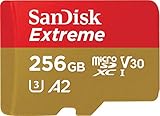
- With SanDisk QuickFlow Technology10 (64GB - 1TB), this card optimizes performance for timesaving media offloads with quick read speeds up to 190MB/s.9 Pair with the SanDisk Professional PRO-READER SD and microSD to achieve maximum speeds (sold separately).
- Capture fast-action photos or shoot 4K UHD video2 with write speeds of up to 130MB/s.9The SanDisk Extreme microSDXC UHS-I Card lets you shoot more and faster.
- Ideal for recording outdoor adventures, weekend trips, or sporting events without skipping frames. With up to 1TB1, the SanDisk Extreme microSD UHS-I card lets you capture uninterrupted 4K UHD and Full HD video with its UHS Speed Class 3 (U3) and Video Speed Class 30 (V30) ratings.5
- Get faster app performance for an outstanding smartphone experience thanks to the SanDisk Extreme microSD card’s A27Specification.
- SanDisk Extreme microSDHC and microSDXC UHS-I Cards are shockproof, temperature-proof, waterproof, and X-ray-proof,4 so you can enjoy your adventures without worrying about the durability of your memory card.
Rank #4

- Get in Close and Detail: 18.91 Megapixel MOS sensor plus 20x Zoom LEICA Decomar Lens (4.08-81.6 millimeter), plus 5-axis Hybrid O.I.S. (Optical Image Stabilizer)
- 1/2.3-Inch BSI Sensor: The Back Side Illumination Sensor has a large effective area with 8.29M effective pixels, suppressing noise even when shooting in dimly lit conditions. Image Sensor is 1/2.3-inch BSI MOS Sensor
- 4K Recording and In-Camera Editing: Ultra-sharp 4K Ultra HD recording, plus in-camera editing for 1080p displays; Total Pixels 18.91 megapixels, still image 7.00 megapixels [3:2], 8.29 megapixels [16:9], 6.22 megapixels [4:3]
- HDR Movie Feature: Exclusive high-dynamic range feature suppresses blown highlights and blocked shadows for crisper and clearer videos
- Wireless Twin Camera: Wirelessly connect your smartphone's video camera as a sub-camera for a picture-in-picture video effect.Recording Format:JPEG (DCF/Exif2.2)
- Action: Check autofocus, stabilization and rolling-shutter behavior at the frame rate you plan to use.
- Low light: Confirm which lens and mode you can use in dim conditions; high frame rates may require more light.
- Long sessions: Seek model-specific testing for heat and sustained recording, and check any stated clip limits.
- Sound: Make sure the phone’s microphone or your planned external audio setup meets your needs.
A practical model-by-model checklist
- Open the manufacturer’s specification page for the exact model and regional variant.
- Find the actual slow-motion mode and confirm its resolution, fps and supported lens. Do not infer 4K slow motion from separate 4K and slow-motion listings.
- Check whether Log is available in that same mode, and note the profile, codec, stabilization behavior and any restrictions.
- Choose a recording format and estimate the storage you need. Verify any internal-capacity limits and, if applicable, the external drive’s interface, sustained write speed and power requirements.
- Confirm your editor supports the resulting files and that you are comfortable color-correcting Log footage.
- For demanding or lengthy shoots, consult credible testing of the precise model for autofocus, stabilization, low-light results, audio and sustained recording behavior.
Product prices and availability are accurate as of the date/time indicated and are subject to change. Any price and availability information displayed on Amazon at the time of purchase will apply.

