Mini-LED is an LCD backlight technology, not a type of OLED. It uses many small LEDs behind an LCD panel and dims groups of them in local-dimming zones. QLED describes a quantum-dot color layer used in an LCD, so a television can be both QLED and Mini-LED. OLED is different: each pixel emits its own light and can be controlled individually.
For a buying decision, the label is only the starting point. Compare the exact model’s local-dimming behavior, dark-scene blooming, brightness, viewing environment, content and features rather than assuming one technology is always best.
As an Amazon Associate I earn from qualifying purchases.
Mini-LED in plain English
A Mini-LED television is still an LCD television. Its picture begins with a conventional liquid-crystal panel, but the backlight behind that panel uses much smaller LEDs than a typical LED-LCD design. The smaller light sources let the television divide the backlight into more precise areas and control those areas independently. Samsung describes this approach as smaller LEDs enabling more precise local dimming in its guide to the technology (Samsung’s Mini-LED and QLED explainer).
The Tool Desk
Outbyte Driver Updater FREEScan for outdated or missing drivers - takes under a minuteDriver Scan →Outbyte PC Repair FREERepair Windows errors before they cause bigger problemsFix Now →Local dimming means the television raises or lowers the brightness of a backlight zone according to the image. A bright part of a scene can receive more light while a darker area receives less. The zones are groups of LEDs, however—not individual picture pixels. That distinction explains both Mini-LED’s strengths and its limits.
#1 Best Overall

- Witness virtual worlds come to life on a stunning VA panel equipped with state-of-the-art Mini-LED backlight technology and 336 individual dimming zones that produce true blacks and brighter whites
- With Panel resolution 2560x1440, this monitor boasts a pixel density that delivers brilliantly sharp images with the finest details
- Lightning-fast 180Hz (overclocked, via DP1.4) refresh rate and rapid 1ms GtG response time lets you target moving opponents with precision, putting you ahead of the game. Fast-moving action and dramatic transitions will be rendered smoothly without the effects of ghosting
- Adaptive-Sync ensures ultra-smooth, tear-free team fights for flawless skill shots and stutter-free loading times
- The 3-sided frameless display with calibrated color gamut provides true-to-life images. Impressive 134% sRGB color gamut and VESA DisplayHDR 1000 brings characters to life and creates stunning imagery with rich details and diverse contrast
- It can improve contrast over an LCD whose backlight is always lit uniformly.
- It can make bright highlights stand out while keeping nearby areas darker.
- It can still produce a halo, commonly called blooming, when a bright object is close to dark content because one zone covers multiple pixels.
The number of zones, their size, the panel, the video processor and the dimming algorithm all affect the result. “Mini-LED” by itself does not specify any of those model-level details.
What QLED means
QLED is primarily a color-enhancement term for an LCD television. A quantum-dot layer converts or refines light from the television’s backlight so the set can produce a broader or more saturated color range. The label does not, by itself, tell you whether the television has local dimming, what kind of LEDs it uses or how many dimming zones it has.
That is why QLED and Mini-LED are not opposing choices. They describe different parts of the display:
Quick wins for a faster PC:
Clear out junk files and repair common Windows errorsFree Scan →Fix the driver behind crashes, sound loss and screen glitchesFind Drivers →Repair Windows errors before they cause bigger problemsFix Now →- QLED: the quantum-dot layer used to enhance color.
- Mini-LED: the smaller-LED backlight and its local-dimming system.
A product can use both. Samsung’s “Neo QLED” naming combines quantum-dot technology with Mini-LED backlighting, while Philips distinguishes conventional QLED from sets it calls QD MiniLED in its quantum-dot guide (Philips’ quantum-dot explanation). A QLED set without Mini-LED may use another LCD backlight and may have very different dark-scene performance.
Brand labels are not universal technical standards. “Neo QLED” is Samsung product-line language. “QNED” is LG’s LCD category, and the underlying panel and color implementation can vary by model generation. Treat these names as product-family labels and read the specifications for the particular television.
How OLED is structurally different
OLED does not use an LCD layer illuminated by a separate backlight. Each OLED pixel is self-emissive: it creates its own light and can be dimmed or switched off independently. LG’s comparison of OLED, QNED and Mini-LED describes OLED as self-emissive and Mini-LED as an LCD design that still needs a backlight (LG’s OLED, QNED and Mini-LED comparison).
Rank #2

- 27" QHD MINI-LED IPS DISPLAY Experience sharp 2560×1440 QHD resolution on a 27-inch mini-LED IPS panel with 1152 local dimming zones, delivering vivid colors, deeper contrast, and detailed visuals for immersive gaming.
- 320HZ REFRESH RATE & 1MS RESPONSE TIME Dominate fast-paced gameplay with an ultra-smooth 320Hz refresh rate via HDMI 2.1 or DisplayPort 1.4 and fast 1ms GtG response time, minimizing blur and ghosting.
- DISPLAYHDR 1000 CERTIFIED Enjoy lifelike HDR visuals with DisplayHDR 1000 certification, featuring 700 nits HDR brightness and 1200 nits peak brightness for stunning highlights and enhanced contrast.
- ADAPTIVE SYNC & EYE COMFORT FEATURES Stay smooth and tear-free with Adaptive Sync, while Flicker-Free technology helps reduce eye strain during extended gaming sessions.
- WHITE GAMING DESIGN WITH FULL ERGONOMICS Stand out with a sleek white finish and fully ergonomic stand featuring height adjustment, tilt, swivel, and pivot for personalized comfort and setup flexibility.
That pixel-level control changes dark scenes. An OLED can turn off pixels in a black area while leaving adjacent bright pixels on, so it does not need to illuminate a shared backlight zone around a small highlight. Mini-LED LCDs control groups of backlight LEDs behind the panel instead. RTINGS explains that this zone-based system is more precise than a basic LED backlight but is not equivalent to controlling every pixel (RTINGS’ Mini-LED panel guide).
OLED’s self-emissive design also means that an OLED label tells you more about the light-producing structure than an LCD label such as QLED does. Nevertheless, the exact model still determines brightness behavior, anti-reflection treatment, gaming functions and other features.
Mini-LED, QLED and OLED compared
| Reader concern | Mini-LED LCD | QLED LCD | OLED |
|---|---|---|---|
| What the name principally describes | Smaller LEDs in an LCD backlight and associated local dimming | Quantum-dot color enhancement used with an LCD | Self-emissive pixels |
| Can it be combined with another label? | Yes. A set can be both Mini-LED and QLED | Yes. Some QLED products use Mini-LED backlights | QD-OLED is a distinct OLED implementation |
| Dark-scene light control | Backlight controlled in zones; blooming can remain | Varies by model; QLED alone does not guarantee local dimming | Pixel-level light control because each pixel emits its own light |
| What to inspect before buying | Local-dimming behavior, highlight handling, blooming and viewing conditions | Whether local dimming is present and how the model performs | Model-specific brightness, viewing use and features |
These are technology-level distinctions, not a universal ranking. RTINGS’ comparison of Mini-LED and OLED likewise treats the choice as model- and use-dependent rather than declaring one winner for every television (RTINGS’ Mini-LED versus OLED comparison).
Why blooming happens on Mini-LED LCDs
Imagine a white subtitle on a black screen. The subtitle may occupy only a small number of pixels, but the backlight zone behind it covers a larger rectangle. That zone must stay bright enough for the subtitle, which can lift the brightness of nearby pixels that should look dark. The visible halo is blooming, also called backlight bleed in some discussions.
Mini-LED reduces the size of the lighting units and can provide finer zone control than a conventional LED-LCD, but it does not make each LED responsible for one pixel. Blooming therefore depends on:
- the size and arrangement of the local-dimming zones;
- how aggressively the television’s processor reacts to small highlights;
- the panel’s native contrast;
- the angle from which you watch; and
- the room’s ambient light, which can make halos more or less noticeable.
Two televisions both marketed as Mini-LED can look noticeably different in a dark room. A product page that mentions Mini-LED without describing local-dimming behavior is not enough to predict subtitle halos or star-field performance.
Rank #3

- 27" QHD MINI-LED DISPLAY Experience sharp 2560×1440 QHD resolution on a 27-inch mini-LED VA panel with 1152 local dimming zones, delivering deep contrast, vivid colors, and enhanced detail for immersive gaming.
- 300HZ REFRESH RATE & 1MS RESPONSE TIME Gain a competitive edge with an ultra-smooth 300Hz refresh rate via DisplayPort or HDMI and a fast 1ms GtG response time, minimizing motion blur and ghosting during fast-action gameplay.
- DISPLAYHDR 1000 CERTIFIED Enjoy brighter highlights and deeper contrast with DisplayHDR 1000 certification, delivering enhanced HDR visuals for gaming, streaming, and multimedia content.
- WIDE COLOR GAMUT PERFORMANCE Featuring an expanded color range of 150.2% sRGB (CIE1976), this monitor provides vibrant, accurate colors for immersive visuals and improved content clarity.
- ADAPTIVE-SYNC & ERGONOMIC DESIGN Stay in sync with Adaptive-Sync technology for smooth, tear-free gameplay, while the fully ergonomic stand offers height adjustment (130mm), tilt, swivel, and pivot for optimal comfort during extended sessions.
How to choose for your room and content
Bright rooms and daytime viewing
Start by checking measured or independently reviewed brightness for the exact model, along with reflections and screen finish. Mini-LED and other LCD designs can be compelling in bright rooms, but the Mini-LED label alone does not establish a brightness level. Compare measurements made with the same method, because a manufacturer’s peak-highlight figure may not describe sustained full-screen brightness.
Movies and dark-room viewing
Dark-room viewers should examine black-level behavior, letterbox bars, subtitle halos and the television’s dimming controls. OLED’s pixel-level control avoids the shared-zone mechanism that creates blooming on LCDs. A well-implemented Mini-LED can still deliver strong contrast, but the visible result is model-specific. Look for dark-scene observations or measurements for the precise screen size and model number.
Sports, news and other bright full-screen material
Large bright areas stress a television differently from a small highlight. Check how the set handles sustained brightness and whether its automatic brightness limiting changes the picture during long scenes. Do not infer this behavior from the words QLED, Mini-LED or OLED alone.
Recommended Free Tools
Gaming and desktop use
Check the model’s refresh-rate support, input lag, variable-refresh features, HDMI capabilities, viewing angle and operating-system options. These are product features, not automatic consequences of a panel label. For a desktop monitor or a television used as a monitor, also consider text clarity, static-interface use and the manufacturer’s warranty terms.
Wide seating areas
LCD panels and OLED panels can have different off-axis behavior. If people sit far to the side, read independent viewing-angle measurements for the exact panel rather than assuming that Mini-LED or QLED guarantees a particular result.
Independent reader supportYour contribution helps us test, update, and keep practical guides available for everyone.A model-level checklist before you buy
- Write down the complete model number and screen size. Technology names often cover several sizes and generations with different panels and dimming hardware.
- Identify the light source. Confirm whether the LCD is standard LED, Mini-LED or another implementation, and whether quantum dots are present.
- Verify local dimming. A QLED badge does not guarantee it. Check the specifications and independent evaluation for the specific model.
- Read dark-scene findings. Look for blooming around subtitles, stars and isolated highlights, not just a generic contrast claim.
- Check brightness in context. Prefer comparable measurements that state the test pattern and duration over a single unqualified peak number.
- Match the room. Note windows, lamps, seating positions and whether you watch mostly during the day or at night.
- Check the features you actually need. Include HDMI inputs, gaming support, refresh rate, viewing angle, reflections, sound and the operating system.
- Review return and warranty terms. Panel uniformity, blooming tolerance and perceived reflections are easier to judge in your own room.
Common label mistakes
“Mini-LED is just a brighter OLED”
No. Mini-LED is an LCD backlight arrangement. OLED pixels create their own light. Their control structures, strengths and failure modes are different.
Rank #4
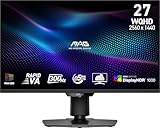
- Mini-LED – Improves HDR with full-array local dimming and 1,152 zones for deeper blacks and brighter highlights
- Rapid VA – Ensures the intensity and purity of colors when gaming
- VESA DisplayHDR 1000 – VESA-certified eye-catching details through precise contrast and shadow adjustment
- 300Hz High Refresh Rate – Delivers smooth visuals for faster in-game response
- 0.5ms (GtG, Min.) Response Time – Eliminates screen tearing and choppy frame rates
“QLED and Mini-LED are competing categories”
No. QLED refers to quantum-dot color enhancement, while Mini-LED refers to the backlight. They can appear together in one television.
Outdated Drivers Are Slowing You Down
One free scan finds every outdated or missing driver and matches the right update for your exact hardware.Free scan · exact hardware matchPC Slower Than It Used to Be?
A free scan shows the junk files, broken settings and background clutter dragging Windows down - then fixes them in one click.Free scan · Windows 10 & 11“Every QLED television has local dimming”
No. QLED does not specify a dimming system. Confirm whether the particular set has local dimming and examine how it performs.
“Mini-LED eliminates blooming”
No. Smaller LEDs and more precise zones can reduce the effect, but zones remain larger than pixels. Processing, zone layout and viewing conditions determine how visible blooming is.
“QNED, Neo QLED and QLED mean the same thing everywhere”
No. These are manufacturer and market product terms. Their panel and backlight combinations can vary by generation, so read the model-specific specification.
“Mini-LED means MicroLED”
No. Mini-LED is a backlight for an LCD. MicroLED refers to a different display approach in which microscopic LEDs act as the light-producing pixels. Do not substitute one term for the other.
Which technology should you pick?
Choose among exact models, not badges. Mini-LED LCD is worth investigating when you want an LCD design with more refined local dimming and potentially strong bright-room performance, provided the model’s blooming and viewing-angle behavior suit you. QLED is useful as a color descriptor, but it needs a second question: what backlight and local-dimming system does this particular QLED television use? OLED is the structurally different option when pixel-level light control and dark-scene performance are central to your viewing.
There is no evidence-based universal winner across all current televisions. The meaningful comparison is the model’s measured brightness, dark-scene behavior, blooming, reflections, viewing angle, gaming features, screen size, room and budget. Treat Mini-LED, QLED and OLED as clues about construction, then verify the details that determine what you will actually see.
Quick Recap
Product prices and availability are accurate as of the date/time indicated and are subject to change. Any price and availability information displayed on Amazon at the time of purchase will apply.

