Outdated Drivers Are Slowing You Down
One free scan finds every outdated or missing driver and matches the right update for your exact hardware.Free scan · exact hardware matchWindows Errors? Fix Them Before They Spread
Repair common Windows errors and clear accumulated junk for a smoother, more stable PC - no reinstall needed.Free scan · no reinstallAn agile retrospective is a regular team meeting to examine how recent work went, identify what helped or got in the way, and agree on practical improvements. In Scrum, the Sprint Retrospective has a specific purpose: planning ways to increase quality and effectiveness. It focuses on how the team worked—not on presenting the product increment to stakeholders.
What happens in an agile retrospective?
Team members look back at a recent period of work, such as a Scrum Sprint, and discuss their interactions, processes, tools, and working agreements. They identify what went well, what caused difficulty, and what changes could make the next period more effective.

The Scrum Guide defines the Sprint Retrospective’s purpose as “to plan ways to increase quality and effectiveness.” The Scrum Team inspects how the Sprint went, including its Definition of Done, identifies the most helpful changes, and addresses the most impactful improvements as soon as possible. An improvement may be added to the next Sprint Backlog. See the Scrum Guide.
Outside Scrum, teams may use retrospectives after another iteration or a project. The precise ceremony can differ, but the central idea remains reflection followed by changes the team can put into practice. The Agile Manifesto expresses a related principle: “At regular intervals, the team reflects on how to become more effective, then tunes and adjusts its behavior accordingly.” It is reproduced in the Agile Manifesto’s principles.
#1 Best Overall
How a Sprint Retrospective differs from a Sprint Review
Both events occur within the Sprint, but they answer different questions. The Sprint Review inspects the Sprint outcome and considers future adaptations with stakeholders. The Sprint Retrospective examines how the Scrum Team worked and plans improvements to its quality and effectiveness. The Scrum Guide describes both events.
When it takes place and how long it lasts
In Scrum, the Sprint Retrospective concludes the Sprint. The Scrum Guide sets a maximum timebox of three hours for a one-month Sprint and says shorter Sprints usually have shorter retrospectives. This is a maximum, not a target duration for every team.
Rank #2

- 6 SETS OF CARDS IN 1 DECK – Easily estimate with up to 6 team members.
- FUN COLOR AND DESIGN – Amazing colors and design for each set and sequence to clearly differentiate and be able to estimate and discuss quickly.
- HIGH QUALITY CARDS – Durable cards that can be used over and over for every planning session. Includes a box for additional protection.
- FIBONACCI SEQUENCE – Simple sequence for all of your estimation needs. 0, 1, 2, 3, 5, 8, 13, 21, ∞, ?, and coffee cup.
For many traditional two-week sprint teams, Atlassian suggests 30 minutes to an hour. Its Team Playbook also describes retrospectives lasting 45 minutes to three hours depending on Sprint duration. Those are practitioner recommendations, not Scrum rules or evidence that a particular length produces better results. See Atlassian’s retrospective guide and its Team Playbook retrospective.
Who attends and who facilitates?
The Scrum Team conducts the Sprint Retrospective. The Scrum Guide does not require a separate facilitator role. In practice, Atlassian recommends having every team member attend and suggests a facilitator—such as the Scrum Master, Product Owner, or a rotating team member—to guide the conversation. Other people who contributed to the work can be included when useful. These are facilitation suggestions, not additional Scrum requirements.
Free tools Windows power users keep installed
One-click scans. No signup required.
Rank #3
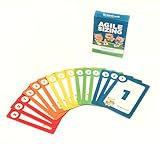
- Fun way to estimate or size your Team's work
- Enough sets for 5 Team Members to play at once
- Card Sequence—1, 2, 3, 5, 8, 13, 21, 40, 100, ?
- 4 Collector's Edition Role Cards included in every deck
- Durable casino quality—manufactured by Bicycle Playing Cards (plastic-coated linen)
A practical structure for the meeting
The Scrum Guide does not prescribe a step-by-step script. This sequence, based on Atlassian’s facilitation guidance, gives a team a clear path from observations to action:
- Set the tone. Agree to discuss the work candidly and respectfully, and explain how notes or feedback will be used.
- Gather observations. Ask what went well and what could improve. Capture responses on a whiteboard, shared document, or sticky notes.
- Find patterns and choose priorities. Group related observations, then select the issues or opportunities that matter most to discuss.
- Explore causes and options. Look for changes to the way work is done rather than assigning blame to individuals.
- Agree on a few actions. Make each action clear enough to carry out, and assign an owner and due date.
- Track and revisit. Record the actions somewhere visible to the team and check progress in a later retrospective.
Repeatedly raising problems without following through can undermine trust. Keeping the action list manageable and revisiting it helps connect discussion to change. For facilitation ideas, see Atlassian’s guide and the Atlassian Team Playbook.
Rank #4

- [Effective Idea Collection] Structure discussions and collect ideas clearly - perfect for workshops, training and team meetings. The moderation cards help to visually organize thoughts and make decisions tangible.
- [Versatile] Ideal for HR training, agile formats such as daily stand-ups, retrospectives, sprint planning as well as for teaching, coaching and consultation. A flexible tool for any group situation.
- [Extensive Set] You will receive 360 cards in 3 shapes (round, rectangular, oval) and 6 bright colours. This variety allows for clear visual distinction and creative design of your content.
- [Clearly structured results] The blank cards can be written on both sides and transform unproductive conversations into clear, sorted results. They encourage brainstorming and structured thinking - without distraction.
- Lightweight and mobile: The entire set weighs only 570 g and is compactly packed (21.5 x 21.5 x 3 cm). It fits in any backpack or briefcase making it ready for school, office or on the go anytime.
Questions and formats to try
Simple prompts can help a team start without forcing a particular answer. Atlassian’s Team Playbook suggests questions such as:
- What went well?
- What went wrong?
- What did you learn?
- What changes can we make?
Other options include Start/Stop/Continue, the 4 Ls (loved, loathed, learned, longed for), and sad/mad/glad. Written or anonymous feedback may help when participants are uncomfortable speaking openly. These are optional formats; choose one that fits the team and the situation. See the Team Playbook and Atlassian’s retrospective guide.
Do these 3 things before closing this tab:
1Clear out junk files and repair common Windows errors2Fix the driver behind crashes, sound loss and screen glitches3Repair Windows errors before they cause bigger problemsHow to choose a retrospective format
There is no single format that suits every team. Before choosing an activity, consider:
- Context: Is the team reflecting on a Scrum Sprint, a different iteration, or a project wrap-up?
- Participation: Will the format make it possible for quieter members to contribute, including in writing or anonymously if useful?
- Mode: Does the team need an in-person whiteboard activity or a shared online space?
- Time: Can the activity leave enough time for discussion and decisions?
- Follow-through: Will it help the team leave with improvement actions it can own and revisit?
These are practical decision points, not a formal scoring system. The Scrum Guide notes that tactics vary with context, and Atlassian recommends choosing formats that help a group surface feedback and act on it.
Quick Recap
Do you need special tools?
No. A team can capture observations and actions with a whiteboard, sticky notes, or a shared document. Atlassian also provides a Confluence retrospective template, but a paid tool or specific software is not required.
Product prices and availability are accurate as of the date/time indicated and are subject to change. Any price and availability information displayed on Amazon at the time of purchase will apply.
The Tool Desk
Outbyte Driver Updater FREEFix the driver behind crashes, sound loss and screen glitchesFind Drivers →Outbyte PC Repair FREERepair Windows errors before they cause bigger problemsFix Now →



