If an electronic tag loses its connection to your phone, its app may stop getting a fresh location and keep showing the last one it received. A Bluetooth tag may still be found later if a compatible device in its finding network detects it. If its battery is dead, it cannot send a new signal until it is powered again. The exact behavior depends on the tag’s model and technology.
First, distinguish losing signal from losing power
A tag that is out of range may still be switched on and broadcasting; it simply cannot communicate directly with your phone. A tag with an exhausted battery cannot transmit at all. That difference determines whether another device might help locate it.
As an Amazon Associate I earn from qualifying purchases.
“Electronic tag” can refer to Bluetooth item finders, GPS/cellular trackers, RFID labels and access-control devices. The examples below concern consumer Bluetooth item finders, with a GPS tracker example for battery reporting. RFID and access-control tags may behave differently.
Free tools Windows power users keep installed
One-click scans. No signup required.
What happens when a Bluetooth tag is out of range?
The direct connection between the tag and your phone is unavailable, so nearby functions such as ringing the tag from the app may not work. The app may retain the location from the last successful connection. Tile says the location displayed in its app is where the Tile was when it last connected successfully to the device and app. Treat that map pin as a past report, not proof of where the tag is now. Tile explains how its connection and last-known location work.
#1 Best Overall

- FIND YOUR ITEMS ON FIND MY — AirTag (2nd generation) helps you keep track of what matters. Attach one to an item you want to keep track of using the Find My app.*
- EXPANDED PRECISION FINDING ON IPHONE AND APPLE WATCH — Get step-by-step directions to your lost item on iPhone and, now, Apple Watch.*
- ENHANCED SPEAKER — With a 50% louder speaker and a new, distinctive chime, it’s easier than ever to hear and find AirTag.*
- PING FROM FAR AND WIDE — Upgraded Ultra Wideband and Bluetooth chips allow you to find your items from even farther away than ever before.*
- SHARE ITEM LOCATION — Share AirTag location access temporarily and securely with trusted contacts, third parties, or over 50 airline partners if you lose something important.
Some Bluetooth tags can receive a newer location through a crowd-finding network. Apple says nearby devices in the Find My network can detect an AirTag’s secure Bluetooth signal and send its location to iCloud; Apple describes those reports as anonymous and encrypted. Tile says a member of its network may automatically and anonymously update a Tile’s location when it is outside the owner’s range. In either case, a compatible device must encounter the tag, so a network update is not continuous GPS tracking and is not guaranteed. Apple describes AirTag’s Find My network; Tile explains out-of-range updates.
What happens when the battery is low or dead?
When the battery is low
Some products show battery status or issue a warning, but the timing and details vary by model. Apple says an iPhone alerts the user when an AirTag battery needs replacing. Samsung says SmartTag battery status is visible in SmartThings. Tractive lists low- and critical-battery warnings for specific GPS tracker models, with thresholds that vary by model; those warnings should not be generalized to Bluetooth tags.
Rank #2
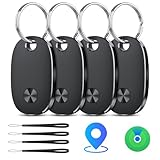
- Track Your Items: Easily track your Bluetooth luggage tracker with the Keys Finder and stop worrying about losing your valuables. Easily track and locate items through the Find My App without subscription fees while connected to the signal range of the global Find My network that reaches billions of iOS devices. Use your phone to trigger the built-in speaker to locate your items within (60 meters/200 feet) Bluetooth range.
- Left Behind Remind and Lost Mode: If an item with a Smart Bluetooth tracker is forgotten and the Bluetooth connection to your iOS device is disconnected, the Find My app will immediately send you a notification that the item is missing. If you preset Lost Mode and retain your contact information, the Key Finder Tracker will allow nearby Apple devices to access your contact information and remotely provide you with the location of the tag.
- Protect Privacy and Easy Pairing: weTag pro focuses on protecting privacy, all communication with the “Find My” network is anonymous and encrypted,location data and history are not stored on air tags. Open the “Find My app” and Bluetooth, click on ‘Items’, then click on “Add Item” and select “Other Supported Item” and follow the in-app instructions for easy pairing without waiting. (Please make sure your device has been updated to iOS 18 to utilize this feature.)
- IP67 Water and Dust Resistant, Replaceable Batteries: Designed for outdoor adventures, this item locator is rainproof to ensure your peace of mind in all weather conditions. It also comes with a replaceable CR2032 battery that lasts up to 2 years.
- Lightweight and Compact Tracking Labels: The air cushion tag has a smooth surface that won't scratch other items. The Air trackerTags weighs only 9 grams, making it easy to carry around. The slim, lightweight and durable design of the Key Finder makes it the perfect companion for keys, wallets, backpacks, suitcases, laptops and luggage.
When the battery is exhausted
An unpowered tag cannot transmit a fresh Bluetooth signal. Neither your phone nor a crowd-finding network can get a new location from it until it has power again. The app may continue displaying the last location it received. Battery status can also be stale: Tractive says its app may show the last battery level reported when a tracker lacks network coverage or has died, even if the battery has since drained further. Tractive explains how offline battery reporting works.
Depending on the design, restoring power means replacing a battery or recharging the device. Check the manufacturer’s instructions for your exact model rather than assuming a tag is user-openable or uses a particular cell.
Rank #3

- 📱 Global Cloud Positioning – Works with both Google's Find Hub & Apple Find My (Not for GPS & Huawei)
- 📢 Loud Alert Sound – Built-in speaker with up to 110dB for quick locating
- 🔋 Far Superior Battery Life – Up to 2 years battery life on Android phone and iphone
- 💧 IP66 Waterproof – It provides protection against rainwaterand splashes
- 📲 Fully compatible with Android & ios – Compatible with devices running iPhone,Android 9 and above, such as Google Pixel, Xiaomi,Sony, Sharp, Oppo,(It is not compatible with GPS or Huawei devices.)
Bluetooth item finders and GPS trackers are not the same
A Bluetooth item finder relies on its direct phone connection for nearby locating and may use a compatible device network for an out-of-range update. A GPS/cellular tracker has a different connection and reporting design; its app can also show old information when the tracker is offline. Do not interpret a Bluetooth crowd-network location as continuous GPS tracking.
The distinction matters when choosing a next step: a Bluetooth finder may need a network encounter to report a remote location, while a tracker’s stale status may reflect a loss of network coverage or power. The precise behavior depends on the product.
Rank #4

- [Compatible with Android and iOS] This tracking tag is officially certified by Apple and Google and works with Google's "Find My Device" app and Apple's "Find My Device" app, so there are no compatibility issues. (Note: It does not support simultaneous connection of multiple devices; only one device can be connected at a time.)
- [Easily Find Nearby Items] New Tracking Tags - 4-pack, say goodbye to the hassle of losing valuables. Whether it's a suitcase, handbag, car keys, backpack, or any other essential, simply tap in the Find Center app, and the tracking tag will emit a loud 120-decibel tick to locate your item. The Find Center app makes it easy to find lost items, with no monthly fees or subscriptions. (Note: Not compatible with Huawei devices.)
- [Global Tracking]: Track your items using the Google Find My Device app (Android) or the Apple Find My app (iOS). Within Bluetooth range (up to 120 feet), you can activate the built-in speaker to locate your item by sound. Once out of range, simply view the last known location on a map to quickly retrieve it.
- [Sharing Mode, Privacy and Security]Share with family members to help them find your items. You can also share the tracker's location with family members. (Note: Cannot pair with both Android and iOS devices simultaneously. Tracking tags allow you to view your real-time location. When the distance is less than 120 feet (approximately 37 meters), you can use the app to play a sound and locate the device. Even if items are out of Bluetooth range, the "Find My" network (connecting millions of devices worldwide) can help you find them. We use the latest ISO data encryption and protection technology to ensure your location data is encrypted and inaccessible even to the manufacturer.)
- [IP67 Waterproof, Replaceable Battery] This tracking tag boasts an IP67 waterproof rating, crafted with premium materials and superior workmanship, effectively preventing splashes and brief immersion. It uses the latest CR2032 button battery, offering up to 10 years of battery life. The tracking tag will remind you to replace the battery when it's low, and the removable design makes battery replacement easy.
How to check a missing or unresponsive tag
- Check the location’s freshness. Look for the time or status of the last location report in the app. If it is old, the pin is not a live position.
- If the tag should be nearby, move into range. Try the manufacturer’s locate or ring function once the phone can connect directly.
- Check the battery status in the manufacturer’s app. Remember that a level last reported before the tag went offline may no longer be current.
- If it is out of range, use the available finding-network feature. Features such as a network-assisted update or “notify when found” depend on another compatible device encountering the tag.
- If the tag remains unresponsive, follow its model-specific power instructions. Confirm the battery type and polarity in the official instructions before replacing a cell, or recharge it if that is how the device is designed.
Battery details depend on the model
Published battery-life figures are product estimates, not a universal lifespan for electronic tags. Apple says an AirTag lasts more than a year on a standard replaceable battery; actual life depends on use. Samsung gives an estimate of about one year for Galaxy SmartTag and SmartTag+, dependent on usage and other factors. Tile states a Bluetooth range of 100–500 feet, but that is a range span cited by Tile, not a guaranteed distance for every model or environment. Apple’s AirTag page, Samsung’s SmartTag support page and Tile’s range guidance provide the respective product details.
Apple specifies a replaceable CR2032 battery for AirTag, and Samsung specifies CR2032 cells for SmartTags. These examples do not mean every tag uses a CR2032 or has a user-replaceable battery. Check the instructions for the make and model you own.
Quick Recap
Best Value

- 📱 Global Cloud Positioning – Works with both Google's Find Hub and Apple Find My (Not for GPS & Huawei)
- 📢 Loud Alert Sound – Built-in speaker with up to 105dB for quick locating
- 🔋 Far Superior Battery Life – Up to 2 years battery life on Android and ios
- 💧 IP65 Waterproof – It provides protection against rainwaterand splashes
- 🔊 Visualize Distance – Visualize distance using UWB technology within Bluetooth range, allowing you to immediately see the distance
Product prices and availability are accurate as of the date/time indicated and are subject to change. Any price and availability information displayed on Amazon at the time of purchase will apply.

