Photos, email, and files are not automatically transferred to relatives when someone dies. Google handles access as a reviewed request and will not give out the person’s password or login details. Apple’s clearest planned route is Legacy Contact: the named contact must present an access key and proof of death. In both systems, the result depends on advance settings, the type of data, encryption, local documentation rules, and whether the family wants data, account closure, or a usable device.
What happens to a deceased person’s Google or Apple account?
First identify the provider and the outcome you need. Preserving photos is different from closing an account, and either task is different from preparing a phone or computer for a new owner. Do not begin by trying to guess a password or bypass a screen lock. The official processes are designed to verify the requester and limit access to protected information.

As an Amazon Associate I earn from qualifying purchases.
| Question | Google Account | Apple Account |
|---|---|---|
| Primary post-death route | A request by an immediate family member or representative, reviewed by Google | Legacy Contact request with an access key and death certificate, or a location-specific legal process |
| Passwords and login details | Not provided. Google states, “We cannot provide passwords or other login details.” | Legacy Contact is not a password handover; protected credentials are excluded |
| Advance planning | Inactive Account Manager, with up to 10 contacts and selected data categories | Legacy Contact designation, with a unique access key that must be preserved |
| Typical data that may be available | Content Google approves after reviewing the request; the exact scope is not guaranteed | Photos, messages, notes, files, device backups, and other eligible data |
| Important exclusions or limits | Closure first prevents a later content-transfer request; inactivity and storage policies still apply | Purchased media, subscriptions, passwords, passkeys, payment details, and some end-to-end encrypted data are excluded or unavailable |
| Device reuse | Separate from account content and governed by the device maker | Activation Lock is removed after an eligible request is completed, but the device must still be erased and restored |
These are provider policies, not an automatic inheritance mechanism. A court, executor, or family member may have authority under local law, but the provider still applies its own verification and technical limits.
How to request content from a deceased person’s Google Account
Choose content before closure
Google’s deceased-user process allows an immediate family member or representative to request account closure, funds in some circumstances, or account data. Google says it may provide content after careful review, while treating privacy and security as its primary responsibility. The request starts at Google’s deceased-user account request page.
#1 Best Overall
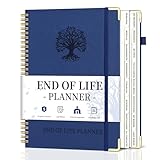
- What You Left Behind When You Left: This end of life planner with tabs meticulously covers 16 different sections, ensuring all key details are recorded. From personal information to final wishes, all necessary information that loved ones may need is carefully organized.
- Thoughtful Design: Featuring a B5 size (7.9" x 10.4"), our peace of mind planner is equipped with twin-wire spiral binding for 360° flexible page turning. It comes with an inner pocket, pen holder, and elastic band for organization flexibility.
- Comprehensive Structure: The death book planner includes 16 detailed sections such as catalog pages, personal and family info, medical info, property and financial assets, beneficiaries, pet info, insurance coverage, active accounts, memberships, funeral arrangements, and final wishes.
- Exclusive Features: The final wishes organizer planner is printed in large font on 100GSM non-bleed paper, easy to read. Special gold corner protection design effectively safeguards the cover from damage. Includes 8 blank note pages to meet diverse note-taking and planning needs.
- Ideal for Seniors and Adults: Our estate planning organizer helps to document and clearly communicate lifelong aspirations. Ensure family can accurately execute wishes without overlooking any details, providing peace of mind.
If the family wants photos, Gmail messages, Drive files, or other content, make the content request first. Google says that selecting account closure means it cannot later process a request to turn over the account contents. Closure is therefore an irreversible choice for the purpose of a later content handover, not a harmless first step.
What Google will and will not provide
Approval is case-specific. A successful request does not turn the requester into the account holder and does not supply a master login. Google explicitly says it cannot provide passwords or other login details. The company may ask for identity, relationship, legal authority, and other documentation before deciding what, if anything, can be released.
Plan for the possibility that only some requested material is available. Google does not promise that every message, attachment, photo, or file will be delivered, and its review can take account privacy, security, and applicable law into consideration.
Google’s advance-planning option: Inactive Account Manager
While the account holder is alive, Inactive Account Manager can specify what should happen after a period without account activity. The owner can name up to 10 trusted contacts, choose all or selected available data categories, and set the inactivity period that triggers the plan. A contact selected to receive data gets an email with a download link after the trigger period.
What counts as activity
Google checks more than a single sign-in. Signals can include sign-ins, activity in My Activity, Gmail use, and Android check-ins. The trigger is therefore an inactivity rule, not a verified declaration of death. A person who is alive but unable to use an account could activate the plan, while a death followed by occasional automated or family activity might delay it.
Rank #2

- Fireproof and Water-resistant: The multi-Layer file organizer is made of silicone coated material and aluminum foil which withstand the temperature up to 5200℉(double safe protection).Aluminum foil lining isn’t easily melt under high temperature after several tests. It has been passed the UL94 -V0/5VA flame retardant test.The bag is fireproof and Water-resistant, which can effectively protect your important documents in a fire,flood,and wet weather. They will further keep your files intact
- Large-capacity(15.1"x11.2"x4.3"): Compared with other bags,our fireproof file bag adopts a multi-layer design that can meet all your storage needs. These include 13 accordion Pockets with labels(each expanding to 1.2 inches),8 passport mesh bags, 16 card slots, 4 U Disk pockets, 7 folder layers and one main pocket with a large space. It can store your important documents,money,passport,U Disk,cards,laptop,certificates in a safe and orderly way. Perfect for daily file filing and storage.
- Combination Lock Protection: Compared with other bags,our multi-Layer fireproof document organizer bag can lock files and items inside the bag for safety. High-quality password lock provides maximum security for your valuables such as contracts, cards, certificates, conference materials, passports, etc. The package includes an instruction manual for lock(The folders inside can be disassembled and used separately).The double zipper design makes it easier to open and close. No keys required.
- Multiple security protection: Design with a strong grab handle for carrying everything you needed easily, the zipper has a safer waterproof design,strap handle design on the back(with reflective strip) allows you to insert a suitcase handle, Buckle can hold documents in place.Not only can you put it in your home, office, car, safe box,cabinet, you can also take it to travel and various outdoor activities. Of course, giving it as a Christmas gift to your family is also a good choice.
- Trusted after sales service: In the event of an emergency, our fireproof file bags are lighter, easier to carry than fireproof safes and quick to grab and go. We only wish to present the best to customers,to protect your valuables.If there any quality problem, please feel free to let us know.We promise to arrange a REPLACEMENT or 100% REFUND immediately. Ready to respond within a 24 hour time,your suggestion has a great impact on the upgrade of our products.
Do not treat inactivity as permanent storage
Google reserves the right to delete an account and its data when it has been inactive across Google products for at least two years. Separately, Google’s storage guidance says content can become eligible for deletion after an account remains over its storage limit for two years, with at least three months’ notice for accounts covered by that policy. These are policy thresholds, not a universal countdown from the date of death, and Inactive Account Manager does not override them. Details are in Google’s storage policy explanation.
How Apple Legacy Contact works
The two items the contact must have
Apple states: “Your Legacy Contact must have both the access key and your death certificate to request access after you pass away.” The request process is described in Apple’s Legacy Contact instructions. The access key is generated when the account holder adds the contact. Apple recommends printing it and keeping it with estate-planning papers, while also giving the contact a retrievable copy.
The Tool Desk
Outbyte Driver Updater FREEScan for outdated or missing drivers - takes under a minuteDriver Scan →Outbyte PC Repair FREERepair Windows errors before they cause bigger problemsFix Now →A Legacy Contact does not need an Apple Account or an Apple device merely to be designated. When making a request, however, the contact must provide the key and the required death documentation. Requirements vary by country or region; Apple gives Japan as an example where a family certificate may be accepted instead of a death certificate.
Data that may be included
Depending on the account and its protection settings, Apple lists photos, messages, notes, files, device backups, and other data among the material a Legacy Contact may request. Access is not a mirror of the deceased person’s sign-in. It is a time-limited, purpose-specific process governed by Apple’s verification.
Data a Legacy Contact cannot obtain
Apple excludes purchased movies, music, books, and subscriptions. It also excludes iCloud Keychain information, including payment details, passwords, and passkeys. If the family’s main objective is recovering a saved password or a paid item, Legacy Contact is not designed to provide it.
Rank #3

- Store (Family) Papers Safe & Sound: Keep all your essential papers safely in one spot with ZICOTOs’ important document organizer. Swiftly locate anything from legal to medical papers for the whole family. Ditch the paper chaos, embrace order & enjoy the simplicity with the Zicoto expanding file folder
- Organize It Like a Pro: Get super organized with 8 large, numbered envelopes (9.5x12”), each holding 40+ letter-sized sheets. Perfect for documents, passports, photos, and more. The document folder organizer transforms your paper clutter into a masterpiece of order!
- Customize to Your Needs: The important document folder organizer binder lets you label each section your way with a customizable table of contents, numbered envelopes and a sticker sheet with blank & pre-named stickers. Your Binder, your way - organizing has never been this easy!
- Ample Space for Everything: The 12.8x10.83” document organizer folio is perfect for your 8.5x11" letter size or A4 papers. Need more room? No worries, the life binder includes a handy back pocket for extra documents, notes and more. Keep everything neatly stored and easily accessible
- Stylish & Practical Premium Design: Featuring a chic linen cover in modern sage with classy golden edges, the expanding file folder looks as good as it functions. An elastic band keeps everything in place - no more loose papers flying around!
If there is no Apple Legacy Contact access key
Apple has a separate process for requesting access to a deceased family member’s account: Request access to a deceased family member’s Apple Account. Without the key, Apple may accept legal documentation. Depending on the country or region, that can include a death certificate, a court order, or other documents. Apple describes a court-order route in the United States, Israel, and other locations, while some jurisdictions use alternative procedures.
Do not assume that a court order from one country is valid everywhere or that one form covers every Apple service. Check the current process for the deceased person’s region before filing. Even when Apple grants a request, the resulting access can remain limited by encryption and the specific data-protection configuration.
Why encryption can block photos or files
Standard iCloud protection
Under Apple’s standard data protection, iCloud Mail is encrypted in transit and on Apple’s servers. Photos and iCloud Drive are encrypted in transit and at rest. Apple retains the keys needed to operate those services, subject to the account process and legal requirements.
Advanced Data Protection
With Advanced Data Protection, Photos and iCloud Drive are among the categories protected with end-to-end encryption. The keys are held on trusted devices rather than being available to Apple in the normal way. Apple says it cannot recover end-to-end encrypted data when the necessary recovery mechanisms are unavailable. Its iCloud data security overview explains which categories receive this protection.
In a legal request involving encrypted data, Apple may ask for the device passcode or other information. A death certificate or court document does not decrypt a file by itself. Families should therefore avoid promising that every photo, message, or Drive document will be recoverable.
Do these 3 things before closing this tab:
1Scan for outdated or missing drivers - takes under a minute2Repair Windows errors before they cause bigger problems3Fix the driver behind crashes, sound loss and screen glitchesData access, account deletion, and device reuse are separate
Completing an account request does not automatically make a device ready for another person. Apple says that after a Legacy Contact or account-deletion request is completed, Activation Lock is automatically removed. The device must still be erased and restored before it can be set up with a different Apple Account. Apple also says it cannot remove a passcode lock without erasing the device.
- Preserve data first. Submit the Google content request or Apple Legacy Contact/legal request before choosing account closure or erasure.
- Record the decision. Note whether the estate wants copies of data, permanent deletion, or both at different stages.
- Complete the provider process. Keep confirmation emails, approved download links, and any deadlines.
- Erase only after preservation. Once the necessary material is secured, follow the device maker’s erase-and-restore procedure for reuse.
A practical checklist for families and executors
- Identify whether the account is Google, Apple, or both, and list the exact services involved.
- Decide whether the priority is photos and files, email, account closure, or device reuse.
- For Google, submit a content request before selecting closure at the official request page.
- For Apple, search estate papers, printed records, and the contact’s records for the Legacy Contact access key.
- Gather the death certificate and check the deceased person’s country or region for additional legal-document requirements.
- Expect passwords, passkeys, payment details, purchased media, and subscriptions to remain unavailable.
- Ask whether Advanced Data Protection or another end-to-end encryption setting was enabled before promising that files can be recovered.
- Keep downloaded copies secure and document who is authorized to handle them.
- Do not erase a phone or computer until the family has decided whether its local data is needed and the relevant cloud request is complete.
Planning ahead to prevent an avoidable loss
For a Google Account owner
Open Inactive Account Manager, choose an inactivity period, add up to 10 trusted contacts, and select only the data categories each person should receive. Review the contacts and categories periodically. Make sure the account remains within storage limits and that trusted people know a plan exists without sharing a password.
For an Apple Account owner
Add a Legacy Contact from Apple Account settings, generate the access key, and print or securely store it with estate documents. Give the designated person a way to locate the key and explain that the key alone is insufficient: Apple also requires proof of death. Recheck the designation after major changes in family circumstances or account-protection settings.
Advance planning cannot make encrypted data or excluded credentials available. It does ensure that the person who is supposed to apply has the right artifact, the right instructions, and fewer delays when a request becomes necessary.
Common mistakes and how to avoid them
Starting with account deletion
On Google, closure can block a later content request. Preserve or request the material first.
Best Value

- FIREPROOF & WATERPROOF DOCUMENT PROTECTION: Fully protect your files and keep them organized with Andyer fireproof accordion file organizer. It features 3 layers of silicone-coated fiberglass which withstand the temperature up to 2500℉ - Has passed global flammability standards and vertical burning tests(SGS UL94 V-1). With a waterproof silicone outer, to stop sprinklers, rain, and water damage
- SECURE COMBINATION LOCK FOR PRIVACY: This important document folder features a resettable 3-digit lock, The locked file organizer prevents unauthorized access to ID, sensitive contracts and financial documents. Our file folder organizer securely stores and organizes your important documents including letters/A4 documents, receipts, bills, USB drives, passports, invoices and more
- LARGE CAPACITY ALL-IN-ONE ORGANIZER: Efficiently organize and easily lookup all your papers in one place with our accordion folders. Featuring a multi-pocket, multi-layer design, you can flexibly organize everything and your papers won't wrinkle. Meets all your storage needs! Includes 13 folded pockets with labels, 1 zipper pocket, 2 pen slots, 6 card slots, 4 USB slots, 4 Passport-sized pockets and 1 main pocket
- INNOVATIVE HUMANIZED DESIGN: Compared with other document organizers, our fireproof expanding file folder comes with an extra front pockets (14.2 x 7.7 inches), which is perfect for storing cash, passports, letters, and other frequently used small items for easy access at any time! No need to open the whole bag to find your urgent needs
- PORTABLE & DURABLE FOR ALL OCCASIONS: Brightly colored tabs are included to make filing and retrieving documents simple. Designed with double zippers and sturdy handles, it's easy to carry and organize your important documents anytime and anywhere. Compared with safes, our important document organizers are lighter, more portable and quicker to grab and go. Perfect for business, travel, office, school, home storage
Assuming a will is the same as a provider request
An estate document can establish authority, but Google or Apple may still require their own forms, identity checks, death records, or court documents.
Expecting a password vault inside the account
Google will not provide login details, and Apple Legacy Contact excludes iCloud Keychain passwords, passkeys, and payment information. Plan separate access to any password manager or paper records that the estate lawfully controls.
Confusing a phone with its cloud account
A device may contain local photographs or messages that were never synchronized. Conversely, cloud data may survive after a device is erased. Handle preservation and device reset as separate decisions.
Quick wins for a faster PC:
Repair Windows errors before they cause bigger problemsFix Now →Fix the driver behind crashes, sound loss and screen glitchesFind Drivers →Clear out junk files and repair common Windows errorsFree Scan →Treating two years as a death deadline
Google’s two-year inactivity and over-quota thresholds are policy conditions based on account activity and storage status, not a guaranteed date measured from death. Keep the account plan current and respond to notices.
Quick Recap
Product prices and availability are accurate as of the date/time indicated and are subject to change. Any price and availability information displayed on Amazon at the time of purchase will apply.

