The Tool Desk
Outbyte PC Repair FREERepair Windows errors before they cause bigger problemsFix Now →Outbyte Driver Updater FREEScan for outdated or missing drivers - takes under a minuteDriver Scan →“SD analog formats” is shorthand for standard-definition video carried as an analog television signal. The phrase combines two different ideas: standard definition describes a conventional television resolution class, while analog describes a continuous signal. Neither term, by itself, identifies a particular tape or recording system.
What does “SD analog” mean?
Standard definition and analog describe different properties of video. The U.S. National Archives defines an analog signal as one encoded in a medium that is “infinitely variable”—a continuous signal rather than discrete digital data. VHS tape is one example of analog media. National Archives glossary
| # | Preview | Product | Price | |
|---|---|---|---|---|
| 1 |

|
Sanyo VHS/DVD Combo Player (Renewed) | $239.99 | Buy on Amazon |
| 2 |

|
Panasonic PV-9450 4-Head Hi-Fi VCR | $150.00 | Buy on Amazon |
| 3 |

|
Sony VHS/DVD Combo Player (Renewed) | $249.00 | Buy on Amazon |
| 4 |

|
MAGNAVOX DV220MW9 DVD Player VCR Combo (Renewed) | $249.94 | Buy on Amazon |
| 5 |
|
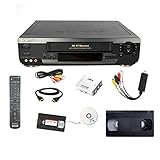
Sony VCR VHS Transfer Bundle w/ Remote, USB Adapter, HDMI Converter (Renewed) | $307.00 | Buy on Amazon |
As an Amazon Associate I earn from qualifying purchases.
“SD analog” is therefore a useful broad description, not the name of one television standard. It does not specify a tape format, aspect ratio, encoding system or exact frame timing.
Free tools Windows power users keep installed
One-click scans. No signup required.
How do tape formats differ from television standards?
A recording format describes the medium and the equipment used to record and play it. A television standard describes how the video signal is encoded. The Library of Congress treats VHS as a video-format example and NTSC as a broadcast-standard example. Library of Congress: VHS format description
#1 Best Overall
- Item model may vary
- Color may vary
- Aux input through cable-satellite box
- Dolby digital stream output
- Remote control included
- Recording formats: VHS, Betamax, U-matic, Betacam and Super-VHS.
- Analog television encoding systems: NTSC, PAL and SECAM.
These categories are not interchangeable. A tape label may tell you its recording format without identifying the television system recorded on it. Also, not every format associated with the standard-definition era is analog: the Library of Congress distinguishes later digital formats such as Digital Betacam from analog formats. Library of Congress: video formats overview
What are NTSC, PAL and SECAM?
NTSC, PAL and SECAM are the three major analog composite television encoding systems identified by the National Archives. They were used in different regions and are not universally compatible. National Archives: video recording formats
Rank #2
- VHS hi-fi stereo
- MTS/SAP broadcast reception
- Multibrand universal remote
- Auto clock set with backup, trilingual on-screen programming and setup
- Limit 2 per customer
| System | Timing described by the Library of Congress |
|---|---|
| NTSC | Nominally 30 frames (60 fields) per second |
| PAL | 25 frames (50 fields) per second |
| SECAM | 25 frames (50 fields) per second |
These are system timing values in the Library of Congress technical overview, not a claim that every recording or variant has identical properties. The page does not state a publication date. The figures also do not establish a universal picture-quality ranking. Library of Congress: video signal parameters
What’s actually slowing this PC down?
Pick the symptom - the matching free tool is one click away.
Can a PAL tape play on an NTSC VCR?
Not necessarily. Playback depends on both the physical recording format and the television system recorded on the tape, as well as the player’s capabilities. A player must match the recorded system or explicitly support multiple systems. The National Archives notes that standards converters are available, but a converter does not replace a compatible tape player; the required equipment depends on the source, player output and destination. National Archives: video playback guidance
Before playback or transfer, check:
- Which recording format the tape uses and whether the deck supports it.
- Which television system is recorded, if known, and whether the deck handles it.
- What output the deck provides and whether the destination equipment accepts it.
- Whether the source and destination systems differ and require conversion.
If conversion is needed, look for a PAL/NTSC video standards converter that supports the specific source, destination and connections in your setup. A converter’s presence alone does not ensure that an incompatible deck can read the tape.
Independent reader supportYour contribution helps us test, update, and keep practical guides available for everyone.How is an analog tape converted to digital?
Digitization captures the analog signal from a compatible playback deck and produces digital video. The exact equipment chain depends on the tape format, recorded television system, deck output, capture equipment and intended file. For compressed file production, Library of Congress guidance describes converting picture data from analog composite sources to digital component format before compression. Library of Congress: analog-to-digital video conversion
Rank #4
- DVD, DVD-R,-RW and CD-R,-RW playback
- 4-head design with monophonic sound
- S-video output,Title and subtitle display
- Program play or random play
- Identify the tape and its system. Determine the recording format, such as VHS, and the television system, such as PAL or NTSC, where possible.
- Choose a compatible playback deck. Use a deck that supports the tape format and recorded system, or a multi-system player that supports both.
- Check the signal path. Confirm that the deck’s output can connect to the capture device and that the destination accepts the signal standard. Add standards conversion if the source and destination require it.
- Capture and create the file. Convert the analog picture signal to digital video, then encode it for the intended preservation or viewing use.
For preservation as well as everyday viewing, plan around the source tape, playback deck, signal standard, connection compatibility and the requirements of the resulting file—not simply the word “SD.”
Recommended Free Tools
Quick Recap
Best Value
- USB capture device converts VHS tapes to digital video files, includes a link to download the software. If you require a physical CD please let us know.
Product prices and availability are accurate as of the date/time indicated and are subject to change. Any price and availability information displayed on Amazon at the time of purchase will apply.

