Free tools Windows power users keep installed
One-click scans. No signup required.
To archive research images so you can find and use them later, preserve more than the image files: keep a preservation master, create access copies for current needs, record enough metadata to identify and manage each item, and periodically check that stored files remain usable. The right format and metadata depend on the source, intended use, repository requirements, storage limits, and available software; no single format or storage device guarantees long-term preservation.
What a useful visual archive preserves
A folder of image files may be a starting point, but it is not a complete preservation workflow. A useful archive connects each image to its identity, origin, context, technical characteristics, permitted or intended uses, and place in the collection. It also documents how files were named, captured or received, processed, and stored.
Think in terms of three linked parts: the image files, the information needed to interpret and manage them, and the procedures that keep both findable and usable over time. The National Archives and Records Administration (NARA) describes metadata as supporting identification, management, access, use, and preservation throughout an imaging workflow. It warns that images without sufficient metadata face greater risk of being lost.
Decide what to preserve before choosing formats
Start by identifying what the image represents and what future users may need to do with it. A scan of a fragile annotated photograph, a born-digital research image, and a screenshot documenting a changing web page have different preservation needs. Record the source and intended use before settling on a file format or processing routine.
Quick wins for a faster PC:
Scan for outdated or missing drivers - takes under a minuteDriver Scan →Repair Windows errors before they cause bigger problemsFix Now →Fix the driver behind crashes, sound loss and screen glitchesFind Drivers →#1 Best Overall

- Lineco is a leading manufacturer of archival storage for conservation of photos, documents, and artwork. Trusted by museums and archives, ideal for your family memorabilia
- Use these boxes for moving or storage items, preserving prints, documents, magazines, photos, stamps, envelopes, invoices, bills, papers, etc
- Ready-To-Assemble design allows for flat shipping and storage when not in use. No glue or tools are required for assembly, see instructions. Featuring cut-out handles, removable lid, and double layered bottom for additional strength
- These storage cartons feature double thick bottom panels, ensuring exceptional strength for the storage of documents and folders
- 12" x 15" x 10" Cartons, manufactured in the US from Tan Buffered Acid-free, lignin-free Corrugated B-Flute Board. Pack of 5
Separate preservation masters from access copies
A preservation master retains the image information needed for future use. An access copy is prepared for a particular viewer, screen, bandwidth constraint, or other present-day use. Keeping these roles distinct means you can refresh access copies as needs change without treating a reduced or reformatted version as the only surviving file.
Record which file is the master and how any derivative was made. If an image is cropped, resized, compressed, color-adjusted, or otherwise changed, retain enough information to distinguish that derivative from the source and understand its relationship to it. Whether to keep intermediate files depends on the collection’s purpose and repository policy.
Choose formats for the collection, not by slogan
Evaluate candidate formats against the source’s characteristics and required fidelity, openness and sustainability, repository support, intended access and editing, storage constraints, and the software people will use. A format that suits one research collection may be unsuitable for another. Include the reasons for the decision in the collection’s documentation so future managers can understand the trade-off.
Rank #2

- Brand Background: Lineco is a leading and trusted brand for archival quality art, photography, and framing supplies
- Preservation: Our box can storage your photos and important documents. It is used by professional photographers to house prized photos, albums, and scrapbooks
- Premium Quality: Lineco storage boxes are manufactured in USA. This box is made with 60 point board and lined with acid-free archival quality and lignin-free
- Drop front design: Created with metal edge construction on the corners, adding great durability and strength. The lid does come off and it has a drop-front design, meaning it's super easy for you to storage your items in and out
- Overall Size: 9.75" x 12.75" x 3" for 9x12 Documents, Newspapers, Certificates, Pictures, Important Delicate Prints, and Old Pictures
The Library of Congress’s Recommended Formats Statement 2025–2026 expresses preferences for published content; its main focus is not personal papers or archival acquisitions. It should not be treated as a universal format rule for every research image collection. NARA’s digital photographic records guidance lists TIFF and JPEG variants in its transfer context and calls for documentation when an agency-specific naming convention is used. The UK National Archives describes an ingest workflow that identifies file formats and may convert files to a preferred preservation format. These are institutional practices in particular contexts, not a mandate that every researcher use one format.
Canada’s Heritage Information Network summarizes criteria for evaluating formats, but its report is limited to digitized content; it is not general workflow advice for born-digital materials. Check whether a recommendation actually covers your source type and repository before applying it.
Build a repeatable ingest workflow
Ingest is the controlled process of bringing image files into the archive, checking them, associating metadata, and placing them into managed storage. Adapt the steps below to institutional policy when one applies.
Rank #3

- Bundle Pack: each package includes 10 archival record storage cartons; This larger pack size ensures that you have enough storage boxes to declutter your space effectively; A perfect choice for bulk storage needs in offices, libraries or at home
- Generous Size: with dimensions of 15 x 12 x 10 inches (LxWxH), our archival storage boxes provide ample space for your storage needs; With such generous proportions, these boxes are designed to accommodate a wide variety of items
- Quality Material: our archival boxes are crafted from acid free paper and corrugated board; This ensures that your stored documents and keepsakes have the optimal protection they deserve; These storage cartons offer reliable durability for long-lasting use
- Ready to Use: the ready to use design of our acid free box allows for transport and storage when not in use; No glue or tools are required for assembly; Please refer to the picture assembly instructions; Features cut-out handle, removable cover and thickened cardboard for added strength
- Multi Functional Use: our archival boxes storage can be applied to store prints, documents, magazines, photos, stamps, envelopes, invoices, paper, and more; They're also ideal for keeping family mementos; These boxes are a versatile container
- Inventory sources and intended use. List originals or source locations, approximate scope, relevant context, and likely research or access needs. Note whether items are physical originals to digitize or already digital.
- Capture or gather files. Keep source files identifiable. For digitization, use a capture process appropriate to the material and quality needs; the information available here does not establish a scanner model or universal capture setting. Do not silently overwrite originals with edited versions.
- Designate masters and derivatives. Decide which files serve as preservation masters and which are access copies. Record relationships and significant transformations.
- Assign stable identifiers and metadata. Give each item an identifier that is unique within the collection or repository. Capture descriptive context and technical or management information needed to find, interpret, and preserve it.
- Document names and formats. Write down the naming convention, the format decisions, and any exceptions. At ingest, identify file formats and review metadata rather than assuming filenames or extensions tell the whole story.
- Package and store according to policy. Put files and associated metadata into the repository’s approved structure or package, following its preservation decisions. Storage media alone is not a preservation plan.
- Monitor and plan follow-up. Keep preservation storage under review, document checks and actions, and plan for format action when required by repository policy or changing tool support.
Record metadata that answers future questions
Metadata should be designed around what future users and collection managers will need to identify, retrieve, understand, use, and preserve an image. There is no universal metadata set for every collection, so follow repository standards where applicable and document local choices.
- Identity: stable identifier, title or short label, and relationship to a series, project, or other images.
- Context: creator or source when known, date or date range when known, subject, location where relevant, and the research context needed to interpret the image.
- Technical information: file format and relevant image characteristics required by your workflow or repository.
- Process and provenance: whether an item was digitized or born digital, capture or processing steps that affect interpretation, and links between source, master, and access copies.
- Management: naming convention, storage or package location, access or use conditions where applicable, and preservation actions or decisions.
Do not imply certainty where it is absent: mark unknown dates or creators as unknown rather than guessing. Use controlled terms or structured fields when your repository requires them, and retain a short explanation of local fields and conventions so another person can apply them consistently.
Archive web pages and other browser-based research images
A screenshot can document what appeared in a browser at a particular capture, but it is a visual record, not necessarily a complete preservation of the underlying page, its behavior, or all contextual information. Record the page URL, capture date, relevant research context, and any capture settings that affect interpretation. If reproducibility matters, retain whatever additional source material or documentation your research protocol and repository require.
Rank #4
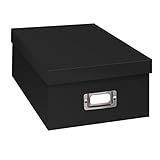
- Solid black only
- Heavy duty storage box
- Metal identification plate
- Index cards included
- Photo safe: acid free
For a manual browser workflow, open the target page, set the viewport and display state relevant to the question, capture the screenshot, and review the resulting file before ingest. Note whether the capture is full-page or viewport-only and whether dynamic or consent elements affected what was visible. Save the file as an access or research artifact according to your policy; do not assume it is a substitute for a preservation master of the source material.
Or skip the browser setup
ScreenshotNeo provides a website screenshot API and MCP server for developers. One GET request can return a PNG, JPEG, WebP, or PDF. Its pre-capture cleanup accepts cookie or consent banners like a visitor and removes more than 60 known consent platforms, newsletter popups, and chat widgets; each cleanup step can be turned off. Bot checks or CAPTCHAs, blank pages, timeouts, failed loads, and cache hits cost nothing, and response headers identify the page verdict and billing status. Its MCP server includes take_screenshot, get_page_info, and capture_pdf for AI agents and MCP clients.
For an automated capture, create an API key and use this cURL example, adapting the target URL:
curl -G "https://api.screenshotneo.com/v1/shot" -d access_key=YOUR_API_KEY --data-urlencode url=https://stripe.com -o shot.webpSee the ScreenshotNeo API documentation for parameters and response details. The filename extension should match the output format you request or receive; configure output options as described in the documentation. Treat the result as a capture to review and ingest, not as a replacement for metadata or preservation planning.
Best Value

- Brand: Lineco is a leading and trusted brand for archival quality art, photography, and photo box supplies.
- Storage: fits for 11 x 14 inch Documents, Certificates, Photos, and Prints, Art and Notes.
- Material: Manufactured in USA. Made of 60 point board and lined, acid-free archival quality and lignin-free.
- Clamshell design: Art storage box with metal edge construction corners, for durability and strength.
- Box Size: 11.5 x 14.5 x 1.75 inches
Python equivalent:
import requests
r = requests.get("https://api.screenshotneo.com/v1/shot", params={"access_key": "YOUR_API_KEY", "url": "https://stripe.com"}, timeout=90)
open("shot.webp", "wb").write(r.content)
Node.js equivalent:
const q = new URLSearchParams({ access_key: 'YOUR_API_KEY', url: 'https://stripe.com' });
const res = await fetch(`https://api.screenshotneo.com/v1/shot?${q}`);
ScreenshotNeo has a free plan with 1,000 shots per month and no card required; paid plans start at $5 for 3,000 shots. See ScreenshotNeo for the service and plans. Sign up for 1,000 free screenshots a month, with no card required.
Independent reader supportYour contribution helps us test, update, and keep practical guides available for everyone.Make files findable and check preservation over time
Choose identifiers and naming conventions that remain understandable outside the software that created them. Avoid relying on a folder name or a person’s memory as the only link between an image and its context. Store metadata with the collection in a form your repository can manage, and keep documentation of naming and format conventions available to those responsible for ingest and access.
Preservation continues after ingest. The Library of Congress describes ongoing work on sustainable formats, metadata, packaging, and monitoring and reporting of digital storage. In practice, follow the storage and monitoring policy of the responsible repository, record preservation actions, and revisit format support when tools or institutional requirements change. No single external drive, cloud account, or file extension can by itself ensure long-term access.
What’s actually slowing this PC down?
Pick the symptom - the matching free tool is one click away.
Troubleshoot common archive failures
- Files exist, but no one can identify them. Add or restore identifiers and contextual metadata; document naming conventions and relationships between files. Do not infer missing context from a filename alone.
- A derivative has replaced the source. Check backups or upstream source locations, then establish a master-and-access-copy workflow so future transformations do not silently displace the preservation file.
- Ingest rejects or mishandles a file. Identify the actual format, review its metadata, and consult the repository’s preferred-format policy. If conversion is required, document the decision and preserve the source according to policy.
- Images look different in another viewer. Record relevant technical details and the software or processing context available to your workflow; distinguish a viewing derivative from the master.
- A browser capture omits a banner, content, or page state. Review the capture against the research question, record capture conditions, and recapture if needed. A screenshot represents a particular browser view, not every state or feature of a page.
- Stored files are no longer readily usable. Escalate through the repository’s preservation process, assess format and storage status, and document any planned preservation action rather than relying on a one-time copy.
Choose a workflow that fits the collection
A small personal project may need a concise inventory, stable identifiers, documented master and access-copy roles, and a reliable managed storage arrangement. An institutional collection may require formal metadata standards, transfer specifications, package structures, format identification, and documented conversion decisions. In both cases, the durable principle is the same: preserve the image together with enough context and management information to understand it, and keep the preservation process under review.
Frequently Asked Questions
Should I keep both the original file and a converted preservation copy?
Follow the responsible repository’s policy. Some ingest workflows convert files to a preferred preservation format; document any conversion and retain the source where policy requires it.
Is a screenshot enough to preserve a web source?
Not necessarily. It records a browser view at capture time, but does not by itself preserve page behavior or all contextual information. Decide what additional material your research protocol needs.
Quick Recap
Product prices and availability are accurate as of the date/time indicated and are subject to change. Any price and availability information displayed on Amazon at the time of purchase will apply.
Do these 3 things before closing this tab:
1Fix the driver behind crashes, sound loss and screen glitches2Clear out junk files and repair common Windows errors3Scan for outdated or missing drivers - takes under a minute



