What’s actually slowing this PC down?
Pick the symptom - the matching free tool is one click away.
Looking at a window and pinching your fingers to open it makes Apple Vision Pro’s central idea click: your eyes choose, your hands confirm, and digital screens can sit around the room instead of on a desk. That feels like a glimpse of a different kind of computing. It does not make the headset an obvious purchase. The current M5 model starts at $3,499 in the United States, weighs 750–800 grams with its Light Seal and Dual Knit Band, and relies on an external battery. The breakthrough is real; the trade-offs are, too.
What a Vision Pro demo feels like
A useful way to judge Vision Pro is to try it, not just read its specification sheet. In a July 15, 2024 hands-on, a BGR reviewer spent about 30 minutes with the first-generation headset in an Apple Store in Paris. The guided setup included a face scan, Light Seal fitting, an optical-insert check, a hand scan, and eye-tracking calibration. Apple continues to offer one-to-one store demonstrations; check Apple’s Vision Pro shopping page for current availability.
The setup matters because the headset must sit in the right position for both comfort and eye tracking. A demo also gives you a chance to see whether the fit, field of view, and sense of immersion work for you. A short, guided session is not a test of all-day comfort, long-term productivity, or how every app behaves.
Why eye-and-hand control feels different
In ordinary navigation, look at an app, button, or window, then pinch your thumb and index finger to select it. The same basic combination can open apps, return to the home view, scroll, and move or resize windows. You do not need to hold a controller just to operate the interface.
Recommended Free Tools
#1 Best Overall

- 256GB Storage Capacity
- Top VR Experience: Oculus Quest 2 features a blazing-fast processor, top hand-tracking system, and 1832 x 1920 Pixels Per Eye high-resolution display, offering an incredibly immersive and smooth VR gaming experience.
- Anti-Slip Controller Grip Covers: grip covers are made of nice silicone material that effectively prevents sweat, dust, and scratches. Anti-slip bumps enhance the handgrip and feel.
- Adjustable Knuckle Straps: knuckle straps make it possible to relax your hands without dropping the controllers. High-quality PU material offers extra durability and velcro design makes it easy to adjust the strap length to different needs.
In the 2024 demonstration, the BGR reviewer found this interaction intuitive after calibration. That is the most persuasive part of the “future” claim: the interface feels less like pointing a device at a screen and more like directing attention, then confirming an action. Apple lists eyes, hands, and voice as primary inputs; keyboards, trackpads, mice, and game controllers are also supported. See Apple’s technical specifications.
A store demo is a controlled, short experience. It cannot establish how reliable hand input will be during long sessions, in poor lighting, in a crowded room, or when your hands are outside the cameras’ view. For typing or precise Mac work, conventional peripherals remain relevant.
Where the sense of presence comes from
Spatial photos and video
Spatial photos and videos give familiar memories depth, making people and objects seem to occupy more of your space than they would on a flat screen. The effect is especially compelling for personal footage: a family moment can feel less like watching a recording and more like revisiting a scene. The 2024 hands-on praised this material and suggested a reason iPhone owners might capture spatial media even if they do not yet own a headset. The payoff, however, depends on having a way to view it that can reproduce the effect.
Immersive video and environments
A large virtual screen is not the same as an immersive scene. On a virtual screen, you watch content in a room-sized environment; in an immersive experience, the scene surrounds more of your view and can make objects feel close enough to reach. The BGR reviewer described reacting physically to a virtual basketball and emotionally to virtual animals during the guided demo. That is evidence of how powerful a curated experience can feel to one person, not a guarantee that every video will produce the same response.
Passthrough with digital windows
Vision Pro does not simply turn the outside world off. Cameras and sensors capture the room so you can see the physical environment while digital windows sit within it. Apple says the system combines high-resolution, tracking, and eye-tracking cameras with TrueDepth, LiDAR, and inertial sensors. It lists 12-millisecond photon-to-photon latency for the R1 system. Those are manufacturer specifications, not a promise that every scene will look or feel identical to direct vision.
Rank #2

- High-end materials and design: This VR stand is made of high-quality silver aluminum alloy base and pillars, with a simple and elegant appearance, both modern and durable. The dark acrylic transparent tray design is not only beautiful and fashionable, but also perfectly blends into various home and office environments.
- Stability and security: The stand is well designed, with a stable base, non-slip silicone pads, and a large tray to provide optimal balance and support. Whether placed on a desktop or other flat surface, it can ensure that your VR device is as stable as a rock to prevent sliding and accidental falls.
- Easy to assemble: The bracket is easy to install. Detailed instructions are included in the package, and assembly can be completed in a few minutes, allowing you to quickly enjoy the convenience brought by the stand.
- Battery Holder Included: The base battery holder is equipped with a silicone pad, which neatly stores the batteries for easy access and ensures the safety of battery, reducing clutter and improving convenience.
- Warranty: We offer a 30-day return policy, if any product defects or problems occur during this period, we will replace you with a new one.
Apple also says the M5 model’s cameras transmit more than one billion pixels per second to its displays and that infrared flood illuminators improve hand tracking in low light. These are Apple’s claims about the hardware, not independent measurements. The practical impression is that passthrough is central to the device: it lets virtual work and media coexist with a real room rather than requiring a complete escape into VR.
The display is excellent; the headset is still hardware
For the current M5 model, Apple lists dual micro-OLED displays with 23 million pixels, 92% DCI-P3 coverage, and refresh-rate support at 90Hz, 96Hz, 100Hz, and 120Hz. The specifications also list support for 24fps and 30fps playback modes for judder reduction. Apple describes the display as delivering more pixels than a 4K television to each eye; that comparison does not mean viewing through a headset is equivalent to watching a 4K television in every respect. Full details are in Apple’s specifications.
Sharp text, fine interface details, movies, panoramas, spatial photos, and Mac Virtual Display all benefit from the display. But you are still looking through optics, and the view is not identical to natural human vision. A virtual screen can give you more room to arrange content; it cannot remove the weight on your face or the need to manage power.
Comfort, weight, and battery life are part of the experience
The original 2024 reviewer felt pressure around the cheekbones, which improved after adjusting the fit, but said a longer session was needed to judge comfort. The current M5 model comes with a Dual Knit Band, a different design from the launch-era headset. That change may help some users find a better fit, but it does not make the headset light: Apple lists a weight of 750–800 grams including the Light Seal and counterbalanced band. Its separate battery weighs 353 grams.
Apple rates the M5 headset for up to 2.5 hours of general use or up to 3 hours of video playback, and says it can be used while charging. Those are Apple’s stated limits; actual use varies. The battery connects separately, so the cable and the need to charge are part of living with the device. A 30-minute store session cannot tell you whether the headset will remain comfortable through several hours of work.
Rank #3

- NO WIRES, MORE FUN — Break free from cords. Game, play, exercise and explore immersive worlds — untethered and without limits.
- 2X GRAPHICAL PROCESSING POWER — Enjoy lightning-fast load times and next-gen graphics for smooth gaming powered by the SnapdragonTM XR2 Gen 2 processor.
- EXPERIENCE VIRTUAL REALITY — Take gaming to a new level and blend virtual objects with your physical space to experience two worlds at once.
- 2+ HOURS OF BATTERY LIFE — Charge less, play longer and stay in the action with an improved battery that keeps up.
- 33% MORE MEMORY — Elevate your play with 8GB of RAM. Upgraded memory delivers a next-level experience fueled by sharper graphics and more responsive performance.
If comfort is uncertain, have the store help with the fit and try the headset before deciding. People who need prescription correction should check the ZEISS Optical Inserts requirements; Apple says ordinary glasses cannot be worn inside the headset. Its shopping page lists inserts at $99, but confirm prescription and compatibility details during purchase: Apple’s Vision Pro shop.
What Vision Pro can replace—and what it cannot
| Use | Where it fits | What limits it |
|---|---|---|
| Television or movie screen | A private, large virtual screen can suit travel, limited space, and immersive viewing. | It is a personal device, not a shared living-room screen; battery life and the need to wear a headset make it an expensive way to watch ordinary video. |
| Mac monitor | Mac Virtual Display can provide a large virtual workspace for focused work or travel, especially if you already own a Mac. | The Mac still handles the full macOS workflow. A physical keyboard is better for serious typing, and a conventional monitor is easier to share and use for long sessions. |
| iPad | Compatible iPhone and iPad apps extend what you can do in the headset. | Compatibility is not the same as spatial design. Reading, notes, and casual browsing can be simpler on a tablet. |
| Gaming headset | Vision Pro supports game controllers and spatial games. | The cited hands-on experience does not establish it as the best choice for gaming, fitness, or social VR; compare the game library and controls you actually want. |
Early hands-on coverage from AppleInsider noted that ordinary productivity and PDF apps could work while a conventional iPad or external keyboard remained preferable for some tasks. The important question is not how many apps can open in a headset, but whether the spatial version of your own work is meaningfully better. Read AppleInsider’s early hands-on for that productivity context.
Free tools Windows power users keep installed
One-click scans. No signup required.
Software has grown, but app count is not the same as usefulness
The current M5 Vision Pro ships with visionOS 26. Apple describes a mix of native visionOS apps and compatible iPhone and iPad apps, alongside Mac Virtual Display, Apple Immersive content, and features such as widgets and improved Personas. The distinction matters: an app that runs in a floating window is useful, but it does not necessarily take advantage of spatial computing.
Apple says visionOS 26 supports selected 180-degree, 360-degree, and wide-field-of-view video from action cameras, naming Canon, Insta360, and GoPro among supported makers. That expands how spatial and immersive footage can reach the headset, but it does not mean every camera or video becomes immersive automatically. See Apple’s M5 Vision Pro announcement for the product and software details.
Before buying, list the apps and tasks you expect to use. If your must-have workflow depends on an app that is merely compatible rather than designed for spatial interaction, the headset may add a new screen without improving the task.
Rank #4
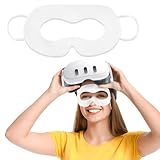
- Customized For Multiple Devices: This VR Face Pad designed specifically for Oculus Meta devices 3/3S/2, and compatible with Apple Vision Pro, providing a perfect fit and ensure a more breathable and comfortable VR experience
- Premium Material: Our disposable VR mask made of high-quality nonwoven sheet and is soft and skin-friendly. Featuring breathable, no irritation to the skin when long-term use, provide a comfortable fit for an immersive VR gaming
- Keep Clean & Hygienic : By wearing sweat-proof VR masks, you can keep your headset clean while playing VR games. And make the experience more hygienic when you sharing the VR headset with family and friends
- Protect Your Eyes: The disposable face covers act as a barrier between your eyes and the VR headset, preventing any potential transfer of dirt, oil, or sweat that may accumulate on the device
- Wide Applications: These sweat-proof VR masks are not only suitable for personal use at home with friends and family, but also perfect for enhancing the gaming experience at virtual reality game exhibitions or events. Our disposable VR eye mask is also ideal for VR entertainment during family gatherings, VR business users, VR experience stores and other scenarios
Motion comfort, privacy, and sharing
Motion comfort varies
The BGR reviewer, who said they were sometimes prone to motion sickness, reported no nausea during the short demo. That observation applies to one person and one brief session, not to all users or longer use. Looking at windows anchored in a room can feel different from moving through an immersive environment. Start with a short session, use comfort options or less immersion if needed, take breaks, and stop if discomfort develops.
PC Slower Than It Used to Be?
A free scan shows the junk files, broken settings and background clutter dragging Windows down - then fixes them in one click.Free scan · Windows 10 & 11Crashes, No Sound, or Screen Glitches?
Random freezes, missing sound and display glitches usually trace back to one bad driver. Find and replace yours safely.Free scan · under a minuteEye input and privacy
Vision Pro uses eye tracking for input and Optic ID for authentication. Apple says Optic ID data is encrypted and accessible only to the Secure Enclave, and that eye-input data is not shared with Apple, third-party apps, or websites; only the user’s final selections are transmitted. Those are Apple’s privacy statements, available on its Vision Pro product page.
A personal device in a shared room
The headset’s exterior can make conversation feel less spontaneous, even as EyeSight is designed to signal to people nearby when the wearer is aware of them. It is also harder to share a headset than a television: different people may need different fit configurations, and the experience is inherently individual. That makes Vision Pro more natural for private viewing or focused work than for family movie night.
What the current model costs
Apple introduced the M5 Vision Pro in October 2025 with a U.S. starting price of $3,499. The listed storage options are 256GB, 512GB, and 1TB. That is the current U.S. starting price, not a worldwide quote; availability and pricing vary by market. Check Apple’s announcement and shopping page for current local details.
Think about total ownership cost, not just the headset. Prescription inserts may be needed; a Mac, keyboard, trackpad, or other peripherals may be necessary for a particular workflow; paid apps or media subscriptions may add cost. None of those additions makes sense for every buyer, so price them only against the work or experiences you actually plan to use.
Best Value

- SMALL SPACE AND LARGE CAPACITY: The mini case designed by SARLAR for Quest 3S/Quest 3/Quest 2/Vision Pro/Steam Frame VR. It is convenient for storage and travel, bid farewell to the huge box, and can accommodate official strap and some accessories.
- FASHION AND STURDINESS: As supreme as official fabric, mini version design enhances the taste of grade. Made of high-density durable material, fixed elastic band built-in, shockproof, anti-scratch stylish.
- THOUGHTFUL DESIGN: Precise designed keep your gear organized and secure with a Each individual slot and elastic strap that hold everything in place.
- EXCLUSIVE PATENTED DESIGN:High-end linear design, majestic, high-grade. A storage case designed for Oculus Meta Quest 2/Quest 3/AVP, a patented product.
- NO IRRITATION ODOR- Premium eco-friendly felt fabric, recyclable. Hand-built, non-glue lamination, no harmful odor.
International buyers should check account and content limits before importing or purchasing. Apple says App Store, Apple Music, and Apple TV purchases require an Apple Account region where Vision Pro is available, and app and content availability can vary. Its buying FAQ also covers travel and purchase considerations: Apple Vision Pro buying information.
Who should buy, demo, wait, or choose another headset?
Buy if spatial use has real value to you
Vision Pro makes the most sense when immersive media, spatial photography, 3D visualization, enterprise training, or a private virtual Mac display serves a recurring and valuable need—and you accept its weight, battery arrangement, and price. The strongest case is not replacing every computer; it is paying for experiences or workflows that a flat screen cannot provide as well.
Book a demo if fit or comfort is the unknown
If the interface intrigues you but you are unsure about pressure, motion comfort, prescription correction, or passthrough, an Apple Store demonstration is a sensible next step. The eyes-and-hands interaction and spatial media are difficult to evaluate from specifications alone.
Wait if you need a general-purpose computer
For all-day productivity, a shared entertainment system, ordinary browsing, or a lower-cost route to VR, Vision Pro is difficult to justify. A MacBook, iPad, monitor, television, or less expensive VR headset may solve those jobs more simply. Buyers focused on gaming, fitness, or social VR should compare the Meta Quest platform, while checking current models and prices directly at Meta Quest.
Verdict: a convincing preview, not a universal upgrade
Vision Pro makes eye-and-hand control, spatial screens, and immersive media feel tangible rather than theoretical. That is a credible glimpse of a possible computing future. The current M5 model improves the hardware and ships with visionOS 26, but the fundamental decision remains personal: does spatial computing improve something you do often enough to justify a heavy headset, external battery, and $3,499 U.S. entry price? If you cannot name that recurring use, admire the future at a demo and wait.
Quick Recap
Product prices and availability are accurate as of the date/time indicated and are subject to change. Any price and availability information displayed on Amazon at the time of purchase will apply.




