Free tools Windows power users keep installed
One-click scans. No signup required.
A USB-C car charger is faster only when its supported output and charging protocol exceed those of the vehicle’s built-in port—and when your phone and cable can use that power. There is no universal winner. Built-in ports differ by vehicle, model year, trim and port purpose, while the phone ultimately controls how much power it accepts.
Check the exact owner’s manual before comparing numbers. A USB-C-shaped connector does not by itself mean fast charging, and a charger’s advertised maximum is not a guaranteed charging rate for every phone.
As an Amazon Associate I earn from qualifying purchases.
The short answer: compare the ratings, not the connector
Use the built-in port if its documented output meets your phone’s charging requirements and you also need a wired data connection to the infotainment system. Consider a USB-C Power Delivery (PD) charger in the 12 V accessory socket when the vehicle port is limited, unavailable, or slower than a compatible phone-and-cable combination.
What’s actually slowing this PC down?
Pick the symptom - the matching free tool is one click away.
The practical charging rate is constrained by the weakest link in a chain:
#1 Best Overall

- Triple-Port 167.5W Max: Seamlessly power up all your essential devices with the first USB-C port delivering a powerful 100W, the second USB-C port providing 45W, and the USB-A port adding an additional 22.5W.
- Ultra-Fast 100W USB-C1 Port: With the first USB-C port offering 100W, quickly charge your 16-inch MacBook Pro from 0 to 50% in only 47 minutes.
- Reliable 45W USB-C2 Port: The second USB-C port offers 45W max of power, providing fast and reliable charging for iPhones and Samsung devices, keeping you connected without any delays.
- Tiny and Mighty: Designed to be unobtrusive, this super-compact charger won't clutter your car's interior.
- What You Get: Anker Car Charger (167.5W, 3 Ports), 3.3 ft USB-C to USB-C cable, welcome guide, 18-month warranty, and our friendly customer service.
- the vehicle port or 12 V charger’s power and protocol;
- the USB cable’s capability;
- the phone’s supported charging specification and current battery conditions.
If any one of those limits is lower, the phone draws less power. A 60 W label on a car adapter cannot force a phone designed to accept 18 W to draw 60 W.
What the documented examples show
Manufacturer manuals demonstrate why a single “built-in USB speed” figure is misleading. The following are specific documented configurations, not a head-to-head test or universal ratings.
| Example | Documented electrical rating | Interpretation |
|---|---|---|
| Renault USB-C multimedia port | 15 W maximum at 5 V per covered port | A ceiling for the specified USB-C multimedia port; the manual does not make it a rating for every Renault vehicle or port. |
| Kia NQ5KH owner manual (2024) | Fast-compatible devices: 9.0 V, maximum 3.0 A. Normal charging: 5.0 V, maximum 3.0 A. | Those figures equal calculated maxima of 27 W and 15 W respectively (voltage multiplied by current). The phone determines which mode it can use. |
| Gearmo GM-UCPDCARB car charger manual (published 2017) | Up to 60 W on USB-C and up to 15 W on USB-A | An example of the headroom a socket-powered charger may offer. It is an older product specification, not a current market survey or a recommendation of that model. |
Kia’s manual states that “Charging speed is determined according to the charging specification of the connected digital device.” In other words, the 27 W fast-compatible mode is available only when the connected device and cable negotiate it. Renault’s 15 W figure and Kia’s figures describe particular ports and configurations; they should not be averaged or treated as cross-brand benchmarks.
Quick wins for a faster PC:
Scan for outdated or missing drivers - takes under a minuteDriver Scan →Clear out junk files and repair common Windows errorsFree Scan →Fix the driver behind crashes, sound loss and screen glitchesFind Drivers →How to interpret the voltage and current figures
When a manual lists both voltage and current, multiply them to calculate the theoretical maximum: 9 V × 3 A equals 27 W, while 5 V × 3 A equals 15 W. Those are ceiling values under the stated mode, not promises that a phone will draw them continuously. The phone may select the 5 V mode, negotiate a different profile, or reduce power during charging. A listed wattage also does not reveal whether two ports share an internal power budget, so the per-port and combined-output tables matter.
Conversely, a port described only as “USB-C” has not told you its voltage, current, data role or fast-charge support. Look for an explicit electrical rating and a description of compatible devices in the manual.
Why built-in ports vary so much
Ports may serve different jobs
A dashboard USB socket can be designed for charging, data transfer, or both. Hyundai documents separate behavior for a charging-only mode and a mode that charges while sending data to the infotainment system. It also warns that some devices may not charge through the port. A data-capable socket may therefore be useful for navigation, music or phone integration even if its power output is modest.
Vehicle equipment is not uniform
Output can change between model years, trims, seating rows and individual sockets in the same vehicle. Chevrolet’s support guidance directs owners to the vehicle’s Owner’s Manual because charging options vary by vehicle. Do not infer the rating of a rear-seat port from the front console port, or assume that every USB-C socket in a model has the same electronics.
Recommended Free Tools
USB-C identifies the shape, not the charging standard
USB-C is a connector format. It does not automatically identify USB Power Delivery, a particular voltage, a current limit or a fast-charge profile. The manual must establish what the port supports. The same caution applies to a replacement car adapter: read the per-port rating and the rules for sharing power when multiple devices are connected.
Rank #2

- Universal High-Speed Charging: PowerIQ 3.0 ensures rapid charging for USB-C phones, tablets, and more with fast charging capabilities.
- Space-Saving Design: Ultra-Compact build provides easy access to other dashboard functionalities while supporting fast charging for your devices.
- Wide Device Compatibility: Effortlessly powers USB-C devices with fast charging technology, enhancing user experience across gadgets.
- Safe and Reliable Charging: Built-in safety technology helps protect devices with safeguards for stable, high-speed charging.
- What You Get: PowerDrive III Duo car charger, welcome guide, our worry-free 18-month warranty, and friendly customer service.
How a 12 V USB-C car charger can be faster
A socket-powered adapter converts the vehicle’s 12 V accessory-socket supply into charging output for one or more USB ports. A well-specified USB-C PD adapter can offer more voltage and current combinations than a basic built-in port. The 2017 Gearmo GM-UCPDCARB manual, for example, lists up to 60 W from USB-C and up to 15 W from USB-A. That illustrates the potential advantage, but the product’s age means you should verify current specifications and availability before buying that exact model.
“Up to” is important. The adapter’s maximum may apply only to its USB-C port, only when another port is unused, or only under a particular PD profile. Read the label or manual for:
- the maximum output of the USB-C port you will use;
- available voltage/current profiles rather than wattage alone;
- how output is divided when USB-A and USB-C are used together;
- whether the rating is continuous and supported by the vehicle socket.
The adapter also cannot bypass the phone’s own charging controls. A phone may deliberately reduce current as its battery fills or if it detects heat, and the manufacturer documentation does not establish a universal numerical adjustment for temperature, battery percentage or simultaneous use.
The Tool Desk
Outbyte Driver Updater FREEScan for outdated or missing drivers - takes under a minuteDriver Scan →Outbyte PC Repair FREEClear out junk files and repair common Windows errorsFree Scan →Built-in port versus 12 V charger: a practical comparison
| Question | Built-in USB port | USB-C charger in the 12 V socket |
|---|---|---|
| What determines output? | The exact vehicle port electronics and its documented charging mode. | The adapter’s per-port profile, vehicle socket input and power-sharing rules. |
| Can it carry infotainment data? | Some ports can charge and transfer data; others are charging-only. | It supplies power and should not be treated as the vehicle’s data connection. |
| What must be compatible? | Vehicle port, phone, cable and charging protocol. | Adapter profile, phone, cable and the 12 V socket. |
| What is the convenience trade-off? | No extra accessory, but capability depends on factory equipment. | Potentially more output, but it occupies the accessory socket and adds another component. |
This comparison is about capability, not guaranteed minutes to full charge. A lower-rated factory port may still be the better choice if it is the only one that supports the wired connection you need.
Check your setup before buying anything
Follow this sequence for your exact vehicle and phone. It prevents a high-wattage purchase that cannot improve charging.
- Identify the exact vehicle. Record the model year, trim and the physical socket you plan to use. Include whether it is a front multimedia port, a rear-seat port or the 12 V accessory socket.
- Open the vehicle manual. Find the USB or connectivity section and note each port’s maximum voltage, current or wattage, its charging standard and whether it supports data. Chevrolet specifically advises consulting the manual for vehicle-specific charging information.
- Determine the port’s purpose. If the manual describes charging-only and data/infotainment modes, choose the data-capable port when you need a wired phone connection. Do not assume a port that powers a device also supports infotainment data.
- Check the phone’s supported input. Use the phone maker’s specifications to find its maximum wired charging power and supported protocol. The phone, not the adapter label, sets the practical ceiling.
- Use a suitable cable. Kia recommends the device manufacturer’s official cable. A cable must support the negotiated charging mode; a physically fitting cable can still restrict power or fail to carry data.
- Compare compatible ceilings. If the built-in port’s documented output is at least as high as the phone’s supported mode, an add-on adapter may not make charging faster. If the port is lower, a USB-C PD car charger with a compatible profile may provide useful headroom.
- Check multi-port behavior. For an adapter with several outputs, verify whether the advertised USB-C maximum applies when another device is charging. Use the per-port figures, not the largest number printed on the package.
- Test under comparable conditions. Compare the same phone, cable, battery range and vehicle state. Without a controlled test naming all four, do not claim a fixed number of minutes saved.
A quick decision worksheet
Write down three numbers before shopping: the built-in port’s documented maximum, the phone’s supported wired-input maximum and the USB-C port’s per-port maximum on any adapter you are considering. Then identify the charging mode shared by all three. The smallest compatible ceiling is the one that matters.
For example, a vehicle port documented at 15 W cannot provide a 27 W mode simply because the phone supports it. An adapter rated up to 60 W may raise the available ceiling, but only if its profile matches the phone and the cable. If the phone accepts less than 15 W, neither option can make it draw more than its own limit. This worksheet also exposes when a product’s headline total depends on leaving another output unused.
Finally, mark whether you need infotainment data. If the answer is yes, reserve the vehicle’s data-capable port for that connection and treat the 12 V adapter as a separate power source.
Rank #3

- 【Fast Charging 3 Devices Simultaneously】200W fast car charger with 2 Type-C ports and 1 USB port, allowing you to charge up to 3 electronic devices at the same time.
- 【200W Car Charger USB C Fast Charge】200W (Max) super fast usb c car charger supports Type-C1 100W, Type-C2 100W and USB-A 60W high output and is compatible with QC4.0, QC3.0, PD3.0, PPS, SCP/FCP, AFC fast charging protocols for all devices.
- 【Excellent Heat Dissipation & Safety Car Charger】New heat dissipation process, low temperature charging without burning. With over-current, over-voltage, over-temperature and other protection, safety protection equipment. Intelligent start trickle mode, mobile phones do not overcharge, battery healthier.
- 【LED ambient light】The car charger has an ice blue ring LED ambient light for easier charging at night.
- 【Wide Compatibility】USB C car charger is compatible with most devices, such as for MacBook Pro Air, NoteBook, iPad Pro, iPhone 15 Pro Max 14 13 12 11, AirPods Pro, Steam Deck, Switch, Galaxy S23 Ultra/S22/S21, Steam Deck and more. 12V-24V car charger universal.
When the built-in port is the better choice
You need wired infotainment data
Use the vehicle’s documented data-capable port for functions such as phone integration, media or navigation. A 12 V charger is designed to supply power; it does not replace the vehicle’s USB data path. This distinction follows the charging-versus-data roles described in Hyundai and Chevrolet documentation.
The phone is already the bottleneck
Suppose the vehicle port can supply 27 W in a compatible mode, while your phone accepts less. Replacing it with a higher-rated adapter cannot increase the phone’s accepted power. The extra capacity is unused.
You want a factory-integrated installation
The built-in socket requires no extra accessory and is less likely to be misplaced. It may also remain powered according to the vehicle’s own ignition and accessory behavior, whereas a socket adapter adds another component to install and remove.
Do these 3 things before closing this tab:
1Fix the driver behind crashes, sound loss and screen glitches2Clear out junk files and repair common Windows errors3Scan for outdated or missing drivers - takes under a minuteWhen a USB-C PD car charger is worthwhile
The manual documents a lower ceiling
A 15 W maximum, such as the covered Renault multimedia-port example, may be adequate for light use but can be limiting for a phone that supports a higher compatible mode. A correctly specified PD adapter can offer more headroom from the 12 V socket.
The built-in socket is charging-only or inconveniently located
If the available USB port is reserved for data, is occupied by another device, or is too far from the driver, a 12 V adapter can provide a separate power connection. Confirm that the accessory socket is suitable for the adapter and that the adapter’s rating applies to the port you intend to use.
You charge more than one device
Multiple-device use makes power-sharing rules critical. A charger advertised at 60 W on USB-C may reduce that output when USB-A is active. Select an adapter whose individual-port and combined-output specifications match your devices.
Common buying mistakes
- Assuming every USB-C port is fast: Connector shape does not establish PD support or a wattage.
- Comparing total adapter wattage: The largest printed number may apply to one port under limited conditions. Read the per-port table.
- Ignoring the cable: A cable that fits can still restrict the negotiated mode or omit data capability.
- Using the wrong factory socket: A charging-only port may not support infotainment, while a data port may have a modest charging ceiling.
- Expecting a fixed time saving: Battery state, heat, active use and power sharing change the observed rate.
- Treating an old specification as current: The Gearmo manual is from 2017; confirm present documentation and availability for any product you buy.
Real-world factors that change charging speed
Even with matching ratings, observed speed changes during a drive. The manufacturer documentation does not provide a universal correction factor, so treat these as reasons not to promise a fixed charging time:
- Battery state: phones commonly manage current as the battery approaches full charge.
- Temperature: heat can cause the device to reduce charging power.
- Active use: navigation, games, cellular data and a bright display consume power while charging.
- Simultaneous loads: another phone, accessory or USB device can trigger power sharing.
- Cable capability: the cable may not support the negotiated current, voltage or data function.
- Protocol mismatch: an adapter can offer a profile the phone does not recognize, falling back to a lower mode.
- Vehicle conditions: the accessory socket and port electronics must deliver the adapter’s required input consistently.
Because these variables interact, a wattage comparison is a capability comparison, not a guaranteed time-to-full result.
Rank #4
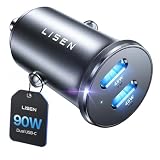
- THROW AWAY THE OLD A+C CAR CHARGER: What sets the LISEN usb c cigarette lighter adapter fast charger for iphone Duo & 18 pro max apart is its dual USB-C ports, each capable of delivering up to 45W of power. This configuration is particularly beneficial for users looking to fast charge two high-power devices at once, such as an iPhone 17 Pro Max and an iPad Pro. The simultaneous 45W output is a game-changer, significantly reducing charging times and ensuring your devices are ready to go when you are
- DUAL USB C FOR VERSATILE CHARGING: The LISEN 90W cigarette lighter adapter usb c car charger for iPhone 18 Pro Max 12v lives up to its promise of super fast charging. It supports Power Delivery (PD) 3.0. In practical terms, this means it can charge an iPhone 18 Pro from 0 to 83% in just about 30 minutes, a claim that holds up under testing. The charger is equally adept at handling other PD-compatible devices, ensuring that everything from smartphones to tablets receives an efficient power boost
- PREMIUM METAL ALLOY SHELL: The LISEN 90W usb c car charger adapter for iPhone 18 Pro Max fast charging impresses right out of the box with its sleek, all-metal design. Not only does the metal construction give it a premium feel and look, but it also aids in heat dissipation, ensuring the charger stays cool even when powering two devices simultaneously
- SMALL SIZE, BIG POWER: The tiny thumb-sized (2.1" (L) x 0.9" (W)) body fits most car 12V cigarette lighter usb c charger, providing a trim, less cluttered look. Its mini size is noteworthy, making it unobtrusive and a perfect fit for most car interiors without sacrificing accessibility
- UL AND FCC CERTIFICATION: LISEN iPhone Duo & iPhone18 Pro Max Car Charger USB C Fast Charging equipped with the intelligent power management chip, and passed UL, CE, FCC, and RoHS certifications. Made with PC fuel barrier V-0 grade material, it won 't get heat, is flame retardant, and is environmentally friendly
Choosing a compatible USB-C car charger
Use this checklist when the built-in port is not sufficient:
- Choose a USB-C PD model whose per-port profile includes the phone’s supported charging mode.
- Check the exact USB-C output, not only a total advertised wattage.
- Read the multi-port sharing table before connecting a second device.
- Use a reputable, manufacturer-specified cable; Kia’s manual recommends the device maker’s official cable.
- Confirm that the charger is intended for your vehicle’s 12 V accessory socket and that its current draw is appropriate.
- Keep the built-in data-capable port available when wired infotainment features are required.
- Treat old product manuals as historical specifications. The Gearmo manual dates from 2017, so verify present-day documentation and availability before relying on it.
The sensible upgrade is not automatically the adapter with the biggest number. It is the one whose protocol, cable and per-port output align with the phone, without sacrificing a data connection you still need.
Troubleshooting a slow or non-charging phone
The phone charges but slowly
- Recheck the vehicle manual for that specific socket and confirm its maximum output.
- Inspect the phone’s charging specification and the cable’s capability.
- Try the same phone and cable in the other documented vehicle port, if available.
- If using a 12 V adapter, test with only the USB-C port active and compare its per-port rating with the combined-output rating.
- Reduce heat and heavy phone use, then compare at the same battery percentage.
The phone does not charge through the built-in port
Verify whether the socket is data-only, charging-only, or subject to a vehicle-specific compatibility limitation. Hyundai notes that some devices may not charge through its documented port modes. Try the port identified in the manual for charging and use a suitable cable.
Infotainment stopped working after adding an adapter
A socket charger supplies power but does not carry the vehicle’s USB data connection. Reconnect the phone to the vehicle’s data-capable USB port for infotainment functions, while using the 12 V adapter only for separate charging if needed.
A high-wattage adapter produces no improvement
Check the phone’s maximum input and the negotiated protocol. The adapter may be offering more power than the phone accepts, or the cable may be limiting the connection. A larger label cannot override those limits.
Bottom line for the buying decision
Read the exact vehicle manual first. If its built-in port supports a charging mode that matches your phone and cable, it may be just as fast and is the simplest option—especially when you need infotainment data. If the manual documents a lower output, or the available port is inconvenient or occupied, a USB-C PD charger in the 12 V socket can be faster when its compatible output exceeds the port’s rating. In every case, the phone’s specification, the cable and operating conditions determine the speed you actually see.
Frequently Asked Questions
Is a USB-C car charger always faster than a built-in USB-C port?
No. It is faster only when its compatible per-port output exceeds the vehicle port’s output and the phone and cable support that charging mode. Connector shape alone does not determine speed.
PC Slower Than It Used to Be?
A free scan shows the junk files, broken settings and background clutter dragging Windows down - then fixes them in one click.Free scan · Windows 10 & 11Crashes, No Sound, or Screen Glitches?
Random freezes, missing sound and display glitches usually trace back to one bad driver. Find and replace yours safely.Free scan · under a minuteHow do I find my car’s USB charging wattage?
Look up the exact model year and trim in the owner’s manual. Check each socket’s voltage, current or wattage, charging standard and whether it is charging-only or data-capable. Do not assume every port in the vehicle is identical.
Best Value

- 67W 3-Port Super Fast Car Charger: Total 67 Watt USB C car charger Support PD 37W Max (USB C) and QC 30W Max (USB-A) output, can fast Charge for Most USB-A and USBC Devices Simultaneously. One car charger for all your USB A & USBC devices, your ideal travel companion
- 3X Fast Charge Speed: with upgrade PD and QC Fast Charging Technology, it can rapid charging for iPhone and Samsung or other phones from 0-50% in about 30 minutes, up to 3X faster than before, even can fast charge for Macbook air and iPad in high speed
- Broad Compatibility: with USB-C and USB-A output, can charge almost all USB Devices, compatible with iPhone 18 Pro/18 Pro Max, iPhone Duo, iPhone 17/17 Pro Max, iPhone Air, iPhone 16/16e/16 Pro Max/16 Plus, iPhone 15/15 Pro Max/15 Plus, iPad, Samsung Galaxy S26/S25/S24/S23/S22/S21/S20, Note 20/10/9, Google Pixel 11/10/9/8/7/6/5, android Cell Phone and other devices
- Safe & Reliable: USB C Car Charger Cigarette Lighter with intelligent chip inside, the Car Charger Adapter provides multi protections against over-current, over-voltage, over-heating and short-circuit. will automatically stop charging when power is full; the product shell made by ABS + PC fireproof material, ensure Protect your device and charge safely all the time
- What You Get: 1 x 67W 3-Ports USB-C & USB-A car charger Adapter + 1 x 3FT USB C to USB C Cable (Color: Black), 1-Year Replacement
What do 9 V/3 A and 5 V/3 A mean in a vehicle manual?
They are voltage and maximum-current figures. Multiplying them gives calculated ceilings of 27 W and 15 W respectively. The phone and cable determine which mode is negotiated and whether the maximum is actually used.
Can a 60 W car charger make my phone charge at 60 W?
No. The phone controls its accepted input. A 60 W rating describes the adapter’s available capacity under specified conditions; the phone may draw less because of its own limit, cable capability, protocol choice, battery state or temperature.
Will a 12 V USB-C charger work for wired Apple CarPlay or Android Auto?
The charger supplies power but does not replace the vehicle’s USB data path. Connect the phone to the vehicle port identified in the manual as data-capable for infotainment, and use the 12 V charger as a separate power source if needed.
Why does my phone charge slowly from a port that looks like USB-C?
The port may have a lower power ceiling, lack the required charging protocol, be intended mainly for data, or be limited by the cable or phone. Check the manual, phone specification and cable, then test another documented port under the same conditions.
Does using two devices reduce a car charger’s speed?
It can. Many multi-port adapters divide their available output. Read the per-port and combined-output specifications and check whether the advertised USB-C maximum applies while another port is active.
Should I buy the older Gearmo GM-UCPDCARB because it lists 60 W?
Treat that 2017 specification as an example of possible adapter headroom, not a current recommendation. Verify present specifications, availability, socket compatibility and power-sharing behavior for any product you consider.
The Bottom Line
Which charges faster? Whichever setup offers the higher compatible charging mode after accounting for the vehicle port, adapter, cable and phone. Check the exact manual first; choose a USB-C PD charger only when it adds useful headroom, and keep the factory data port for infotainment.
Quick Recap
Product prices and availability are accurate as of the date/time indicated and are subject to change. Any price and availability information displayed on Amazon at the time of purchase will apply.

