Free tools Windows power users keep installed
One-click scans. No signup required.
Digital decluttering is a practical review of the files, photos, apps, messages, email and notifications you accumulate. The aim is to keep useful information easy to find while removing what no longer serves you and reducing avoidable interruptions—not to erase everything or promise a cure for stress.
What digital decluttering includes
It covers both material already stored on your devices and the inputs that keep arriving. That means organizing or removing files and photos, but also reviewing email subscriptions and notification settings. A useful approach treats it as personal information management: deciding what to retain, making retained material retrievable, managing reminders and attention, and limiting confusing copies or versions. Microsoft Research’s personal-information-management framework offers a way to think about those connected tasks.
As an Amazon Associate I earn from qualifying purchases.
How to declutter without losing something important
-
Pick one source of friction
Choose a single area that is causing trouble: perhaps a crowded photo library, downloads folder, desktop, inbox, unused apps or persistent notifications. Focusing on one domain makes it easier to decide what belongs there and to finish a manageable review.
The Tool Desk
Outbyte PC Repair FREEClear out junk files and repair common Windows errorsFree Scan →Outbyte Driver Updater FREEFix the driver behind crashes, sound loss and screen glitchesFind Drivers →Special offer. See more information about Outbyte and uninstall instructions. Please review EULA and Privacy policy. -
Remove only what is clearly disposable
Start with items you recognize as unwanted, such as unused apps, duplicate or unwanted photos, old downloads and mailing lists you no longer want. If a file’s value or retention needs are unclear, keep it until you can make an informed decision. Cleveland Clinic’s practical guidance includes reviewing digital material and creating folders or renaming files to make what remains easier to manage: Cleveland Clinic’s digital-clutter guide.
#1 Best Overall
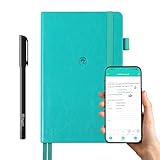 Digital Planner Notebook Real-Time & Offline Sync with Digitize Smart Pen
- 【Important Note】 Before using the YUAN Smart Pen for the first time, fully charge it via USB. The first full charge may take several hours – we recommend charging it overnight.
- 【Yuan Smart Notebook】the handwriting of the smart notebook can not be erased! our smart notebook with the special code for the smart pen to recognize, so the Yuan smart pen only work with our Yuan smart notebook. Replacement smart notebooks and the refill of the smart pen are available in our store.
- 【Pen-and-Paper Texture & Real-Time Digital Sync】Enjoy smooth, natural handwriting with real-time sync to your mobile device via the smart pen—no scanning or photo-taking required. Offline notes automatically upload when reconnected, balancing the traditional writing experience with modern digital convenience.
- 【4 Versatile Page Templates & All-in-One Planner】 Features daily/weekly planners smart notebook, to-do lists, grid and lined pages, ideal for project management, fitness tracking, family scheduling, budgeting, task lists and more. One notebook replaces multiple planners for work and daily life.
- 【Smooth Smart Pen & Complete Set】The Yuan smart pen with smart notebook planner delivers consistent, skip-free writing. Package includes: 1×Smart Pen, 1×Digital Notebook (187 pages), 4×D1 ink refills, 1×USB charging cable, 1×user manual—ready to use out of the box.
-
Make the kept material easy to retrieve
Use a small number of folders with names you understand, and choose file names that make their contents or purpose recognizable. A system is useful only if you can keep it current and find things in it; elaborate categories can add work without making retrieval easier.
-
Check backups before deleting local copies
If you want to remove files from a device, first confirm that the files you intend to keep are backed up and that you can open or restore them. An external hard drive can be one option for selected files, as TechRadar’s discussion of digital decluttering and storage suggests. It is not a complete backup plan by itself: a drive can fail or become inaccessible, so verify that the copy works before removing an original.
Rank #2
 Rocketbook Fusion Reusable Undated Productivity Planner, Letter Size 8.5x11, Gray - Goals, Monthly and Weekly Calendar, Daily To-do List, Lined and Dotted Notes Pages
- Plan, Digitize, Erase, Re-Plan: Write to-do lists, notes, and goals on reusable paper with the Pilot Frixion Pen. Digitize plans using the Rocketbook app and organize in the cloud. When done, simply wipe the pages clean with a damp cloth and reuse.
- 7 Versatile Page Templates: Plan for life and work with Monthly & Weekly Calendar, To-Do List, Goal Tracker, Idea List, and both Dotted and Lined Notebook Pages. Diverse for everything from project management to fitness tracking to household planning.
- App-Enabled for Digital Organization: The Rocketbook app allows you to scan and upload your plans & lists directly to cloud platforms like Google Drive, Dropbox, OneNote, etc. The app-connection ensures your notes are accessible from anywhere.
- High-Quality & Durable Materials: Premium reusable paper, durable spiral binding, and a waterproof cover. The flexible design allows it to lay flat for comfortable writing and planning sessions, whether you're at home, school, or the office.
- Eco-Friendly and Reusable: Replaces the need for traditional paper planners. Designed for sustainability, combining the convenience of 7 reusable page types with the ability to digitize and erase, allowing you to streamline tasks and reduce waste.
-
Reduce the next wave of incoming clutter
Unsubscribe from unwanted mailing lists and review which apps are allowed to send notifications. This addresses the flow of new material as well as the backlog. KonMari’s digital-decluttering guide also recommends reviewing digital items and unwanted inputs.
Special offer. See more information about Outbyte and uninstall instructions. Please review EULA and Privacy policy. -
Keep the review lightweight
Return periodically to one domain rather than waiting for every device and account to feel overwhelming. A short, repeatable review can help you notice accumulating files or interruptions, but how much time it takes—and whether it changes how you feel—will vary.
Rank #3
Sale Rocketbook Reusable Smart Everyday Planner, Executive 6x8.8, Black
- ENDLESSLY REUSABLE - Rocketbook Everyday Planner has 8 unique page templates including Daily, Weekly, Monthly, and Annual Planning, as well as journal and notebook pages. Just Plan, Scan, Erase and Reuse again and again.
- VERSATILE - Undated template pages and journal note pages adapt to your planning style and reduce planner guilt. Easily change plans, goals, schedules, and notes by simply wiping clear and writing again.
- CLASSIC PEN & PAPER FEEL - experience the timeless feel of pen to paper with our patented paper technology that allows for smooth writing. Effortlessly connect your handwritten plans to the digital world through the Rocketbook App.
- UNLOCK PRODUCTIVITY - Handwritten plans and notes can be digitized and scanned with the free Rocketbook app, allowing seamless uploads to the cloud service of choice including Google Drive, Dropbox, Evernote, OneNote, Slack, iCloud, and more.
- PACKAGING INCLUDES - 1 Rocketbook Executive Size Everyday Planner (6" x 8.8"), 1 Pilot Frixion Pen, and 1 Microfiber Cloth
Choose a method that fits the material
| Method | Best suited to | Retrieval and upkeep | Main caution |
|---|---|---|---|
| Delete | Items you have identified as unwanted or clearly disposable | Removes clutter without requiring an ongoing filing system | Deletion may be hard to reverse; do not use it for material with uncertain value or retention needs |
| Archive | Material you do not need at hand but may need later | Preserves future retrieval, provided you remember where it went | An archive can become another unsearchable pile if it has no understandable organization |
| Folders and clear file names | Material you expect to find again | Can make retrieval easier when categories and naming habits remain simple | A complicated structure can take effort to maintain |
| Separate storage, such as an external drive | Selected files you want to keep outside a device or ongoing cloud storage | Can preserve a separate copy if it remains accessible and restorable | One drive is not automatically a reliable backup; check that files can be opened or restored before deleting originals |
The right choice depends on whether you need an item again, how much effort you can sustain, and what could happen if it disappears. If you are unsure, preserving a recoverable copy is safer than treating uncertainty as a reason to delete.
Independent reader supportYour contribution helps us test, update, and keep practical guides available for everyone.What the evidence does—and does not—say
Reported survey figures suggest people use different habits on different devices. Kaspersky’s 2026 reporting says 72% of smartphone users regularly manage or delete photos and videos, compared with 49% of PC users; it also reports that 46% of smartphone users organize files and emails into folders or naming conventions, compared with 57% of PC users. The available release excerpt does not establish the full methodology or geography, so these figures should be read as reported survey results, not universal estimates of digital-decluttering behavior. Kaspersky’s 2026 report.
Rank #4

- 📆【 Design Your Day & Achieve Your Most Important Goals】Strategically plan your year and live each day with purpose. Keep your top priorities front and center, ensuring that you focus on what truly matters.Experience the luxury of 160 pages of 100gsm thick paper in our notebooks, providing a smooth writing surface that is perfect for all types of pens and markers. Elevate your writing experience with the premium quality paper of our notebooks.
- ⚡【3 in 1 Charger Cable and Power Bank】Stay charged and organized on-the-go with our A5 Journaling Notebooks featuring a built-in 8000mAh power bank - perfect for work or journaling adventures! It can be used as power bank during power outages and emergencies.Ideal for night camping or any outdoor emergency.keep your devices powered up and your thoughts flowing with our high-quality Hardcover Journal.
- 📈 【 Perfect Hardcover Journal】Leather journal have a comfortable touch. Utilize this black fabric padfolio portfolio binder to store your documents, travel tickets, notes, files, or school assignments; the notepad includes slots for files, business cards, and a pen. Perfect folio professional notepad for work
- 💡【Night Lights & 15W wireless charger】Illuminate your thoughts with our business padfolio that includes a night light, making late-night writing sessions or reading in bed a breeze. Plus, enjoy the convenience of 15W wireless charging for your devices! Let our stylish business padfolio inspire you with its built-in night light and wireless charging capabilities.
- 🎯 【Great Value for Money】You will get 1*Daily Journal Planner,1*Wireless Charging Station,1*8000mAh power bank,1*Night Lights,3 in 1 Charger Cable,1*16GB Flash USB Drive,4*Card Slots,1*Gift Box,1*Ballpoint Pens,1*pen loop,160 pages paper.
Routine accumulation should not be confused with a disorder. Research on digital hoarding describes a spectrum that can include difficulty discarding and distress; an example questionnaire item is, “I find it extremely difficult to delete old or unused files.” That item is not a diagnostic test, and ordinary digital clutter alone does not establish a disorder. For context, see the ACM paper on digital hoarding.
Recommended Free Tools
There is also not enough evidence here to claim that a decluttering routine will cure stress, improve mental health or productivity, recover a particular amount of storage, or guarantee lower cloud costs. The useful case is practical: reduce what you do not need, preserve what matters and make the rest easier to locate.
Quick Recap
Best Value

- Unique Design & Brighter Thick Lines: The new generation of flexible 10 inch LCD screen, the writing and drawing lines on it are very brighter and more thickness. The screen of doodle board with monochrome blue-green handwriting and a striking clear display, providing enough space for graffiti.
- Full Protection & Stable Stand High quality PU protective cover will wrap the electronic notepad in all-around perfectly, with well shock adsorption. Foldable cover design ,can be folded into a stable stand for viewing and writing.
- Environmental & Eye Protection: The single color drawing pad uses the LCD pressure-sensitive technology, No more worry about wasting paper .The LCD screen has no radiation and glare, does not light up in the dark and comfortable for your eyes.
- One Key to Delete & Lock Function :You can record the draft on the board when you need, delete the draft when you are done, and keep the text;the lock design enables avoiding erasing your favorable drawing or sketches by accident.
- Wide Application & Perfect for All Ages: The 10 Inch LCD writing Board is suitable for notes, drafts,arithmetic, spelling and learning assistants. It can be used as a memo board, drawing board, notepad, office writing board, graphic aids, writing pad, etc. It is a good helper and perfect gift for nonverbal users, but also for teachers, designers, businessmen, etc.
Product prices and availability are accurate as of the date/time indicated and are subject to change. Any price and availability information displayed on Amazon at the time of purchase will apply.

