What’s actually slowing this PC down?
Pick the symptom - the matching free tool is one click away.
Short answer: Tesla Full Self-Driving (Supervised), Ford BlueCruise and GM Super Cruise are driver-assistance systems, not autonomous vehicles. Tesla describes a broader, destination-oriented feature that can attempt turns, intersections, roundabouts and highway entry or exit. BlueCruise and Super Cruise are primarily hands-free highway systems restricted to prequalified or mapped roads. None removes the driver’s legal and practical responsibility to watch the road and take over immediately.
The meaningful comparison is not the word “self-driving” in a product name. Compare each system’s operating domain, supported roads, vehicle and software eligibility, driver-monitoring method, behavior when markings or cameras are compromised, and the warnings issued when you must resume control. Current manufacturer descriptions and regulator guidance do not establish a fair head-to-head winner for safety or reliability.

As an Amazon Associate I earn from qualifying purchases.
At a glance: how the three systems differ
| System | What the official material says it does | Where it operates | Driver’s role | Main comparison question |
|---|---|---|---|---|
| Tesla Full Self-Driving (Supervised) | Attempts to follow a destination, negotiate intersections and roundabouts, make turns, and enter or leave highways. | Availability and behavior vary by region, manufacture date, vehicle configuration, hardware and software. Road markings, weather, camera visibility and map currency affect operation. | Remain attentive, monitor the road and be ready to intervene. The cabin camera is used for attentiveness monitoring and warnings can escalate. | Does the broader task set fit your routes, and are you prepared for more frequent supervision and interventions? |
| Ford BlueCruise | Hands-free driving combined with adaptive cruise control on prequalified highway sections called Blue Zones. Ford lists version-dependent features such as in-lane repositioning, lane-change assistance and automatic lane changes on supported newer versions. | Only eligible vehicles and prequalified highway sections support the relevant functions. Model year, configuration and software version matter. | Continue attending to the road even when the system permits hands-free operation. | Do your regular highways fall inside Blue Zones, and which BlueCruise software version is installed? |
| GM Super Cruise | Hands-free assistance on GM-mapped compatible roads. | GM’s current Chevrolet support page claims more than 600,000 miles of compatible roads. Coverage depends on the particular vehicle, road and current map data. | Stay attentive and ready to take control. Super Cruise cannot steer around objects and is not a crash-avoidance system. | Are your actual routes mapped, and can you handle a takeover when an obstacle or unusual condition appears? |
These descriptions come from the manufacturers’ manuals and support pages, not a common test. They describe intended capabilities and limits rather than proving that one system is safer, smoother or more dependable than the others.
The Tool Desk
Outbyte PC Repair FREERepair Windows errors before they cause bigger problemsFix Now →Outbyte Driver Updater FREEScan for outdated or missing drivers - takes under a minuteDriver Scan →What Tesla Full Self-Driving (Supervised) is designed to do
Destination-oriented driving
Tesla’s Model 3 owner’s manual describes Full Self-Driving (Supervised) as an attempt to navigate to a destination by following roads, negotiating intersections and roundabouts, making turns, and entering or exiting highways. That is a wider task description than a system limited to a defined highway network.
#1 Best Overall
“Supervised” is essential to the name. Tesla’s manual states: “None of these features make Model 3 fully autonomous or replace you as the driver.” The feature can make decisions along a route, but the driver remains responsible for detecting problems and intervening.
Conditions that can require intervention
Tesla’s instructions identify situations such as narrow roads, construction zones and complex intersections as examples where intervention may be needed. The manual also cautions that behavior at intersections can appear inconsistent. A route that works smoothly on a clearly marked road does not establish that the same behavior will be reliable at a temporary lane shift, an unusual junction or a road with poor visibility.
Attentiveness monitoring
The cabin camera monitors driver attentiveness. Warnings can escalate when the system detects inadequate attention, and the driver must respond to prompts. Camera visibility, the driver’s position and changing road conditions can affect the monitoring experience. Treat every alert as a request to resume active control, not as a nuisance to be dismissed.
Quick wins for a faster PC:
Clear out junk files and repair common Windows errorsFree Scan →Fix the driver behind crashes, sound loss and screen glitchesFind Drivers →Repair Windows errors before they cause bigger problemsFix Now →What Ford BlueCruise is designed to do
Blue Zones define the operating domain
Ford describes BlueCruise as hands-free driving added to adaptive cruise control on prequalified highway sections called Blue Zones. The “hands-free” description applies only inside the supported operating domain and does not turn the vehicle into an autonomous car. Outside a Blue Zone, the relevant hands-free function may not be available even if adaptive cruise control or lane-centering functions remain present.
Why BlueCruise software versions matter
Ford says capabilities differ by software version and eligible vehicle. Its version-specific descriptions include features such as in-lane repositioning, lane-change assistance and automatic lane changes on supported newer versions. Because the exact feature set depends on model year, configuration and installed software, a vehicle listing that says “BlueCruise” is not enough to establish which behavior you will receive.
Before buying or relying on a vehicle, verify the installed version in the vehicle’s software information and compare it with Ford’s current compatibility information for that vehicle. Do not infer that a feature shown in a demonstration or listed for a newer model is available through an update on every earlier vehicle.
What GM Super Cruise is designed to do
Mapped compatible roads
Super Cruise provides hands-free assistance on roads that GM has mapped as compatible. Chevrolet’s current support material claims more than 600,000 miles of compatible roads. That is GM’s network figure on the page reviewed in 2026, not an independent measurement of safety, user miles or performance, and the page did not state a publication year.
Free tools Windows power users keep installed
One-click scans. No signup required.
Rank #2
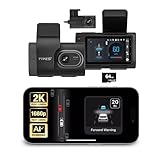
- Full Coverage, Front and Rear - The TYPE S T200 PLUS showcases a 2K 1440p front-facing dashcam and an optional 1080p rear camera. This configuration empowers you to capture both the front and rear perspectives of your vehicle while driving, greatly enhancing safety. This comprehensive coverage can provide crucial evidence in the unfortunate event of accidents.
- Minimize the Blind Spots - The TYPE S AI dash cam incorporates a crucial Blind Spot Warning feature to improve road safety. This system actively monitors the vehicle's blind spots, alerting the driver to the presence of other vehicles in these hard-to-see areas. Using visual or audible signals, the dashcam provides timely warnings, prompting the driver to exercise caution during lane changes or maneuvers.
- Front & Rear Collision Warning - The TYPE S ADAS dash cam features Front & Rear Collision Warning, a smart system that alerts you when you're too close to the car in front or if a vehicle behind is approaching too quickly. Using advanced driver assistance algorithms, it provides real-time warnings, enabling quick responses and enhancing overall road safety.
- Lane Departure Warning - The Lane Departure Warning built-into the TYPE S AI Dashcam uses AI triggered advanced sensors to monitor your vehicle's lane position. If any deviation is detected, it issues a prompt alert, enhancing driving safety by notifying you of deviations and potentially preventing lane-related incidents.
- Stop & Go Reminder - Stay vigilant at traffic stops as the 1440p AI dash cam by TYPE S recognizes when the car ahead starts moving while you're still. Our intelligent reminder keeps you on track, gently prompting you to get moving and prevent any traffic disruptions
The practical question is whether your own routes are included. A large national total does not guarantee coverage on a particular rural connector, recently rebuilt highway or route across a border. Map availability can also change, so check the live compatibility information for the vehicle and trip you intend to make.
Important limits around obstacles
Chevrolet says Super Cruise cannot steer around objects and cannot replace the driver’s responsibility to be attentive and ready to take control at any time. It is assistance for compatible roads, not a system that independently handles every hazard. Be prepared to steer or brake when traffic, debris, construction equipment or an unusual road layout exceeds what the system can manage.
All three fit the Level 2 driver-assistance model
The National Highway Traffic Safety Administration describes Level 2 as a system that provides continuous assistance with both acceleration/braking and steering while the driver remains fully engaged and attentive. The driver remains responsible for driving. This framework applies even when a system permits hands-free operation on a qualifying road.
NHTSA also warns against using “self-driving” as a casual description of higher automation because the phrase can suggest that a driver needs to do less than the system actually permits. Product names therefore should not be used as a safety classification. Tesla’s “Full Self-Driving (Supervised),” Ford’s “hands-free” terminology and GM’s “Super Cruise” branding all require you to read the operating instructions and observe the road.
Do these 3 things before closing this tab:
1Scan for outdated or missing drivers - takes under a minute2Clear out junk files and repair common Windows errors3Fix the driver behind crashes, sound loss and screen glitchesOperating boundaries: the comparison that matters most
| Boundary | Tesla FSD (Supervised) | Ford BlueCruise | GM Super Cruise |
|---|---|---|---|
| Road scope | Attempts destination-oriented driving across more road situations, subject to regional, hardware, software, map, marking and weather limits. | Prequalified highway sections called Blue Zones for hands-free operation. | GM-mapped compatible roads; Chevrolet currently cites more than 600,000 miles. |
| Intersections and turns | Manual describes negotiating intersections and roundabouts and making turns; it warns that behavior can appear inconsistent. | Primary hands-free domain is qualifying highways; exact lane-change behavior varies by version and vehicle. | Use is tied to mapped roads; the driver must handle conditions the system cannot manage. |
| Obstacle handling | Intervention may be needed around construction, narrow roads and complex situations. | Remain responsible for monitoring the road and taking control when conditions exceed the system’s limits. | Cannot steer around objects and is not a crash-avoidance system. |
| Driver monitoring | Cabin-camera attentiveness monitoring with escalating warnings. | Hands-free operation still requires the driver to attend to the road; exact prompts depend on the vehicle and software. | Driver must remain attentive and ready to take control. |
When can you use Super Cruise?
You can use it only when the vehicle is eligible, the current software and map data support the function, and you are on a compatible mapped road under conditions the system accepts. A hands-free indicator or equivalent in-vehicle confirmation means the assistance is available in that situation; it does not authorize you to stop supervising.
- Confirm vehicle eligibility. Check the exact model, model year, trim, installed hardware and regional availability in the owner’s information.
- Check the route. Verify that the roads you plan to use are in GM’s current compatible-road network. Do not rely solely on a national mileage headline.
- Prepare the vehicle. Keep the relevant sensors and cameras clean and unobstructed, and install manufacturer-approved software updates when available.
- Engage only after the system indicates availability. If the road, weather, markings or map data are outside the operating domain, keep driving manually.
- Continue monitoring. Watch traffic, lane changes, signs, roadworks and objects. Be ready to steer or brake immediately.
- Respond to every takeover request. If an alert appears, resume control promptly. Do not test the system by delaying your response.
How to compare BlueCruise software versions
Ford’s own descriptions make software version a buying and safety variable. Use this checklist rather than assuming every BlueCruise vehicle has the newest behavior:
- Record the vehicle’s exact model year, trim and configuration.
- Open the vehicle’s software or system-information screen and note the installed BlueCruise version.
- Match that version to Ford’s current feature and eligibility information.
- Check whether in-lane repositioning, lane-change assistance or automatic lane change is listed for that specific vehicle and version.
- Confirm which functions work only in Blue Zones and what happens when the vehicle leaves one.
- Ask whether a software update is available, whether the hardware supports it and whether any subscription or regional condition applies.
Version labels can change as Ford revises the software. Treat a dealer listing, online video or feature shown on another model as an example, not proof that your vehicle has the same capability.
Driver monitoring and takeover behavior
Tesla
Tesla uses a cabin camera to assess attentiveness and escalates warnings when attention is inadequate. Keep your eyes and attention on the driving task, maintain a clear view of the road and be prepared for an immediate intervention request. Camera obstruction or unusual seating and lighting conditions can affect monitoring.
Windows Errors? Fix Them Before They Spread
Repair common Windows errors and clear accumulated junk for a smoother, more stable PC - no reinstall needed.Free scan · no reinstallOutdated Drivers Are Slowing You Down
One free scan finds every outdated or missing driver and matches the right update for your exact hardware.Free scan · exact hardware matchFord
BlueCruise’s hands-free capability does not transfer responsibility to the vehicle. The driver must continue watching the road and be ready to take over when the system leaves its supported domain, encounters an unusual condition or issues a prompt.
GM
Super Cruise likewise requires an attentive driver. Chevrolet’s support language says it cannot drive the vehicle or replace your responsibility to be attentive and ready to take control at any time. Hands-free steering is not permission to read, sleep, use a phone or supervise another activity.
What happens outside normal conditions?
Plan for a handoff whenever the road stops resembling the conditions the system was designed and mapped to handle. Common triggers include:
- Construction zones, temporary barriers or shifted lanes.
- Blocked, dirty or poorly positioned cameras and sensors.
- Faded, missing or conflicting lane markings.
- Heavy rain, snow, fog, glare or other weather that reduces visibility.
- Objects in the lane, stopped traffic or an obstacle the system cannot route around.
- Complex intersections, unusual roundabouts or narrow roads.
- Out-of-date map data or a road recently changed by maintenance.
The correct response is to take control smoothly, increase following distance and continue manually until the road and system status clearly return to an acceptable operating condition. If a warning persists, end the assistance session rather than repeatedly attempting to re-engage it.
Vehicle, hardware and software eligibility
Eligibility is not universal within any of the three product families. Check all of the following before purchase or use:
- Model and model year: manufacturers may enable different functions on different generations.
- Trim and configuration: installed cameras, sensors, computing hardware and steering or braking equipment can differ.
- Region: legal availability, maps and feature rollout can vary by country or market.
- Software version: updates can add, change or restrict functions.
- Road data: Blue Zones and mapped compatible roads are not interchangeable terms; each manufacturer defines its own coverage.
- Current vehicle condition: dirty sensors, blocked cameras, damaged glass or warning lights can prevent assistance or reduce its reliability.
Ask for the vehicle identification details and the current owner’s manual, then verify the feature in the manufacturer’s live documentation. A generic model name is insufficient.
Rank #4

- Universal Fit for Most 12V Vehicles-Designed for sedans, SUVs, and pickup trucks with DC 12V power systems. Professional installation is recommended. Includes an installation manual and radar angle alignment tool for accurate setup and optimal detection performance
- 24GHz Millimeter Wave Radar Detection-Built-in dual 24GHz millimeter wave radar sensors provide stable blind spot monitoring with a detection range of 1–32.8 ft (0.3–10 m). When a moving vehicle approaches from the side or rear blind zone, the LED warning indicator activates automatically
- Multi-Mode Blind Spot Warning Alerts-The system provides real-time alerts based on driving conditions for safer lane changes: 1.Turn signal OFF – the corresponding LED warning light stays illuminated when a vehicle enters the blind spot zone 2.Turn signal ON – the corresponding LED flashes and the buzzer sounds 3 warning beeps during lane changes 3. Hazard lights ON – the LED flashes continuously and the buzzer sounds 3 times for increased driver awareness
- Professional Installation Required-Radar sensors cannot penetrate metal surfaces. Please read the installation manual carefully before installation. Proper sensor mounting position, angle, height, and wiring are essential for accurate blind spot monitoring performance
- Enhanced Driving Safety in All Conditions-Improves driving awareness by monitoring vehicles approaching from rear and side blind spots. Effective during lane changes and in low-visibility conditions such as nighttime driving, rain, snow, or fog
Safety evidence: what is and is not established
The available official material supports a responsibility framework and a capability comparison, not a ranked safety result. Tesla, Ford and GM describe their own systems under different conditions, with different eligible vehicles, maps and software. Those descriptions cannot be converted into a common crash rate, disengagement rate or reliability score.
NHTSA’s November 5, 2024 preliminary evaluation document discusses Tesla Full Self-Driving (Supervised) communications and examples that the agency considered inconsistent with supervision cautions while also noting Tesla disclaimers. It is an investigative document describing concerns and evidence, not a final defect determination and not a controlled comparison with BlueCruise or Super Cruise.
No matched, current three-system test is established here. Be skeptical of a simple claim that one product is “the safest” unless the claim identifies the same vehicles, roads, weather, software versions, exposure and independent test method for all systems.
A practical decision framework
Choose based on route coverage first
If most of your driving is on highways that appear in Ford’s Blue Zones or GM’s mapped network, a highway-focused system may cover your routine with fewer out-of-domain transitions. If you want assistance that attempts destination navigation, turns and intersections, Tesla’s stated task scope is broader, but it also demands close supervision across a wider variety of situations.
Choose based on your tolerance for supervision
All three require attention. The differences are in how they monitor you, where they can operate and how often the system may ask you to intervene. A driver who prefers a tightly bounded highway function may value predictable road limits; a driver seeking route-level assistance may accept more varied behavior in exchange for broader task coverage.
Choose based on the exact vehicle, not the badge
Compare the specific model, hardware, software version, map coverage and region. Two vehicles carrying the same system name can have different functions, and an update advertised for a newer vehicle may not be available on an earlier one.
Choose based on failure handling
Read the manual’s instructions for camera blockage, weather, construction, map gaps and takeover alerts. The best fit is the system whose limits you understand and whose handoff behavior you can manage calmly on your normal roads.
Questions to ask before relying on any system
- Which exact roads near my home and workplace are supported today?
- What hardware and software version does this vehicle have?
- What driver-monitoring method is used, and what warnings appear before assistance disengages?
- How does the system behave at construction zones, blocked cameras, poor markings and obstacles?
- What functions remain available outside a Blue Zone or mapped compatible road?
- How often does the manufacturer update maps and software, and can updates change feature availability?
- What does the owner’s manual require me to do after a takeover prompt?
Bottom line
Tesla Full Self-Driving (Supervised) is described as destination-oriented assistance that attempts more types of roadway tasks, while Ford BlueCruise and GM Super Cruise focus on hands-free assistance within defined highway networks. The broader description does not prove superior safety, and a hands-free function does not make a vehicle autonomous. Compare the roads you actually drive, the exact vehicle and software version, the driver-monitoring demands and the system’s behavior when conditions exceed its limits. On the evidence available, there is no defensible overall winner—only a system that may fit your routes and supervision habits better than another.
Quick Recap
Product prices and availability are accurate as of the date/time indicated and are subject to change. Any price and availability information displayed on Amazon at the time of purchase will apply.

