The best Steam Machine alternative for 1440p gaming depends on whether you value turnkey simplicity, the smallest possible enclosure, or higher graphics headroom. A ready-built mini PC such as the Minisforum AtomMan G1 Pro is the easiest compact option and has published 1440p results in selected games. A small-form-factor desktop with a discrete Radeon RX 9060 XT can deliver substantially more graphics performance and allow future GPU upgrades, but it is larger and requires more setup. An integrated-graphics mini PC such as the Minisforum Venus UM790 Pro is better treated as a lower-cost, lighter-gaming choice centered on 1080p.
None of these labels guarantees a fixed frame rate in every current game. Resolution, quality preset, ray tracing, upscaling and frame generation change the result, so use the measured examples below as game-specific evidence rather than a universal promise.
As an Amazon Associate I earn from qualifying purchases.
At a glance: which alternative fits your 1440p setup?
| Path | Example | Physical size in the cited coverage | 1440p evidence | Main trade-off |
|---|---|---|---|---|
| Ready-built gaming mini PC | Minisforum AtomMan G1 Pro with a low-profile RTX 5060 | 3.8 liters, according to PC Gamer’s 2026 guide | 59 average FPS (42 FPS 1% low) in Baldur’s Gate 3 at Ultra 1440p; 52 average FPS (36 FPS 1% low) in Metro Exodus Enhanced at Ultra 1440p | Very small and simple, but demanding games may require reduced settings or upscaling; verify the exact SKU and price |
| Small-form-factor desktop | LDLC PC Box example with an AMD Radeon RX 9060 XT | 11.5 liters in TechRadar’s cited example | TechRadar describes substantially more graphics performance than the Steam Machine; no matching FPS figures are provided | More assembly or configuration, a larger enclosure and more attention to heat and noise; discrete graphics can be replaced later |
| Integrated-graphics mini PC | Minisforum Venus UM790 Pro | Not stated in the cited evidence | PC Gamer positions it around playable 1080p gaming, not as its principal general-purpose 1440p recommendation | Lower-cost, compact route for lighter games, but it is not equivalent to a discrete-GPU system for demanding 1440p titles |
The comparison examples and measurements come from PC Gamer’s mini-PC guide, updated September 30, 2026, and TechRadar’s LDLC compact-build coverage. They are not a head-to-head test of every configuration.
What’s actually slowing this PC down?
Pick the symptom - the matching free tool is one click away.
What “1440p capable” should mean in practice
1440p is a display output of 2,560 by 1,440 pixels. A PC can output that resolution while rendering internally at a lower resolution through an upscaler, so “1440p” alone does not tell you the workload the GPU handled. Native 1440p renders every frame at the target resolution; quality upscaling reconstructs a 1440p image from a lower internal render and can improve performance; frame generation creates additional displayed frames but does not make the underlying game simulation run at the same rate.
#1 Best Overall
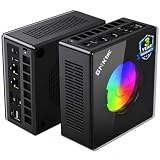
- AMD Ryzen 9 8945HS Processor - GMKtec K11 mini pc equipped with the AMD Ryzen 9 8945HS CPU, featuring 8 cores, 16 threads, and boost up to 5.4 GHz. It offers superior multitasking performance for demanding tasks like gaming and content creation, with energy-efficient power management at 35W TDP (upgradable to 70W)
- 32GB DDR5 + 1TB PCIe 4.0 SSD - GMKtec K11 mini computers comes with 32GB(dual-channel) DDR5 RAM at 5600 MT/s , which can be expanded to 128GB and 1TB PCIe 4.0 M.2 2280 SSD supports dual PCIe Gen4 x4 SSD slots expanded up to 8TB, ensures lightning-fast read/write speeds
- WHY CHOOSE DDR5 5600MHz DUAL CHANNEL (2×16GB) - With a 5600MHz clock—a 17% frequency uplift over 4800MHz—this kit delivers massive bandwidth gains that elevate real-world performance. Gamers enjoy higher minimum FPS and less stutter in open-world and sim titles for a smoother competitive experience. Video editors and 3D creators benefit from faster 4K/8K timeline scrubbing, quicker renders in DaVinci Resolve and Premiere, and swifter asset loading. For AI/LLM workloads, the superior throughput reduces I/O bottlenecks, cuts token generation latency, and accelerates model fine-tuning by keeping processing cores fed with data—so you wait less and create more.
- Oculink Port - The Oculink port enables higher bandwidth capabilities, better frame rates and lower lag. The standard also operates at PCIe x4 speeds, compared to Thunderbolt's x3. Gamers and content creators can benefit from Oculink's higher bandwidth, resulting in better performance and lower lag for eGPU setups
- 4-Screen 4K Display Support - K11 mini pc supports simultaneous 4K display output on 4 screens via HDMI 2.1 (4K@60Hz), DisplayPort 2.1 (4K@60Hz), and USB4 (up to 40Gb/s). Ideal for multitasking, it provides an immersive experience for professional work, gaming, and entertainment
Settings matter just as much. Ultra presets often use higher-quality shadows, reflections, textures and effects than High or Medium. Ray tracing can reduce frame rate sharply, while turning it off or selecting a balanced upscaling mode can make a small PC feel much faster. A result from one title cannot establish performance in another title with a different engine or graphics workload.
- Native 1440p: the clearest test of raw rendering performance, but usually the most demanding.
- 1440p with upscaling: often the practical target on compact hardware; record the upscaler mode when comparing results.
- Ray tracing: an optional quality feature with a substantial performance cost in some games.
- Frame generation: can raise displayed FPS, but latency and image quality depend on the game and implementation. A benchmark with frame generation disabled is not directly comparable with one that enables it.
Before buying, write down the games you actually play, the display’s refresh rate and whether you prefer higher image quality or a steadier frame rate. “1440p at 60 FPS” is a different requirement from “1440p output that stays responsive near 40 FPS,” and both differ from competitive play at 120 Hz.
Use the Steam Machine as a baseline, not a guarantee
Valve describes the Steam Machine as a SteamOS living-room PC with a semi-custom AMD CPU and GPU. Its official product page warns that some specifications may change before availability. Stock, regional configurations and final specifications therefore need to be checked on the live page rather than assumed from an early announcement.
The Tool Desk
Outbyte Driver Updater FREEFix the driver behind crashes, sound loss and screen glitchesFind Drivers →Outbyte PC Repair FREEClear out junk files and repair common Windows errorsFree Scan →PC Gamer’s 2026 review lists a Zen 4 six-core, twelve-thread processor, RDNA 3 graphics with 8 GB of GDDR6 memory and two storage-capacity options. In its tested configuration, Cyberpunk 2077 averaged 28 FPS at 1440p Medium with ray tracing enabled, Quality FSR enabled and frame generation disabled. That is a specific result for one game and one configuration; it is not a claim that every Steam Machine game will run at 28 FPS or that 1440p High is guaranteed.
The baseline is useful because it illustrates the compromises of a fixed, living-room-oriented design. A turnkey SteamOS experience reduces setup work, while a Windows mini PC or a self-built desktop may expose more driver, launcher and configuration decisions. The alternatives below trade some of that simplicity for different sizes, operating-system preferences or upgrade paths.
Option 1: AtomMan G1 Pro for the smallest ready-built route
What it is
The AtomMan G1 Pro is the strongest ready-built compact fit in the cited evidence. PC Gamer’s guide describes a 3.8-liter chassis and a low-profile RTX 5060. That volume is small enough for a shelf, media cabinet or desk where a conventional tower would be awkward, although you still need to leave room for ventilation and access to ports.
What the published tests show
PC Gamer reports 59 FPS on average with a 42 FPS 1% low in Baldur’s Gate 3 at Ultra 1440p. In Metro Exodus Enhanced at Ultra 1440p, it reports 52 FPS on average and a 36 FPS 1% low. The 1% low figure indicates the slower moments in the run and is often more useful for judging smoothness than the average alone.
Recommended Free Tools
Those measurements demonstrate that the machine can deliver playable 1440p gaming in the tested configurations. They do not establish native rendering, the behavior of every current AAA release or a guaranteed 60 FPS target across your library. The guide’s exact test settings and the machine’s installed memory and storage should be checked before purchase because regional SKUs can differ.
Who should choose it
- Choose it when you want a prebuilt system with minimal assembly and a genuinely small enclosure.
- Choose it when your games resemble the tested workloads and you are comfortable lowering a preset or enabling an upscaler in heavier titles.
- Choose another path if you expect to replace the graphics card later, because the compact, low-profile design is built around its supplied GPU rather than a normal desktop upgrade cycle.
Checks before ordering
- Confirm the exact processor, graphics card, memory and SSD configuration on the seller’s live listing.
- Check whether the operating system and license match your preferred launchers and controller setup.
- Measure the available shelf space, including clearance around the intake and exhaust openings.
- Compare the complete current price, shipping, warranty and return terms for your region; PC Gamer’s reviewed price is historical evidence, not a permanent quote.
Option 2: an RX 9060 XT small-form-factor desktop for more headroom
Why a discrete-GPU build changes the decision
A desktop built around a full discrete graphics card can devote more power and cooling capacity to rendering than an ultra-compact integrated or low-profile design. TechRadar’s cited LDLC PC Box example uses an AMD Radeon RX 9060 XT and is described as offering substantially more graphics performance than the Steam Machine. The article presents the example at the same price as the Steam Machine, but it does not provide a price figure that can be safely generalized across regions or dates.
The RX 9060 XT is a component recommendation, not a standalone console. You need a compatible motherboard, processor, memory, storage, power supply, cooling solution and case. The cited PC Box occupies 11.5 liters, about three times the 3.8-liter volume quoted for the AtomMan G1 Pro, so it is still compact but not in the same ultra-small class.
Rank #2

- Built to Conquer. Ready to Rule: Powered by the AMD Ryzen 9000 Series processor, ROG GR70 delivers elite-tier gaming performance once reserved for bulky desktops—now in a compact form that answers your call for more power, less space.
- Every Frame. Every Kill—Faster: Paired with NVIDIA GeForce RTX 50-Series mobile GPU, ROG GR70 ensures ultra-smooth gameplay with high FPS and low latency. Dominate every match with lightning-fast reflexes and no dropped frames.
- Always Connected. Always Ahead: Featuring Wi-Fi 7 with certified Bluetooth 5.4, ROG GR70 is built to eliminate bottlenecks and get you ahead—whether you're online, syncing gear, or booting into the next match.
- Cool. Quiet. Ruthless: Advanced thermal design with custom cooling system keeps temperatures down and acoustics low—even under intense loads. It’s deadly silent and deadly fast.
- Mini Size. Mega Impact: ROG GR70 fits power and aesthetics into an ultra-compact, silver-hued chassis. It’s desk-friendly, travel-ready, and designed to stun—without compromising what's under the hood.
What the evidence does and does not prove
“Substantially more graphics performance” is a relative description from TechRadar, not a supplied FPS table. Do not convert it into a specific 1440p frame-rate promise. The useful conclusion is that the discrete card gives a larger performance buffer and a conventional upgrade path; the actual result depends on the processor, power limits, drivers, game settings and cooling in the finished system.
Outdated Drivers Are Slowing You Down
One free scan finds every outdated or missing driver and matches the right update for your exact hardware.Free scan · exact hardware matchPC Slower Than It Used to Be?
A free scan shows the junk files, broken settings and background clutter dragging Windows down - then fixes them in one click.Free scan · Windows 10 & 11Setup and living-room compromises
A small-form-factor desktop demands more decisions than a turnkey SteamOS appliance. You may need to assemble components, install an operating system, update firmware and drivers, set fan behavior and verify that the selected graphics card physically fits the case. Even a retailer-built system can require more initial configuration than a ready-to-play mini PC.
Thermals and acoustics deserve special attention in a living room. A compact case has less internal volume for airflow, and a high-power GPU can make fan noise more noticeable during long sessions. Check independent measurements for the exact case and card combination when available, and avoid placing the system in an enclosed cabinet.
Who should choose it
- Choose the RX 9060 XT route when demanding games, higher settings or a future GPU replacement matter more than the smallest footprint.
- Choose it when you are comfortable with Windows or another desktop operating system and with troubleshooting component compatibility.
- Choose a ready-built mini PC instead when you want the fewest installation decisions and do not plan to upgrade the graphics card.
Option 3: an integrated-graphics mini PC for lighter gaming
The Minisforum Venus UM790 Pro represents a different priority: low cost and compactness rather than maximum 1440p throughput. PC Gamer frames it around playable 1080p gaming. The cited evidence does not establish it as a strong general 1440p recommendation, so it should not be presented as equivalent to the AtomMan G1 Pro or an RX 9060 XT desktop.
An integrated-graphics system can make sense for esports games, older titles, indie releases, emulation workloads that fit its capabilities, streaming and general desktop use. For a 1440p monitor, you can still set the desktop output to 1440p while rendering games at 1080p or a lower internal resolution, but image sharpness and frame rate will vary by title.
Free tools Windows power users keep installed
One-click scans. No signup required.
Pick this category when your budget and physical-space limits are strict and your game library is demonstrably light. If modern, visually demanding games are the main reason for the purchase, the money saved on the mini PC may be offset by having to use low settings or a lower resolution more often.
Decision guide by priority
You want the smallest practical box
Start with the 3.8-liter AtomMan G1 Pro class. Verify ventilation clearance and accept that some demanding games will need settings changes. Its published 1440p results are encouraging for selected titles but should not be read as an across-the-board Ultra guarantee.
You want the strongest graphics and an upgrade path
Use the 11.5-liter RX 9060 XT small-form-factor direction. Confirm the case, power supply and cooling can support the card, and budget time for operating-system and driver setup. The larger enclosure is the price of more graphics headroom and a replaceable desktop GPU.
You mostly play lighter games or need the lowest entry cost
Consider an integrated-graphics mini PC such as the Venus UM790 Pro, with 1080p as the evidence-supported target. Do not buy it expecting the same 1440p experience as a discrete-GPU machine.
You want a console-like living-room experience
Give extra weight to the operating system, controller support, suspend and resume behavior, automatic updates and launcher compatibility. SteamOS can reduce desktop maintenance, while a Windows-based alternative may offer broader launcher support but more setup. Confirm the supplied OS and your preferred game stores before paying.
Rank #3

- Office Gaming Mini PC - UPGRADED GMKtec Nucbox M5 Ultra Series is equipped with the powerful AMD Ryzen 7 7730U processor, 8 Cores/16 Threads, Base 2.00GHz (Power Saving Quiet Mode) with Turbo Boost up to 4.50GHz (Performance Mode) in BIOS settings, Based on the ZEN 3+ architecture, this small but powerful mini pc delivers satisfying results in productivity, office work, and gaming. 35% Performance increase over AMD Ryzen 5 7430U/ Ryzen 7 5700U, 5600U, 5560U, 5500U.
- 16GB DDR4 RAM & 256GB PCIe SSD - Installed with DDR4 16GB RAM (1x16GB), the Nucbox M5 Ultra mini pc support expansion to 64GB RAM. Featured with 256GB M.2 2280 PCIe 3.0 SSD, support dual slot expansion to 4TB SSD. (Upgrades not included)
- DUAL NIC LAN 2.5G RJ45 - Fast Network Speeds: Enjoy up to 2500Mbps data transmission speed without worrying about lagging. Ideal for working, gaming, and surfing the internet. Great for Untangle, Pfsense or as a server office PC.
- Mini Desktop Computer with 4K Triple Screen Display - Nucbox M5 Ultra integrates AMD Radeon Graphics 8 Cores 2000 MHz GPU to deliver powerful graphics processing power to easily handle the demands of complex design software, 4K@60Hz UHD video editing, and playback. It can connect to 3 display screens simultaneously.
- Fast Internet WiFi 6E + BT5.2 Connection - GMKtec Mini PC with WiFi-6E Wireless, have 2.5G/5G/6G triple band, more faster and lower latency. Bluetooth 5.2 allowing you more quickly to connect other wireless devices (headset, mouse, keyboard, etc.) Interface features 2*USB3.2 ports, 2*USB2.0 ports, 1*HDMI 2.0 port(4K@60Hz), 1*USB-C port(PD/DP/DATA), 1*DP Port, 1*Audio 3.5mm (HP&MIC), 1*DC Power Port.
A practical buying checklist
- List the games and targets. Record each game, desired resolution, quality preset, ray-tracing preference and minimum acceptable frame rate.
- Separate native from reconstructed output. When reading a benchmark, note whether it used native 1440p, an upscaler, ray tracing or frame generation.
- Match the test to your library. The AtomMan figures come from Baldur’s Gate 3 and Metro Exodus Enhanced; they cannot predict every engine.
- Measure the room. Compare case volume, width, height, depth and ventilation clearance rather than relying on a “mini” label.
- Choose your setup tolerance. Decide whether you want a ready-built machine or are willing to install an operating system, drivers and game launchers.
- Price the complete system. Include memory, storage, operating-system licensing, accessories, shipping and taxes. A component price is not the price of a working living-room PC.
- Check upgrade limits. Find out whether memory and storage are replaceable and whether the case and power supply can accept a future GPU.
- Recheck availability. Product stock, regional SKUs and specifications change; use the manufacturer or retailer’s live listing immediately before ordering.
How to configure a compact PC for 1440p
Start with a repeatable baseline
Install the current graphics driver for the exact GPU, select the monitor’s native 2,560 × 1,440 mode and begin with the game’s High preset rather than assuming Ultra is appropriate. Disable frame generation for your first comparison so that the underlying rendering performance is clear. Record the average and 1% low over the same scene or built-in benchmark.
Use upscaling deliberately
If native 1440p is below your target, enable the game’s quality-oriented upscaling mode and compare image quality in motion. Move to a balanced mode only when the quality mode does not meet your frame-rate goal. Lowering shadows, volumetric effects and ray tracing often preserves more visible detail than dropping the entire preset.
Check sustained behavior
Compact systems can perform well in a short benchmark and slow down after heat builds up. Test a demanding section for at least the length of a normal play session, watch for clock-speed drops or sudden fan surges, and keep the vents clear. If temperatures or noise are unacceptable, reduce power or graphics settings before assuming the hardware is defective.
Common mistakes and fixes
Mistake: treating an average FPS number as a guarantee
Fix: Read the game name, resolution, preset, ray-tracing state, upscaler and frame-generation state attached to the number. Use 1% lows to judge dips and seek results for games you actually play.
Mistake: confusing output resolution with render resolution
Fix: Check the game’s internal-resolution or upscaling setting. A 1440p monitor signal may contain an image rendered internally at 1080p or lower.
Mistake: buying an integrated mini PC for a demanding AAA library
Fix: Treat the Venus UM790 Pro evidence as 1080p-focused. Move to a discrete-GPU system if high visual settings at 1440p are a primary requirement.
Mistake: overlooking case airflow
Fix: Measure clearance, keep intake and exhaust unobstructed and account for sustained noise. An 11.5-liter desktop and a 3.8-liter mini PC have different cooling constraints even when both are marketed as compact.
Mistake: assuming every regional SKU is identical
Fix: Confirm the installed GPU, memory, storage, operating system, wireless hardware and warranty on the listing for your country. Do not rely on a review unit’s configuration when ordering a different SKU.
Bottom line for a 1440p living-room PC
For the simplest compact purchase, the AtomMan G1 Pro is the evidence-backed starting point: its 3.8-liter enclosure and the published 1440p results in two demanding games make it a credible mini-PC option, provided you accept game-by-game settings decisions. For the most graphics headroom and a replaceable GPU, the RX 9060 XT small-form-factor desktop is the stronger direction, with the cited 11.5-liter LDLC build illustrating the size and setup cost. For inexpensive, lighter gaming, an integrated-graphics mini PC can be sensible, but the available evidence supports 1080p rather than a blanket 1440p recommendation.
Whichever route you choose, verify the live specification and total regional price, then compare benchmarks that match your games and settings. That process is more reliable than treating “1440p ready” as a fixed performance class.
Quick Recap
Product prices and availability are accurate as of the date/time indicated and are subject to change. Any price and availability information displayed on Amazon at the time of purchase will apply.
Quick wins for a faster PC:
Fix the driver behind crashes, sound loss and screen glitchesFind Drivers →Clear out junk files and repair common Windows errorsFree Scan →Scan for outdated or missing drivers - takes under a minuteDriver Scan →
