What’s actually slowing this PC down?
Pick the symptom - the matching free tool is one click away.
Choose a sunrise alarm when you want a gradual light cue leading up to a fixed wake time. Choose a smart alarm when a particular connected function—such as app scheduling or integrations—solves a real problem in your routine. Neither category has been shown by the available evidence to produce better sleep overall. The practical choice is about the cue, controls and routine you will actually use, not a promise that one type treats poor sleep.
A sunrise alarm can start brightening the room before the alarm sounds. A smart alarm may offer connected controls or sleep-related data, but “smart” is not a consistent specification: features, phone requirements and measurement claims differ by model. Check the exact manual and privacy terms before buying.
As an Amazon Associate I earn from qualifying purchases.
The short decision rule
- Pick sunrise simulation if your main goal is a gentler, light-based lead-in to a known wake time, especially when a sudden sound leaves you groggy.
- Pick a smart alarm if you need a specific connected feature, such as schedules managed from a phone, home-automation control or data you can review, and you are comfortable with the required setup.
- Pick a conventional backup or a hybrid if reliability matters more than either category’s extra features. Confirm that the model has the alarm schedule, power behavior and audible backup you need.
These are feature decisions. There is no established independent head-to-head evidence showing that smart alarms or sunrise alarms improve sleep outcomes more than the other category.
What a sunrise alarm clock actually does
Gradual light before the alarm
A sunrise alarm is defined by a gradually increasing light cue before the selected wake time. On Philips’ HF3505/01, the sunrise simulation runs for 30 minutes and is followed by sound at the set alarm time. The light is intended to be noticed while you are still in bed; it does not depend on a phone notification.
#1 Best Overall

- Gentle Wake Up with Sunrise Alarm Clock: The sunrise simulation gradually brightens over a customizable 5-60 minutes before your set alarm time, aligning with your circadian rhythm for a peaceful, stress-free start to your day.
- Soothing Sound Machine for Better Sleep: Choose from 25 calming sounds, including white/pink/brown/blue noise and natural sounds like waves and rain. Set the sleep timer for a restful slumber.
- Immersive Bluetooth Audio: Stream music, podcasts, or audiobooks via Bluetooth. The 5W stereo speaker delivers clear sound quality, creating an immersive listening experience.
- 0-100% Dimmable Digital Clock & Night Light: Adjust the clock’s display to the perfect brightness with a full-range dimmer. The soft night light features 12 color options including a sunset light, perfect for reading or relaxing before bed.
- Personalize Your Wake-Up Experience: Customize your morning with 7 alarm sounds and adjustable volume. Choose from 3 wake-up modes: gentle light + sound, just the alarm, or sunrise light without sound for a natural wake-up experience.
Sound and light are separate choices
Many wake-up lights combine light with an audible alarm. The HF3505/01, for example, lists two natural sounds, ten light-intensity settings and a maximum of 200 lux. Those figures describe that model, not every sunrise clock. Other products may offer a shorter or longer ramp, different colors, a display that can be dimmed, or no sound at all.
Some include a sunset routine
Bedtime features are not implied by the word “sunrise.” Philips’ HF3650/60 is a separate example that adds a sunset simulation, with light gradually decreasing and optional sound. If a wind-down sequence matters to you, verify that the candidate model has it and check how the schedule is programmed.
What counts as a smart alarm clock
A category, not a single feature list
“Smart alarm” generally means an alarm with connected or software-controlled functions, but the label does not define a standard. One model may require an app and Wi-Fi; another may use Bluetooth or work mainly through physical controls. Some offer multiple schedules, integrations or data dashboards. Others simply let you change settings from a phone.
Do these 3 things before closing this tab:
1Repair Windows errors before they cause bigger problems2Fix the driver behind crashes, sound loss and screen glitches3Clear out junk files and repair common Windows errorsConnected does not mean clinically intelligent
A product can be smart in the engineering sense without accurately measuring sleep. If it claims to track sleep stages, readiness or recovery, treat those readings as consumer estimates. The American Academy of Sleep Medicine (AASM) says consumer sleep technologies lack sufficient validation against polysomnography, the clinical reference test, and cannot currently be used to diagnose or treat sleep disorders.
Phone and account dependence varies
Before choosing a connected alarm, establish whether the alarm still rings when the phone is off, the app is unavailable, Wi-Fi drops or an account is no longer supported. Also check whether schedules can be edited on the device itself. A phone-dependent alarm can be convenient, but it adds another failure point to a function you need every morning.
Side-by-side comparison
| Decision point | Sunrise alarm | Smart alarm |
|---|---|---|
| Primary wake cue | Light that increases gradually before a chosen time; sound may follow or accompany it. | Model-dependent; commonly sound, app controls or other connected cues. A gradual light is not guaranteed. |
| Example documented specification | Philips HF3505/01: 30-minute sunrise program, up to 200 lux, ten light intensities and two natural sounds. | No universal specification; verify the exact model’s cue, schedule and settings. |
| Controls | Often physical buttons, with features varying by model. | May include an app, Bluetooth, Wi-Fi, an account or physical controls; requirements vary. |
| Sleep tracking | Not inherent to the category. | May be advertised, but consumer measurements are not validated diagnostic tests according to the AASM. |
| Bedtime function | Some models add sunset dimming and optional sound; HF3650/60 is one example. | May offer routines or integrations, but the presence and behavior are model-specific. |
| Best reason to choose it | You want a predictable visual cue before a fixed wake time. | A particular connected control or data function is valuable enough to justify its complexity. |
What the evidence does—and does not—show
Evidence box: Philips summarizes studies in which wake-up lights were associated with better subjective waking quality and less sleep inertia. In the controlled laboratory study by Van de Werken and colleagues (2010), Philips reports that participants woke an average of two minutes earlier than with a sound-only alarm and felt more ready to wake. These are study results as summarized by the manufacturer, not proof that all sunrise alarms improve sleep or outperform smart alarms.
Rank #2

- 【Cut Jarring. Awaken Sunrise】Reacher sunrise alarm clock mimics the glow of natural light. Its sunrise simulation gently brightens your room from 1% to 100% over 5–60 minutes, easing you out of sleep like a soft morning breeze. Without harsh alarms — just a gentle wake up light that makes every morning feel calmer, brighter, and truly refreshing.
- 【Sleep Deeply with Soothing Sounds】26 gentle sleep sounds, like white noise, ocean waves, rain, wind - help block distractions, quiet your thoughts, and guide you into deep, restful sleep. A 5–180 min timer automatically turns off sound and night light, supporting a peaceful and personalized bedtime routine.
- 【0-100% Dimmable Clock & Night Light】With a full-range display dimmer, get your personal comfort clock brightness without disturbing your sleep at night. 8 different colors of the nightlight with adjustable brightness. Soft light for reading, no eye strain for kids and adults.
- 【Ease into Setup】Designed for simplicity, the clock features clearly labeled icons and a logical layout for easy one-handed use. Just a quick glance to get started. With a built-in battery, you’ll worry about losing your alarm, light, or sound settings—even if the power goes out.
- 【Stylish Wood Design for Decor】 You will love the aesthetic of this sunrise clock sound machine. Sleek, clean, and modern make it looks like a beautiful piece of wood furniture. Functionality and stylish appearance make it a perfect gift for your family, lovers, friends, and kids.
The AASM’s position statement, posted October 8, 2019, says consumer sleep technologies lack validation against polysomnography and cannot currently be used to diagnose or treat sleep disorders. Tracking may help a patient and clinician discuss patterns when interpreted alongside a clinical evaluation, but it is not a substitute for one.
Wake-up-light studies summarized by Philips
Philips cites Gimenez et al., “Effects of artificial dawn on subjective ratings of sleep inertia and dim light melatonin onset,” Chronobiology International 27, 1219–1241 (2010). Its summary describes two home-use sub-studies reporting improvements in subjective waking quality, energy, ease of rising, mood, productivity and social interactions, along with reduced sleep inertia.
It also cites Van de Werken et al., “Effects of artificial dawn on sleep inertia, skin temperature, and the awakening cortisol response,” Journal of Sleep Research 19, 425–435 (2010). The manufacturer describes this as a controlled laboratory study and gives the two-minute average difference in final awakening time versus a sound-only alarm.
A third citation is Fromm et al., “Evaluation of a dawn simulator in children and adolescents,” Biological Rhythm Research 42, 417–425 (2011). Philips summarizes a study of 103 pupils aged 7–18 and reports greater alertness and easier waking during the wake-up-light week than during their habitual routine.
How to interpret those findings
- The outcomes reported are mainly subjective waking experiences or short-term study measures, not evidence that a clock increases total sleep time.
- The cited work concerns artificial dawn or wake-up lights, not modern smart alarms as a class.
- The available material does not establish a current independent systematic review comparing the two categories.
- Manufacturer summaries are useful descriptions of the cited studies, but they should not be treated as independent clinical conclusions.
There is therefore no sound basis to say that either clock treats insomnia, prevents a sleep disorder or is clinically superior overall.
Recommended Free Tools
When a sunrise alarm is the better fit
You wake at a stable time
Light simulation works most predictably when you can set one target wake time and allow the ramp to run before it. If your schedule changes daily, confirm that the clock can store the schedules you need or be adjusted quickly without a phone.
Rank #3

- 【Full-Screen Sunrise Simulation for Heavy Sleepers】 This sunrise alarm clock mimics natural dawn, glowing from dark to full brightness within 10-60 minutes before your alarm. Its front full-screen panel delivers superior light coverage to gently wake deep sleepers without jarring jolts.
- 【Dual Alarms, Snooze & Auto-Sync】 Easily set separate Everyday, Weekday, or Weekend routines for your family. Features a custom 5-20 min snooze. Syncs automatically with your phone via Bluetooth for precision timekeeping—no tedious manual resetting.
- 【25 Natural Sleep Sounds & FM Radio】 Fall asleep to 25 natural sounds and white noises with a flexible 10-480 min sleep timer. Supports an L0 screen blackout mode for total darkness. Features a built-in 76-108 MHz FM radio with auto-scan to easily set radio stations as your alarm tone.
- 【Atmosphere Lights & 5W Bluetooth Speaker】 Experience 17 lighting effects (8 solid colors & 9 dynamic RGBs) with an immersive music-rhythm mode that flashes to the beat. The premium 5W speaker streams crisp, rich audio from your phone, upgrading the poor audio and rigid lighting common in older models.
- 【Intuitive Setup & Ideal Gift】 Designed with straightforward buttons for frustration-free operation out of the box. This aesthetic nightlight clock is functional bedroom decor and the ideal birthday or holiday gift for families, parents, and seniors.
Sudden sound is the problem
If a loud alarm feels abrupt, a gradually brightening room may provide an earlier visual cue. It will not work equally for everyone: heavy sleepers, people facing away from the lamp and anyone sleeping in a bright room may notice less contrast. Keep an audible cue available until you know the light is sufficient for you.
You prefer a device that works by itself
A sunrise clock with local buttons can be simpler than a connected device. That simplicity is useful in a guest room, a shared household or a bedroom where you do not want a phone nearby. Confirm that the specific model retains the alarm after a power interruption and that its display can be dimmed enough for your room.
When a smart alarm is the better fit
You have a concrete connected-use case
Choose smart features for a reason you can name: remotely changing an alarm, managing several schedules, integrating with another home device or reviewing a trend that you will discuss with a clinician. Do not buy the label alone. If you would set the alarm once and never use the app again, a simpler model may serve the same routine with fewer dependencies.
You accept setup and maintenance
Connected alarms can involve an app installation, account creation, permissions, firmware updates and Wi-Fi troubleshooting. Read the privacy policy and check whether core alarms run locally. Consider what happens if the manufacturer discontinues the app or changes account requirements.
You can separate convenience from diagnosis
A dashboard can help you notice that bedtime or wake time is inconsistent. It cannot establish sleep apnea, insomnia or another disorder. If the device reports a concerning pattern, use it as a prompt to describe your symptoms to a health professional, not as a diagnosis.
How to compare individual models before buying
1. Identify the actual wake cue
Write down whether you want gradual light, sound, vibration or a combination. For light, check the ramp duration, maximum brightness, color or color temperature and the position of the lamp relative to your pillow. A specification such as 200 lux on the HF3505/01 is meaningful only for that model and its stated measurement; it does not make every sunrise lamp equally bright.
Rank #4

- CLINICALLY PROVEN*: Philips wake-up lights are recommended by physicians and pharmacists for establishing a healthy sleep and wake routine**
- PERSONALIZATION: Simulated sunset and sunrise and choice of 5 different natural wake-up sounds
- SMART FEATURES: FM radio, tap snooze and automatic dimmable display
- MOOD AND ENERGY: proven to give you an easy and energetic wake-up and improve your mood in the morning***
- Can be used as a bedside reading lamp with 20 brightness settings.
2. Check control paths
Look for the exact buttons or menu path used to set the time, alarm, snooze and brightness. Then check app requirements: phone operating system, Bluetooth or Wi-Fi, account login and whether the alarm can be edited offline. A device that cannot be configured conveniently is a poor fit even if its feature list looks impressive.
Outdated Drivers Are Slowing You Down
One free scan finds every outdated or missing driver and matches the right update for your exact hardware.Free scan · exact hardware matchWindows Errors? Fix Them Before They Spread
Repair common Windows errors and clear accumulated junk for a smoother, more stable PC - no reinstall needed.Free scan · no reinstall3. Verify schedule flexibility
Check the number of alarm times, weekday or weekend options, stored profiles and whether a temporary alarm can be set without overwriting your regular schedule. The HF3505/01 lists one alarm time, so a household with different wake times would need to account for that limitation.
4. Separate light settings from display settings
Ask two different questions: how bright is the wake light, and how dark can the clock’s always-on display become? A strong sunrise simulation can still disturb sleep if the clock face glows all night. Look for independent controls for display dimming, sunrise brightness and sound volume.
5. Treat tracking claims cautiously
Determine what sensor produces a sleep estimate, where data is stored, how long it is retained and whether sharing is optional. Compare the claim with the AASM’s warning that consumer sleep technologies are not validated diagnostic or treatment tools. A sleep score should never replace clinical assessment.
6. Check bedtime features explicitly
If you want a wind-down routine, verify the presence of sunset dimming, sound choices, duration and whether the routine can be disabled on selected nights. HF3650/60 demonstrates that sunset simulation can be an added feature, but it should not be assumed on another sunrise or smart model.
Quick wins for a faster PC:
Repair Windows errors before they cause bigger problemsFix Now →Scan for outdated or missing drivers - takes under a minuteDriver Scan →Clear out junk files and repair common Windows errorsFree Scan →7. Plan for failure
Read the manual’s instructions for power loss, daylight-saving changes, software updates and reset procedures. Confirm whether there is a backup audible alarm, battery reserve or another independent alarm in the household. These details were not established for a specific smart-clock model here, so they must be checked on the model you are considering.
Best Value
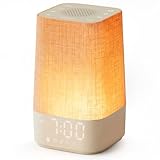
- 10–60 Min Gentle Sunrise Wake-Up: This sunrise alarm clock lets you set a 10–60 minute sunrise simulation, or use a 30-minute gradual transition from soft glow to full light. Designed for light sleepers and alarm-sensitive adults, its soothing lighting helps turn harsh morning wake-ups into a calming, peaceful morning routine while the gradual brightness encourages a more natural start to the day.
- Made for Bedroom Natural Wake-Up: Built for light sleepers, adults sensitive to loud alarms and working adults who dislike sudden beeping, this wake up light sunrise alarm clock combines gradual light, gentle alarm sounds and bedside comfort to help you wake more naturally. The soft lighting supports a peaceful morning, while the gentle transition helps your partner or family stay asleep whenever possible.
- Softer Than Basic Alarm Clocks: Unlike traditional alarm clocks that rely on sudden loud ringing or fixed brightness, this gentle alarm clock offers 13-level brightness control, 32-level volume adjustment and light-first wake-up to fit dark rooms, quiet bedrooms and sound-sensitive sleepers. Choose lighting that's bright enough for comfortable mornings or softer for a more calming wake-up experience. Designed to work great in different bedroom environments.
- 30 Sounds, Sleep Timer & Easy Controls: This white noise machine with clock includes 10 white noise sounds and 20 nature sounds, giving you a variety of sounds and many options for relaxing, sleeping or unwinding. It also features a 30–480 minute sleep timer, continuous play, memory function, snooze, 5-level display dimmer, backlit buttons and easy-to-use, highly functional controls for daily night and morning use.
- Gift-Ready Sunrise Alarm Clock: A practical bedroom gift for light sleepers, alarm-sensitive adults, office workers and anyone building a calmer sleep-wake routine. Use it as a sunrise wake up light, bedside night light, white noise sound machine and gentle alarm clock. Its stylish design looks great on a bedside table while delivering soothing lighting and reliable daily performance, backed by dependable customer support.
Setting up a sunrise routine
- Set the final wake time. Use the time you must be out of bed, not the time you hope to press snooze.
- Choose the ramp duration. Start with the manufacturer’s default or a 30-minute program such as the one documented for HF3505/01. Adjust only after observing several ordinary mornings.
- Position the light. Place it where the illuminated face is visible from the pillow without shining directly into another sleeper’s eyes.
- Select sound as a safety net. Use a gentle sound at the final alarm while you learn whether the light alone is noticeable enough.
- Dim the display separately. Keep the clock readable when needed but avoid unnecessary overnight glow.
- Review the result after a week. Note whether you woke before the sound, felt less groggy and still obtained enough time in bed. Do not infer a medical improvement from a single morning.
Setting up a smart-alarm routine
- Confirm connectivity before relying on it. Pair the device, complete account setup if required and test it with the phone disconnected or the network temporarily unavailable.
- Create the schedules you actually use. Set workdays, weekends and any rotating shifts. Verify which schedule is active on the device, not only in the app.
- Choose a primary and backup cue. If the model supports only a phone notification, keep an independent alarm until reliability is proven.
- Review permissions and data controls. Disable access that is not needed and learn how to delete or export sleep-related data.
- Test updates and power recovery. After a firmware update or outage, check the displayed time and the next alarm rather than assuming settings survived.
- Use measurements as context. Record how you feel and how consistent your schedule is; do not treat a score as a diagnosis.
Shared bedrooms, accessibility and household trade-offs
Partners with different schedules
A light ramp can wake a partner earlier than intended, while an app-controlled alarm may let one person manage a personal schedule. Check whether the light direction, brightness and sound can be limited to one side of the bed. If the model stores only one alarm, it may not suit two different wake times.
People who do not see the light clearly
Sunrise simulation is a visual cue. Anyone with limited light perception, an obstructed view of the clock or a room that remains bright may need sound or another cue as the primary alarm. Smart features do not automatically solve that issue; verify available sound, vibration or accessibility controls.
Children and adolescents
The Philips summary of Fromm et al. concerns 103 pupils aged 7–18, but it does not establish that every child will respond similarly or that a wake-up light treats a sleep problem. Parents should set age-appropriate schedules and seek medical advice for persistent difficulty waking, loud snoring or excessive daytime sleepiness.
Troubleshooting common disappointments
The light does not wake you
Check the ramp start time, brightness setting, lamp orientation and whether daylight already fills the room. Add sound, move the clock into your field of view and allow enough time in bed. If you still cannot wake reliably, use an independent alarm rather than continually increasing brightness.
The alarm feels too harsh
Lower the sound volume, choose a different tone and lengthen the light ramp if the model allows it. A sunrise cue is not required to replace sound entirely; combining a softer sound with earlier light may be more comfortable.
The smart alarm misses an alarm
Check power, time-zone settings, network status and whether the app shows the alarm as active on the device. Test local controls and establish a backup alarm. Do not rely on cloud connectivity for a safety-critical wake time until the manual confirms how offline alarms behave.
The sleep data looks alarming
First check for sensor fit, missing nights and changes in bedtime. Consumer estimates can be wrong and are not diagnostic. If symptoms such as persistent insomnia, gasping, loud snoring or severe daytime sleepiness are present, discuss them with a clinician instead of trying to self-treat with a clock.
The Tool Desk
Outbyte Driver Updater FREEFix the driver behind crashes, sound loss and screen glitchesFind Drivers →Outbyte PC Repair FREERepair Windows errors before they cause bigger problemsFix Now →When to ask a clinician instead of changing clocks
Seek professional advice for ongoing trouble falling or staying asleep, repeated inability to wake, loud snoring or breathing pauses, morning headaches, or daytime sleepiness that affects driving, work or school. The AASM states that consumer sleep technologies cannot currently diagnose or treat sleep disorders. They may provide context for a clinical conversation, but a sleep study or other evaluation should be chosen by a qualified professional.
A practical buying framework
- Name the problem. Is it an abrupt alarm, an inconsistent schedule, a need for remote control, or concern about sleep symptoms?
- Choose the least complex feature that solves it. A sunrise ramp addresses a light-cue preference; a smart function addresses a specific connected task.
- Verify the model, not the category. Check alarm count, ramp duration, brightness, sound, display dimming, connectivity, offline behavior and power recovery in the current manual.
- Keep an independent fallback. Especially during the first week, use a second alarm or household backup.
- Judge success by routine, not a score. Look for consistent wake times, enough time in bed and how rested you feel. Escalate persistent symptoms to a clinician.
For a reader who wants a clear recommendation, the sunrise option is the more direct match for a gradual light cue before a fixed wake time. The smart option wins only when its particular connected controls or data functions matter enough to justify their setup and limitations. The evidence does not justify claiming that either one is generally better for sleep.
Quick Recap
Product prices and availability are accurate as of the date/time indicated and are subject to change. Any price and availability information displayed on Amazon at the time of purchase will apply.

