Short answer: the Valve Index is no longer the sensible default for a new VR buyer, but it remains unusually good at the things enthusiasts notice most: off-ear spatial audio, hand-strapped finger-sensing controllers, high-refresh Lighthouse tracking and a mature SteamVR setup. Keep a working Index if those features are why you enjoy VR. Buy one only when a discounted or used kit is substantially cheaper than newer options and you specifically want its audio, controllers or tracking.
What changed after six years
Valve launched the Index in 2019 as a leading PC VR headset. Six years later, its tethered design, mounted base stations and aging optics make it harder to recommend at its original pricing. Road to VR concluded on March 17, 2025 that the Index was no longer worth its roughly $1,000 full-kit position for most people, even while praising its headphones.

As an Amazon Associate I earn from qualifying purchases.
Valve has now discontinued Index production and is clearing remaining stock, according to PC Gamer’s October 14, 2026 report. Steam and SteamVR support continues, so discontinuation does not make an existing headset unusable. It does mean buyers should treat the Index as a specialist or second-hand purchase rather than a current mainstream platform.
Recommended Free Tools
Why the Index still feels special
Off-ear speakers that do not seal your ears
The Index uses open-backed speaker drive units about 5 cm in diameter. They sit close to the ears instead of clamping over them, creating a spacious sound field while leaving the ears uncovered. Valve’s engineering explanation attributes the low perceived leakage to near-field placement and acoustic cancellation. The same design keeps your ears cooler and makes it easier to hear the room.
#1 Best Overall
“The listener wearing the headset has their ears so close to the drive unit (near-field) that the cancellation is not perceived as the pressure from the front side is RELATIVELY so much closer to the ear than the rear side.” — Tim Whitwell, CTO, Tectonic, in Valve’s Index ear-speaker engineering article
The microphone also streams at 48 kHz, which helps explain why voice chat remains a strength rather than an afterthought. Valve is preparing a Steam Frame audio and battery strap with hot-swappable batteries and balanced-mode-radiator drivers intended to match the Index speakers, but no launch date for that strap has been stated.
Controllers that stay on your hands
Index controllers wrap around the hands rather than requiring a constant grip. You can open your fingers without dropping them, while capacitive sensors detect individual finger positions. That makes grabbing, throwing and releasing feel more natural in games designed around hand presence. The controllers are still one of the clearest reasons an enthusiast might retain the Index ecosystem.
Crashes, No Sound, or Screen Glitches?
Random freezes, missing sound and display glitches usually trace back to one bad driver. Find and replace yours safely.Free scan · under a minutePC Slower Than It Used to Be?
A free scan shows the junk files, broken settings and background clutter dragging Windows down - then fixes them in one click.Free scan · Windows 10 & 11Rank #2

- VR Experience: Immerse yourself in virtual reality with the Valve Index VR headset, designed specifically for PC and SteamVR platforms for seamless gaming and interactive experiences
- Display Quality: Experience crystal-clear visuals with high-resolution displays and optimized optics that deliver stunning graphics and reduced screen-door effect
- Comfort Design: Ergonomically engineered headset with adjustable head strap and face gasket ensures comfortable extended wear during long gaming sessions
- PC Integration: Seamlessly connects with your PC to access SteamVR's extensive library of virtual reality games, applications, and experiences
- Renewed with CPS 1-Year Warranty for added hardware protection.
High-refresh Lighthouse tracking
The Index relies on SteamVR Lighthouse base stations. Once mounted and configured, that external tracking provides a mature, low-latency room-scale experience and supports the headset’s high-refresh modes. The cost is permanent hardware around the play space, additional setup and another potential component to replace.
Fit can matter more than the headline field of view
Valve’s own field-of-view guidance says that, in designs targeting more than 90 degrees, each millimeter of excess eye relief can reduce visible FOV by about three degrees. Facial geometry can change eye relief by plus or minus six millimeters. Your IPD, glasses, facial interface and dialed eye relief therefore determine the view you actually see; a specification comparison alone cannot predict comfort or immersion.
Where the Index has fallen behind
- Weight: about 809 g, compared with 515 g for a Quest 3 with its stock strap and 107 g for Bigscreen Beyond 2.
- Connection: it requires a cable to a gaming PC; there is no standalone mode or built-in wireless PC streaming.
- Tracking hardware: two mounted Lighthouse base stations are part of the practical setup.
- Optics and resolution: newer headsets offer clearer pancake lenses and higher-resolution displays, making the Index’s launch-era image quality easier to notice.
- System cost: the $499 headset-only list price never included the gaming PC or base stations. The complete setup was positioned at roughly $1,000 before counting a suitable computer.
That total-system burden is why a cheap-looking used headset can still become an expensive purchase. Check that the listing includes the cable, power supply and both controllers, then budget for functioning base stations and a PC capable of modern PC VR.
Rank #3
- HEADSET ONLY. (MAY NOT INCLUDE HEAD STRAP ADJUSTMENT PAD). Controllers and base station purchased seperately
- 5x IMPROVEMENT over first-generation PC VR HMDs.
Is the Valve Index still worth buying?
Buy or keep it when these conditions fit
- You already own Lighthouse base stations and Index controllers.
- The off-ear speakers, microphone and high-refresh feel matter more to you than wireless freedom.
- You primarily play SteamVR titles and have a powerful gaming PC with a convenient cable route.
- The used or clearance price is clearly below the cost of assembling a newer complete system.
Skip it when you want a simple first headset
- You want to play without a gaming PC, cables or mounted tracking hardware.
- You are sensitive to headset weight or want a sharper image through pancake lenses.
- You would be paying close to the old full-kit price for a product whose production has ended.
There is no representative six-year failure-rate study establishing how long every Index will last. Longevity is therefore a condition-and-support question: inspect the lenses, displays, cable, speakers, controllers and base stations individually, and remember that continued SteamVR support is not the same as new hardware production.
What’s actually slowing this PC down?
Pick the symptom - the matching free tool is one click away.
Should you replace a six-year-old Index?
Replace it if the cable, weight or optical clarity is now the problem you notice every session. Keep it if the experience you value is specifically the audio, controllers and Lighthouse tracking; replacing the headset alone can remove those advantages without improving every part of the experience.
Meta Quest 3: the practical all-round replacement
Quest 3 combines higher resolution, pancake lenses, inside-out tracking and standalone software. It can also stream SteamVR wirelessly through Steam Link. Road to VR recommends at least Wi-Fi 5 and ideally Wi-Fi 6 or Wi-Fi 6E for wireless PC VR. Its 515 g stock-strap weight is substantially lower than the Index’s 809 g, although the stock strap’s comfort is a common consideration. You trade away the Index’s off-ear speaker design and Lighthouse controller ecosystem for a simpler, wireless platform.
Rank #4
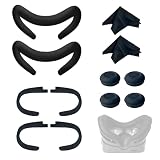
- Ice Silk & High Breathability: Designed specifically for Valve Index VR headset, the ice silk face gasket offers exceptional breathability, keeping your face cool and dry during long gaming sessions
- Machine Washable & Hygienic: The face gasket is machine washable for easy cleaning; together with the included cleaning cloths, you can quickly wipe down the headset and gasket, making shared use more hygienic and worry-free
- 2-Pack Face Gaskets + 4 Thumbstick Covers: Includes 2 replaceable ice silk face gaskets for easy swapping, plus 4 thumbstick covers that protect your Valve Index controllers from wear and tear, enhancing grip and control during intense gameplay
- 2 Cleaning Cloths + 2 Sets of Velcro Straps: The microfiber cleaning cloths safely clean lenses and face gaskets for a clear view; the 2 extra Velcro straps ensure a secure, non-slip fit even after extended use
- Lightweight & Comfortable Design: Thinner and lighter than standard foam padding, reducing pressure on your cheeks and forehead. Comfortable even with glasses, so you can stay fully immersed in VR
Bigscreen Beyond 2: the specialist Lighthouse upgrade
Bigscreen Beyond 2 is aimed at owners who already have base stations, Index controllers and a powerful PC. It weighs 107 g, uses 2560×2560 micro-OLED panels per eye, offers a stated 116-degree horizontal FOV and costs about $1,019. It has no standalone mode, so it removes headset weight while retaining the same PC-and-Lighthouse dependency. Its compatibility with SteamVR base stations and Index controllers means an Index owner can upgrade the display without abandoning that input system.
Valve Steam Frame: convenience at a premium
Steam Frame represents Valve’s move toward wireless and standalone play. It supports wireless PC streaming, standalone SteamOS software and inside-out tracking in a lighter design. The 256 GB model starts at $1,059, however, and the available information does not indicate a dramatic image-quality advantage over Quest 3. Its value proposition is eliminating the cable and tracking setup, not delivering a clear optical leap. Valve’s planned speaker-and-battery strap may address audio and endurance, but its release date has not been announced.
Index versus the realistic alternatives
| Option | Best for | Main strengths | Main compromises |
|---|---|---|---|
| Valve Index | Existing PC VR and Lighthouse owners | Off-ear speakers, 48 kHz microphone, Index controllers, high-refresh Lighthouse tracking, mature SteamVR support | About 809 g, cable, two base stations, dated optics, discontinued production |
| Meta Quest 3 | Most new buyers and wireless users | Pancake clarity, higher resolution, inside-out tracking, standalone software, wireless Steam Link PC VR | Stock-strap comfort, platform/account trade-offs, dependence on a good wireless network for PC streaming |
| Bigscreen Beyond 2 | Enthusiasts who already own Lighthouse gear | 107 g, 2560×2560 micro-OLED per eye, 116-degree horizontal FOV, eye tracking | About $1,019; still needs base stations, controllers and a PC; no standalone mode |
| Valve Steam Frame | Buyers prioritizing wireless Valve software | Wireless PC streaming, standalone SteamOS, inside-out tracking, lighter design | $1,059 starting price for 256 GB; not a major stated image-quality upgrade over Quest 3; planned audio strap has no launch date |
Can you keep Index controllers and base stations with a newer headset?
Yes, when the replacement is built for SteamVR Lighthouse tracking. Bigscreen Beyond 2 is the documented example: it works with existing SteamVR base stations and Index controllers, allowing an owner to replace the 809 g headset while retaining the hand-tracked input hardware. This route is attractive if your room is already installed and your main complaint is headset weight or display quality.
A Quest 3 or Steam Frame takes a different approach with inside-out tracking. That reduces room hardware and setup, but it is not a drop-in continuation of the Index’s Lighthouse controller arrangement.
A buying checklist for a used or clearance Index
- Confirm the package: verify the headset, tether, power supply, both Index controllers and any required base stations are included.
- Inspect the optics: look for scratches, display artifacts, dead pixels and uneven brightness while showing a uniform scene.
- Test audio and microphone: check both open-backed speakers, volume control and voice input; these are core reasons to choose the Index.
- Check tracking: run room setup and confirm both base stations remain visible without dropouts.
- Measure the total cost: include a gaming PC, replacement cables or stations and your wireless or wired play-space needs.
- Compare the price with alternatives: if the complete used setup approaches a newer wireless headset, the Index’s setup burden is difficult to justify.
The bottom line for 2026
The Valve Index is still the reference point for VR audio, hand-secured finger-sensing controllers and high-refresh Lighthouse play, but it is no longer a general recommendation. Keep a working unit when those qualities define your library. Choose Quest 3 for the easiest all-round replacement, Bigscreen Beyond 2 for a very light Lighthouse-based enthusiast upgrade, or Steam Frame only if wireless Valve software is worth its premium. Valve’s production sunset makes a discounted or used Index a targeted enthusiast buy—not the default headset it was in 2019.
Quick Recap
Product prices and availability are accurate as of the date/time indicated and are subject to change. Any price and availability information displayed on Amazon at the time of purchase will apply.
Quick wins for a faster PC:
Scan for outdated or missing drivers - takes under a minuteDriver Scan →Repair Windows errors before they cause bigger problemsFix Now →Fix the driver behind crashes, sound loss and screen glitchesFind Drivers →
