Do these 3 things before closing this tab:
1Repair Windows errors before they cause bigger problems2Scan for outdated or missing drivers - takes under a minute3Clear out junk files and repair common Windows errorsFor most trips, take your everyday phone—provided it is updated, protected with a strong passcode, backed up, and prepared for the destination’s service requirements. A separate, minimally configured travel phone can be worthwhile if you have a specific reason to limit the data you carry or want a backup in case your main phone is lost. It is not a universal privacy fix, and it adds setup and account-access hassles.
What “burner phone” means for travel
Here, a burner phone means a separate phone used for the trip, with fewer personal accounts and less stored information than your everyday device. It need not be disposable. A spare phone may provide a useful boundary between travel and personal data, but calling it a burner does not make it inherently secure or exempt it from inspection.
As an Amazon Associate I earn from qualifying purchases.
The right choice depends on what information you need to carry, what disruption losing your phone would cause, and whether you can reliably use a new device for travel tasks. A tourist taking a short domestic trip has different needs from someone carrying sensitive work information or traveling to a destination with particular connectivity or device rules.
Everyday phone vs. separate travel phone
| Consideration | Everyday phone | Separate travel phone |
|---|---|---|
| Data exposure | May contain personal, work, and account data you do not need on the trip. Remove or secure what is unnecessary. | Can carry less information if you configure it that way; it is not automatically private or secure. |
| Trip utility | Usually already has your maps, airline apps, tickets, contacts, photos, banking, accessibility settings, and messaging history. | Requires you to install or transfer what you need and check that essential apps and documents work. |
| Loss or theft | Losing your primary device can expose accounts and disrupt communication. | Can serve as a backup, but is another device to protect. A backup is useful only if you can access essential accounts and service on it. |
| Setup and access | Less new-device setup, though you should confirm roaming, SIM or eSIM access, and account recovery. | May require new sign-ins, account verification, and a plan for receiving authentication codes without the everyday phone. |
| Cost and burden | No second handset to maintain. | Adds the cost and effort of a device, service, charging, setup, and upkeep; the sources cited here do not quantify those costs. |
When your everyday phone is the better choice
Use your everyday phone when its convenience matters more than reducing the amount of data you carry, and you can prepare it sensibly. Keeping the device you already know can make it easier to reach travel documents, maps, banking, contacts, and accessibility tools. Before leaving, review which data and apps you actually need rather than assuming everything must stay on the phone.
#1 Best Overall
![Tracfone, TCL FLIP 3, SIM Card Included Flip Phone (Locked to Carrier) | 16GB, Stone Gray, 5MP Video Capable Camera, Locked [Sim Card Included - Separate Purchase Not Necessary]](https://m.media-amazon.com/images/I/31w5fHyjtJL._SL160_.jpg)
- Carrier: This phone is locked to Tracfone, which means this device can only be used on the Tracfone wireless network. A Tracfone plan is required to activate this device. Activating is easy, upon receipt go to Tracfone Website and select “Activate” and follow the prompts.
- 📱 Classic Flip Design & Dual Displays: Features a pocket-friendly flip design with a large internal display for easy reading and navigation, plus a convenient external preview screen to check time, incoming caller ID, and notifications at a glance without opening the phone. Sim Card Included - Separate Purchase Not Necessary
- 📶 Reliable 4G LTE Connectivity & VoLTE: Powered by 4G LTE network speeds for crystal-clear HD voice calls, reliable text messaging, and dependable nationwide coverage across America's top networks.
- ⌨️ Tactile Keypad & Loud Speakerphone: Designed with large, easy-to-press buttons for comfortable dialing, intuitive menu navigation, and a powerful speakerphone for hands-free conversations.
- 🔋 All-Day Battery: Stay connected with a long-lasting battery designed for extended talk and standby time. Wi-Fi Note: Wi-Fi is locked until device is activated. Note: Network-locked to TracFone for 365 days from activation.To find the no-contract Tracfone plan for you, visit the Tracfone Store Link located below the product title
The U.S. State Department’s current communication-abroad guidance recommends checking whether your plan works at your destination, considering roaming or local SIM/eSIM options, saving emergency and consular contacts, and securing and updating devices. It also suggests considering a backup device or printed contacts if a phone is lost or stolen. This is practical guidance, not a claim that every traveler needs a second phone.
When a separate phone may make sense
A separate device is worth considering if you have a specific elevated data-exposure concern, need to leave sensitive personal or work information behind, or want a backup communications device. The State Department’s older student-travel brochure, Safety and Security for U.S. Students Traveling Abroad, advises: “If feasible, use a different phone and a new email account while traveling.” It also recommends sanitizing devices and removing sensitive contact, research, or personal data. That advice is aimed at students and is not a universal instruction for tourists or a current policy for every traveler; the brochure’s publication date is not established.
Rank #2

- Carrier: This phone is locked to Tracfone, which means this device can only be used on the Tracfone wireless network. Tracfone plan required, activating is easy, just 3 steps.
- DISPLAY: Immersive viewing on a 6.7-inch super-bright 120Hz display with powerful stereo speakers and Bass Boost for cinematic entertainment.
- CAMERA SYSTEM: Advanced 50MP Quad Pixel camera captures sharp, detailed photos and videos in any lighting condition
- PERFORMANCE: Lightning-fast 5G connectivity paired with a powerful processor and RAM Boost for smooth multitasking.
- BATTERY LIFE: Long-lasting 5000mAh battery with TurboPower charging technology delivers hours of power in minutes.
A second device only reduces exposure if you deliberately limit what is on it. Decide which accounts and information are essential, configure the phone before departure, and make sure you can still reach family, emergency services, travel documents, and critical accounts. If you cannot reliably sign in or receive verification codes without your main phone, the separation may create more risk and disruption than it solves.
Recommended Free Tools
Border inspection is a separate consideration
Taking a different phone does not establish immunity from inspection. U.S. Customs and Border Protection says travelers crossing the U.S. border are subject to inspection and that officers may search electronic devices on rare occasions during inspection. See CBP’s Border Search of Electronic Devices at Ports of Entry. This information does not determine what will happen in an individual encounter or establish the rules for another country. Check current official guidance for the relevant border and your circumstances.
Rank #3

- Carrier: This phone is locked to Tracfone, which means this device can only be used on the Tracfone wireless network. Activating is easy, just 3 steps.
- ACTIVATION Promotion: Includes 1500 min, 1500 texts & 1500 MB Data + add more as you need it
- CAMERA SYSTEM: 50MP Quad Pixel camera. Capture sharper, more vibrant photos day or night with 4x the light sensitivity.
- PERFORMANCE: Blazing-fast Qualcomm performance. Get the speed you need for great entertainment with a Snapdragon 680 processor and 4GB of RAM.
- 64GB built-in storage. Get plenty of room for photos, movies, songs, and apps. Made for US
Prepare whichever phone you take
For your everyday phone
- Install operating-system and app updates before departure, and back up information you would need if the phone were lost.
- Use a strong passcode or password, enable the screen lock and device-finding features, and keep the phone physically secure.
- Remove data you will not need, where appropriate, and save emergency numbers and embassy or consulate details somewhere accessible.
- Check whether your carrier plan works at your destination. Confirm local SIM/eSIM availability, network compatibility, coverage, and any local registration rules before you go.
- Avoid sensitive tasks such as banking over open public Wi-Fi. If a transaction cannot wait, CISA advises using cellular data instead. Turn Bluetooth off when it is not in use, verify public hotspot details, and avoid public computers or charging stations you do not control.
These steps reflect advice from the State Department’s communication-abroad page and CISA’s device travel tips and travel tip card.
For a separate travel phone
- Choose a compatible device and confirm it can obtain service where you are going. If buying a phone, an unlocked smartphone for travel is one option; neither the label “burner” nor the purchase alone guarantees compatibility or privacy.
- Install updates, set a strong lock, and enable device-finding features before the trip.
- Add only the accounts, maps, travel documents, emergency contacts, and communication tools you genuinely need. Test them while you still have access to your everyday phone.
- Plan how you will reach essential accounts and receive verification codes if the everyday phone is unavailable. Keep a backup route for important contacts or documents.
- Keep the spare device charged and secure. A local SIM or international eSIM may address connectivity, but it does not by itself reduce the data stored on the phone.
Check connectivity and local requirements before departure
Whether you carry one phone or two, service depends on the device, provider, and destination. The State Department notes that some countries require local SIM registration with identification and recommends checking local rules and carrier options before travel. Confirm that a phone is unlocked if you plan to use another provider, and verify network compatibility and coverage. A SIM or eSIM is a service option, not a substitute for data-security decisions.
Quick Recap
Best Value
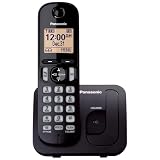
- Easy to Find and Use: A large 1.6" amber backlit handset display ensures easy readability, even in low light, so nighttime calling is effortless; enjoy seamless dialing, menu navigation, and caller ID viewing
- Easily Block Unwanted Callers: Call Block lets you easily and permanently block up to 30 unwanted numbers, giving you control over your calls
- Long Lasting Battery: Enjoy up to 10 hours of talk time and 144 hours of standby time, ensuring your handset is ready whenever you need it; Eco Mode optimizes power usage, extending battery life while reducing energy consumption
- Hands-Free: Speakerphone feature provides convenient hands-free communication, allowing you to multitask while on a call; whether you're working, cooking, or relaxing, enjoy clear and reliable audio without needing to hold the handset
- Clear Communication: Chat anywhere in your home, with DECT 6.0 technology for a strong, clear signal wherever you go
Rank #4

- Only Compatible with Lively Phone Service: The Jitterbug Flip2 is only compatible with Lively phone service; plans include flexible talk & text options and 24/7 access to Lively’s caring team
- Easy-to-Use Flip Phone: The Jitterbug Flip2 features a high-contrast screen, big buttons, simple menus, a powerful speaker, one-touch speed dial, easy voice services and a help button on the keypad.
- Help when you need it: Once your phone is activated with Lively, our 100% U.S.-based team is here to help, 24/7 - From everyday questions to emergencies. You can even add Urgent Response service for extra peace of mind.
- Online Activation: Activate phone online for easy setup, and for additional questions, call our customer service agents for questions about your service and phone
- Why Lively: Lively offers Jitterbug cell phones and Lively medical alert devices that help seniors stay connected, safe and healthy
A practical decision rule
- Choose your everyday phone if you need its existing apps and accounts, can protect it and remove unnecessary data, and do not have a particular reason to separate travel from personal information.
- Consider a separate phone if carrying less sensitive data or retaining a backup would materially help you, and you can set it up without losing reliable access to essential services and accounts.
- Do not treat either choice as a guarantee. A spare phone is another device to secure, and it does not establish that a border inspection will not occur.
Product prices and availability are accurate as of the date/time indicated and are subject to change. Any price and availability information displayed on Amazon at the time of purchase will apply.
Free tools Windows power users keep installed
One-click scans. No signup required.

