Immich has several ways to share photos with family, and the right choice depends on what you want to share and whether relatives have accounts on your server. Use a shared album for selected photos and collaboration, partner sharing for a chosen user to view and download your library, or a public link for recipients without Immich accounts. A newer people-sharing feature was announced for rollout in 2026, but check your installed version before relying on it.
Choose the sharing method that matches your recipient
Immich’s sharing options are not interchangeable. Shared albums and partner sharing are for users on the same Immich server; public links are designed for people who do not have an account there. The choice also determines whether you share selected items or a broader part of your library. Immich’s sharing documentation describes these options.


As an Amazon Associate I earn from qualifying purchases.
| Option | Who can receive it | What you share | Recipient access |
|---|---|---|---|
| Shared album | Users on the same Immich instance | A selected album | Viewer (read-only) or editor (read/write); editors can add their own photos and videos |
| Partner sharing | A chosen user on the same instance | Your entire library | Can view and download assets |
| Public link | Anyone with the link; an Immich account is not required | Selected photos or videos, or an album | Depends on the link’s configured settings, which can include an expiration date, password protection, and permitted-action controls |
| People sharing | Users in a cluster group, according to Immich’s rollout announcement | All people | Read or write permissions; availability depends on the installed release |
Share selected photos with a family album
Use a shared album when relatives have accounts on your Immich server and you want to collect a particular event, trip, or set of pictures in one place. You can assign viewer access for read-only sharing or editor access when recipients should be able to contribute their own photos or videos. This keeps the collaboration focused on that album rather than opening up your whole library.
Recommended Free Tools
Give one person access to your library
Partner sharing is the documented option when you want a chosen user on the same Immich instance to view and download your entire library. It is broader than sharing one album, so decide whether library-wide access is appropriate before enabling it.
#1 Best Overall
Share with someone who has no Immich account
Create a public link when the recipient is outside your server’s user list. Immich supports links to selected photos or videos and to albums, with options such as expiration, password protection, and controls over permitted actions. The URL itself functions as a secret that makes guessing the link difficult, according to the documentation; that is different from access restricted to named users on your instance. Treat anyone who obtains the link as a potential recipient, and set the available protections to suit the material.
What changed with people sharing?
Immich’s September 30, 2026 recap described cross-user people sharing as available in release-candidate builds and expected in v3.3.0 the following week. The announcement says users in a cluster group can be given access to all people, with read or write permissions that work in both directions. That timing is an expectation stated in the recap, not confirmation that stable v3.3.0 had shipped. The earlier v3.2.0 release post listed cross-user people features among its highlights, but that alone does not establish the stable availability of the newer sharing workflow. Check the release and interface you actually run before following version-specific instructions. Immich Team’s September recap and its v3.2.0 release post provide the dated rollout context.
Independent reader supportYour contribution helps us test, update, and keep practical guides available for everyone.A practical decision rule
- Share one collection and let family contribute: choose a shared album and assign editor access.
- Share your complete library with a particular server user: choose partner sharing.
- Send selected media to someone without an Immich account: use a public link and configure its protections.
- Share people across users: first confirm that your installed version includes the feature and the relevant permissions.
All of these options assume Immich is running on a server that you can access and that the media has been uploaded there; see the Immich quick start for the server and upload basics.
Quick Recap
Best Value
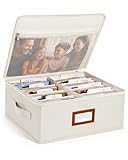
- Photo Storage Box for 4x6 Pictures with 8x10 Mesh Pocket: Designed as a photo storage box for 4x6 pictures, this photo organizer box fits standard 4x6 photo prints to keep pictures flat without bending or curling. Ideal for picture storage of family photos, events, and memories. A mesh pocket under the lid provides extra space for 8×10 prints or certificates.(Patent pending)
- Large Capacity with Dividers: Built-in upright dividers keep photos separated and easy to access, even when the box is full. Includes 8 removable inner boxes to organize photo, allowing up to 2000 photos to be sorted by years, family members, trips, holidays. With leather label holder and side handle, suitable for placement in homes, offices, and other places.
- Easy Labeling & Quick Access: Includes 30 divider cards, 61 self-adhesive preprinted labels and 3 blank labels to help organize photos by year or occasion. Clear, flexible categories make it simple to find “that one picture” without digging through stacks of prints.
- Lid for Cleaner Long-Term Storage: The fitted lid helps safeguards against yellowing & aging and keeps photos cleaner during long-term storage. A practical solution for preserving printed photos you don't need to access every day. Suitable for users seeking archival-style photo storage boxes without bulky plastic containers.
- Ready for Photos, Cards, and Thoughtful Gifts: Organize old family members photos, wedding prints, postcards, and tickets in one place, or fill the box as a finished memory gift for parents and grandparents.
Rank #4

- Extra Large Size: The photo storage box external dimensions measures 11.5 x 8.8 x 1 inches and internal dimensions measures 11.5 x 8.5 x 0.98 inches Suitable for storing 8 x 10 inches photos and 8.5 x 11.5 inches letter & A4 paper and other items.
- Safe & Durable Material: The scrapbook paper storage case is made of high quality PP material, Acid-Free, strong and durable, moisture-proof and dust-proof, not easy to break, easy to clean and can be used for a long time. Additionally, it is free from Bisphenol A, acids, PVC, and lignin, making it recyclable.
- Closure Design: These photo boxes storage comes with 2 safety latches that securely lock the storage case, preventing dust and liquids from entering and ensuring safe storage of items. Transparent design allows you to easily identify the contents without having to open it.
- Neat and Organized: The photo oarganize and storage boxes are stackable to save storage space, and the included labeling stickers keep the boxes organized and tidy on your desktop, perfect for home, office and school use.
- Multi-Purpose Storage Box: The 8 X 10 inch photo storage box can store and organize photos, stationery, office supplies, important documents, crafts, art supplies, CDs, comics, electronics, small parts or other personal items.
Rank #3

- All-in-One Photo & Craft Organizer : Perfect for storing 4x6 photographs, greeting cards, scrapbooking supplies, stickers, or office essentials. Keep your space tidy and your memories protected.
- Secure Snap-Tight Closures : Each inner case features a secure latch to keep your items in place and safe from dust, moisture, or damage — ideal for long-term photo storage or travel.
- Large Capacity Storage Set : Includes 16 individual 4" x 6" photo cases, each holding up to 100 photos. Organize up to 1,600 photos in one compact, easy-to-carry system.
- Durable & Portable Design : Made from sturdy, break-resistant plastic with strong load-bearing ability. Great for stacking, storing, or taking on the go.
- Space-Saving Dimensions : Outer case measures 12.0 x 14.8 x 5.1 inches; individual cases measure 4.75 x 6.70 x 1.23 inches — compact yet spacious enough for bulk storage needs.
Product prices and availability are accurate as of the date/time indicated and are subject to change. Any price and availability information displayed on Amazon at the time of purchase will apply.

