Recommended Free Tools
The fastest way to understand data on a JavaScript website is usually to observe the request that already fetches it. Open Chrome DevTools before reloading the page, use the Network panel’s Fetch/XHR filter, trigger the action that loads the data, and inspect the request and response. If the endpoint is authorized for your use, reproduce that structured request directly with its method, URL, parameters, body, headers, cookies, authentication state and pagination fields. Direct requests are generally easier to reproduce and scale than driving a browser, but HTML parsing or browser automation is still appropriate when the data is rendered locally, protected by a session, or dependent on interaction.
What scraping a network request means
A browser page is often only a user interface. The records you see may arrive later through a JSON Fetch or XHR request after the initial HTML has loaded. Scraping the network request means identifying that data call and requesting the structured response instead of scraping the final pixels or guessing an undocumented URL.
This approach can reduce parsing work and browser overhead, but it does not bypass permission requirements. Use an endpoint only when your account, contract, the site’s terms and applicable law allow the access. Do not attempt to defeat authentication, CAPTCHAs, bot checks or other technical controls.
Choose the right extraction method
| Method | Use it when | Main trade-offs |
|---|---|---|
| Direct HTTP request | A stable, authorized JSON, CSV or similar endpoint supplies the records. | Lowest latency and easiest reproducibility; you must preserve authentication, parameters and changing request details. |
| HTML parsing | The server-rendered response already contains the information. | Simple for static pages, but selectors can break when markup changes. |
| Browser automation | Data appears only after JavaScript execution, interaction, scrolling or a browser-specific session. | Most capable, but slower, more resource-intensive and harder to operate reliably. |
Compare data availability in the response, authentication complexity, JavaScript or anti-bot dependence, request volume, latency, reproducibility, maintenance cost and permission constraints before committing to one method.
What’s actually slowing this PC down?
Pick the symptom - the matching free tool is one click away.
#1 Best Overall
![[Upgraded] AURSINC NanoVNA-H Vector Network Analyzer 9KHz -1.5GHz Latest HW V3.7 HF VHF UHF Antenna Analyzer, Measuring S Parameters, SWR, Phase, Delay, Smith Chart](https://m.media-amazon.com/images/I/41hseV6xSbL._SL160_.jpg)
- [UPGRADED NanoVNA-H] New HW Version V3.7. It is upgradeable as new firmware is developed. With MicroSD card port now can have the measurement data or the screenshots saved in the it at anytime. Added battery circuit management, more secure. Redesigned PCB, you can connect to mobile phone with Type C-Type C cable (original PCB needs OTG cable), see a clear HD image on your phone. Added a ABS case, which is protective and dust-proof. Disply: 2.8 inch TFT (320 x240).
- [IMPROVED FREQUENCY ALGORITHM] The improved frequency algorithm can use the odd harmonic extension of si5351 to support the measurement frequency up to 1.5GHz. The 9KHz-300MHz frequency range of the si5351 direct output provides better than 70dB dynamic, The extended 300M-900MHz band provides better than 60dB of dynamics, and the 900M-1.5GHz band is better than 40dB of dynamics.
- [MULTIPLE FUNCTIONS] The default firmware main function is used for antenna performance measurement. The TX/RX method can measure the complete S11 and S21 parameters. If you need to obtain S12 and S22, you need to manually replace the transceiver port wiring. The CH0 output level is increased to 0dBm when using the fundamental wave, resulting in more accurate reflection measurement.
- [SUPPORT ANDROID PHONE & PC SOFTSARE CONTROL] Designed a practical and simple control application on PC, you can download touchstone(SNP) files for radio design and simulation software. There is a PC interface that adds functionality and lets you work interactively on a bigger screen. Supports time domain analysis function (TDR). Compatible with most Android mobile phones, convenient for connecting to mobile phones. Support Windows Computer Control.
- [STRONG AND SECURE POWER SUPPLY] This VNA is battery powered or USB powered. Built in 650mAh battery, could work for 2 hours continuously. For longer measurement time, kindly connect an external power source. The product interface displays battery usage, providing a clear understanding of the power status.
Find the request in Chrome DevTools
- Open DevTools first. Press F12 or use the browser menu’s More tools → Developer tools. Select Network before reloading the page. The panel records only traffic that occurs while it is open.
- Preserve useful traffic. Enable the recording control and, when a reload would otherwise erase evidence, enable Preserve log. Reload the page, sign in if you are authorized to do so, and reproduce the click, search, filter or scroll that reveals the target records.
- Filter the list. Choose Fetch/XHR, then narrow by domain, URL text, status or request type. A search for a visible term such as items, search, graphql or api is often more useful than guessing a URL.
- Inspect candidates. Select a request and examine Headers, Payload, Preview, Response, Initiator, Timing and Cookies. The response should contain the records or a cursor leading to them; an HTML document, analytics event or image request is usually not the target.
- Trigger a second state. Change the page, move to the next page or scroll farther. Compare the new request with the first one. Parameters that change—such as
page,offset,limit, a cursor or a filter—usually reveal the pagination model. - Save evidence. Use DevTools’ export function to save a HAR when you need a reproducible record. A raw response fixture lets you test your parser without repeatedly contacting the site.
Copy a request safely
Right-click a selected request and choose Copy → Copy as cURL. Treat the result as a diagnostic starting point, not as permission. Remove secrets before storing it in source control. Session cookies, bearer tokens and signed parameters can grant account access; keep them in environment variables or a secret manager, and rotate any credential that was accidentally exposed.
Record every field the server uses
Before rewriting a request in code, make a small request specification. Record:
- HTTP method and complete URL, including the query string.
- Query parameters, form fields or JSON body, including filters and sort order.
- Headers that affect behavior, such as
Accept,Content-Type, an API key, an authorization token, a CSRF value or a client-specific header. - Cookies and the session or account that owns them.
- Response format, status codes and the field containing records.
- Pagination state: page number, offset and limit, cursor, continuation URL or a “has more” flag.
- Any request generated by a prior call, such as a token, nonce or signed value.
Do not copy every browser header blindly. Start with the fields demonstrated to matter, then remove one at a time in a controlled, authorized test. Headers such as browser telemetry or an exact Referer may be unnecessary, while a CSRF token or content type may be mandatory.
Reproduce the request with cURL
Use the copied command to verify that the endpoint responds outside the browser. Replace the example URL and fields with values from your own authorized request:
Free tools Windows power users keep installed
One-click scans. No signup required.
curl 'https://api.example.com/items?page=1&limit=50'
  -H 'Accept: application/json'
  -H 'Authorization: Bearer YOUR_TOKEN'
For a JSON body, use the observed method and payload rather than converting it to query parameters:
curl -X POST 'https://api.example.com/search'
  -H 'Content-Type: application/json'
  -H 'Authorization: Bearer YOUR_TOKEN'
  --data '{"query":"laptops","page":1}'
Check the status code and save a raw response fixture. A successful browser request that fails in cURL usually means a missing cookie, token, body field, content type or session-dependent value.
Rank #2

- UPGRADED NANOVNA ANALYZER: SeeSii Nanovna-h4 Vector Network Analyzer is developed by Hugen. With the latest 4.4 version,9KHz-1.5GHz measure range,4.0 inch LCD touchscreen, mini and portable design. This Antenna Analyzer is provides outstanding vector network measurement capabilities and perfect for evaluating antenna resonance and SWR. It is a very handy & smart analyzer for electronics engineers, amateur radio operators, or radio diy amateurs
- BUILT-IN MICRO-SD PORT & TIME DISPLAY: The latest antenna analyzer with a MicroSD card port, so you can save field test data or screens to a MicroSD card at any time, supporting up to 32GB memory card. (Not included in the package).In addition, different from the old version of NanoVNAs, the date and time can be customized, which is convenient for you to further record and save data. The default firmware main function is used for antenna performance measurement
- IMPROVED FREQUENCY ALGORITHM: The Vector Network Analyzer can use the old harmonic extension of si5351 to support the measurement frequency up to 1.5GHz. The 50K-300MHz frequency range of the si5351 direct output provides better than 70dB of dynamics, The extended 300M-900MHz band provides better than 60dB of dynamics, and the 900M-1.5GHz band is better than 40dB of dynamics. Great for troubleshooting antennas and improving performance
- PC CONNECTION & TX/RX FUNCTION: The VNA analyzer uses PC software NanoVNASaver, it can connect to a NanoVNA and extracts the data for display on a computer for saving to Touchstone files. We can export Touchstone (snp) files for various radio design and simulation software through PC software. In addition, the default firmware is mainly used for antenna performance measurement. The TX/RX method can measure the complete S11/S21 parameters (need to manually replace the transceiver port wiring)
- Abundant Accessories: Equipped with 1x NanoVNA-H4(with 1950mA-h battery), 1x USB Type-C cable, 2 x 15cm SMA male to male RG316 RF cable, 1x SMA male calibration kit - OPEN,1x SMA male calibration kit - SHORT,1 x SMA male calibration kit - LOAD,1 x Touchscreen pen. It's very useful as an antenna analyzer for your ham station, easy to set without fancy calibration
Build a resilient Python extractor
The following template handles common JSON pagination, deduplication, bounded retries and both forms of Retry-After. Adapt the field names to the response you observed; it deliberately does not assume that every API uses items or next_cursor.
import email.utils
import time
from datetime import datetime, timezone
import requests


def retry_after_seconds(value):
    if not value:
        return None
    try:
        return max(0, float(value))
    except ValueError:
        try:
            when = email.utils.parsedate_to_datetime(value)
            if when.tzinfo is None:
                when = when.replace(tzinfo=timezone.utc)
            return max(0, (when - datetime.now(timezone.utc)).total_seconds())
        except (TypeError, ValueError, OverflowError):
            return None


def get_json(session, url, params, max_attempts=6):
    for attempt in range(max_attempts):
        response = session.get(url, params=params, timeout=30)
        if response.status_code == 429:
            delay = retry_after_seconds(response.headers.get('Retry-After'))
            if delay is None:
                delay = min(60, 2 ** attempt)
            time.sleep(delay)
            continue
        if 500 <= response.status_code < 600:
            time.sleep(min(60, 2 ** attempt))
            continue
        response.raise_for_status()
        return response.json()
    raise RuntimeError('Retry limit reached')


session = requests.Session()
session.headers.update({'Accept': 'application/json',
                        'Authorization': 'Bearer YOUR_TOKEN'})
url = 'https://api.example.com/items'
params = {'limit': 100}
seen = set()
records = []

while True:
    data = get_json(session, url, params)
    page_records = data.get('items', [])       # change to the observed field
    for record in page_records:
        key = record.get('id')                 # use a stable key from the response
        if key is None or key not in seen:
            records.append(record)
            if key is not None:
                seen.add(key)

    next_cursor = data.get('next_cursor')      # or inspect a next-link field
    if not next_cursor:
        break
    params = {'limit': 100, 'cursor': next_cursor}

print(f'Collected {len(records)} records')
Keep a log of the URL and pagination parameters for each request. If a run stops, resume from the last known cursor or page rather than starting over. Cache responses where the data can tolerate it; caching lowers load and makes parser development repeatable.
Use Fetch in Node.js
Node’s built-in fetch can replay a JSON request. This example shows a single page; add the same cursor or page loop used by the Python template.
const response = await fetch('https://api.example.com/items?page=1&limit=50', {
  headers: {
    'Accept': 'application/json',
    'Authorization': 'Bearer YOUR_TOKEN'
  }
});

if (!response.ok) {
  throw new Error(`${response.status} ${response.statusText}`);
}

const data = await response.json();
console.log(data.items);
Implement pagination without losing records
Pagination is part of the API contract, not an optional enhancement. Identify which of these patterns the response actually uses:
| Observed pattern | Stop condition | Risk to handle |
|---|---|---|
Page number, such as page=2 |
A documented total, an empty page or a returned “last” indicator. | Records can shift while new items are added; stable sorting and deduplication matter. |
| Offset and limit | The returned count is less than the limit or an explicit total is reached. | Large offsets can become slow, and changing data can cause skips. |
| Cursor or continuation token | No cursor or link is returned. | Reuse the cursor exactly as returned; do not manufacture or edit it. |
| Continuation URL | The next-link field is absent or null. | Keep the URL’s query parameters intact and validate its host before following it. |
Deduplicate on a stable record identifier. Log the last successful request, response status and item count. Set a maximum page count or elapsed-time budget so a malformed “next” value cannot create an infinite crawl.
Control rate, concurrency and retries
Honor server pacing
A 429 Too Many Requests response means you should slow down. The Retry-After header can contain either a delay in seconds or an HTTP date; wait for that value before making the follow-up request. If it is absent, use exponential backoff with a cap and add jitter when multiple workers are running.
Do these 3 things before closing this tab:
1Clear out junk files and repair common Windows errors2Fix the driver behind crashes, sound loss and screen glitches3Repair Windows errors before they cause bigger problemsRank #3

- 2026 Upgraded Tinysa Ultra+ ZS407 Spectrum Analyzer: Supports an ultra-wide frequency range of 100kHz–7.3GHz, delivering precise test data for RF system development, satellite alignment, and frequency verification. Features a 4.0-inch HD touchscreen (480×320 resolution) with up to 450 scan points for clear visualization of complex spectrum data. The intuitive interface ensures ease of use, while ESD protection and the latest V0.5.4 hardware system provide professional and stable performance
- Broad Frequency Coverage: Supports 100kHz–7.3GHz, ideal for 5G NR, Wi-Fi 6E, satellite communications, and higher wireless frequency bands. Calibrated up to 8GHz, it enables broader applications for high-frequency testing in lab environments. Standard mode covers 100kHz–800MHz, while ULTRA mode extends to 6GHz. With 200Hz–850kHz RBW, it ensures fast, efficient measurements, meeting high-precision needs like SSB two-tone intermodulation tests
- Robust Signal Generation: Functioning as both a spectrum analyzer and signal generator, it produces MF/HF/VHF sine waves from 100kHz-900MHz, UHF square waves from 800MHz-6.3GHz, and mixed signals from 4.4GHz-6.3GHz. Our spectrum analyzer antenna's versatility is perfect for RF system development, wireless communication debugging, and RF interference detection, aiding professionals in identifying and resolving frequency issues
- Convenient PC Control and Data Transfer: With USB and TinySA-APP connectivity, the device supports real-time data display and transfer, enhancing data management efficiency. This sdr spectrum analyzer includes a 32GB MicroSD card for easy data storage and sharing, catering to spectrum scanning, signal detection, and radio noise measurement needs
- 10-Hour Working Time: Powered by a 5000mAh battery, it offers up to 10 hours of continuous operation, ideal for field use by RF interference troubleshooters and satellite communication technicians. This signal analyzer's compact design makes it portable for various work environments, facilitating quick wireless signal detection and analysis for electronic and audio technicians
Bound concurrency
Start with one worker. Increase concurrency only when the service permits it and measurements show that the extra parallelism is useful. A small fixed pool, per-host rate limit and global request budget prevent accidental bursts. Retries count toward your load budget, so do not retry every status code: authentication failures, invalid parameters and permission errors need correction rather than repetition.
Cache and resume
Cache immutable or infrequently changing responses with a documented TTL. Store raw responses and a progress checkpoint. On restart, resume from the checkpoint and deduplicate output. Never cache private responses where doing so would expose another user’s data.
Robots.txt, permission and responsible use
Before crawling a host, request its /robots.txt, identify the crawler user-agent group that applies to your client, and apply the most-specific matching Allow or Disallow rule. A successful retrieval should be parsed according to the Robots Exclusion Protocol. A failed or unavailable file requires a conservative operational decision and, where appropriate, clarification from the site owner.
Robots.txt is a crawler preference mechanism, not authentication or a license to access protected data. The Internet Engineering Task Force’s RFC 9309 explicitly states: “These rules are not a form of access authorization.” You still need permission for private endpoints, account data and uses restricted by terms, contracts or law. Rate limits, opt-out requests and deletion requests should be treated as real operational requirements.
The Tool Desk
Outbyte Driver Updater FREEFix the driver behind crashes, sound loss and screen glitchesFind Drivers →Outbyte PC Repair FREEClear out junk files and repair common Windows errorsFree Scan →Use DevTools throttling and blocking as diagnostics
Chrome can throttle a connection or block selected resources locally. Use these controls to discover whether a page depends on a script, API call, image or third-party service, and to observe behavior under slow or failed loads. This is a test of your local browser session; it does not grant permission to stress the remote service or justify extra requests.
Troubleshooting common failures
The request returns HTML instead of JSON
You may have selected a document or redirect rather than the data call. Filter to Fetch/XHR, inspect the Initiator chain and confirm the response content type. A login page usually indicates that the session cookie or authorization token is missing or expired.
Rank #4

- UPGRADED NANOVNA ANALYZER: AURSINC NanoVNA-H4 Vector Network Analyzer by Hugen features the latest V4.4 firmware, a 9kHz–1.5GHz measurement range, and a 4.0-inch LCD touchscreen. The Antenna Analyzer provides outstanding performance for S-parameter testing, antenna resonance analysis and SWR evaluation with excellent vector network measurement capabilities. It is an efficient testing tool for electrical engineers, ham radio operators, antenna builders and radio DIY enthusiasts
- IMPROVED FREQUENCY ALGORITHM: The improved frequency algorithm of Nano VNA H4 can use the odd harmonic extension of si5351 to support the measurement frequency up to 1.5GHz. The 50K-300MHz frequency range of the si5351 direct output provides better than 70dB dynamic. The extended 300M-900MHz band provides better than 60dB of dynamics, and the 900M-1.5GHz band is better than 40dB of dynamics. Used it to check out new cable or antenna installations and to routinely adjust the RF tuner for optimum
- BUILT-IN MICRO-SD PORT & TDR FUNCTION: This antenna analyzer features a brand new panel and a new SD port for data storage, supporting up to 32GB memory cards (not included). Unlike older NanoVNA versions, it lets you customize the date and time for easier data recording. Added TDR functionality—widely used to quickly measure coaxial cable length and locate faults via impedance discontinuity calculations. The default firmware's main function is antenna performance measurement
- PC CONNECTION & ANDROID CONTROL: Using the PC software NanoVNASaver, the Nano VNA H4 antenna analyzer can connect to your device, extract data for display on a computer, and save it to Touchstone files. You can also export Touchstone (snp) files via the software for use in various radio design and simulation tools. With its TX/RX method, the analyzer measures complete S11 and S21 parameters. To obtain S12 and S22 parameters, you only need to manually rewire the transceiver ports
- WHAT'S INCLUDED: 1 x NanoVNA-H4 Host (built-in 1950mAh long-life battery), 1 x 4pcs SMA Male Calibration Kit (open/short/load + SMA female-to-female connector, for precise calibration), 2 x 6.3-inch (16cm) SMA Male-to-Male RG174 RF Cables, 1 x USB Type-C Data Cable, 1 x Type-C to Type-C Cable, 1 x Lanyard (with integrated stylus), 1 x Extra Stylus Pen, 1 x User Manual. It's a great antenna analyzer for your ham station—easy setup, no complex calibration
You receive 401 or 403
Check whether the endpoint requires an account, a CSRF token, a particular cookie or a short-lived signature. Re-authenticate through the permitted workflow and keep credentials out of logs. Do not try to evade an access control or bot defense.
You receive 429
Stop increasing concurrency. Read and obey Retry-After, reduce request frequency, cache earlier pages and ask the service owner for an approved quota if your use case needs more capacity.
Quick wins for a faster PC:
Clear out junk files and repair common Windows errorsFree Scan →Fix the driver behind crashes, sound loss and screen glitchesFind Drivers →Repair Windows errors before they cause bigger problemsFix Now →The browser shows records but your script sees an empty array
Compare the exact request body, query parameters and headers. The browser may send a filter, locale, date range, cursor or feature flag that your script omitted. Check whether a preceding request creates a token required by the data call.
Pagination repeats or skips records
Log every cursor or offset and verify that the sort order is stable. Deduplicate by a durable identifier. If the source changes while you crawl, prefer cursor pagination or an API-provided snapshot mechanism.
The endpoint changes frequently
Undocumented internal endpoints can change without notice. Keep a fixture, parser tests and a small canary run. If the provider offers a documented API, prefer it for long-lived integrations.
Independent reader supportYour contribution helps us test, update, and keep practical guides available for everyone.Or skip the browser setup
If your goal is a clean visual capture rather than extracting structured records, ScreenshotNeo makes one authorized GET request for a PNG, JPEG, WebP or PDF. Before capture it accepts the cookie or consent banner like a visitor and removes more than 60 known consent platforms, newsletter popups and chat widgets; each cleanup step can be turned off. Bot checks or CAPTCHAs, blank pages, timeouts, failed loads and cache hits are not billed, and the response identifies the result with X-Page-Verdict and X-Billed headers. It also provides an MCP server for Claude, Cursor and other MCP clients, with take_screenshot, get_page_info and capture_pdf tools.
Run the following examples from the ScreenshotNeo documentation after creating an API key:
Best Value
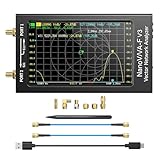
- [1MHz-6GHz ULTRA-WIDE RANGE] Upgraded NanoVNA-F V3 covers 1MHz to 6GHz. Features S21 dynamic range up to 65dB and S11 up to 50dB for fast, high-precision RF measurements.
- [801 SCAN POINTS & RTC] Delivers high data resolution with 101-801 customizable scan points and 12 calibration storage slots. Built-in Real-Time Clock (RTC) for easy timestamping.
- [4.3" IPS TOUCH SCREEN] High-resolution 4.3-inch IPS TFT LCD touch display offers wide viewing angles and clear visibility under bright outdoor light. Intuitive touchscreen interface.
- [VERSATILE RF MEASUREMENTS] Measures S-parameters, VSWR, Log Mag, Phase, Smith Chart, Group Delay, Resistance, and Reactance. Ideal for filters, amplifiers, cables, and duplexers.
- [4500mAh BATTERY & DURABLE SHIELD] Rugged metal aluminum housing shields against EMI interference. Built-in 4500mAh battery charges fully in 3 hours via Type-C for long field work.
curl -G "https://api.screenshotneo.com/v1/shot" -d access_key=YOUR_API_KEY --data-urlencode url=https://stripe.com -o shot.webpimport requests
r = requests.get("https://api.screenshotneo.com/v1/shot", params={"access_key": "YOUR_API_KEY", "url": "https://stripe.com"}, timeout=90)
open("shot.webp", "wb").write(r.content)const q = new URLSearchParams({ access_key: 'YOUR_API_KEY', url: 'https://stripe.com' });
const res = await fetch(`https://api.screenshotneo.com/v1/shot?${q}`);Its 63 options include full-page capture with lazy images loaded, CSS-selector element capture, dark mode, device presets and custom viewports, retina scale, PDF paper and page controls, custom CSS or JavaScript, click and wait actions, selector hiding, ad and tracker blocking, custom headers and cookies, user-agent, authorization, timezone and geolocation, transparent backgrounds, resizing, configurable caching, signed image links, asynchronous jobs with signed webhooks, bulk capture for up to 100 URLs per call, a usage API and an OpenAPI specification. Parameter names used by other screenshot APIs also work, which can simplify a migration.
| Plan | Included shots | Price |
|---|---|---|
| Free | 1,000 per month | $0, no card |
| Starter | 3,000 | $5 |
| Growth | 15,000 | $15 |
| Pro | 60,000 | $39 |
| Scale | 250,000 | $99 |
| Business | 1,000,000 | $249 |
Yearly billing gives two months free, and every feature is available on every plan. Start with 1,000 free screenshots a month with no card.
Operational checklist
- Confirm that the endpoint and intended data use are authorized.
- Capture the request only after DevTools is recording and save a redacted fixture.
- Preserve the method, parameters, body, required headers, cookies and pagination state.
- Use bounded concurrency, caching, checkpoints and a finite stop condition.
- Honor robots.txt preferences, Retry-After and provider-specific quotas.
- Test parsers against fixtures, monitor status changes and remove secrets from logs.
Frequently Asked Questions
Can I replay a request copied from a browser for private data?
Only when you are authorized to access that data and the endpoint. A copied cookie or token is a credential, not permission to use someone else’s account.
Should I save a HAR file in my repository?
Save a redacted HAR outside public source control or keep only sanitized fixtures. HAR files can contain cookies, authorization headers and sensitive response bodies.
When should I stop using an undocumented endpoint?
Move to a documented API or request provider guidance when the endpoint is unstable, requires evasive behavior, or cannot meet the site’s permission and rate-limit requirements.
Quick Recap
Product prices and availability are accurate as of the date/time indicated and are subject to change. Any price and availability information displayed on Amazon at the time of purchase will apply.




