Windows Errors? Fix Them Before They Spread
Repair common Windows errors and clear accumulated junk for a smoother, more stable PC - no reinstall needed.Free scan · no reinstallOutdated Drivers Are Slowing You Down
One free scan finds every outdated or missing driver and matches the right update for your exact hardware.Free scan · exact hardware matchIf your Samsung stove displays “AP” while you are connecting it to SmartThings, it is showing a setup state—not, by itself, a fault. On compatible ranges, Samsung’s instructions use AP to indicate that the appliance is ready to be added in the SmartThings app. The exact steps depend on the model, so check your range’s manual if the display appears unexpectedly or setup does not finish.
What does AP mean on a Samsung stove?
On supported Samsung ranges, AP is the indicator for the SmartThings connection setup state. Samsung instructs owners to press and hold the range’s Smart Control button until AP appears, then add the range in the SmartThings app. Samsung’s range setup instructions describe AP as part of preparing the appliance to connect.
As an Amazon Associate I earn from qualifying purchases.
That instruction does not establish AP as a general error code. Samsung treats range error codes separately; the AP pairing guidance is not a diagnosis of a failed control board or other hardware problem. Also, “/AP” in a regional model number is different from AP shown on the stove’s display.
Recommended Free Tools
What to do when AP appears
- Check your model. Find the range’s model number and consult its user manual for Smart Control and SmartThings support. Not every model has a Smart Control button, and instructions can differ. Samsung’s NX60A6115SS/AP support page, for example, provides manuals for that model family and market; it is not a universal guide for all Samsung ranges.
- Start adding the range in the app. Open SmartThings, choose to add a Samsung device as a Range, and follow the on-screen prompts. See Samsung’s range and SmartThings connection guide.
- Put the range into setup mode when prompted. On a compatible model, hold Smart Control until AP appears. Follow the manual for your range rather than assuming a fixed hold duration; Samsung’s general instruction is to hold the button until the indicator appears.
- Complete registration with the phone near the appliance. Enter the correct home-network credentials and follow the app’s prompts.
If SmartThings setup stalls or AP disappears
First distinguish between AP appearing during an intentional pairing attempt and registration failing to complete. The former is the documented setup state. If the connection stalls, check the SmartThings app, the network credentials, Wi-Fi signal at the range, and whether the appliance’s Wi-Fi is enabled. Samsung notes that network requirements vary by device, so use the range’s manual rather than applying a router-band rule intended for another product category. Its SmartThings connection troubleshooting guide lists app, network, signal, and appliance Wi-Fi checks.
#1 Best Overall

- Samsung DE92-02588G Range Oven Main Control Board + Clock monitors the oven temperature and controls the oven heating functions in the range, and includes the digital display for the time and temperature settings
- Samsung DE92-02588G is a genuine Original Equipment Manufacturer (Authorized OEM) part. Compatible Brands: Samsung
- Samsung DE92-02588G is a perfect fit within various supported Samsung brand models
- Samsung DE92-02588G is quality tested for excellent performance as per Samsung's standards
- It is recommended to either refer to your appliance service manual, contact your appliance manufacturer, or contact a service professional to validate the needed part number for your appliance prior to purchasing
If AP mode turns off before registration finishes, restart the registration flow in SmartThings, as described in Samsung’s appliance registration guidance. If setup continues to fail, use the manual for the exact model and contact Samsung support with the model number and the point where setup stops.
Independent reader supportYour contribution helps us test, update, and keep practical guides available for everyone.When AP is not enough to diagnose a problem
The letters alone do not establish that the range needs repair. If AP appears while you are following the pairing steps, treat it as a setup indicator. If it appears outside that context, or the controls do not behave as the model manual describes, consult the manual or Samsung support; the available setup instructions do not determine what AP means in every model or circumstance.
Quick Recap
Rank #4

- The DG94-04041B Oven Control Board is a genuine Original Equipment Manufacturer (Authentic OEM) part from Samsung that fits various models from the following brands of ranges: Samsung
- OEM Part DG94-04041B Oven Control Board is a brand new part; quality tested as per Samsung standards. The genuine replacement part is a new Samsung part that doesn't replace any other part
- The Samsung DG94-04041B Range Oven Control Board controls the functions of the range including the temperature settings
- The Samsung Part DG94-04041B is also called a MCB, PCB, ECB, main control board, power control board, and electronic control board
- It is recommended to either refer to your appliance service manual, contact your appliance manufacturer, or contact a service professional to validate the needed part number for your appliance prior to purchasing
Rank #3
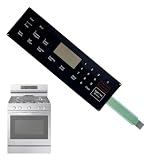
- ✔OE Number:This DG34-00025A range oven touch pad part fit for this part AP5800759 PS8764897.Fixes errors,unresponsive buttons,cracks,or peeling issues.
- ✔Compatible with Samsung models:This DG34-00025A range oven touch pad compatible with various models of Samsung range ovens,Samsung Stove/Oven.NX58F5300SS/AA-0000,NX58F5500SB/AA-0000,NX58F5500SS/AA-0000,NX58F5300SS/AA-00,NX58F5300SS/AA-01,NX58F5500SB/AA-00,NX58F5500SB/AA-01,NX58F5500SS/AA-00,NX58F5500SS/AA-01,NX58F5500SS/AA-02.Please check the buttons and words details same as your orignial one.
- ✔High quality material:Using high-quality polyester film and other materials,it has good insulation, heat resistance,Scratch-resistant design,Oil-proof surface and can withstand frequent touch operations and high temperatures in the kitchen environment.Tested To Meet OEM Quality Standards,excellent Performance And Long Service Life.
- ✔Enhanced Touch Sensitivity:The DG34-00025A Touchpad Overlay Features Advanced Touch Technology That Offers Enhanced Sensitivity And Precise Touch Response.Whether You're Setting The Cooking Temperature,timer,or Other Settings,the Touchpad Responds Promptly And Accurately,enhancing Your Overall Cooking Experience.
- ✔best performance:With This DG34-00025A Control Panel Dependable Replacement,Once Installed,it Seamlessly Integrates With Your Oven's Controls,restoring Full Functionality And Ensuring A Consistent Cooking Experience,you Can Rely On Your Samsung Stove Oven To Perform At Its Best.
Rank #2

- GENUINE OEM: This Samsung Assy Pcb Main is a genuine OEM (Original Equipment Manufacturer) part manufactured to exact specifications
- COMPATIBLE MODELS: NX58H5600SS/AA, NX58J5600SG/AA, NX58M5600SW/AA, NX58M5600SB/AA, NX58H5600SS/AC
- Main PCB Board Assembly works with some models of Samsung Ranges
- DURABLE MAIN PCB ASSEMBLY: measures 18" (l) x 14" (w) x 7" (h) and is manufactured with premium materials for durability and maintains functionality for all ranges - follow instructions in owner's manual for easy and seamless installation
- MODEL NUMBER: DE92-02588J
Product prices and availability are accurate as of the date/time indicated and are subject to change. Any price and availability information displayed on Amazon at the time of purchase will apply.
Do these 3 things before closing this tab:
1Fix the driver behind crashes, sound loss and screen glitches2Clear out junk files and repair common Windows errors3Scan for outdated or missing drivers - takes under a minute
