Recommended Free Tools
For most households, Roku Ultra is the best all-round streaming box. It combines 4K, HDR10+, Dolby Vision, Dolby Atmos, Wi‑Fi 6, Ethernet, USB and the Voice Remote Pro. Choose Apple TV 4K if Apple devices and fast navigation matter most; its A15 Bionic platform was faster in Tom’s Guide’s app-loading tests. Choose the third-generation Fire TV Cube if hands-free Alexa control of your television, receiver and smart-home devices is the priority.
Roku Ultra vs Apple TV 4K vs Fire TV Cube at a glance
These are all full-featured 4K streaming boxes, but they solve different problems. Roku emphasizes a straightforward, broad platform; Apple TV emphasizes performance and Apple integration; Fire TV Cube emphasizes voice-first control of entertainment equipment.


As an Amazon Associate I earn from qualifying purchases.
| Device | Best fit | Video formats documented | Audio documented | Networking and ports | Control model | Storage/configuration |
|---|---|---|---|---|---|---|
| Roku Ultra | Most households and buyers who want the broadest feature balance | 4K, HDR10+, Dolby Vision | Dolby Atmos | Wi‑Fi 6, Ethernet, USB | Voice Remote Pro | Storage capacity not stated in the cited product material |
| Apple TV 4K (3rd generation, 2022) | Apple households and anyone prioritizing fast app launches | Dolby Vision up to 2160p/60 fps, HDR10+ | Dolby Atmos | 64GB model uses Wi‑Fi; 128GB model adds Wi‑Fi and Ethernet | Siri Remote with USB‑C charging | 64GB Wi‑Fi or 128GB Wi‑Fi + Ethernet |
| Fire TV Cube (3rd generation, 2022) | Hands-free Alexa and smart-home or AV-system control | 4K Ultra HD, Dolby Vision | Additional surround formats are not stated in the cited specification | Wi‑Fi 6E, tri-band 2×2 MIMO; wired networking is available | Far-field Alexa microphones plus remote | Storage capacity not stated in the cited specification |
Do not choose on a universal price winner. Current prices and promotions change, and no stable price comparison is established here. Apple TV 4K is reported to cost more than the alternatives in Tom’s Guide’s comparison, but the practical value depends on your ecosystem and control requirements.
Which streaming device is best for most people?
Roku Ultra: the safest general recommendation
Roku Ultra is the strongest default recommendation because it covers the features that most living rooms need without making voice control or a particular phone ecosystem mandatory. Roku’s current product information lists 4K, HDR10+, Dolby Vision, Dolby Atmos, Wi‑Fi 6, Ethernet, USB and the Voice Remote Pro. That combination makes it a particularly good answer when you are asking which streaming box has Ethernet, want modern HDR, or need a remote with more capability than a basic infrared handset.
#1 Best Overall

- Ultra-speedy streaming: Roku Ultra is 30% faster than any other Roku player, delivering a lightning-fast interface and apps that launch in a snap.
- Cinematic streaming: This TV streaming device brings the movie theater to your living room with spectacular 4K, HDR10+, and Dolby Vision picture alongside immersive Dolby Atmos audio.
- The ultimate Roku remote: The rechargeable Roku Voice Remote Pro offers backlit buttons, hands-free voice controls, and a lost remote finder.
- No more fumbling in the dark: See what you’re pressing with backlit buttons.
- Say goodbye to batteries: Keep your remote powered for months on a single charge.
It is also the sensible choice when several people use the same television and you want a conventional remote-driven interface. Roku’s platform is broad, so it is a practical general-purpose box for a mixed household rather than a device selected primarily for Apple services or Alexa routines.
Apple TV 4K: best for Apple users and speed
Apple TV 4K is the best streamer for Apple users who already rely on Apple devices and services and who notice interface delays. Apple’s third-generation model, identified in current product materials as a 2022 device, uses an A15 Bionic chip. Tom’s Guide reported that it loaded Netflix, YouTube, Disney Plus and Spotify faster in its testing than the latest Fire TV Cube and Roku Ultra. That is a comparative result from one publication’s testing, not a guaranteed number of seconds for every network or app, but it explains why Apple TV often feels especially responsive.
The trade-off is configuration choice. The 64GB version is Wi‑Fi only, while the 128GB version combines Wi‑Fi with Ethernet. If your router is distant, your wireless environment is crowded, or your home theater depends on a wired connection, the 128GB model is the Apple configuration to consider.
Do these 3 things before closing this tab:
1Clear out junk files and repair common Windows errors2Scan for outdated or missing drivers - takes under a minute3Repair Windows errors before they cause bigger problemsFire TV Cube: best hands-free Alexa streamer
Fire TV Cube is worth it when you genuinely want to operate the television and connected AV equipment by voice. Amazon describes the third-generation Cube (2022) as a 4K Ultra HD, Wi‑Fi 6E device with Dolby Vision and tri-band 2×2 MIMO. Its far-field microphones can access and launch content, control the TV and AV devices, switch inputs and adjust volume without a remote or a paired Echo speaker.
That hands-free capability is the reason to select Fire TV Cube. If you plan to use a remote for every action and do not need Alexa or smart-home control, Roku Ultra is generally the simpler recommendation. Fire TV Cube’s voice advantage also depends on placing the box where its microphones can hear you and on correctly connecting the devices it is expected to control.
Picture quality: 4K, Dolby Vision and HDR10+
What all three have in common
All three devices are positioned as 4K streamers, and Dolby Vision is documented for Roku Ultra, Apple TV 4K and the third-generation Fire TV Cube. A streamer cannot create HDR that your television does not support, however. The TV, receiver or soundbar in the signal path must also accept the selected format, and the actual output is negotiated between the devices.
Roku Ultra’s HDR coverage
Roku lists 4K, HDR10+ and Dolby Vision for Ultra. That is the broadest explicitly documented HDR combination in this comparison, especially for buyers whose television supports HDR10+ as well as Dolby Vision. Roku’s product description presents the device as delivering “spectacular 4K, HDR10+, and Dolby Vision® picture” alongside Dolby Atmos audio.
Apple TV 4K’s Dolby Vision limit
Apple specifies Dolby Vision up to 2160p at 60 frames per second and also lists HDR10+. The 2160p/60 qualification matters if you are matching the box to a television or receiver with specific frame-rate requirements. Apple’s format support is therefore clear, but you should still confirm that every HDMI component between the Apple TV and display can pass 4K HDR at the desired setting.
Fire TV Cube’s documented formats
Amazon’s specification identifies 4K Ultra HD and Dolby Vision for the third-generation Fire TV Cube. The cited material does not establish HDR10+, HLG or a detailed frame-rate matrix for this comparison, so those formats should not be treated as confirmed from the available specification alone. If a particular HDR format is essential, verify the exact television, receiver and Cube documentation for your region before buying.
Audio and home-theater compatibility
Roku Ultra and Apple TV 4K both explicitly list Dolby Atmos support. That makes either a reasonable source for a Dolby Atmos soundbar or receiver, provided the rest of the HDMI chain supports the format and the streaming service supplies an Atmos track.
Rank #3

- Ultra-speedy streaming: Roku Ultra is 30% faster than any other Roku player, delivering a lightning-fast interface and apps that launch in a snap.
- Cinematic streaming: This TV streaming device brings the movie theater to your living room with spectacular 4K, HDR10+, and Dolby Vision picture alongside immersive Dolby Atmos audio.
- The ultimate Roku remote: The rechargeable Roku Voice Remote Pro offers backlit buttons, hands-free voice controls, and a lost remote finder.
The cited Fire TV Cube specification confirms its 4K and Dolby Vision capabilities but does not state Dolby Atmos or other surround formats in the material used for this comparison. Do not assume a particular surround format merely because a device is marketed as a 4K streamer; check the current technical specification for the exact Cube model and your audio equipment.
In every case, connect the box to an HDMI input that can pass the required video and audio formats. If your receiver or soundbar is older, connecting the streamer directly to a compatible TV input and routing audio separately may be necessary, depending on the equipment.
Performance: which box feels fastest?
Apple’s measured app-loading advantage
Tom’s Guide reported that Apple TV 4K’s A15 Bionic loaded Netflix, YouTube, Disney Plus and Spotify faster than the latest Fire TV Cube and Roku Ultra in its testing. The report did not establish a universal benchmark score in the supplied material, and app updates, network conditions and background activity can change perceived speed. The useful conclusion is directional: Apple TV 4K is the performance choice when rapid launching and navigation are more important than hands-free control.
What speed does not tell you
Faster launches do not automatically make Apple TV the best streamer for every room. Roku’s remote and platform may be easier for a mixed household, while Fire TV Cube can save time by accepting voice commands for content, inputs and volume. Consider the actions you repeat most often rather than treating processor performance as the only measure of quality.
Networking and ports: which streaming box has Ethernet?
| Need | Roku Ultra | Apple TV 4K | Fire TV Cube |
|---|---|---|---|
| Wi‑Fi generation | Wi‑Fi 6 | Wi‑Fi; generation is not stated in the cited comparison | Wi‑Fi 6E with tri-band 2×2 MIMO |
| Ethernet | Yes | Only the 128GB Wi‑Fi + Ethernet configuration | Wired networking is available |
| USB | USB listed | USB‑C Siri Remote charging connector; no separate USB storage port is established here | USB availability is not stated in the cited material |
Roku Ultra and Fire TV Cube provide a wired-network option, and Apple provides Ethernet only on the 128GB model. A wired connection can be useful when the box is near a router, when walls or congestion weaken Wi‑Fi, or when you want to remove wireless variability from troubleshooting. Check the physical port on the exact unit and buy the appropriate Ethernet cable; the television’s HDMI cable is a separate requirement.
Fire TV Cube’s Wi‑Fi 6E and tri-band 2×2 MIMO are relevant if your network also supports 6GHz Wi‑Fi and you can place the Cube within suitable range. A newer Wi‑Fi label does not overcome a poor location or an older router.
Remote and voice control
Roku Voice Remote Pro
Roku Ultra includes the Voice Remote Pro. It is the best fit for people who want a capable handheld remote with voice input but still expect ordinary button-based navigation to be the primary control method. That balance is useful in households where one person uses voice commands and another prefers a remote.
Apple Siri Remote
Apple TV 4K uses a Siri Remote, and Apple’s store material identifies a USB‑C version. Siri is a natural extension for users already comfortable with Apple’s voice assistant, while the remote remains the main physical control. Apple’s control advantage is strongest when the box sits inside a wider Apple-device routine rather than as an isolated television accessory.
Fire TV Cube far-field Alexa
Fire TV Cube is the only option here designed to listen for far-field Alexa commands without requiring a remote or paired Echo. Amazon says it can launch content, control the television and AV devices, switch inputs and adjust volume. That can be valuable for accessibility, for a wall-mounted television whose remote is often misplaced, or for a room where Alexa already controls lights and other devices.
Quick wins for a faster PC:
Scan for outdated or missing drivers - takes under a minuteDriver Scan →Repair Windows errors before they cause bigger problemsFix Now →Fix the driver behind crashes, sound loss and screen glitchesFind Drivers →Voice control is not identical to universal control. The Cube must be able to communicate with the television and receiver, and commands depend on compatible equipment and correct setup. If you prefer a quiet box with no always-listening microphone, Roku or Apple’s remote-centered approaches may be more appropriate.
Best Value
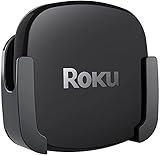
- DESIGNED IN THE USA.
- COMPATIBLE with ALL Roku Ultra models (including Roku Ultra 2024, 2025, and 2026).
- WHAT’S IN THE BOX: Premium mount for Roku Ultra and all mounting hardware.
- PERFECT FOR WALL-MOUNTED TELEVISIONS: Attaches Roku Ultra to the back of your television (or to a wall near your television). Makes Roku Ultra installation easy. Provides direct access to the HDMI ports on the back of your television and eliminates the need to tunnel an HDMI cable through your wall.
- HEAT MANAGEMENT – Ventilation channels allow cool air to flow under your Roku Ultra.
Ecosystem and everyday use
Roku’s broad platform
Roku Ultra is the least ecosystem-dependent recommendation. It works well when household members use different phones and services and nobody wants the streamer tied to one mobile platform. Its appeal is the combination of broad app access, familiar navigation and the hardware features listed above.
Apple services and devices
Apple TV 4K makes the most sense when Apple devices and services are central to your routine. The A15-based hardware, Siri Remote and Apple’s own integration are the reasons to pay attention to it even when another box offers similar 4K HDR basics. The 128GB model also combines that ecosystem with Ethernet, making it the more flexible Apple choice for a wired theater.
Amazon Alexa and smart-home control
Fire TV Cube is the specialist option for Alexa households. Its value increases when you want one spoken command to open content, change the input on an AV receiver and adjust volume, or when the television is part of a larger Alexa-controlled room. If those scenarios do not describe your use, the additional voice hardware may not justify choosing it over a simpler remote-driven box.
Free tools Windows power users keep installed
One-click scans. No signup required.
Setup checklist for any of the three
- Confirm the display chain. Make sure the television, receiver or soundbar and HDMI cable support the 4K and HDR formats you intend to use. A high-speed HDMI cable is the appropriate starting point for 4K HDR connections.
- Choose wired or wireless networking. Use Ethernet on Roku Ultra, Fire TV Cube or the Apple TV 4K 128GB model when a stable wired route is convenient. Otherwise, place the box where its Wi‑Fi signal is strong and unobstructed.
- Connect the box directly to power and HDMI. Select the matching HDMI input on the television, then complete the device’s on-screen account and network setup.
- Set the video output deliberately. In the device’s display or video settings, select a 4K and HDR mode supported by the television. If the screen or receiver does not support Dolby Vision or HDR10+, use a compatible alternative rather than forcing an unsupported signal.
- Configure audio. Select the soundbar or receiver path and confirm that Dolby Atmos is enabled where both the streamer and the audio equipment support it.
- Test the controls you bought the device for. On Roku, test voice search and the Voice Remote Pro. On Apple TV, test Siri and the USB‑C remote charging setup. On Fire TV Cube, test wake-word commands, input switching and receiver volume from the intended seating position.
Which one should you buy?
Pick Roku Ultra when…
- You want the simplest general-purpose 4K streaming box.
- You need Ethernet and USB without selecting a special storage tier.
- Your television supports HDR10+, Dolby Vision or both.
- You prefer a conventional remote with optional voice input.
- The household uses a mixture of phones, platforms and streaming services.
Pick Apple TV 4K when…
- You already use Apple devices and services heavily.
- Fast app launches and responsive navigation are your top priorities.
- You want Dolby Vision up to 2160p/60 fps and HDR10+.
- You need Ethernet and are willing to buy the 128GB Wi‑Fi + Ethernet configuration.
- You prefer Siri and a compact USB‑C-charging remote.
Pick Fire TV Cube when…
- You want hands-free Alexa without a remote or paired Echo.
- You need voice control for the television, receiver, input selection and volume.
- Your network can take advantage of Wi‑Fi 6E and tri-band connectivity.
- Smart-home control is a primary reason for buying a streaming box.
- You accept that a voice-first interface is more important than the simplest remote experience.
Model dates and evidence boundaries
The Fire TV Cube discussed here is the third generation, identified by Amazon as a 2022 device. Apple’s current product materials identify the Apple TV 4K as third generation (2022). The current Roku Ultra product passage used for this comparison does not expose a model-year number, so no Roku year is assigned. Specifications can vary by region or revision; check the exact listing and ports before ordering.
No independent market-share, benchmark-score or stable current-price figure is established for these devices in the available material. The performance conclusion comes from Tom’s Guide’s comparative app-loading test, while format, port and control claims come from the manufacturers’ documented product information.
Final recommendation
Buy Roku Ultra for the broadest, least-compromised feature set: 4K, HDR10+, Dolby Vision, Dolby Atmos, Wi‑Fi 6, Ethernet, USB and Voice Remote Pro. Buy Apple TV 4K when Apple integration and speed justify selecting the 64GB Wi‑Fi or 128GB Wi‑Fi + Ethernet model. Buy Fire TV Cube when hands-free Alexa control of your TV, receiver and smart-home equipment is the feature you will use every day.
Quick Recap
Product prices and availability are accurate as of the date/time indicated and are subject to change. Any price and availability information displayed on Amazon at the time of purchase will apply.

