The Tool Desk
Outbyte PC Repair FREEClear out junk files and repair common Windows errorsFree Scan →Outbyte Driver Updater FREEFix the driver behind crashes, sound loss and screen glitchesFind Drivers →If you forgot your Roku account PIN, you can’t look up the old one in Roku’s instructions; sign in at my.roku.com and change it to a new four-digit PIN. If the prompt appears in a Roku TV’s Live TV settings, however, it may be asking for a separate TV parental-controls PIN.
Reset your Roku account PIN
- Go to my.roku.com and sign in to the Roku account linked to your device.
- Open My Account > Profile & Settings > PIN/Parental controls. Depending on the account-page layout or region, the PIN settings may appear under Device settings.
- Select Change PIN, enter a new four-digit PIN, and save it. Roku’s instructions describe changing or resetting the PIN, not revealing the existing one. Roku Support: How to create, change, or remove your Roku PIN
If you can’t sign in, use Roku’s account recovery process first; you need access to the account to change its PIN.
As an Amazon Associate I earn from qualifying purchases.
Check which Roku PIN the prompt needs
Roku has an account PIN and, on Roku TVs, a separate PIN for Live TV parental controls. Where the prompt appears is the quickest clue.
| Where you see the prompt | Likely PIN | Where to manage it |
|---|---|---|
| Adding an app, making a Roku-billed purchase, or managing a subscription through Roku | Roku account PIN | Sign in at my.roku.com and open the account’s PIN settings. |
| Roku TV Live TV input, including antenna channels or channels in the Live TV Channel Guide | Roku TV Live TV parental-controls PIN | On the TV, go to Settings > Parental controls. Use Change PIN to change it. Roku also provides Reset parental controls, which clears Live TV parental-control settings, including the PIN. See Roku Support: Set parental controls. |
The TV’s Live TV PIN is not the same as your Roku account PIN. Changing one does not change the other.
#1 Best Overall

- Easy voice search & control: Quickly search across thousands of top channels, play entertainment, control your streaming, and more with your voice
- No more juggling remotes: Power up your TV, adjust the volume, control your Roku device, switch inputs on your Roku TV, and more—all in a tap
- Pre-set channel shortcuts: Pre-set channel shortcuts let you launch popular streaming channels with the push of a button, all without having to scroll
- Simple setup: Simply turn on your Roku device and pull the battery tab on the back of the remote and it should pair automatically
- Works with your Roku device: Roku Voice Remote works with all Roku TV models, Roku audio products, and most Roku players*
What the Roku account PIN controls
The account PIN is optional and four digits long. Depending on your PIN preferences, Roku can require it for adding apps, subscribing, renting or buying through Roku, or changing auto-renew through the device’s Subscriptions menu. It can also be used for parental controls on The Roku Channel and Howdy. Roku Support explains the PIN settings.
- The PIN is not required to use the Roku website or mobile app.
- The parental-control setting described here applies to The Roku Channel and Howdy on Roku devices, not their website or mobile app and not other streaming services.
- Roku says PIN and parental controls require you to be signed in; they do not work in Guest Mode.
Why might a purchase or subscription go through without the PIN?
Two common explanations are that the device is linked to a different Roku account than the one where you configured the PIN, or that you bought the subscription directly from the streaming provider rather than through Roku. Check which account is linked to the device and review that account’s PIN preferences. Roku says its PIN protects purchases made through Roku; it does not protect subscriptions billed directly by a streaming service. For those, check the provider’s own purchase and parental-control settings. Roku Support Canada: Why was a purchase allowed without my Roku PIN?
Quick Recap
Best Value

- No Setup Required: the remote control replacement for Roku TV which can solve your home backup remote control needs. Simply Insert 2 AAA batteries (Not included) , then turn on your device and it will automatically pair, perfectly replacing your original remote control
- Upgrade Material: our remote replacement is made of high quality ABS and silicone, ABS improves durability, can be used for a long time, and also keeps you and your children away from harm
- Completely Compatible: the replacement remote controls only for roku series TVs, compatible with TCL Roku TVs, Hisense Roku TVs, Onn Roku TVs, Sharp Roku TVs, Philips Roku TVs
- Notice: Only for roku tv, not for roku stick/roku box 1/2/3/4(HD/LT/XS/XD), not for roku ultra/roku express/roku premiere and roku player
- Key Features: Get to favorite apps quickly with 8 shortcut buttons for Disney, Netflix, YouTube, Hulu, Primevideo sling, Apple TV+ and VUDU. Strongest signal by mature infrared technology, farther transmitting distance, stable performance, following the movement of the tv page without obvious delay
Rank #4
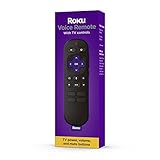
- Convenient Voice Controls
- TV Power, Volume, And Mute Buttons
- Pre-Set Channel Shortcut Buttons
Rank #3

- Stay powered for months: Keep your remote running for three months on a single charge. With 50% more battery life and USB-C charging, Roku Voice Remote Pro (2nd Edition) is the ultimate TV companion.
- Built for movie nights: No more fumbling in the dark to find the pause button or turn up the volume. Always know what you’re about to press with easy-to-see backlit buttons.
- Just talk to it: Got popcorn fingers? Leave the remote in the other room? Just say “Hey Roku” from across the couch and control your streaming with your voice.
- Find your lost remote: Don't break a sweat tearing apart the couch. Just say “Hey Roku, where’s my remote?” or find it using the free Roku Mobile app.
- One that does it all: No more juggling remotes. Roku Voice Remote Pro (2nd Edition) powers up your TV, adjusts the volume, and controls your Roku device.
Rank #2

- The information below is per-pack only
- Easy voice search & control: Quickly search across thousands of top channels, play entertainment, control your streaming, and more with your voice
- No more juggling remotes: Power up your TV, adjust the volume, control your Roku device, switch inputs on your Roku TV, and more—all in a tap
- Pre-set channel shortcuts: Pre-set channel shortcuts let you launch popular streaming channels with the push of a button, all without having to scroll
- Simple setup: Simply turn on your Roku device and pull the battery tab on the back of the remote and it should pair automatically
Product prices and availability are accurate as of the date/time indicated and are subject to change. Any price and availability information displayed on Amazon at the time of purchase will apply.

