Recommended Free Tools
Neither design is universally better. A controller with replaceable AA cells minimizes downtime when you keep a charged spare pair nearby and lets you choose compatible batteries. A controller with a built-in battery keeps the hardware simple to charge through a cable, but a depleted battery normally means waiting, playing wired, or using a model-specific replacement service. Your better choice depends on whether instant swaps, charging convenience, battery choice, or repairability matters most.
The clearest examples are Microsoft’s Xbox Wireless Controller, which accepts AA batteries and is advertised for up to 40 hours of battery life on AA batteries, and Sony’s DualSense, which uses a built-in battery charged through USB-C. Microsoft also sells a separate Xbox Rechargeable Battery + USB-C Cable whose product page says a full charge takes under four hours. Those figures are manufacturer specifications for named products and configurations, not a controlled comparison.
As an Amazon Associate I earn from qualifying purchases.
What the two battery designs actually mean
Replaceable cells
A replaceable-cell controller has a compartment that the user can open without disassembling the electronics. The Xbox Wireless Controller uses standard AA-format cells. You can install disposable AAs, rechargeable AAs with a separate charger, or a dedicated rechargeable cartridge made for the controller, provided the product is compatible with your exact controller revision.
Free tools Windows power users keep installed
One-click scans. No signup required.
The main operational advantage is a charged spare. When the cells run down, you remove them and insert the charged pair instead of connecting a cable or stopping to wait. The AA format can also be useful if you already use the same type of cell in other household devices. Those are practical benefits of the format, not independent performance measurements.
#1 Best Overall

- Rechargeable Battery: This rechargeable battery pack provides extended gameplay for your X-box Series S and X-box Series X consoles.
- USB-C Charging: Conveniently recharge the battery pack using the included USB-C cable for hassle-free power on the go.
- Compact Design: The external battery pack features a sleek and portable design, allowing you to take it wherever your gaming adventures lead.
- Compatibility: Designed specifically for the X-box Series S and X-box Series X, ensuring seamless integration and optimal performance.
- Long-Lasting Power: Enjoy extended gaming sessions without interruptions, thanks to the high-capacity battery pack.
Built-in batteries
A built-in design places the rechargeable battery inside the controller. Sony describes the DualSense Wireless PS5 Controller as charging and playing through its built-in battery and USB-C port. You connect a cable to the controller, a console, or another suitable power source rather than opening a battery door.
Built-in does not mean the battery can never be serviced. Manufacturers may publish instructions for a particular model, and a repair shop may be able to replace an internal pack. It does mean that the owner cannot normally make an immediate swap to a charged AA pair. Whether a replacement is practical, safe, or warranty-compatible must be determined for the exact model.
Replaceable versus built-in batteries at a glance
| Decision factor | Replaceable cells | Built-in battery |
|---|---|---|
| Downtime | A charged spare pair can restore play immediately. | Normally requires charging, playing while connected, or arranging a model-specific repair. |
| Charging routine | Disposable cells need no charging; rechargeable AAs need a charger; a dedicated pack charges through the controller. | Use the controller’s cable or charging accessory and keep a charging location available. |
| User serviceability | Cells can be changed through the battery compartment without opening the controller. | Serviceability varies by model. Do not assume an internal pack is user-replaceable. |
| Choice and reuse | Can support compatible disposable or rechargeable cells and, in some cases, a dedicated pack. | Usually limited to the installed battery system and compatible replacement parts. |
| Runtime evidence | Must be tied to the cell type and controller. Xbox’s advertised figure applies to AA batteries. | Must be tied to the specific controller and battery. No directly comparable official DualSense runtime is established here. |
| Cost and waste | Depends on whether you buy disposable cells, rechargeable cells and a charger, or a dedicated pack, plus replacement frequency. | Depends on the controller’s purchase price, charging equipment, battery longevity, and service cost. No cross-product lifecycle statistic establishes a universal winner. |
Xbox Wireless Controller: a replaceable-AA design with rechargeable options
Microsoft’s Xbox Wireless Controller product page lists AA batteries and advertises up to 40 hours of battery life on AA batteries. Microsoft presents that as a manufacturer claim for the controller and that power configuration; it is not an independent test and does not describe the runtime of a separate rechargeable pack.
What’s actually slowing this PC down?
Pick the symptom - the matching free tool is one click away.
Using disposable AA batteries
Disposable AAs are the simplest setup if you do not want to maintain a charging routine. Keep a spare pair in the same place as the controller so a low-battery warning does not end a session. Follow the polarity marks in the battery compartment and replace both cells as a matched pair rather than mixing old and new cells.
This option can be convenient for occasional players or households that already keep AA cells for other equipment. Its disadvantages are the recurring need to buy cells and the need to store and dispose of used batteries according to local rules.
Rank #2

- Compatible for Xbox Controllers Original: Specially designed for Xbox Series X, X box Series S, X box One, X box One X, X box One S, X box One Elite controller. The Ni-MH Rechargeable battery pack comes with 4 battery covers, 2 for Xbox one and 2 for Xbox Series X/S. The charger and battery kit offers a high capacity and fast charging solution (Warm Tips: Not Fit for Third-Party Controllers, NOT Compatible with Xbox 360)
- 2x4800 mWh Ni-MH Controller Battery Pack for Xbox: This Ni-MH battery pack for Xbox one controller equipped 2x 4800mWh (2x 2000mAh) rechargeable batteries, only take 2.5-3 hrs to get fully charged, each battery provides up to 28+ hrs of constant playtime. 2000+ Recycle Times of Rechargeable Battery for xbox One Controllers, you can enjoy your game time for a long time. No worry about running out of batteries
- Safety Design-Reliable Battery for Xbox: Built-in smart charge protection fully protects NiMH rechargeable battery pack for xbox, ensuring safety during the charging process. No more worries for short-circuit, over-charged, over-current, over-voltage and over-heated. Even if you forget to remove the battery in time
- LED Indicates Charge Status: The Battery Charger for Xbox has 2 clear LED charging indicator showing charge status. Red light is charging, green light is fully charged/standby. Rechargeable controller battery charger for xbox will stop charging automatically when the batteries are fully charged. This Ni-MH battery pack with charger for Xbox controller is a quality accessories kit for Xbox gamers
- Fast Charging-Easy to Use: Providing 2 Charging Ways: 1) Charge the battery by USB type-C cable separately. 2) Plug the provided usb type-C cable into the battery pack inside the controller that you can continue gaming. No need to separate them from the controllers, enjoy uninterrupted gaming without worrying about running out of charge. Package: 2x 4800 mWh Ni-MH rechargeable battery pack for xbox controller, 2 Battery cover for Xbox Series X/S controller, 2 Battery cover for Xbox 1 controller, 1x USB type-c charging cable, 1x user manual
Using rechargeable AA cells
Rechargeable AAs preserve the quick-swap behavior while moving charging outside the controller. Buy cells and a charger that explicitly match the controller’s requirements, then maintain at least one charged spare pair. The controller sees the cells as its power source; the charger handles the recharge cycle.
Because no universal runtime or lifetime-cost figure is established for rechargeable AA models, do not assume that a particular cell will match Microsoft’s “up to 40 hours” estimate. Runtime changes with cell capacity, age, wireless features, headset use, vibration, and play habits.
Do these 3 things before closing this tab:
1Clear out junk files and repair common Windows errors2Fix the driver behind crashes, sound loss and screen glitches3Repair Windows errors before they cause bigger problemsUsing Microsoft’s dedicated rechargeable pack
Microsoft separately sells the Xbox Rechargeable Battery + USB-C Cable. Its product page says a full charge takes under four hours. The pack is an optional accessory; do not assume it is included with every Xbox Wireless Controller listing.
Before buying, check the exact controller revision, the battery-door shape, and the connector supplied with the pack. If quick swaps are your priority, a single installed pack is not enough: keep a second compatible charged set, whether that means another pack or rechargeable AAs, if the product supports them.
Third-party dedicated packs
Third-party packs can have different charging times and protection features. For example, the manufacturer page for a rechargeable battery pack for Xbox Series X|S claims official licensing, about three-hour charging, and overcharge protection. Treat those as that manufacturer’s claims, verify availability and compatibility for your controller, and do not transfer specifications from one pack to another.
Rank #3

- 【DESIGNED FOR XBOX CONTROLLERS】: The GKHERD rechargeable battery pack is specifically designed for Xbox Series X|S and Xbox One/Xbox One S/Xbox One X/Elite controllers; The foolproof design at the top of the battery makes installation easy and convenient.(Note: This battery is only compatible with the official controller; it is not compatible with third-party controllers.)
- 【TWO CHARGING METHODS】: 1. Insert the battery into the controller and charge through the controller's Type-C USB port, allowing you to play while charging—simple and quick.; 2. Charge the battery directly through the Type-C USB port on the battery itself.
- 【2 X 6600MWH XBOX RECHARGEABLE BATTERY PACK】: Featuring a 6600mWh high-capacity lithium battery cell, it only takes 2.5 to 3 hours to fully charge, providing 15 to 18 hours of gameplay for extended battery life. The lithium battery can be recharged over 3,000 times, which is 2-3 times the lifespan of a NiMH battery.
- 【SAFETY PROTECTION & LED INDICATOR】: The GKHERD rechargeable battery has passed UL/CE/FCC certification and includes built-in protection against overcharging, overcurrent, overheating, and short circuits, ensuring worry-free overnight charging and extending battery life. The C02 battery is also equipped with an LED indicator to monitor the charging status at any time.
- 【PACKAGE CONTENTS】: The GKHERD rechargeable battery pack includes 2*6600mWh rechargeable battery and 1*Type-C USB charging cable. (The vibration motor frequency varies across different games, which affects battery life)
DualSense: built-in battery and USB-C charging
Sony’s DualSense Wireless PS5 Controller uses a built-in battery and USB-C port. Sony describes charging and playing with the controller connected, so the normal routine is to plug it in at the console or another suitable charger when the battery is low.
No directly comparable official DualSense runtime figure is published. Avoid converting the Xbox AA estimate into a prediction for DualSense: the controllers, batteries, software loads, and test conditions are different.
What the built-in routine is like
- Connect a compatible USB-C cable to the controller.
- Connect the other end to the console or an appropriate power source.
- Leave the controller connected until it has enough charge for the next session, or continue playing while it is wired if your setup allows.
- Return the cable to the same location after play so charging is not dependent on finding it later.
This arrangement removes the need to handle loose cells and a separate AA charger. The trade-off is that there is no instant cell swap when the internal battery is empty.
Downtime: the deciding difference for many players
When replaceable cells are faster
A replaceable design wins on recovery time when a charged spare is ready. Competitive players, families sharing one controller, and anyone who cannot keep a cable within reach benefit from exchanging the depleted set in seconds. The advantage disappears if every set is empty or if the only available cells are incompatible.
When built-in charging is simpler
A built-in controller can be easier for a single-player setup where the cable remains beside the console. There is one charging port and no battery door, storage case, or separate cell charger to manage. Playing wired can bridge a low-charge situation, although cable length and seating position then become practical constraints.
Rank #4
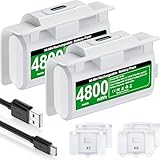
- 【Battery Charging Kit for Xbox Series X Series S Xbox One】The white xbox battery charger kit is equipped with 2x 4800mWh rechargeable xbox battery pack and 4 xbox controller battery covers (2x xbox one battery covers and 2x xbox series x|s battery back covers). Ensuring a continuous power source for your different types xbox controller (Please NOTE:Not Fit for Third-Party Xbox Controllers)
- 【Plug and Play, 2 Charging Methods to meet gaming time】(1) Just plug the provided usb c cable into the xbox one controller battery pack inside the controller that you can continue gaming. Don’t worry about low battery affecting the game rhythm.And the 1.5m charging cable equipped allows you to charge and play as you please (2) Charge the battery separately, two spare batteries for easy use and replacement, doubling the gaming time and keeping your Xbox One/Xbox Series X|S controller fully charged at all times
- 【Fast Charging 2 X 4800mWh Xbox Battery Pack Rechargeable】With a charging time of 4 hours, each battery provides an impressive 8-12 hours of playtime. Enjoy a constant and ready-to-go power source, eliminating the need for mid-gaming session battery swaps
- 【LED Indicator for Charge Status & 4.92ft Type C Charging Cable】There is a LED light on the xbox series x controller battery pack which next to the charing port can indicate charging status,red light shows charging, red light goes out to indicate charging is complete.And the USB-A to USB-C extended charging cable can be compatible with a range of power sources such as gaming consoles, PC, USB HUB, wall adapters, etc
- 【Multiple Protections & Extended Battery Life & Energy-saving Design】Our xbox usb c plug in battery adopts the most advanced technology, ensures the safety of charging the battery overnight at night, with overcharge / overvoltage / overcurrent / overheating / short circuit protection. And it extends the service life of the battery, can be recharged 2000+ times.Our xbox battery charger rechargeable that are more energy-efficient, reusable, and say goodbye to AA batteries
How to choose based on your routine
- Choose replaceable cells if you regularly forget to charge, need the shortest possible interruption, or want batteries that can be used in more than one device.
- Choose built-in charging if you prefer one cable, normally play near the console, and do not want to buy, label, and rotate spare cells.
- Choose a replaceable controller with a rechargeable solution if you want both instant swaps and lower dependence on disposable batteries.
Serviceability: what “built-in” does and does not tell you
Do not infer repair instructions from the battery location alone. Microsoft’s Xbox Elite Series 2 Controller Safety & Repair Instructions discusses lithium-ion battery handling, including a built-in or removable-cartridge battery configuration, and provides inspection and repair procedures for that model family.
That documentation supports a narrow conclusion: an internal battery can be serviceable through model-specific procedures. It does not establish that every controller with a built-in battery is intended for customer replacement, nor does it make opening another controller safe. Sony also lists embedded-battery products in its US battery-embedded-products information; consult the documentation for your exact controller before attempting any repair.
Why opening an internal-battery controller is different
- The battery may be a lithium-ion pack that can be damaged by puncture, crushing, heat, or a short circuit.
- Opening the shell can damage clips, seals, cables, or controls and may affect warranty or service eligibility.
- A replacement pack must have the correct voltage, connector, dimensions, protection circuitry, and model compatibility.
- A repair guide for one model is not a general do-it-yourself procedure for other controllers.
If the internal battery is swollen, hot, leaking, or physically damaged, stop using the controller and follow the manufacturer’s safety and service instructions rather than continuing to charge it.
Independent reader supportYour contribution helps us test, update, and keep practical guides available for everyone.Runtime claims: compare like with like
Battery-runtime numbers are meaningful only when the controller, power source, and test conditions are named. The Xbox Wireless Controller’s “up to 40 hours” statement is associated with AA batteries. It is not a promise for Microsoft’s optional rechargeable pack, rechargeable AA cells from an unspecified manufacturer, or another controller.
No directly comparable official runtime figure is published for DualSense. That absence is not evidence that DualSense lasts a particular amount of time; it means a precise comparison would require a stated test method or a source that publishes equivalent measurements.
Best Value

- 【4x 6200mWh Batteries Compatible with Xbox】This battery pack rechargeable with charging station, comes with 4x 6200mWh rechargeable batteries.The battery backup can double the gaming time, 6200mWh high capacity controller batteries allowing you or your family or friends to fully enjoy the fun of gaming without worrying about low battery affecting the game rhythm
- 【One Button Touch Control 7 LED Modes】The controller battery charger kit compatible with xbox one features 7 adjustable led modes to create a dazzling and cool gaming atmosphere for you, you just pressing the button to adjust lighting model (Breathing Light,Running Light,Monochromatic Static Light and More). Press 3 seconds to turn off the ambient lighting
- 【20H Playing Time & Fast Charging Battery Dock】High speed charging, our battery pack only takes 4-5 hours to fully charge, and then you can play games for 15-20 hours. The battery charging station provides sufficient battery life for your controller,and 4 pack rechargeable batteries for easy use and replacement, doubling the gaming time and keeping your wireless controller fully charged at all times
- 【Clear Dual Color LED Indicator Light & Anti Slip Design】The charging station compatible with xbox features clear dual color LED indicator lights, with red indicating charging in progress and green indicating charging completed. A clear design that allows for intuitive viewing of battery charging status. And the bottom is equipped with a silicone pad, which has anti slip and sound insulation functions
- 【Portable Sized & Easy to Carry】The size of battery rechargeable is 4.25 x 7.55 x 1.57 inch / 10.8 x 19.2 x 4 CM.The compact sized can easily be placed in a backpack, and can be carried out at any time, such as playing games at your friend's house or traveling, adding some leisure gaming time to your trip
| Product or configuration | Published battery information | How to interpret it |
|---|---|---|
| Xbox Wireless Controller with AA batteries | “Up to 40 hours of battery life” from Microsoft | Manufacturer estimate for the named controller and AA configuration; not an independent laboratory comparison. |
| Xbox Rechargeable Battery + USB-C Cable | Full charge in under four hours from Microsoft | Charging-time claim for the optional accessory; no separate runtime figure is established here. |
| DualSense Wireless PS5 Controller | Built-in battery with USB-C charging and play | No directly comparable official runtime figure is established here. |
Cost, waste, and long-term ownership
No lifecycle study establishes that replaceable or built-in batteries cost less or create less waste in every case. The result depends on the controller’s price, the number and type of replacement cells, charger costs, how often the battery is replaced, and the labor or parts cost of servicing an internal pack.
Questions to calculate for your own setup
- Will you use disposable AAs, rechargeable AAs with a charger, or a dedicated rechargeable cartridge?
- How many spare sets are needed to avoid downtime in your household?
- Does the controller require a proprietary pack, and is that pack sold separately?
- What is the manufacturer’s service route when the internal battery no longer holds a useful charge?
- What disposal or recycling facility is available in your area for used cells or damaged lithium-ion packs?
Disposal rules differ by jurisdiction, and no universal recycling procedure is established. Use local authority guidance and the battery manufacturer’s instructions instead of placing damaged lithium-ion batteries in ordinary household waste.
Practical buying and setup checklist
If you are choosing a replaceable-AA controller
- Confirm which cell format the controller accepts and whether the manufacturer specifies a particular battery type.
- Decide between disposable AAs, rechargeable AAs with a compatible charger, and a dedicated rechargeable pack.
- Buy or retain at least one charged spare set if avoiding downtime is important.
- Label or separate charged and depleted sets so they are not mixed.
- Check the exact controller revision before ordering a battery cartridge or charging accessory.
If you are choosing a built-in-battery controller
- Confirm that the controller charges through the connector and cable supplied or specified by the manufacturer.
- Keep a cable at the console and, if you play elsewhere, a second compatible cable in that location.
- Plan where the controller will charge between sessions.
- Check the manufacturer’s support page for the exact model’s battery-service policy before assuming a replacement is possible.
- Stop using and charging the controller if the battery becomes swollen, unusually hot, or physically damaged.
Troubleshooting common battery problems
The Xbox controller does not power on after an AA swap
- Remove both cells and verify their orientation against the compartment markings.
- Install a matched pair with sufficient charge; do not mix a new cell with a depleted one.
- Inspect the contacts and battery door for dirt or damage without bending the contacts aggressively.
- If the controller works with one set but not another, replace or recharge the failing set rather than assuming the controller is defective.
A rechargeable pack will not charge
- Confirm that the pack is designed for your exact controller revision and that it is seated correctly.
- Try the manufacturer-specified cable and a known-good power source.
- Check the pack’s charging indicator and instructions for the expected behavior.
- Stop using the pack if it heats excessively, swells, leaks, or shows physical damage, and contact the manufacturer or an authorized service provider.
A built-in controller loses charge unusually quickly
First check whether the change is consistent across several sessions; a single estimate is not a controlled battery-health test. Try the specified cable and power source, then consult the exact controller’s support documentation. If the battery is old or physically compromised, use the manufacturer’s service route rather than installing an unverified replacement.
Bottom-line decision
Pick replaceable batteries when uninterrupted play and battery choice matter more than having one integrated charging routine. Pick a built-in battery when cable charging beside the console is the simpler habit and you accept charging or wired play when the battery is low. For an Xbox Wireless Controller, the AA design gives you the option of instant swaps, rechargeable AAs, or Microsoft’s optional pack. For DualSense, the built-in USB-C approach is straightforward but does not provide that swap-out path. Neither architecture has a proven universal advantage in runtime, total cost, or environmental impact.
Quick Recap
Product prices and availability are accurate as of the date/time indicated and are subject to change. Any price and availability information displayed on Amazon at the time of purchase will apply.

