What’s actually slowing this PC down?
Pick the symptom - the matching free tool is one click away.
For engineering work, choose a Python alternative by the workflow you need to support—not by a blanket claim that one language is better. MATLAB is the clearest fit when a project depends on MathWorks toolboxes, Simulink, or model-based design and code generation. Julia is an open-source option for numerical and scientific computing, while R is worth considering for statistically focused work; the evidence here for R’s engineering role is narrower. Python with SciPy also remains a viable baseline.
How to choose an engineering language
Start with the work the team must deliver, then check the ecosystem and integration requirements. MathWorks describes MATLAB applications spanning control systems, signal processing, robotics, aerospace, automotive, systems engineering, verification, and code generation in its MATLAB product overview and Help Center. That breadth matters most when the relevant toolbox or workflow is actually required; it does not make MATLAB necessary for every engineering task.

- Required capabilities: Identify the numerical methods, domain-specific functions, simulation, verification, and deployment steps the project needs.
- Toolbox or package fit: Check whether a needed capability is built into the environment, supplied by a commercial toolbox, or maintained in an external package. For Julia, the official learning guide notes that many use cases require external packages.
- Integration: Account for existing Python, C/C++, Fortran, MATLAB, or R code, as well as hardware and data interfaces. Julia’s official documentation describes language interoperability and parallel or distributed computation, but specific integration work depends on the project.
- Team and lifecycle: Consider current skills, onboarding, package maintenance in the particular subfield, and the cost and licensing terms that apply to your organization. The sources do not establish a neutral total-cost or productivity ranking.
MATLAB: choose it when MathWorks workflows matter
MATLAB is a proprietary computing platform with engineering applications and an integrated set of products. MathWorks says: “MATLAB is a computing platform that is used for engineering and scientific applications like data analysis, signal and image processing, control systems, wireless communications, and robotics.” Its product materials also describe toolboxes and integration with Simulink for model-based design and automatic embedded-code generation. These are vendor descriptions of capabilities; whether they justify MATLAB depends on the project’s actual requirements.
MATLAB is especially relevant when an established workflow depends on a specific MathWorks toolbox, Simulink models, verification tools, or generated code. If the project needs only general numerical computing and does not rely on those products, compare the available alternatives against the required functions rather than assuming the integrated environment is essential.
Recommended Free Tools
#1 Best Overall

- Construction Calculator with Writing Tablet:Equipped with a flip-page writing pad for quick note-taking, it requires no paper or pen, making it both eco-friendly and convenient. The thick, phone-like material provides strong, phone-level protection, keeping your calculator safe from drops and harsh construction environments
- 200+ Engineer Functions: For Mixed Dimension Calculations and Conversions,Area & Volume,Brick and Block,Concrete, Boards, Flooring, and Wall Stud,Drywall Sheet Count,Circle Area, Circumference, and Arc Properties,Compound Miter,Polygon Tiling,Roofing Material,Foundation Correction,Right Angle and Rafter,Roof Pitch and Angle Conversions,Common Rafter Length,Common/Hip/Jack Rafter and Spacing,Stair Layout,Rake Wall Calculations
- Precision for Every Construction Mind: More than 200 functions, designed specifically for engineering professionals, has 45 fast rebound hard PC buttons are reasonably distributed, more than other engineering calculator.It supports custom parameters.and has 3 storage registers for more convenient and smooth use
- Big Screen & Energy-Saving:With a 3" 12 digits large screen,Higher clarity and lager than other calculators.Clearer reading, fewer errors,8-12 minutes of no operation automatically shut down without worrying about energy consumption
- All-in-One Fit: Suitable for most people including builders, carpenters, concrete workers, contractors and DIY home renovators, roofers, architects, interior decorators, construction estimators, engineering students, etc
Julia: an open-source option for technical computing
Julia’s official documentation describes the language as free and open source under the MIT license and designed for numerical and scientific computing. It highlights just-in-time compilation, multiple dispatch, and support for parallel and distributed computation. The official Julia site lists packages and tools for differential equations, optimization, iterative solvers, and fast Fourier transforms.
Julia is a candidate when those capabilities and its language model fit the work, particularly if the team is comfortable evaluating external packages. The official Julia learning guide cautions that many use cases require packages, so check the package’s scope, maintenance, and suitability in your specific engineering area rather than treating the language itself as a guarantee of domain coverage.
Rank #2

- Professional Grade Scientific Calculator With 240 Scientific Functions.
- 10+2-Digit Widescreen HD Display
- It Has 2-Line Display Shows Entry And Calculated Result At Same Time
- Protective Hardcover Prevents Scratches And Dings
- Meets The Ergonomics Design And Offers A Comfortable Grip, Manufacture Recommended Age +3 Years, CPSIA : No Warning Applicable
Julia’s official download page listed stable version 1.13.1, released September 25, 2026. Performance comparisons need care: Julia’s performance guide explains that a first call may include compilation time, while later calls can behave differently. Benchmark a representative end-to-end workload, including startup and compilation when those affect how the software will be used. Do not infer a universal speed ranking from a language-level slogan.
R: consider it for statistically centered work, with a qualification
The available evidence supports a narrower comparison for R than for MATLAB or Julia. MathWorks’ vendor-authored MATLAB and R comparison says researchers with strong statistical backgrounds may prefer R, and positions MATLAB toward industrial and engineering statistics. That is MathWorks’ perspective, not an independent assessment or a complete account of R’s engineering suitability.
Rank #3

- Professional grade scientific calculator with 240 scientific functions. NOTE: Powered by 1 CR2025 battery. Easily handles 1 and 2 variable statistical calculations, three angle modes (degrees, radians, and grads), and scientific/engineering notation modes
- 12-digit widescreen HD display. 2-line display shows inputs and results at the same time. Works efficiently and makes no mistakes
- Ergonomic design for a comfortable grip. Responsive buttons, clear numbers, and a scratch-proof surface
- Solid sliding protective case covers both sides of the calculator. Protects buttons and the device body
- Package includes: Scientific Calculator*1, Instructions
If statistical analysis is central to the work, assess R against the project’s actual methods, integrations, and deployment needs. The cited comparison alone does not establish whether R is a suitable replacement for an engineering workflow built around specialized simulation, hardware, or code generation.
Python with SciPy: a credible baseline, not a universal performance promise
SciPy supplies scientific-computing functions, making Python a practical baseline when its libraries meet the project’s needs. Its parallel execution documentation says SciPy itself defaults to single-threaded execution, with exceptions for calls to threaded BLAS/LAPACK libraries and selected APIs that can opt into parallel execution. Consequently, “Python is single-threaded” and “SciPy automatically uses all cores” are both too broad: behavior varies by function, linked library, and execution setup.
Rank #4
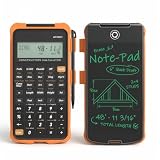
- Professional Feet-Inch-Fraction Conversions for Construction: Master complex field measurements instantly. Precision-engineered for high-precision Feet-Inch-Fraction conversions, this is the essential Contractor Calculator validated by architects, builders, and woodworkers
- Integrated LCD Writing Tablet for Instant Notes: Never lose a measurement or formula again. Solve memory limits and mode-switch data loss with this Construction Calculator with Writing Tablet, a dedicated Engineering Tool for field derived steps. Whether you are jotting down field dimensions or calculating complex loading requirements, the scratch-pad allows you to bypass data loss and mode-switching pain
- Multi-Trade Versatility for Carpenters, Electricians & Pipefitters: Built for the diverse demands of the field. Instantly adapt to any job site with one-click multi-unit conversion between different trades. From Pipefitter Calculator slope calculations to Electrician Calculator and Machinist Calculator scientific functions
- Heavy-Duty Protective Cover & High-Contrast Engineering Display: Optimized visibility under any condition. Say goodbye to screen glare. Our Engineering Calculator features a High-Contrast Display for superior readability from bright outdoor job sites to dim study desks. Encased in a Heavy-Duty Protective Cover, the unit is built to withstand the rigors of your backpack and backpack, preventing input errors and ensuring precise, bug-free Basic Math Accuracy
- Perfect Professional Gift with Unmatched Cost-Efficiency: The ultimate choice for value and utility. Premium professional performance at an accessible price point. Whether looking for Engineer Gifts, Carpenter Gifts, or Graduation Gifts for Engineers, it is the most trusted tool for students, apprentices, and seasoned pros alike
The surfaced SciPy documentation is for version 1.18.0. Compare the actual operations, dependencies, and deployment environment you intend to use; the available evidence does not support a blanket speed comparison against MATLAB or Julia.
Independent reader supportYour contribution helps us test, update, and keep practical guides available for everyone.Which should you choose?
- Choose MATLAB when a required MathWorks toolbox, Simulink, model-based design, verification, or embedded-code-generation workflow is central to the project.
- Evaluate Julia when you want an open-source technical-computing language and its numerical ecosystem and packages cover your specific needs.
- Evaluate R when statistical work is the main concern, but verify engineering-specific requirements independently rather than relying on a vendor comparison as a universal judgment.
- Stay with Python and SciPy when their functions and integrations already support the work; assess parallel behavior at the API and library level.
Before committing, test a representative task from input through the result you need to deliver. Include the dependencies, integration points, runtime setup, and any compilation or model-generation steps that apply. This exposes workflow mismatches that a language reputation or isolated benchmark cannot answer.
Outdated Drivers Are Slowing You Down
One free scan finds every outdated or missing driver and matches the right update for your exact hardware.Free scan · exact hardware matchWindows Errors? Fix Them Before They Spread
Repair common Windows errors and clear accumulated junk for a smoother, more stable PC - no reinstall needed.Free scan · no reinstallQuick Recap
Product prices and availability are accurate as of the date/time indicated and are subject to change. Any price and availability information displayed on Amazon at the time of purchase will apply.



