A custom PS Vita dashboard needs a working HENkaku/taiHEN homebrew environment before the dashboard itself is installed. Your firmware determines the exploit route: HENkaku is the classic path on 3.60, Ensō can make supported 3.60 and 3.65 setups persistent, h-encore or h-encore² covers 3.65–3.74, and Trinity is documented for 3.69–3.70. VitaDeploy provides the bootstrap tools, VitaShell handles FTP/USB transfer and VPK installation, and a PS Vita 1000 may require an official Sony memory card unless its internal memory has been unlocked.
What a custom dashboard actually requires
A “custom dashboard” is an additional homebrew interface, not a replacement firmware that works on an untouched Vita. The console first needs an environment capable of loading unsigned homebrew. That environment is supplied by HENkaku and the taiHEN framework; the dashboard is installed afterward as a separate application, VPK, or—in some projects—a taiHEN plugin.
As an Amazon Associate I earn from qualifying purchases.
The minimum software stack is therefore layered:
- An exploit appropriate to the firmware: HENkaku, h-encore, h-encore², or a documented Trinity route.
- taiHEN: the custom-firmware framework that provides the plugin and homebrew environment. Its project documentation describes taiHEN as “a CFW framework for PS Vita™.”
- VitaDeploy: the bootstrap toolbox used to continue setting up custom firmware and related utilities.
- VitaShell: the file manager used for FTP or USB transfers and for installing VPK packages.
- The dashboard package itself: install it only in the format and firmware range stated by that project.
Ensō is optional rather than a universal prerequisite. On supported firmware it runs an exploit during boot, so HENkaku is prepared automatically instead of being triggered manually after every reboot. Because that changes the console’s boot process, use it only when the guide for your exact firmware and model supports it and you accept the risks of a permanent system modification.
The Tool Desk
Outbyte PC Repair FREEClear out junk files and repair common Windows errorsFree Scan →Outbyte Driver Updater FREEFix the driver behind crashes, sound loss and screen glitchesFind Drivers →Firmware decision tree
Check the Vita’s exact system-software version in Settings → System → System Information before downloading anything. Do not choose an exploit from the model name alone; the version number controls the route.
#1 Best Overall

- Read It Before Buying: The SD2Vita is a third-party memory card adapter. It requires you to currently be on an unlocked 3.60 firmware, such as HENkaku/Ensō, and is also supports 3.60+ firmware 3.65-3.72, which has been released. Note: Please insert it into the game card slot as if it were a PS Vita game cartridge. (Not suitable for the memory card slot)
- Perfect Fit & Seamless Experience: 1:1 precision molding with PS Vita game cartridge. It’s easy to insert and remove without any sticking or popping out. The precise molding ensures smooth operation, but please insert or remove the card slowly to avoid bending or breaking the internal pins
- Wide Compatibility: This PS Vita memory card adapter is compatible with all PlayStation Vita models, including PS Vita 1000, 2000, and PlayStation TV (PSTV). It provides fast game loading with no delays, making it a perfect upgrade for passionate gamers
- Meets All Your Gaming Needs: The included 128GB micro SD card offers lightning-fast read speeds of up to 140MB/s, so you won’t need to spend extra money on additional memory cards. Start your gaming experience right away! Latest version 6.0 SD2VITA microSD card adapter supports any standard microSD card (up to 512GB) to replace expensive PS Vita official memory cards. Enjoy faster loading speeds—20% to 30% faster than the original PS Vita game card
- Never Worry About Running Out of Storage: Sunloy high-speed TF cards feature Class 10, U3, V30, UHS-I, and A1 speed ratings—delivering ultra-fast transfer speeds with exceptional stability. Perfect for storing games, high-res photos, and full HD/4K UHD videos recording. Compatible with smartphones, tablets, cameras, GoPro, laptops, drones, dash cams, DSLRs, computers, security camera, Nintendo Switch, PS Vita, and other portable gaming consoles
| Firmware | Documented route | Persistence option | Important qualification |
|---|---|---|---|
| 3.60 | Classic HENkaku | Ensō can activate the environment at boot | The 3.60 Ensō procedure lists an FTP client, Ensō, and VitaShell as requirements. |
| 3.65 | Ensō is available when the device cannot be downgraded to 3.60; h-encore is also in the documented exploit family for this version | Ensō provides boot-time activation when the device and procedure support it | Some homebrew written only for 3.60 may not work on 3.65. |
| 3.65–3.68 | h-encore | Use a supported persistence method rather than assuming every h-encore setup is persistent | The exploit guide distinguishes h-encore on 3.65–3.68. |
| 3.69–3.70 | h-encore²; Trinity is listed by VitaSDK as a known exploit path for this range | Persistence depends on the chosen supported setup | Check the dashboard’s own compatibility notes before installing. |
| 3.71–3.74 | h-encore² | Do not assume Ensō support; follow the method documented for the exact firmware | h-encore² is the documented exploit family through 3.74. |
The overlap at 3.65 matters. A 3.65 console may be eligible for Ensō, while h-encore remains part of the documented exploit family. Select one complete, internally consistent procedure instead of mixing files from different guides.
Hardware and storage prerequisites
Identify the Vita model first
Storage instructions differ between the original PS Vita 1000, the PS Vita 2000, and PlayStation TV. Record the model before following a transfer guide. A procedure written for a Vita 1000 can assume removable-card storage that a different model handles differently.
When a PS Vita 1000 needs a memory card
The h-encore guide states that a PS Vita 1000 requires an official Sony memory card unless internal memory has been unlocked. If your 1000 has neither an official card nor unlocked internal storage, the exploit bootstrap may have nowhere to place the required files. Confirm this requirement before attempting the installation.
Computer and connection options
Prepare a computer for downloading the exploit and dashboard files. VitaShell supports both an FTP client on the computer and USB transfer, so use whichever method your setup and guide document. Keep the dashboard package in an identifiable folder and do not rename a file merely to make it appear compatible; the package’s format and instructions determine how it must be installed.
Rank #2
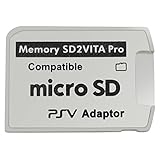
- Read This Before Buying: sd2vita is a third party memory card adapter which requires you to currently be on an unlocked 3.60 firmware like HENkaku/ Ensō, also supports 3.60+ firmware 3.65-3.68, which has been released
- sd2vita can’t be used as ps vita memory card, it doesn’t fit the memory card slot, put this in your game card slot as the PSV game cartridge
- Latest Version 5.0 SD2VITA microSD card adapter, you can replace the expensive PS Vita memory card with any microSD card up to 256GB, loading speed is 20% - 30% faster than original game card
- 1:1 precise molding from the PS Vita game cartridge, easy to push in and eject, no stuck or stick out problem as the sd2vita 3.0 version or lower, perfect fit in your PS Vita
- Fully compatible with all Playstation Vita devices – PS Vita 1000/ 2000/ PlayStation TV
Install the baseline homebrew environment
- Record firmware and model. In Settings → System → System Information, note the version, then identify whether the console is a Vita 1000, Vita 2000, or PlayStation TV. Use the matching branch in the firmware table.
- Open the Vita browser at jailbreak.psp2.dev. The HENlo bootstrap flow uses this page to install HENkaku. Follow the on-screen exploit steps for the firmware that is actually installed; do not substitute a 3.60 procedure on a 3.74 system.
- Install VitaDeploy from the bootstrap menu. VitaDeploy is the toolbox that continues the custom-firmware setup. Let it complete before attempting to install a dashboard, because a dashboard installer is not a replacement for the bootstrap utilities.
- Confirm that VitaShell is present. VitaShell is the file manager used by the Ensō procedures for FTP or USB transfer and VPK installation. Launch it once so you know the homebrew environment can run applications before adding another package.
- Verify taiHEN is active. The dashboard may depend on taiHEN plugins even when its visible interface is an ordinary application. If your chosen project specifies a plugin or configuration entry, follow that project’s exact instructions rather than copying a configuration from another firmware guide.
- Decide whether persistence is needed. On supported 3.60 or 3.65 systems, Ensō can run the exploit at boot. Without a persistent method, a reboot can require you to trigger the appropriate exploit again before launching homebrew. Install Ensō only through a procedure that explicitly matches your firmware and model, and understand that it modifies the boot process.
At this point, the Vita should be able to launch VitaShell and the custom-firmware environment should match the firmware branch you selected. Only then should you add the dashboard package.
Transfer and install the dashboard package
1. Confirm the package format
Read the dashboard project’s installation notes before transferring anything. A VPK is installed through VitaShell; a plugin-based dashboard may require a file in a specific directory and an entry in the taiHEN configuration. The sources establish that a universal custom-dashboard package does not exist, so the package’s own firmware and dependency notes control this step.
2. Copy the file to the Vita
Use VitaShell’s FTP server with a computer-side FTP client, or connect by USB if that is the supported option in your guide. The standard destination for a VPK transfer is ux0:data, unless the dashboard documentation specifies another location. After copying, close the transfer session cleanly and verify that the complete filename appears in VitaShell.
Do these 3 things before closing this tab:
1Scan for outdated or missing drivers - takes under a minute2Repair Windows errors before they cause bigger problems3Fix the driver behind crashes, sound loss and screen glitches3. Install a VPK with VitaShell
- Open VitaShell and browse to
ux0:dataor the directory where you placed the package. - Highlight the dashboard’s
.vpkfile and press the VitaShell install command shown on screen. - Wait for VitaShell to finish before deleting the installer. Do not interrupt the transfer or installation partway through.
- Return to the LiveArea and look for the newly installed application, or follow the dashboard project’s launch instructions if it installs as a plugin rather than an icon.
4. Apply any required plugin configuration
Some dashboards need a particular taiHEN plugin configuration even after their application files are installed. If the project supplies a configuration block, use the exact path and section it names. A dashboard that launches but lacks its expected functions can be installed correctly while still missing a required plugin or a firmware-compatible version.
Rank #3

- The Official PlayStation Vita Memory Card
- Required for most game play on PS Vita
- Store game saves, PSN downloads, and personal media
- Save up to : 8 to 16 full PlayStation Vita games, 24 movies, 9,136 songs, or 6,400 photos
5. Reboot only after checking compatibility
Do not reboot immediately after copying an unknown package. First confirm that the dashboard supports the installed firmware and that its instructions do not require a different taiHEN configuration. After installation, reboot once to test the complete startup path; on a non-persistent setup, run the appropriate exploit again before judging whether the dashboard works.
How to compare dashboard projects
If more than one dashboard project fits your use case, compare the technical requirements rather than choosing by screenshots or feature lists. The following checks expose the differences that affect whether a package will work on your Vita.
| Comparison point | What to verify in the project documentation | Why it changes the setup |
|---|---|---|
| Firmware support | Exact supported versions, including whether the project distinguishes 3.60, 3.65, and 3.69–3.74 | A dashboard built for one firmware branch may not run on another, even when both consoles have HENkaku. |
| Persistence | Whether it expects Ensō, a manually triggered exploit, or another supported boot arrangement | The launch sequence after every reboot depends on this requirement. |
| Installation format | VPK application, plugin, or a combination | VitaShell installs a VPK, while a plugin requires the correct taiHEN configuration. |
| Dependencies | Required versions of VitaShell, VitaDeploy, taiHEN, or additional plugins | Missing dependencies can produce a failed install or an interface that starts without its core functions. |
| Model and storage assumptions | Instructions for Vita 1000, Vita 2000, and PlayStation TV | Storage availability and transfer steps are not identical across models. |
A project that does not state its firmware range, package type, or taiHEN requirements is not ready for a blind installation. Treat missing compatibility information as a reason to stop and verify, not as evidence that the package is universal.
Crashes, No Sound, or Screen Glitches?
Random freezes, missing sound and display glitches usually trace back to one bad driver. Find and replace yours safely.Free scan · under a minuteWindows Errors? Fix Them Before They Spread
Repair common Windows errors and clear accumulated junk for a smoother, more stable PC - no reinstall needed.Free scan · no reinstallTroubleshoot by symptom
The browser exploit does not match the console
Return to Settings → System → System Information and re-check the version. A 3.60 HENkaku procedure, a 3.65 Ensō procedure, and an h-encore² procedure are different branches. Restart with the exploit family listed for the installed version instead of trying random payloads.
Rank #4

- Read It Before Buying: The SD2Vita is a third-party memory card adapter. It requires you to currently be on an unlocked 3.60 firmware, such as HENkaku/Ensō, and is also supports 3.60+ firmware 3.65-3.72, which has been released. Note: Please insert it into the game card slot as if it were a PS Vita game cartridge. (Not suitable for the memory card slot)
- Perfect Fit & Seamless Experience: 1:1 precision molding with PS Vita game cartridge. It’s easy to insert and remove without any sticking or popping out. The precise molding ensures smooth operation, but please insert or remove the card slowly to avoid bending or breaking the internal pins
- Wide Compatibility: This PS Vita memory card adapter is compatible with all PlayStation Vita models, including PS Vita 1000, 2000, and PlayStation TV (PSTV). It provides fast game loading with no delays, making it a perfect upgrade for passionate gamers
- Meets All Your Gaming Needs: The included 64GB micro SD card offers lightning-fast read speeds of up to 80MB/s, so you won’t need to spend extra money on additional memory cards. Start your gaming experience right away! Latest version 6.0 SD2VITA microSD card adapter supports any standard microSD card (up to 512GB) to replace expensive PS Vita official memory cards. Enjoy faster loading speeds—20% to 30% faster than the original PS Vita game card
- Never Worry About Running Out of Storage: Sunloy high-speed TF cards feature Class 10, U3, V30, UHS-I, and A1 speed ratings —delivering ultra-fast transfer speeds with exceptional stability. Perfect for storing games, high-resolution photos, recording and storing full HD/4K videos, and other data types. It’s compatible with smartphones, tablets, cameras, GoPro/action cameras, laptops, desktop PCs, DSLR cameras, drones, Nintendo Switch, PlayStation Vita, and other portable gaming consoles
VitaShell or VitaDeploy is missing after bootstrap
Do not proceed to the dashboard. Re-run the bootstrap procedure for the correct firmware and confirm that VitaDeploy and VitaShell are installed and launchable. The dashboard depends on those tools for transfer and installation, so adding another VPK first makes diagnosis harder.
The Vita 1000 has nowhere to store the files
Check whether an official Sony memory card is inserted or whether internal memory has been unlocked. The h-encore requirements make this a specific Vita 1000 issue; do not assume the storage arrangement of a Vita 2000 or PlayStation TV applies to it.
The VPK is not visible in VitaShell
Verify the USB or FTP transfer completed and that the file is in ux0:data, unless the dashboard documentation specifies another path. Refresh the VitaShell listing, check the filename and extension, and transfer the original package again if it is incomplete.
Recommended Free Tools
The installer finishes but the dashboard will not launch
Check the project’s firmware list and installation format. If the dashboard is plugin-based, confirm its taiHEN configuration; if it is an application, confirm that the homebrew environment is active after the reboot. A package written only for 3.60 can fail on 3.65 even though both systems can run HENkaku-related homebrew.
Best Value

- The memory card expands the storage capacity and multimedia capabilities for Sony PlayStation Vita handheld system.
- This memory card can store save data for games, songs, photos, movies, and games for PlayStation Vita, depending on the file sizes.
- You can transfer files from other devices or download directly from internet.
- Required for most game play for PS Vita system. Store game saves, game downloads, and personal media. Provide storage for up to: 4-8 full games for PS Vita system, or 12 movies, or 4500 songs, or 3200 photos
- Compatible with: All Sony PS Vita PSV 1000 / 2000 consoles (PCH-1000 / PCH-2000)
The dashboard worked before reboot but not afterward
This usually indicates that the homebrew environment is no longer active, not necessarily that the dashboard files disappeared. On a setup without boot-time persistence, trigger the matching exploit again. If the firmware supports Ensō and you choose to use it, install it only through the exact supported procedure and account for its permanent boot modification.
Instructions conflict between guides
Give priority to the guide that matches all three variables: firmware, hardware model, and dashboard package. Do not combine a 3.60 taiHEN configuration, a 3.74 exploit payload, and a plugin written for another dashboard unless one document explicitly says that combination is supported.
What the completed setup should look like
A correctly prepared Vita has a firmware-appropriate exploit path, an active HENkaku/taiHEN environment, VitaDeploy available for system-management tasks, and VitaShell available for file transfer and VPK installation. The dashboard then adds its own application or plugin layer. Persistence is a separate decision: Ensō can remove the need to manually trigger an exploit after each reboot on supported 3.60 and 3.65 configurations, but it is not required for every dashboard and it changes the boot process.
What’s actually slowing this PC down?
Pick the symptom - the matching free tool is one click away.
Because dashboard projects do not share one universal package or dependency list, compatibility must be checked at the project level. Match the firmware first, verify the model and storage requirements second, install the baseline tools third, and only then transfer the dashboard in the format its documentation specifies.
Quick Recap
Product prices and availability are accurate as of the date/time indicated and are subject to change. Any price and availability information displayed on Amazon at the time of purchase will apply.

