Short answer: Choose an app if you need flexible, self-paced practice and want immediate checks on played notes and timing. Choose an in-person teacher if you want a person to observe you, adapt explanations and exercises, and answer questions in real time. Neither format is proven to be universally better for every beginner. Your schedule, budget, age, motivation, access to an instrument and preferred kind of feedback should decide the first step.
The most important practical point is easy to miss: the cited piano app requires a piano or keyboard. An app is a lesson delivery method, not a substitute for the instrument itself.
As an Amazon Associate I earn from qualifying purchases.
What you are actually choosing
A beginner is comparing two different learning environments, not simply two versions of the same class. An app gives you a programmed path that you open whenever you have time. A teacher gives you a person who can react to what you play, change the explanation and set work for the next meeting.
On its official piano page, Yousician describes lesson plans, practice controls, and feedback on playing accuracy and timing. Those are useful, concrete capabilities: the software can tell you whether the notes and rhythm it is listening for match the exercise. They do not establish that an app can diagnose every physical or musical issue, such as hand tension, posture, pedaling, tone production or expressive phrasing.
#1 Best Overall

- 61 key keyboard piano kit: complete beginner set with stand, bench, headphones and note stickers.
- Expressive playing: pitch bend wheel and LED panel with 200 rhythms, 200 tones and demo songs.
- Learn faster: Simply Piano lessons and keynote stickers guide kids and adults note by note.
- Quiet practice: headphones keep sessions private in shared rooms and family spaces.
- Everything included: start playing on day one with fewer extra purchases.
In-person teaching is built around direct interaction. A teacher can see your hands, stop you during a passage, ask what feels difficult and change the task immediately. The comparison guide from flowkey presents a teacher as an interactive learning option, while Yousician’s own comparison article says experienced teachers can be especially valuable for children and younger pianists. That is provider guidance rather than an independent finding, but it identifies a real difference in the two formats.
A thesis record from the Royal College of Music discusses studies of online, app-based and in-person instruction, yet the available record does not provide enough information about participants, methods or measures to support a general winner. Treat broad claims that one format always produces faster or better results with caution.
App and teacher compared at a glance
| Decision factor | Piano-learning app | In-person lessons |
|---|---|---|
| Feedback | The cited app describes checks of played-note accuracy and timing. | A teacher can interact directly and respond to what the learner is doing in the moment. |
| Pace and scheduling | Lessons can be practiced at the learner’s pace and used at home, according to the provider’s description. | Progress is organized around scheduled meetings and practice between them. |
| Independence | Works best when the learner can start sessions, follow instructions and notice when help is needed. | The teacher supplies structure, reminders and external accountability. |
| Children and younger beginners | Requires the learner to operate the lesson and practice controls. | Yousician’s article says a skilled teacher may be especially valuable for children and younger pianists. |
| Instrument | The cited app requires a piano or keyboard; it does not specify a required key count or instrument type. | A teacher still needs an instrument for the learner’s practice, but can advise on setup. |
| Cost | Subscription terms and prices vary by country and plan. | Rates vary by teacher, location, lesson length and frequency. |
How an app lesson works for a beginner
1. You bring the instrument
Set up a piano or keyboard before subscribing. The cited product page does not say that a particular number of keys, action type or brand is mandatory, so do not infer a hardware specification from the app requirement. The instrument should be in a place where you can play regularly, with the device running the lesson positioned so that you can see it without twisting your body.
Quick wins for a faster PC:
Fix the driver behind crashes, sound loss and screen glitchesFind Drivers →Repair Windows errors before they cause bigger problemsFix Now →2. You follow a programmed path
Lesson plans divide the first stages into manageable activities. Practice controls let you work through material at your own pace rather than waiting for the next appointment. If a passage is unfamiliar, repeat it slowly and then return to the full exercise; if it is comfortable, continue to the next activity. The software’s structure is useful for deciding what to do next, but it does not know every reason a passage is going wrong.
3. The software listens for selected signals
When the exercise is designed for it, the app can respond to whether the expected notes were played and whether the timing matched the task. Use that response as a narrow diagnostic: it can reveal a missed note or a rushed beat. A green result is not proof that your wrists are relaxed, your fingers are moving efficiently or your musical line sounds convincing.
4. You manage the gaps
Self-paced practice shifts several responsibilities to you. You must decide when to stop, when to repeat a section and when a persistent problem needs human help. A useful rule is to write down the exact measure, fingering or coordination issue that keeps returning. That note gives a future teacher, or your own review, something specific to investigate instead of relying on a vague feeling that the lesson was difficult.
Rank #2

- Comprehensive Beginner's Bundle: Embark on your musical journey with an 88-Key Electric Digital Piano that features semi-weighted keys, delivering an authentic and immersive playing experience. This all-inclusive package comprises essential accessories, including a Sustain Pedal, Power Supply, Stand, Carrying Case, and Headphones, making it the ideal choice for beginners seeking a seamless start to their musical exploration.
- Diverse Sound Palette and Inspiration: Unleash your creative potential with a wide array of sound options, encompassing 128 different instrument voices and rhythms. This versatility allows you to explore and experiment with a variety of musical styles. Dive into the world of music with 80 included demo songs, serving as a valuable resource for practice and performance, enriching your musical repertoire and providing inspiration.
- Authentic Playing Experience: Equipped with a standard touch-sensitive keyboard, this digital piano ensures that you experience the genuine feel and responsiveness of a traditional piano, catering to individuals of all skill levels.
- Seamless Connectivity with Bluetooth: Enjoy the convenience of Bluetooth functionality, which enables effortless connections to other devices. This feature expands your creative horizons, making collaboration and musical exploration a breeze.
- Portability and Convenience: With the included Carrying Case, you can take your music on the go, allowing you to play your favorite tunes wherever inspiration strikes. The Stand and Headphones facilitate practice and performance without constraints, ensuring your music accompanies you on your artistic journey.
What an in-person teacher adds
Live observation
A teacher can watch your hands and body while you play, hear the result in the room and intervene immediately. They may slow the task, change the fingering, isolate one hand or demonstrate a movement before asking you to try again. This kind of feedback is fundamentally different from a note-and-timing check because it includes the learner’s physical approach and musical intention.
What’s actually slowing this PC down?
Pick the symptom - the matching free tool is one click away.
Adaptive sequencing
A fixed app path presents the next programmed activity. A teacher can spend an extra week on reading, move ahead when a concept is secure, or replace an exercise that is producing frustration. The quality of that adaptation depends on the teacher’s skill and on how clearly you describe your goals and difficulties.
Accountability between meetings
Scheduled lessons create an external date by which you expect to have practiced. That can help a beginner who repeatedly postpones solo sessions. It also means that a missed appointment or a week with little practice can affect the pace of the course.
Support for younger learners
Yousician’s provider article specifically frames experienced teachers as especially helpful for children and younger pianists. For a child, the value may include keeping attention on the task, translating instructions into age-appropriate language and communicating with a parent about practice. This is a provider view, not proof that every child needs face-to-face lessons.
Match the format to your situation
An app is a sensible first choice when
- Your available practice time changes from day to day and you need to open a lesson without coordinating another person’s calendar.
- You are comfortable following on-screen instructions, repeating an exercise and deciding when to ask for help.
- You want immediate information about note accuracy and timing while you work.
- You already have a piano or keyboard and can place it where regular practice is realistic.
- You are willing to supply your own accountability with calendar reminders, a written practice log or a fixed daily cue.
An in-person teacher is a stronger starting point when
- You want someone to observe posture, hand movement, coordination and sound rather than only the notes and rhythm detected by software.
- You learn best by asking questions and seeing a concept demonstrated in several ways.
- You are buying or setting up an instrument and want personal guidance on how to use it comfortably.
- You are teaching a child who needs an adult to maintain attention and translate instructions.
- You tend to stop when an exercise becomes confusing and would benefit from a scheduled person who can diagnose the obstacle.
A mixed approach can cover different needs
Some beginners use an app for frequent, short repetitions and meet a teacher when a problem needs direct diagnosis. Others take regular lessons and use an app as an additional source of guided exercises. This is a practical arrangement, not evidence that combining formats guarantees better results. Decide in advance which source has authority when instructions conflict; otherwise, you can spend practice time switching between incompatible fingerings or terminology.
Use feedback without overtrusting it
What an app’s result can tell you
If the app marks a note incorrect, check the key, fingering and reading before repeating the passage. If timing is inconsistent, reduce the speed and count evenly. These responses are most useful when you treat them as clues tied to the specific exercise that generated them.
Rank #3
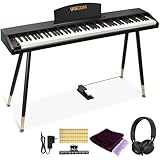
- COMPLETE DIGITAL PIANO SET WITH WOODEN STAND: This 88 key digital piano includes a matching wooden stand, triple pedal, music stand, headphones, music clips, piano cover and key stickers. The full-size piano keyboard gives beginners, teens and adults a complete electric piano setup for home practice, lessons and everyday playing.
- REALISTIC SEMI-WEIGHTED 88-KEY FEEL: The semi-weighted keyboard responds to different playing strength for a more expressive piano practice experience. With a lighter touch and quicker key return than fully weighted keys, this 88 key keyboard piano helps beginners build confidence while learning proper finger control.
- BLUETOOTH AUDIO & MIDI-USB CONNECTIVITY: Use the MIDI-USB output to connect this electric keyboard piano to phones, tablets or computers for compatible learning apps such as POP Piano and Perfect Piano. Bluetooth audio lets the digital piano work as a speaker, making play-along practice and music learning more engaging.
- 600 TONES, 800 RHYTHMS & PRACTICE FUNCTIONS: This digital keyboard piano features 600 tones, 800 rhythms and 80 demo songs, plus metronome, split keyboard, dual voice, transpose, recording and playback. These creative functions support beginner lessons, self-practice, composing and casual home performance.
- WOOD-GRAIN HOME PIANO DESIGN: The wood-grain finish and matching wooden stand give this beginner keyboard piano a warm, furniture-style appearance for bedrooms, living rooms, studios and home music corners. It combines the look of a stylish home digital piano with the practical features needed for daily practice.
What it cannot establish from the described features
The cited product description mentions accuracy and timing, not a complete assessment of technique or expression. A passage can contain the right notes at the right moments while still being tense, uneven in tone, poorly pedaled or musically flat. Build in occasional listening away from the screen: record yourself, listen for a continuous phrase and notice whether your shoulders, wrists and fingers remain comfortable. If you cannot identify the cause of a recurring problem, a teacher’s observation is the appropriate next layer of feedback.
What a teacher can hear and see
A teacher can connect the sound to the movement that produced it. They may notice that a missed note follows a thumb tucking problem, that a rigid wrist is limiting speed, or that the melody is disappearing under the accompaniment. Those observations are not automatic guarantees of good teaching; ask how the teacher explains and demonstrates corrections.
Plan practice around the format
Illustrative app routine
- Start with a short setup. Sit at the instrument, open the planned lesson and remove distractions before playing.
- Complete one guided activity. Keep the speed controlled enough to maintain accurate notes and a steady pulse.
- Review the feedback. Identify whether the main issue was a wrong note, unstable timing or a section you could not understand.
- Repeat one small target. Work on the problem section instead of restarting the entire lesson repeatedly.
- Record the next action. Write down the measure or skill to revisit at the next session.
This routine is an example of how to use a self-paced system; it is not a prescribed schedule from the app provider. The right session length is the one you can repeat consistently without allowing fatigue to create careless habits.
The Tool Desk
Outbyte Driver Updater FREEScan for outdated or missing drivers - takes under a minuteDriver Scan →Outbyte PC Repair FREERepair Windows errors before they cause bigger problemsFix Now →Illustrative teacher-based routine
- Before the lesson, mark passages that felt difficult and bring those questions rather than waiting for the teacher to guess.
- During the lesson, ask the teacher to demonstrate the movement, tempo or fingering you are expected to practice.
- Immediately after, write the assignment in your own words and play it once while the instructions are fresh.
- Between meetings, divide the assignment into small sessions so the final day is not your only practice.
- At the next lesson, report what improved and what remained unclear; that information lets the teacher adjust the sequence.
Signs your routine needs changing
- You repeat the same section without identifying what is failing.
- You can pass an app check but cannot play the passage comfortably or musically without watching the screen.
- You arrive at each lesson unable to recall the assignment.
- You avoid the instrument because the current task is too difficult to start independently.
Change one variable at a time: slower tempo, smaller section, clearer written goal or a request for direct help. Do not respond to every difficulty by adding more material.
Budget the real cost
No current universal price can be quoted responsibly for either option. App subscriptions change by country and plan, while teacher rates depend on location, experience, lesson length and frequency. Compare the terms actually offered where you live rather than relying on an old article or a price from another region.
| Cost item | Questions to answer |
|---|---|
| App access | What subscription period is offered, what is included, and how does cancellation or renewal work? |
| Teacher lessons | What is the local rate, lesson duration, payment schedule and policy for holidays or missed appointments? |
| Instrument | Do you already have a usable piano or keyboard, or must you budget for one before lessons can begin? |
| Travel and time | Will commuting to a teacher add transport costs or make regular attendance difficult? |
| Support between lessons | Is help available between appointments, and is it included or charged separately? |
The instrument is not an optional accessory for the cited app: its official page says a piano or keyboard is needed to start. A beginner digital piano or electronic keyboard is therefore the relevant product category if you do not own an instrument. The available source does not establish a best brand, model, price, key count or feature set, so choose based on a realistic budget, available space and a setup you will use consistently rather than on an unsupported specification.
Rank #4
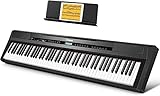
- 🎹 【Full-Weighted 88 key keyboard】The digital electric piano is constructed by 88 full-sized hammer action keys with adjustable touch response. This 88-key weighted keyboard allows to adjust your desired playing style.
- 🎹 【238 Tones & 128 Polyphony】 The 88-key weighted keyboard loaded with 238 types of tone like Ukulele, drum, bass, etc. vividly presenting voices of different instruments, arousing your keen to learn music. The digital electric piano with 128-note max polyphony, players could distinguish tone clearly in Chorus & Reverb under various occasions.
- 🎹【Double Keyboard & Control Panel】This 88 key weighted keyboard provides dual-tone mode for combining two voices together, like piano and drum, inspiring to make a new creation. Panel includes sustain pedal, triangle pedal and audio inputs & outputs, perfectly used for music arrangement and an ensemble.
- 🎹 【Multi-Media Settings】This digital piano features with a backlit LCD screen for clearly showing chords names and notation and adjusting wanted tones, recording mode-MIDI, MP3 Player and two 25W amplifiers, bringing you richer and better experience of practice and performance.
- 🎹【Multi-Purpose 88 key keyboard】This streamlined 88-key piano is designed for rehearsing, learning and creating, practice or performance.
How to evaluate an app before committing
- Confirm the hardware requirement. Make sure you have access to a piano or keyboard and a place to practice.
- Read the feedback description carefully. Check whether the advertised checks concern notes, timing or another defined skill. Do not assume that a general “smart” claim covers posture, tone or pedaling.
- Map the lesson path to your goal. A learner focused on reading notation, accompanying songs or playing by ear may need different material. Verify that the available course actually addresses the skill you want.
- Check the commercial terms. If a trial or cancellation window is offered, note its end date, renewal rule and eligible features. Terms can differ by region.
- Test your independence. After several sessions, ask whether you can start practice, interpret an error and choose a sensible next repetition without outside prompting.
- Set a human-help trigger. Decide that a repeated unexplained problem, pain or growing frustration is a reason to consult a teacher rather than endlessly replaying the same exercise.
How to evaluate a teacher
- State your starting point and goal. Say that you are a beginner and explain whether your priority is reading, songs, technique, improvisation or a combination.
- Ask how lessons are structured. Find out how the teacher introduces new material, assigns practice and checks progress.
- Ask what feedback you will receive. A useful answer should cover more than wrong notes: posture, movement, rhythm, sound and musical decisions should be discussed in terms you can apply.
- Clarify scheduling and missed-lesson rules. Confirm the regular day, lesson length, notice required for changes and how holidays are handled.
- Discuss the instrument. If you are still choosing a piano or keyboard, ask what setup will make practice comfortable; do not treat a teacher’s preference as a universal technical requirement.
- Evaluate communication. You should be able to say that an explanation was unclear and receive another demonstration or analogy without embarrassment.
Age, motivation and access considerations
Adults with irregular schedules
An app removes the need to find a mutually available lesson time, which can make short sessions easier to fit around work or caregiving. The trade-off is that no person is waiting for you when motivation drops. Put practice next to an existing daily habit and keep the first target small enough to begin.
Outdated Drivers Are Slowing You Down
One free scan finds every outdated or missing driver and matches the right update for your exact hardware.Free scan · exact hardware matchWindows Errors? Fix Them Before They Spread
Repair common Windows errors and clear accumulated junk for a smoother, more stable PC - no reinstall needed.Free scan · no reinstallChildren and supervised learning
A child may need an adult to open the lesson, keep attention on the activity and explain why repetition matters. The provider guidance that teachers can be especially valuable for younger pianists is relevant here, but family circumstances differ. An app can still be part of a child’s routine when an adult supplies the structure the software cannot.
Learners without an instrument
Neither format removes the need to practice on keys. Before paying for app access or arranging lessons, solve the instrument question. Borrowing, renting or buying are separate decisions; the cited sources do not identify a particular product or minimum specification.
Learners who need immediate clarification
If you regularly stop because one instruction has several possible meanings, direct teaching may save time. If your questions are occasional and you enjoy experimenting, an app may be sufficient initially, with a teacher added when a specific barrier persists.
A decision process you can use today
- Write your constraints. Note your weekly availability, budget range, age of the learner, location and access to a piano or keyboard.
- Name the feedback you want. Choose between automated checks on notes and timing, live observation, or both.
- Rate your independence honestly. If you can follow a sequence and keep practicing without reminders, self-paced learning is more viable. If not, scheduled instruction has a practical advantage.
- Choose a reversible first step. Compare current local subscription terms with local lesson rates and avoid paying for a long commitment before you know that the format fits.
- Review after a defined trial period. Look for concrete signs: regular sessions, clearer reading or coordination, fewer repeated errors and a better understanding of what to practice next.
- Escalate when the problem is outside the format’s strength. Add direct instruction for persistent technique or interpretation questions; add structured reminders or a simpler practice target when scheduling is the obstacle.
What the available evidence can and cannot establish
The product descriptions support specific statements about app lesson plans, practice controls, note-and-timing feedback and the need for a piano or keyboard. They also support the narrower observation that apps are designed for flexible, self-paced use and that providers see value in teachers for some learners, including younger children.
They do not establish a current universal subscription price, a standard local lesson rate, a required key count, or a guaranteed learning speed. The Royal College of Music thesis record that mentions comparisons between online and in-person instruction is not detailed enough, on its own, to justify a broad effectiveness claim. Read the full thesis document before treating any result from it as evidence for one format over the other.
The practical conclusion is therefore conditional: start with the option whose feedback, schedule and accountability match you, then change or combine formats when your experience shows a specific unmet need.
Quick Recap
Product prices and availability are accurate as of the date/time indicated and are subject to change. Any price and availability information displayed on Amazon at the time of purchase will apply.

