Philips Hue’s Wall Washer launches as a purpose-built way to light textured surfaces evenly—without the “spotlight” look that many accent fixtures can produce. If you’ve ever seen a great hallway wash in a showroom photo, this is the category of product meant to get you there.
The interesting part is timing: it arrives ahead of Philips Hue’s next wave of AI-driven integration. That doesn’t change what you can do today, but it does affect how you should set up naming, rooms, and routines so future automation has a clean foundation.
As an Amazon Associate I earn from qualifying purchases.
What Philips Hue Wall Washer is (and why it matters now)
A Hue Wall Washer is designed to spread light across a wall surface so the illumination looks smooth and consistent from edge to edge. Instead of emphasizing a single point, the fixture aims to create an even wash that flatters paint, stone, drywall texture, and framed art.
It matters because wall-washing is picky: small placement changes can cause hotspots, banding, or uneven brightness. A dedicated fixture reduces guesswork compared with repurposing a spotlight meant for a different beam pattern.
#1 Best Overall
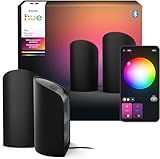
- WIDER LIGHT EFFECT: No matter how far it's placed from the wall, the Play wall washer covers three times as much surface in colorful light as other wall washers
- COLORCAST TECHNOLOGY: The first of its kind wall washer light, our innovative design of precisely arranged LEDs projects color like no other gradient light
- POWERFUL DISPLAY: Offering up to 1035 lumens, this wall washer can shine bright; ultra-low dimming means it can also become a beautiful backdrop or nightlight
- HIGH-QUALITY MATERIALS: The LED wall washer light is made from aluminium with a matte finish, meaning you won't catch any glare from the TV off the light itself
- COMPACT DESIGN: Despite its powerful light output, the Play wall wash light is small in size, only 15.7 cm x 9.1 cm, meaning it fits in smaller spaces, such as on a crowded TV stand or sideboard
How wall washing works: the lighting goal
Wall washing is about controlled beam spread and falloff. Your goal is for the beam to “cover” the wall area while smoothing out the brightness gradient so the texture reads naturally.
- Uniformity: Avoid harsh center brightness that creates obvious hotspots.
- Texture rendering: Enough grazing angle to show texture without making it look gritty.
- Comfort: Prevent glare into seating areas or along eye level.
What you need before setup
Wall Washer is only half the job. To get stable control and future-proof routines, confirm your Hue ecosystem first.
- Power: Wall Washer’s correct power connection for your region (follow the included instructions).
- Hue Bridge (recommended): Needed for the most reliable automations, remote control, and integrations.
- Philips Hue app: Install from the App Store or Google Play on your iPhone, iPad, or Android device.
- Wi‑Fi and a stable network: The Hue Bridge uses your home network for control; your router uptime matters.
If you’re thinking about future AI routines, you’ll want Bridge-based control rather than Bluetooth-only setups, because routines and automations are far more consistent through the Hue ecosystem.
The Tool Desk
Outbyte Driver Updater FREEScan for outdated or missing drivers - takes under a minuteDriver Scan →Outbyte PC Repair FREERepair Windows errors before they cause bigger problemsFix Now →Compatible hubs, apps, and ecosystems
Philips Hue Bridge and Hue app requirements
Philips Hue’s core control usually centers on the Hue Bridge (commonly the 2nd generation model). With Bridge support, you get multi-device control, room grouping, schedules, and third-party platform integrations.
In the Hue app, you’ll set up the Wall Washer under a room so lighting scenes and automation triggers can address it consistently.
HomeKit, Alexa, and Google Home
Hue devices typically integrate with major smart-home platforms. In practice, that means you can control the Wall Washer using:
- Apple Home (HomeKit): Often via the Philips Hue skill/bridge pairing.
- Amazon Alexa: For voice control and routines.
- Google Home: For assistant-based control.
Because AI features may show up first in Hue’s own app experience, treat these platforms as control surfaces, not the “learning brain.” Keep naming consistent to avoid mismatched device labels across ecosystems.
Do these 3 things before closing this tab:
1Repair Windows errors before they cause bigger problems2Scan for outdated or missing drivers - takes under a minute3Clear out junk files and repair common Windows errorsUnboxing and physical installation
Before you add anything to the app, get the physical beam direction right. If the fixture is aimed poorly, software tuning can only compensate so much.
Rank #2

- Wider light effect: No matter how far it's placed from the wall, the Play wall washer covers three times as much surface in colorful light as other wall washers.
- ColorCast technology: The first of its kind, our innovative design of precisely arranged LEDs projects color like no other gradient light.
- Powerful display: Offering up to 1035 lm, this wall washer can shine bright. Ultra-low dimming means it can also become a beautiful backdrop or nightlight.
- High-quality materials: It's made from aluminum with a matte finish, meaning you won't catch any glare from the TV off the light itself.
- Compact design: Despite its powerful light output, the Play wall washer is small in size — only 15.7 cm x 9.1 cm — meaning it fits in smaller spaces, such as on a crowded TV stand or sideboard.
Placement rules for smooth, even coverage
- Distance matters: Too close creates glare and a bright center; too far can make the wash look dim and uneven.
- Aim matters: Aim slightly so the beam skims the wall texture rather than blasting straight in.
- Obstructions matter: Picture ledges, molding, and furniture can cause banding or shadow lines.
Mounting height, distance, and aiming
Use a simple test approach: place/mount at your best estimate, then turn on a neutral white wash. Walk to the far edge of the wall and check for hotspots or sudden gradients.
If your setup includes adjustable brackets, make small changes (centimeters at a time). Move/aim, test again, then lock it down. Wall washing is iterative—plan for at least two adjustment passes.
Setup in the Philips Hue app (step-by-step)
Once the Wall Washer is powered, you can add it to Hue. These steps are written to match typical current Hue app flows.
PC Slower Than It Used to Be?
A free scan shows the junk files, broken settings and background clutter dragging Windows down - then fixes them in one click.Free scan · Windows 10 & 11Outdated Drivers Are Slowing You Down
One free scan finds every outdated or missing driver and matches the right update for your exact hardware.Free scan · exact hardware matchAdd the Wall Washer as a new light
- Open the Philips Hue app on your iPhone, iPad, or Android device.
- Go to Settings or Set up a new device (wording varies by app version).
- Select Light or Add light.
- Choose your Hue Bridge if prompted.
- Follow the on-screen pairing instructions (the app usually instructs you to confirm the light during discovery).
If the light doesn’t show up, power-cycle the Wall Washer once and try again. Keep your phone close to the Bridge during discovery if your setup uses Bluetooth fallback for initial pairing.
Choose a room and set the primary name
- When prompted, assign the Wall Washer to the correct Room (for example, Living Room or Hallway).
- Rename it to a clear label like Wall Washer – Main Wall instead of something generic.
- Confirm and save.
This naming discipline is worth it later when you create scenes and when AI-driven routines arrive. Clean labels reduce the “wrong device” problem across automations.
Create a first scene (warm-to-cool and brightness targets)
Create one baseline scene you’ll actually use. For a wall wash, start with neutral white and then decide whether you prefer warmer or cooler tones.
- Go to Rooms and open your chosen room.
- Select the Wall Washer.
- Adjust Brightness until the wash looks even on the entire wall.
- Adjust Color temperature to a comfortable range (for example, warmer for evenings, cooler for daytime).
- Tap Save to create a Scene (e.g., Evening Wash).
If your Hue app offers a color wheel for full-color modes, still create a neutral “anchor” scene first. It’s easier to maintain visual consistency for a textured wall.
Free tools Windows power users keep installed
One-click scans. No signup required.
Test beam spread and wall falloff
- Stand at the near edge and verify the wash isn’t too bright.
- Stand at the far edge and verify it doesn’t fade into dimness.
- Check at eye level for glare. If the fixture is too low or aimed too steeply, you’ll feel it instantly.
If you see a hotspot, don’t jump straight to color changes—fix positioning first.
Rank #3
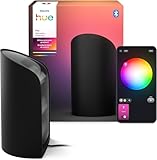
- Wider light effect: No matter how far it's placed from the wall, the Play wall washer covers three times as much surface in colorful light as other wall washers.
- ColorCast technology: The first of its kind, our innovative design of precisely arranged LEDs projects color like no other gradient light.
- Powerful display: Offering up to 1035 lm, this wall washer can shine bright. Ultra-low dimming means it can also become a beautiful backdrop or nightlight.
- MATTE ALUMINUM DESIGN: Crafted from aluminum with a matte finish designed to limit glare from your TV off the light itself.
- Compact design: Despite its powerful light output, the Play wall washer is small in size — only 15,7 cm x 9,1 cm — meaning it fits in smaller spaces, such as on a crowded TV stand or sideboard.
Best practices for scenes, schedules, and automation
Wall washing looks best when it’s consistent with your room’s rhythm: daytime brightness and evening warmth, plus occasional “highlight” moments for art or architectural features.
Schedules that don’t fight your habits
- Create a Daytime schedule that starts when you’re likely awake (not at sunrise if your lifestyle varies).
- Create an Evening schedule with warmer color temperature and slightly lower brightness.
- Keep one “manual override” rule: if you change the lighting, allow it to stay until your next planned schedule time.
This approach avoids the annoying “why did the light change again?” feeling.
Motion and presence routines
If you pair the Wall Washer with Hue motion sensors, use them for function, not ambience. For example, a motion-triggered wash can turn on to a moderate level, then fade down after inactivity.
Quick wins for a faster PC:
Repair Windows errors before they cause bigger problemsFix Now →Fix the driver behind crashes, sound loss and screen glitchesFind Drivers →That’s how you keep the wall wash from becoming distracting during late-night movement.
Lighting “layers” for depth: accent + wash + ambient
A clean wall wash often looks best when it’s only one layer. Combine it with another lighting source—like a ceiling light or floor lamp—for overall comfort.
- Wall Washer: Texture and architectural framing.
- Ambient light: General visibility and comfort.
- Accent light: Art, shelves, or plants.
What “ahead of AI integration” changes for you
AI integration promises more context-aware behavior: routines that adapt to your habits, preferences, and time patterns. The Wall Washer launch being “ahead” means you get usable, controllable wall washing immediately—while expecting smarter automation later.
How to prepare now for smarter routines later
- Use rooms consistently: If you call a space “Hallway” today, don’t rename it monthly.
- Create stable scenes: Keep one or two reliable scenes you always like (for example, “Evening Wash” and “Focus Wash”).
- Avoid device label chaos: If you have multiple wall washers, use a numbering scheme like “Main” and “Secondary.”
- Choose consistent color temperature targets: AI routines will perform better when your baseline preferences aren’t constantly shifting.
Data hygiene: keep names and rooms consistent
Even without knowing how Philips will map AI preference signals, the simplest best practice is to reduce ambiguity. Clear room assignments and predictable scene names make it easier for any future feature to choose the right lighting behavior.
What’s actually slowing this PC down?
Pick the symptom - the matching free tool is one click away.
Troubleshooting when setup or behavior is off
Wall Washer issues usually fall into four buckets: pairing failures, unstable brightness, unexpected color behavior, and control latency. Here’s what to try in the Hue app and in your home network.
Rank #4
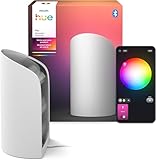
- Wider light effect: No matter how far it's placed from the wall, the Play wall washer covers three times as much surface in colorful light as other wall washers.
- ColorCast technology: The first of its kind, our innovative design of precisely arranged LEDs projects color like no other gradient light.
- Powerful display: Offering up to 1035 lm, this wall washer can shine bright. Ultra-low dimming means it can also become a beautiful backdrop or nightlight.
- High-quality materials: It's made from aluminum with a matte finish, meaning you won't catch any glare from the TV off the light itself.
- Compact design: Despite its powerful light output, the Play wall washer is small in size — only 15,7 cm x 9,1 cm — meaning it fits in smaller spaces, such as on a crowded TV stand or sideboard.
Light won’t connect
- Power-cycle: Turn the Wall Washer off/on at the switch (or power source) and retry pairing.
- Bring devices close: Keep your phone near the Bridge during discovery.
- Check the Bridge: Confirm the Hue Bridge is online (app should indicate connectivity).
If you recently changed your router or moved the Bridge to a different network, you may need to re-authenticate or reconfigure.
Flickering or unstable brightness
- Rule out electrical issues: Confirm the fixture is receiving stable power; loose connections can cause flicker.
- Remove conflicting dimmers: If the Wall Washer is wired through a wall dimmer, it may not behave correctly depending on its driver design.
- Update Hue app: Outdated app builds can mis-handle device states.
If flicker persists, test the Wall Washer on a different circuit (if safe) to isolate electrical versus software causes.
Wrong color temperature or unexpected effects
- Verify scene selection: Confirm you’re not still in an effect-driven scene (like a dynamic color or special mode).
- Reset your baseline: Re-save your “anchor” wall wash scene with the exact brightness and color temperature you want.
- Check room grouping: Sometimes a room-wide command updates multiple devices you didn’t intend.
Delays and missed commands
- Network stability: If the Bridge loses connection, remote control can lag.
- Bluetooth-only fallback: If you’re using a mode that relies on Bluetooth, keep control within range.
- Scene overload: Too many schedules firing at once can create state conflicts.
For fastest response, use Bridge-based control and keep automations simple.
Recommended Free Tools
Advanced tuning: getting a professional-looking wash
Once the basics work, you can tune for look and comfort. This is where you treat the Wall Washer like a controllable instrument, not just “a light.”
Dialing in brightness without blowing out texture
Textured walls can look harsh at high brightness because texture increases perceived contrast. Start lower than you think you need, then increase until the texture reads clearly—but without a glarey center.
Using color temperature to control perceived contrast
Warmer tones tend to feel more natural in evening rooms, while cooler tones can make edges and texture feel crisper. If your wash looks “too sharp,” shift toward warmer; if it looks dull, shift cooler or slightly increase brightness.
Avoiding hotspots and “striping”
- Hotspot fix: Adjust aiming angle downward slightly and check uniformity again.
- Striping fix: Ensure the fixture isn’t partially blocked by trim, shelving, or uneven mounting.
- Edge falloff fix: Re-check mounting height and distance. Sometimes moving the fixture 5–10 cm makes the biggest visual difference.
Alternatives if you need something specific
Sometimes you’re buying for a look that’s hard to achieve with one fixture. Here are practical alternatives depending on your priority.
Other Philips Hue luminaires
If you need more flexibility for color effects, consider Hue fixtures that support richer color behaviors. If your priority is architectural coverage, keep wall washing as the goal, but explore fixtures in the Hue ecosystem that are built for wider beam patterns.
Best Value

- MULTICOLOR GRADIENTS – This RGBWWIC LED lamp blends multiple colors seamlessly to wash the walls with beautiful light gradients, or to match on-screen content in real time when synced
- PRECISE COLORS – This dimmable table lamp features Chromasync, which ensures exceptional color consistency, precise color matching, and uniform brightness across all the Hue lights in your home
- PLACE IT ANYWHERE – With its slender profile, it blends seamlessly with the room, so you can use it as a bedside table lamp, place it next to your TV screen, or use it as a desk light
- SYNC WITH TV – Turn watching movies and playing video games into an immersive experience with surround lighting via content syncing (requires Hue Bridge and either HDMI sync box or Sync TV app)
- UNLOCK MORE WITH A BRIDGE – Add a Bridge or Bridge Pro (sold separately) to your setup to unlock more advanced settings, customizations, and smart automations
When comparing, focus on beam spread and mounting geometry, not just the app features.
Non-Hue wall wash options
If you’re trying to match a very specific theater-style wash or you need tight integration with a home control system, non-Hue LED wall washer solutions may offer more direct control. The tradeoff is typically less plug-and-play automation and fewer “scene-first” experiences.
For most homes, Hue’s biggest advantage is predictable routines, clean grouping, and reliable smart-home integrations.
FAQ about Philips Hue Wall Washer and future AI features
Does Philips Hue Wall Washer require the Hue Bridge?
Bridge-based control is strongly recommended for consistent automation, remote access, and most third-party integrations. Some setups may allow direct control depending on your Hue configuration, but reliability and feature depth are usually better with the Bridge.
Will I lose anything if I set up routines before AI integration arrives?
No. The biggest “preparation” you can do is create stable rooms and scenes you like. Future AI features will still benefit from that groundwork because device labels and lighting preferences stay consistent.
Why does my wall wash look uneven even after pairing correctly?
Most uneven looks come from placement: distance, aiming angle, and obstructions. Firmware and app settings can’t fully correct a physically misaligned beam, so treat positioning as the first fix.
Can I use the Wall Washer with HomeKit, Alexa, or Google Home?
Hue devices typically integrate with these platforms through Hue’s setup and linking flows. If you see missing devices or mismatched names, update your device labels in the Hue app and re-check the platform’s device list.
Bottom Line
Philips Hue Wall Washer is a straightforward upgrade if you want an even, professional-looking wall wash instead of spotlight glare. The launch ahead of AI integration means you can start building real routines now—then benefit later from smarter automation without redoing your whole setup.
Mount carefully, name cleanly, and create one or two anchor scenes that match your day-to-night preferences. That’s the fastest path to lighting that looks good today and stays reliable when future Hue features land.
Quick Recap
Product prices and availability are accurate as of the date/time indicated and are subject to change. Any price and availability information displayed on Amazon at the time of purchase will apply.

