Opinionated Linux is not “back” because one distribution has proved that it makes developers faster. The stronger, evidence-based claim is narrower: Omarchy shows why a deliberately assembled workstation can be attractive again. It combines Arch Linux, the Hyprland tiling window manager and Quickshell with selected applications, visual themes and keyboard-first conventions, giving users a coherent starting point instead of a blank desktop.
That coherence saves configuration decisions and makes customization part of the desktop experience. It also imposes real costs: you must accept the project’s terminal-heavy assumptions, learn its workflow, handle firmware requirements and verify compatibility yourself. Omarchy’s reported downloads and GitHub stars show substantial attention, but they do not establish a Linux-wide revival or prove a productivity gain.
As an Amazon Associate I earn from qualifying purchases.
What “opinionated Linux” means in practice
A designed starting point, not a package list
A conventional desktop distribution tries to be broadly acceptable. It offers familiar menus, many interchangeable applications and settings that rarely force a particular way of working. An opinionated workstation makes different choices on your behalf. The desktop arrives with a preferred window-management model, visual language, keyboard shortcuts, applications and defaults that are intended to work together.
Omarchy’s manual calls it an “omakase Linux distribution.” The comparison is useful: like a chef’s selected menu, it gives you a considered arrangement rather than every possible option. Omarchy is based on Arch Linux, uses Hyprland for tiling windows and Quickshell as its desktop construction kit. Its default application set includes Neovim, Chromium, Obsidian, LibreOffice, Kdenlive and OBS Studio.
#1 Best Overall

- Powerful Xeon Processor: Intel Xeon W-2135 6-Core / 12-Thread 3.7GHz (up to 4.5GHz Turbo) – perfect for CAD, rendering, video editing, simulation, and heavy multitasking
- Ready for Your Build: 64GB DDR4 ECC RAM installed – supports massive upgrades + no GPU, no drive, no OS included – fully customizable workstation PC
- Ultimate Storage Flexibility: 2x M.2 PCIe NVMe slots + 2x 3.5" SATA bays + onboard RAID (0/1/5/10) – add up to multiple TB of blazing-fast SSDs or high-capacity HDDs
- Add Any Graphics Card: No GPU included – 900W 80+ Platinum PSU gives huge headroom for RTX 4090, Quadro, or professional cards in this renewed/refurbished desktop computer
- Pro-Grade Connectivity & Build: Dual 1GB Ethernet, 8x USB 3.1 ports, Windows/Linux ready – certified renewed tower workstation built for 24/7 reliability
Those components are not presented as unrelated packages. The project’s identity depends on how they are connected: a terminal-centered workflow, tiling layouts, themes, launcher and shell behavior, and conventions that can be changed through configuration. “Opinionated” therefore describes both the defaults and the expectation that you will eventually edit them.
Why a coordinated environment can be useful
Starting with an assembled environment compresses a large amount of setup work. You do not first choose a window manager, then find a compatible bar, then invent keyboard shortcuts, then decide which launcher and theme system should bind them together. Omarchy makes those decisions visible on the first boot.
The benefit is not an independently measured speed increase. The available project material describes an intended experience, not a controlled comparison with another distribution. A fair interpretation is that fewer initial choices can reduce setup friction for someone who already likes the underlying workflow. Someone who dislikes tiling or prefers graphical configuration may experience the same defaults as obstacles.
Recommended Free Tools
Omarchy’s stack and the assumptions behind it
| Layer | What Omarchy uses | What that choice implies |
|---|---|---|
| Base operating system | Arch Linux | You receive a rolling, highly configurable foundation and should expect to understand updates and configuration rather than treat the system as a sealed appliance. |
| Window management | Hyprland | Windows are arranged through a tiling-oriented model, with keyboard movement and deliberate layouts central to the experience. |
| Desktop construction | Quickshell | Shell components and desktop behavior are assembled as a coherent layer that can be customized. |
| Default applications | Neovim, Chromium, Obsidian, LibreOffice, Kdenlive and OBS Studio | The installation is ready for coding, browsing, notes, office work and media creation without requiring a blank-slate application hunt. |
The manual is explicit that a terminal-heavy, tiling and theme-oriented environment is an acquired taste. That sentence is more important than the screenshots: Omarchy is not trying to hide its assumptions. Manual configuration is part of the experience, so a prospective user should regard reading configuration files and changing bindings as normal maintenance rather than an exceptional repair.
How the developer workflow is opinionated without being closed
A clear editor default
Neovim is the default editor in Omarchy’s developer workflow. A strong default gives a new installation a recognizable center of gravity: the user can start coding immediately instead of deciding among editors before the rest of the system is understood.
Rank #2

- 【AMD Ryzen 3 5300U CPU: Outperforms N150 & 3500U】 BOSGAME E5 mini PC is powered by the TSMC 7nm FinFET architecture AMD Ryzen 3 5300U processor (4 Cores, 8 Threads, up to 3.8GHz boost, 6MB total cache). Compared to low-end Intel N150 or 3500U chips which only have 4 single threads and throttle under load, the 5300U delivers over 30% faster multi-core speed. Run 30+ browser tabs, large Excel sheets, and Zoom meetings simultaneously without system lag.
- 【8GB DDR4 RAM & 256GB NVMe SSD Storage】 Installed with high-speed 8GB DDR4 dual-channel memory and a fast 256GB M.2 2280 SSD, eliminating slow boot times and application loading delays. To accommodate growing data requirements, the upgradeable hardware design features dual SODIMM slots that allow you to expand memory up to 64GB RAM, ensuring smooth operation during heavy multitasking.
- 【High-Capacity Dual M.2 SSD Storage Expansion】 Never worry about running out of space for your business files. In addition to the pre-installed 256GB system drive, the motherboard houses an extra empty internal M.2 2280 NVMe PCIe 3.0 slot. This allows you to easily add a second solid-state drive for up to an additional 2TB of storage capacity (upgrades not included) without needing to remove or reinstall the original operating system.
- 【Radeon 6-Core Graphics & Triple 4K Displays】 Integrated with official AMD Radeon Graphics (6 Graphics Cores, 1500 MHz frequency) for casual gaming, photo editing, and crisp 4K media decoding. Featuring 1x HDMI 2.0 port, 1x DisplayPort, and 1x Full-Function Type-C port, the E5 outputs true 4K@60Hz resolution to three monitors at once. This multi-screen setup eliminates constant window-switching for traders, programmers, and office workers.
- 【Dual 2.5GbE LAN Ports for Advanced Networking】 Experience fast wired network transmission speeds up to 2500Mbps without lagging or buffering. The integration of dual 2.5 Gigabit Ethernet ports (powered by Realtek RTL8125 controller) makes this compact computer an exceptional hardware choice for tech enthusiasts. Easily configure it into software routers, hardware firewalls (pfSense, OpnSense), home NAS servers, or local homelabs.
The project also documents alternatives. VS Code, Cursor, Zed, Sublime Text, Helix, Vim and Emacs can be installed and selected as system-wide defaults. This is an important distinction between an opinionated system and a locked system. Omarchy chooses a path, but it does not claim that every developer should stay on that path.
Keyboard-first interaction
Tiling and terminal conventions make keyboard movement, launching and switching central operations. For a developer who already works in a terminal and keeps several tools visible, a consistent set of bindings can make the desktop feel like an extension of the editor. For someone who relies on pointer-driven menus, the learning cost is higher.
The Tool Desk
Outbyte PC Repair FREEClear out junk files and repair common Windows errorsFree Scan →Outbyte Driver Updater FREEFix the driver behind crashes, sound loss and screen glitchesFind Drivers →The project’s phrase “The malleable OS for the age of agents” is positioning, not an independent assessment. It signals that the maintainers want the operating system itself to be shaped around a particular style of modern development. Treat that as a design invitation, not a guarantee that agent-assisted work or any other workflow will improve.
Why the model appeals now
Choice overload has become a setup problem
Developer workstations combine an operating system, window manager, terminal, editor, language toolchains, browsers, note systems and communication tools. The flexibility of Linux can turn into hours of decisions before meaningful work begins. Omarchy’s proposition is to provide a maintained baseline, then let users change the parts that matter to them.
This is especially attractive to people who reinstall machines, keep dotfiles, or want the desktop layout itself to be part of their working method. A curated baseline also makes demonstrations and shared configuration easier: two installations start from recognizable conventions before either user applies personal changes.
Rank #3
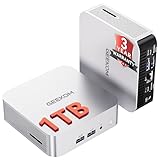
- ➊[【Built to Keep AI Working While You Work】]Cloud AI is only useful when your PC can keep up. Powered by AMD Ryzen 5 7535HS with 6 cores, 12 threads, and up to 4.55GHz, GEEKOM A7 delivers the performance headroom to handle AI-assisted tasks alongside everyday multitasking. Tackle research, document work, content creation, browser-based AI tools, and office apps with ease. No local large-model deployment is needed—A7 works with cloud AI services while keeping your files, apps, and workflow on your PC.
- ➋[DDR5 Speed – Get More Today]Why pay more for memory later? The Ryzen 5 7535HS comes with 16GB DDR5 memory for fast response and smooth multitasking across work, streaming, content creation, and light gaming. As AI demand pushes memory costs higher, getting DDR5 included today adds real value. Swappable slots support up to 64GB, while the 1TB PCIe Gen4 x4 SSD expands to 4TB. The UHS-II SD card slot lets you quickly access and transfer photos, videos, and files without an extra reader—giving you speed, flexibility, and room to grow.
- ➌[Built to Last – Premium Metal Design & 3-Year Support]Why settle for a basic plastic PC? The GEEKOM mini desktop features a premium aluminum alloy chassis built for everyday durability while helping dissipate heat during long hours of use. Rigorous quality and stress testing, along with CE, FCC, and RoHS compliance, add confidence for long-term use. Backed by a 3-year limited warranty and professional support, it’s built to stay reliable as your needs grow.
- ➍ [ Lightning-Fast Connectivity ] Unlock your potential with the GEEKOM A7 mini pc’s high-speed 40Gbps USB4 port, alongside 5 USB 3.2 ports, dual HDMI 2.0, and a 2.5G LAN port. The USB4 port supports 8K display, 100W PD charging, and eGPU expansion, boosting video editing and export speeds. With Wi-Fi 6E, you get ultra-fast, reliable connectivity for all your streaming and creative needs.
- ➎ [ Advanced IceBlast 2.0 Cooling ] Experience quiet efficiency with IceBlast 2.0 technology, featuring dual copper heat pipes and an oversized silent fan that cuts noise to just 36dB while boosting cooling by 52%. Built to run stably in diverse environments (-20°C to 55°C), the A7 includes dust-proof self-cleaning for a longer lifespan, making it the perfect, distraction-free partner for any workspace.
Aesthetic motivation is part of the product idea
The Omarchy manual says, “Because a beautiful system is a motivating system, and productivity has always been downstream from motivation.” That is the project’s design philosophy, not a verified productivity finding. The practical lesson is that appearance, motion and consistent themes can be treated as part of a workstation’s usability rather than decoration.
Whether that motivation matters is personal. A carefully styled desktop can make a machine inviting to use; it can also become a distraction if constant tweaking replaces work. Omarchy gives customization a prominent place, so users should decide in advance how much time they want to spend tuning it.
Installation requirements you should settle before downloading the ISO
Non-negotiable preparation
- Back up the target computer. The full-disk installation erases the selected drive.
- Choose the installation mode. The manual documents a full-disk install and a free-space install. Free-space installation is the documented route for dual booting alongside another operating system.
- Plan for encryption. Full-disk encryption is enabled by default, so you must be able to enter the unlock password at startup.
- Change firmware settings. The manual requires Secure Boot and/or TPM to be turned off for its installer.
- Prepare a keyboard. A wired or 2.4 GHz keyboard is recommended because the manual says a Bluetooth keyboard cannot enter the full-disk encryption password at startup.
These requirements are not details to discover after booting the installer. Disabling Secure Boot or TPM can conflict with an organization’s security policy, and a dual-boot plan needs enough genuinely free disk space. Confirm which drive and partition you are selecting before accepting any destructive prompt.
What the installation time estimate means
The installation page says the process can take under one minute on the fastest modern machines and no more than five minutes on an older computer. Those are the project’s estimates, not an independently timed benchmark. Downloading the ISO, writing installation media, changing firmware settings, backing up data and restoring your preferred applications all take additional time.
A safe installation sequence
- Back up personal files and verify the backup. Keep a second copy somewhere that will not be erased with the target drive.
- Decide between full-disk and free-space installation. Select free-space only when you are intentionally preserving another operating system for a documented dual-boot setup.
- Enter firmware setup and disable Secure Boot and/or TPM as required by the manual. Record the old settings so you can restore them if you abandon the installation.
- Create and boot the Omarchy ISO media. Use the keyboard you intend to have available when the encrypted system starts.
- Inspect the target drive and partition choice twice. A full-disk selection wipes that drive; do not rely on the installer to infer your intention.
- Complete the installation and set the encryption password. Store the password securely and test that the chosen keyboard can enter it after reboot.
- After the first boot, update and configure gradually. Keep the original defaults until networking, graphics and suspend behavior are confirmed, then change one major component at a time.
Compatibility: native hardware, virtual machines and alternatives
Windows applications in a virtual machine
Omarchy’s official site describes a Windows 11 virtual-machine setup for applications such as Microsoft Office and ordinary day-to-day work. It requires a Windows 11 Pro license valid for a virtual machine. The project explicitly says this setup lacks GPU acceleration or passthrough, so it is not intended for gaming or demanding graphics workloads.
PC Slower Than It Used to Be?
A free scan shows the junk files, broken settings and background clutter dragging Windows down - then fixes them in one click.Free scan · Windows 10 & 11Crashes, No Sound, or Screen Glitches?
Random freezes, missing sound and display glitches usually trace back to one bad driver. Find and replace yours safely.Free scan · under a minuteRank #4

- Dell T3620 Music Production Workstation PC / Studio
- Intel i7-6700 4-Core 3.4GHz (4.0GHz Turbo) CPU
- 32GB DDR4 Memory - 512GB SSD (boot) + 2TB HDD (Storage)
- Intel HD Graphics 530 (2x Display Port & HDMI)
- Operating System: Windows 11 Pro
That makes the VM a compatibility escape hatch, not a replacement for a native Windows graphics workstation. Before relying on it, identify which applications need 3D acceleration, specialized peripherals or low-latency performance. Those requirements are outside the stated use case.
Apple silicon, other virtual machines and Steam Deck
The manual lists community-driven approaches for Apple M1 and M2 hardware through Asahi Alarm, Parallels and other virtual machines, as well as the Steam Deck. These are alternatives, not equivalent supported installations. The documentation cautions that some routes are cumbersome or may perform poorly.
A NixOS port is also mentioned, with a warning that it may not stay current with Omarchy. Anyone choosing a port should verify which desktop components, configuration changes and fixes have actually been synchronized before treating it as a drop-in substitute.
Independent reader supportYour contribution helps us test, update, and keep practical guides available for everyone.The trade-off: coherence in exchange for assumptions
| If you value… | Omarchy may offer… | You must accept… |
|---|---|---|
| A ready-made developer desktop | Coordinated applications, themes and shell behavior from the first boot | Learning the project’s conventions instead of designing every layer yourself |
| Keyboard-driven work | Tiling and terminal-oriented interaction | A genuine learning curve if you prefer pointer-first desktop controls |
| Customization | A system where configuration is a visible part of the experience | Ongoing maintenance and the possibility that personal changes complicate upgrades |
| Broad hardware compatibility | A focused installation path with documented options | More checking on unsupported hardware, firmware combinations and community ports |
| Windows software access | A documented Windows 11 VM approach for everyday applications | A Windows 11 Pro VM license and no GPU acceleration or passthrough |
There is no evidence here for ranking Omarchy’s performance against another distribution. The meaningful comparison is about setup and control: how much firmware work you can do, how strongly you want coordinated defaults, how comfortable you are with tiling and terminals, and whether your required applications run natively.
Do these 3 things before closing this tab:
1Repair Windows errors before they cause bigger problems2Fix the driver behind crashes, sound loss and screen glitches3Clear out junk files and repair common Windows errorsWhat the numbers say—and what they do not
When accessed on October 7, 2026, Omarchy’s official website reported 1,245,204 ISO downloads in its first year and 44,130 GitHub stars. Those figures indicate attention to the project.
Best Value

- 【Processor】Intel Core i7-7700 delivers fast, reliable performance for office work, web browsing, and everyday multitasking.
- 【Storage & Memory】8GB DDR4 RAM for smooth multitasking; 256GB NVMe SSD for quick boot times and plenty of room for files and applications.
- 【WiFi Included】A USB WiFi adapter is included in the box, so you can join a wireless network as soon as you power the machine on — no separate purchase needed. DisplayPort video output, multiple USB 3.0/3.1 ports, RJ-45 Gigabit Ethernet, and audio jacks cover everyday home and office needs.
- 【Ready to Use】Ships with Windows 11 Pro pre-installed and activated, plus a wired keyboard and mouse. Plug in and get to work.
- 【BUY WITH CONFIDENCE】Professionally refurbished, tested, and certified to look and work like new; 90-day warranty and technical support.
| Metric | Reported figure | What it cannot establish |
|---|---|---|
| ISO downloads in year one | 1,245,204 | Not unique people, retained installations or active developer workstations |
| GitHub stars | 44,130 | Not a measure of daily use, production adoption or productivity |
Consequently, “why opinionated Linux is back” is best treated as a question prompted by a visible project, not a proven market-wide trend. The available figures do not include a representative industry survey or user study. They support saying that Omarchy has momentum and curiosity around it; they do not support claiming that Linux users generally have returned to opinionated desktops.
Who should choose an Omarchy-style workstation?
Likely fits
- Developers who already use a terminal and want tiling behavior to be a first-class desktop convention.
- Users who prefer a strong baseline and would rather modify a coherent system than assemble one package at a time.
- People comfortable reading documentation, changing configuration and diagnosing hardware or firmware issues.
- Anyone who values a consistent visual environment and sees customization as part of how they work.
Likely mismatches
- Computers that must retain Secure Boot or TPM settings because of organizational policy.
- Systems whose primary workload needs GPU passthrough, high-end gaming support or demanding graphics inside the documented Windows VM.
- Users who need a graphical, low-maintenance desktop and do not want to learn tiling or terminal conventions.
- Hardware combinations that depend on an unmaintained port or a community path whose performance is uncertain.
A decision checklist before you commit
- Can you back up the machine and identify the exact drive you are willing to modify?
- Is disabling Secure Boot and/or TPM acceptable on this computer?
- Do you want a documented dual-boot setup, or are you prepared for a full-disk replacement?
- Will a wired or 2.4 GHz keyboard be available to unlock encryption at startup?
- Are your essential applications native to Linux, or can the documented Windows VM meet their needs without GPU acceleration?
- Are you willing to use Neovim as the starting point, even though alternatives are available?
- Will you maintain configuration and investigate issues when a community hardware route is involved?
If several answers are no, a less prescriptive desktop is likely a better fit. If most are yes, Omarchy’s value is the reduction of initial design work while keeping the system open to personal changes.
What Omarchy teaches about the future of developer desktops
Omarchy’s lesson is not that every developer should adopt Arch, Hyprland or a terminal-first desktop. It is that the workstation itself can be designed as an integrated product. Defaults can express a workflow, visual style and set of priorities, while still allowing users to replace individual applications and system-wide editor choices.
What’s actually slowing this PC down?
Pick the symptom - the matching free tool is one click away.
That approach addresses a real tension in Linux: freedom creates possibility, but possibility creates decisions. Omarchy resolves the tension by making more decisions up front and exposing the configuration so users can take ownership later. Its installation requirements, compatibility caveats and maintenance burden are the price of that coherence.
The project therefore provides a useful case study in renewed interest in opinionated Linux, not conclusive proof of a broad resurgence. Its reported attention is real, its design proposition is clear, and its limitations are equally concrete. Whether that exchange is worthwhile depends less on a trend than on how closely your own work matches the assumptions built into the machine.
Quick Recap
Product prices and availability are accurate as of the date/time indicated and are subject to change. Any price and availability information displayed on Amazon at the time of purchase will apply.

