There is no single “open-world city builder” with one standard feature set. Mod support, co-op rules, save sharing, and hardware requirements vary by game. The safest way to choose is to identify the exact title first, then check four things: how deeply you can create or modify worlds, whether multiplayer is cooperative or competitive, how saves move between modes or machines, and the published platform requirements.
At a glance: how the representative games differ
The following comparison uses the features and requirements published for each title. “Not stated” means the cited listing did not publish a comparable figure, not that the feature is absent.
As an Amazon Associate I earn from qualifying purchases.
| Game | Creation and mod tools | Multiplayer | Save model | Published minimum requirements or platform notes |
|---|---|---|---|---|
| Rising World | Unrestricted world modification, more than 200 building materials, blueprints, Plugin API | Single-player and multiplayer | Buildings can be saved and shared as blueprints | Windows, macOS, and Linux; hardware figures not stated |
| Kingdoms Reborn | Procedurally generated world and simulated citizens; mod details not stated | Real-time cooperation or competition for up to 8 players | Multiplayer save details not stated | Hardware figures not stated |
| Technicity | Steam Workshop sharing for prefab buildings, item designs, and maps | Online co-op | Multiplayer save behavior not stated | Windows listing: 3 GHz CPU, 8 GB RAM, 2 GB graphics memory, 2 GB storage minimum; client compatibility also matters |
| Pioneers of Pagonia | Integrated Pagonia Editor for custom islands and challenges | Shared co-op with up to 4 friends | Multiplayer saves and seamless solo/multiplayer switching | Hardware figures not stated |
| Dream Engines: Nomad Cities | Survival city-building systems; mod support not stated | Single-player | Cloud saves | Windows minimum: 3.0 GHz dual-core CPU, 8 GB RAM, GTX 660-class graphics, DirectX 11, 4 GB storage |
| Town to City: Sandbox Regions mod | Links multiple sandbox regions while keeping each region’s world state | Mod-specific; no general multiplayer claim | Linked-region configuration is restored through the normal save system; Campaign saves are isolated | Behavior depends on the host game and the mod version |
What “mods” and creation tools actually mean
“Supports mods” can describe very different levels of control. A game may expose a formal plugin interface, let players exchange finished maps, or simply include an editor made by the developer. Those options affect what you can build, how easily you can share it, and how likely an update is to break it.
Rising World: the deepest modification claim in this group
The official description says, “Everything you see can be changed,” and calls the world “fully modifiable without any restrictions.” It also advertises a Plugin API, more than 200 building materials, and a blueprint system for saving and sharing buildings. That combination makes it the clearest choice here for players who want to alter the world itself or extend the game with plugins rather than only download prefabricated content.
#1 Best Overall

- Build the city of your dreams with a boardgame that feels a lot like SimCity
- Each player creates their own city, one building tile at a time
- Dozens of different building tiles that all interact with each other
- The resulting cities tell a story, from run down abandoned towns to thriving metropolises
- 1-4 players, Ages 13 and up
Blueprints are a creation-sharing feature, not the same thing as a complete multiplayer save. A blueprint packages a building for reuse; it does not automatically transfer every terrain change, settlement statistic, or mod dependency in a world. Before exchanging one, make sure the recipient has any required plugin and the same or a compatible game version.
Technicity: Workshop-based sharing
Technicity is a first-person, open-world city builder with Steam Workshop support. The listing specifically describes sharing prefab buildings, item designs, and maps. This is convenient when you want community-made assets without manually copying a plugin folder, but Workshop distribution does not by itself guarantee that every asset works after a game update. Read an item’s description for dependencies, supported versions, and whether it is intended for a new map or an existing city.
Pioneers of Pagonia: an integrated editor
Pioneers of Pagonia includes a Pagonia Editor for custom islands and challenges. An integrated editor generally offers a more controlled workflow than unrestricted code or file modification: the game can validate the content and present it through its own menus. The trade-off is that the editor’s boundaries define what can be changed. It is a strong fit for players who want to design scenarios and share structured challenges rather than rewrite game systems.
Town to City: Sandbox Regions mod
The Town to City: Sandbox Regions mod links regions while preserving each region’s separate world state. Its page says you can save, exit, relaunch, and load the save with the linked-region configuration restored. The mod is designed for Sandbox Mode and keeps normal Campaign saves isolated. Treat this as a behavior of that specific mod, not as evidence that every city-builder mod preserves linked-world state.
Rank #2
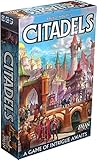
- REVISED EDITION: Experience the ultimate game of intrigue and strategy with Citadels Revised Edition, a condensed and travel-friendly version of Bruno Faidutti's classic masterpiece.
- BECOME A MASTER BUILDER: Step into the role of a aspiring Master Builder and recruit citizens with unique expertise to outsmart your rivals, aiming to create the most majestic metropolis and earn the coveted title!
- PERFECT FOR ALL: With approachable rules and wide player count, Citadels Revised Edition is an ideal choice for both casual and party game players, offering an exciting blend of bluffing and backstabbing gameplay.
- UNBEATABLE CONTENT: This edition contains all the published Citadels content, ensuring endless replayability. Explore popular preset scenarios and experiment with countless homebrew combinations.
- STUNNING ILLUSTRATIONS: Immerse yourself in the game's rich world with 27 diverse characters, each beautifully illustrated to enhance your gaming experience.
How to evaluate a mod before installing it
- Confirm the host game, edition, platform, and supported game version.
- Check whether the download is a map, asset pack, script/plugin, or a complete conversion; each has different risks.
- Read installation and removal instructions before loading a valuable save.
- Back up saves and record the active mod list so you can reproduce the environment.
- Do not assume an automatic Workshop update is reversible; keep a copy of a working version when the platform allows it.
Multiplayer: co-op, competition, and player limits
Kingdoms Reborn
Kingdoms Reborn is the most explicit example of a city builder designed for both collaboration and rivalry. Its official site describes players as able to “Cooperate or compete in real-time with your friends in multiplayer mode” and publishes support for up to eight players. That wording means you should establish the session’s rules before starting: a shared economy and common objectives play very differently from competing settlements on the same generated map.
Pioneers of Pagonia
Pioneers of Pagonia advertises shared co-op with up to four friends. Its multiplayer design is closely tied to its save system: the same settlement can move between solo and multiplayer play, provided the host and participants use compatible game versions and the save is available to the host. Decide who owns the save and where it is stored before investing many hours in a joint settlement.
Technicity
Technicity offers online co-op and invites friends to join a world to build cities or role-play. The listing does not establish a universal player cap in the cited material, so do not infer one from the other games in this table. Check the current in-game lobby or storefront details for the edition and platform you plan to use.
Do these 3 things before closing this tab:
1Repair Windows errors before they cause bigger problems2Fix the driver behind crashes, sound loss and screen glitches3Clear out junk files and repair common Windows errorsRising World
Rising World supports both single-player and multiplayer. Its official wording is, “Play Rising World alone in Singleplayer, or build your world together with your friends in Multiplayer.” The game’s extensive modification options make version alignment particularly important: a server and its clients may need the same plugins and compatible content even when the base game itself is installed correctly.
Rank #3

- Roll your Meeples, Build the City: Bring the roaring 1920s to life as you roll your meeples, gather materials, construct buildings, and rise to fame as the city’s top builder.
- Push your Luck for Big Rewards: Standing meeples work hard, earning you valuable resources—but if you take risks to reroll, you might lose it all!
- Strategic Engine-Building Fun: Balance risk and reward to complete projects, earn prestige, and expand your workforce.
- Perfect for Family Fun or Game Night: A clever, tactile game that combines luck and strategy—easy to learn, satisfying to master, and stunning on the table.
- Quick to Play, Big on Depth: Games run about 45–60 minutes, making it an ideal choice for a satisfying weeknight challenge or the centerpiece of game night.
Dream Engines: Nomad Cities
Dream Engines is listed as a single-player survival city-building game. Cloud saves can synchronize progress between supported installations, but they do not create a co-op mode or turn a solo save into a multiplayer session. This distinction is important when a store page mentions cloud infrastructure near a game’s other features.
Before hosting or joining a session
- Verify that every participant owns the same title and compatible edition.
- Match the game version and, where applicable, the complete mod or Workshop loadout.
- Confirm whether the session is hosted from one player’s machine, a dedicated server, or a platform service.
- Test with a new world before opening a long-running settlement.
- Agree on save ownership, backup responsibility, and what happens if the host is unavailable.
Save games, blueprints, and cloud storage are different
A save can mean the complete state of a world, a reusable building design, or a synchronized copy stored online. These mechanisms solve different problems and are not interchangeable.
Multiplayer saves and mode switching
Pioneers of Pagonia is the clearest documented example of a shared save workflow: its listing promises “Multiplayer save games, seamless switching between single player and multiplayer.” In practical terms, that addresses the common question of whether a settlement begun alone can later be opened for co-op and then continued solo. Keep a backup before adding a major editor asset or changing the mod environment.
Recommended Free Tools
Blueprint sharing
Rising World’s blueprints are portable building packages. They are useful for sharing a house, factory, or other structure without handing over an entire world. Because a blueprint is not a complete world save, terrain edits, inventories, progression, and plugin-provided objects may remain behind or require the same dependencies on the receiving system.
Rank #4
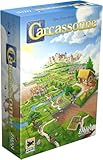
- CLASSIC TILE PLACEMENT: Draw and place landscape tiles to build cities, roads, fields, and monasteries, then deploy meeples as knights, farmers, and monks to claim features and score points.
- STRATEGY FOR ADULTS AND FAMILIES: Carcassonne pairs intuitive rules with meaningful decisions, making it accessible for ages 7+ while still engaging experienced adult board gamers.
- REPLAYABLE MEDIEVAL ADVENTURE: Randomized tile draws create a different landscape every game, bringing fresh puzzles and competitive fun to family game night and casual group play.
- TWO TO FIVE PLAYERS: Built for 2-5 players with an average 35-minute playtime, Carcassonne fits weeknight sessions at home, family gatherings on vacation, and adult board game evenings.
- INCLUDES MINI-EXPANSIONS: The base game comes with The Abbot and The River mini-expansions in the box, adding variety to the classic Carcassonne board game experience from the start.
Cloud saves without multiplayer
Dream Engines lists cloud saves while remaining single-player. Cloud synchronization protects against losing local progress and can make switching devices easier, but it does not imply that two players can open the same world together. Check whether the platform keeps multiple versions, because a damaged or newly synchronized save may overwrite the copy you wanted to recover.
Mod-managed regional state
The Town to City: Sandbox Regions mod stores each linked region’s state through the game’s normal save process and restores the configuration after relaunch. Its separation of Sandbox and Campaign saves is a useful safety boundary. Do not move that save to another installation until you have confirmed that the identical mod version and configuration are present.
A reliable backup routine
- Exit to the main menu before copying saves so the latest state is flushed to disk.
- Keep at least one dated backup made before installing or removing a mod.
- Record the game version, platform, and active content beside the backup.
- For cloud-enabled games, retain a local copy when the platform offers an export or local-save option.
- Test one backup by loading it before deleting older copies.
System requirements: use the exact listing, not a category average
Minimum specifications are title-specific. They also describe the lowest supported configuration, not a promise of high resolution, large cities, or stable frame rates in every situation. Simulation-heavy cities can become more CPU-limited as citizen counts and pathfinding workloads grow.
Outdated Drivers Are Slowing You Down
One free scan finds every outdated or missing driver and matches the right update for your exact hardware.Free scan · exact hardware matchPC Slower Than It Used to Be?
A free scan shows the junk files, broken settings and background clutter dragging Windows down - then fixes them in one click.Free scan · Windows 10 & 11| Game | Minimum specification published in the cited listing | Additional published information |
|---|---|---|
| Technicity | Windows 7/8/10 listing; 3 GHz processor; 8 GB RAM; OpenGL 3 graphics with 2 GB memory; 2 GB storage | Recommended: Intel Core i5 or Ryzen 5, GTX 1050 or RX 560, and broadband internet |
| Dream Engines: Nomad Cities | Windows; 3.0 GHz dual-core CPU; 8 GB RAM; GTX 660 or better; DirectX 11; 4 GB storage | Recommended: 3.5 GHz quad-core CPU and GTX 970 or better |
| Rising World, Kingdoms Reborn, Pioneers of Pagonia | Not stated in the cited material | Check the current storefront or publisher listing for the edition and operating system you intend to use |
Technicity’s storefront-client caveat
The Technicity listing includes an important date qualification: the Steam Client supports Windows 10 and later from January 1, 2024. That client requirement is separate from the game’s older Windows 7/8/10 wording. A computer might meet the game’s listed hardware and operating-system minimum while still failing to run the current storefront client. Verify both layers before buying or installing.
Best Value
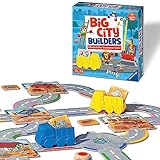
- SKILL DEVELOPMENT: Big City Builders game enhances fine motor skills, color matching, decision making and turn-taking abilities. It's not just a game, it's a tool for growing minds.
- ADAPTABLE GAMEPLAY: The game grows with your child. With variant rules, you can adapt the complexity of play, making it a lasting part of your child's playtime.
- HIGH-QUALITY COMPONENTS: The game comes with a color die, 2 truck movers, 24 road puzzle pieces, 6 construction sites, 12 material tiles, and instructions, providing a rich and engaging play experience.
- FUN AND EDUCATIONAL: This game offers a combination of fun and learning. Children can use their imagination to play with the truck movers and road puzzle pieces even outside of the game.
- TRUSTED QUALITY: Ravensburger, a trusted name since 1883, encourages discovery and learning through play with its range of toys, games, and puzzles.
How to check your own PC
- Open your operating system’s system-information panel and note the CPU model, installed RAM, and Windows version.
- Check the graphics adapter and dedicated video memory in the graphics or display settings.
- Compare the free storage on the target drive with the listing’s requirement, leaving room for updates and saves.
- Check the current platform client requirement separately from the game page.
- If you plan to use large cities, high simulation speeds, or visual mods, treat the recommended specification as a starting point rather than a guarantee.
Common problems and the safest fixes
A modded save will not load
First restore the exact mod list and game version used when the save was created. If the game opens without the mod, do not overwrite the original save; use a copied file while testing. Remove or update one mod at a time, and consult the mod author’s compatibility notes before applying a patch to a long-running world.
Friends cannot join a world
Confirm the host is running the intended multiplayer mode, then compare versions, downloadable content, and mods on every machine. If the title uses an invitation or lobby system, have the host create a fresh test session. A successful test with a new world helps separate network or version problems from a damaged save.
A save appears to have rolled back
Stop launching the game repeatedly if cloud synchronization is involved. Check local and cloud copies, identify the newest known-good timestamp, and restore that copy to a separate folder before experimenting. For mod-linked regions, verify that the configuration file and the save are traveling together.
The Tool Desk
Outbyte PC Repair FREEClear out junk files and repair common Windows errorsFree Scan →Outbyte Driver Updater FREEScan for outdated or missing drivers - takes under a minuteDriver Scan →The game runs but slows down in a large city
Lower simulation speed or graphics settings, close background applications, and watch whether CPU or GPU usage is the limiting factor. Large populations, pathfinding, and extensive scripted content can stress the processor even when the graphics card meets the minimum. Keep a backup before removing performance-related mods, because deleting a dependency can make a save unloadable.
Quick Recap
Which type of player should choose which game?
- Choose Rising World if unrestricted construction, plugins, and reusable blueprints are more important than a published player cap or detailed hardware guidance.
- Choose Kingdoms Reborn if your priority is a real-time city-builder session where friends can cooperate or compete on the same generated world.
- Choose Technicity if first-person construction, online co-op, and Workshop exchange of buildings, items, and maps fit your play style; verify the current Windows client requirement first.
- Choose Pioneers of Pagonia if you want an integrated editor and a documented save workflow that moves between solo and shared co-op.
- Choose Dream Engines: Nomad Cities if you want a single-player survival city builder with cloud synchronization and do not need multiplayer.
- Use Town to City: Sandbox Regions only when you specifically want its linked-region behavior in Sandbox Mode and are prepared to manage mod-version compatibility.
A purchase and installation checklist
- Write down the exact game and platform; “open-world city builder” is not enough information to establish compatibility.
- Read the current listing for multiplayer mode, player limit, editor or mod support, and save behavior.
- Compare your PC with the game’s minimum and recommended specifications, including the platform client.
- Install and test the unmodified game before adding Workshop items, plugins, or region mods.
- Create a dated backup after the first successful launch.
- For co-op, have every participant match the version and content loadout before opening the main save.
Product prices and availability are accurate as of the date/time indicated and are subject to change. Any price and availability information displayed on Amazon at the time of purchase will apply.

