Free tools Windows power users keep installed
One-click scans. No signup required.
Nintendo is openly encouraging players to try the optional Joy-Con 2 mouse controls in Fire Emblem: Fortune’s Weave. But “dodgy” is not an established verdict: the one hands-on preview in the available coverage praised the controls as smooth and effective, while noting that its writer barely used them. The fair answer is that the mode is worth trying if point-and-click suits you, but there is not enough evidence to call it unreliable—or to say every player will prefer it.
What Nintendo wants you to try
Fire Emblem: Fortune’s Weave is a Nintendo Switch 2 exclusive released on September 17, 2026. Its official game page describes an optional mode that uses Joy-Con 2 mouse controls to move units and access helpful information. Nintendo says you can switch between mouse and button controls whenever you like, so trying the mode does not commit you to using it for an entire battle or playthrough. Nintendo’s game page does not specify every interface interaction or provide technical settings such as sensitivity or remapping.
As an Amazon Associate I earn from qualifying purchases.
Nintendo producer Genki Yokota makes the invitation explicit: “If you’re interested in experiencing a tactical RPG with mouse controls, we’d love for you to give it a try.” The interview was translated from Japanese and conducted before release. That is an invitation to sample a new option for the series, not evidence that mouse control is required or better than buttons. Read Nintendo’s developer interview.
Are the mouse controls actually dodgy?
The available firsthand preview does not support that label. In a preview published August 13, 2026, TechRadar senior writer Harry Padoan described the controls as “smooth and effective.” He also said he did not use them much because he prefers traditional controls. That is a positive but limited individual impression—not a controlled comparison, a long-term assessment, or proof of how the mode feels to other players. TechRadar’s preview therefore offers no basis for presenting “dodgy” as a broad player consensus.
#1 Best Overall

- Converts your Joy‑Con 2 into a mouse‑style controller grip, delivering smoother aiming, improved tracking, and more natural hand movement for Nintendo Switch 2 games.
- Features an ergonomic hand‑filling design that provides a comfortable, natural grip to help reduce wrist strain and hand fatigue during extended gaming sessions.
- Allows quick and easy slide‑in installation, securely holding the Joy‑Con 2 in place with no tools, batteries, or setup required, just attach and start playing.
- Lightweight and compact design makes this Switch 2 accessory easy to carry in a backpack or case, ideal for both home setups and portable gaming.
- Designed specifically for Nintendo Switch 2 Joy‑Con 2 controllers, offering a secure fit and reliable performance as a Hyperkin accessory.
The practical comparison depends on what you are doing. Pointing may feel more direct when selecting a unit or inspecting information, while button navigation may feel more natural to someone accustomed to the series’ traditional controls. Those are questions to judge in play, not documented performance findings: the available sources do not report a particular misclick problem, quantify selection accuracy, or assess comfort across handheld, tabletop, and docked play.
How to decide whether to use it
- Try mouse mode if you want to see whether pointing makes unit selection or information access feel more direct to you.
- Stay with buttons if that is more comfortable or familiar; Nintendo presents mouse control as an option, not a replacement.
- Switch as needed rather than treating the choice as permanent. Nintendo says you can move between mouse and button controls at any time.
The key question is not whether the mode is universally good or bad, but whether its pointing-based interaction suits your play style and setup. No ergonomic assessment or formal head-to-head control test is available in the cited coverage, so a personal trial is more informative than treating one preview writer’s preference as a verdict.
Rank #2
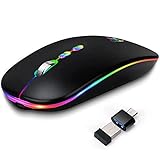
- Led Wireless Mouse: This wireless mouse Bluetooth with lights can give you more fun during office time. You can choose use the 2.4G wireless mouse when the mouse botton switch is on the 2.4G mode,or connect your laptop's Bluetooth to use the Bluetooth mouse, easy to switch,suitable for any occasion
- Silent Mouse Rechargeable: Noiseless click, no worrying about disturbing others beside you, let you concentrate on work. Our wireless mouse has a built-in durable rechargeable battery that can be easily charged via the included USB cable. Charging for 2 hours, it can be used for 8-10 days
- Back to Desktop Button & DPI Adjustable: This Bluetooth mouse has two buttons behind its scroll wheel. The M button allows you to return to the laptop desktop and handle other things while browsing the web.3 adjustable DPI level s( 800, 1200, 1600) to change the speed and sensitivity of your laptop mouse cursor freely
- Wide Compatibility Mouse Wireless: This mouse for laptop has a working distance of up to 10 meters (33 feet) for fast data transfer with no delay or loss, and fits on both micro USB and Type-C ports, eliminating the need to worry about USB ports.Our computer mouse is perfectly compatible with Windows XP, Vista, 7, 8 and 10 / Vista / Windows ME and Mac OS systems.Also support Bluetooth connection, this led wireless + bluetooth mouse perfectly fits for desktop, laptop, PC, for Macbook, for iPad and other Bluetooth devices
- Laptop Mouse and Operation Notice: Our wireless mouse for laptop is slim and lightweight, Size : 4.52 in * 2.35 in * 0.78 in, durable ergonomic mouse is perfect for travel. The USB receiver is stored inside the back of the mouse. No need for a driver, Plug and Play! This cordless mouse has built-in automatic sleep mode and wake-up mode to effectively save energy. If you encounter any problems while using this USB mouse, please feel free to contact us
What the latest update does—and does not—say
Nintendo Support lists version 1.0.1, released September 16, 2026. The notes mention additional weapons and general fixes, but do not identify a mouse-control fix. It would be inaccurate to treat this update as confirmation that Nintendo corrected a problem with the mode. Nintendo Support’s update notes.
Crashes, No Sound, or Screen Glitches?
Random freezes, missing sound and display glitches usually trace back to one bad driver. Find and replace yours safely.Free scan · under a minutePC Slower Than It Used to Be?
A free scan shows the junk files, broken settings and background clutter dragging Windows down - then fixes them in one click.Free scan · Windows 10 & 11Quick Recap
Best Value

- ⌨️🖱️【ENHANCE THE GAMING EXPERIENCE】arVin switch keyboard and mouse adapter can help you play games with wired or 2.4G wireless keyboard and mouse, replacing your original wireless controller, provide you with precise control without delay and enhancing game fun! This switch converter perfect for FPS, TPS, RPG and RTS games. for Call of duty (COD), PUBG, Fortnte and most shooting games.
- ⌨️🖱️【MULTI-PLATFORM COMPATIBLE】This arVin wired keyboard and mouse adapter for nintendo switch consoles and Switch Oled; for PS4/PS4 Slim/PS4 Pro/PS3; for Xbox 360/Xbox One/Xbox One S/Xbox One X; supports wired & 2.4G wireless keyboard & mouse. 【❌ NOT for PS5/Xbox Series/Switch Lite/PC/Bluetooth wireless keyboard & mouse, No support for third-party controllers】
- ⌨️🖱️【SUPPORT CUSTOMIZED MAPPING】This keyboard and mouse adapter for PS4/PS3 supports key mapping and can store up to 8 different sets of mouse and keyboard key settings so you can switch between them when playing different games. 【Press F12 & F1-F8 keys on keyboard simultaneously to switch】
- ⌨️🖱️【SUPPORTS MOUSE SENSITIVITY SETTING】This keyboard and mouse adapter for xbox one/xbox 360 supports adjusting the mouse sensitivity according to your habit, press F12 and keys 1-9 (Numbers above keyboard letters) on keyboard simultaneously to switch.
- ⌨️🖱️【EASY TO USE】This ps4 keyboard and mouse adapter is plug and play, no need to download app and install drivers, guided by the original game controller, you can set the keyboard and mouse buttons to any function of the controller buttons. No delay. (Please read the user manual or video carefully before use.)
Rank #4

- 【Speed DPI Switch】 Bengoo customizable RGB gaming mice, with 4 adjustable DPI speed Switch:1200-1600-2400-3600, you can control the speed more freely and easily. No need any driver, plug and play directly.
- 【Flexible Buttons】 Equipped with six buttons: Left button, Right button, Forward, Back, DPI button and Scroll wheel, meets for your demands excellently for different games, enables to switch fast while gaming.
- 【Lighting Colors】 Muti-colors lights greatly match your style, provide you fancy gaming environment and highlight your game atmosphere.
- 【Ergonomic Design】 Perfectly fits under your palm, skin-friendly material we take provides you a perfect hand feel, gives gamers the most comfortable gaming experienece and makes you feel free from fatigue.
- 【Wide Compatibility】 Support Windows XP, Vista, Windows 7, Windows 8. Adaptable for Notebook, PC, laptop, Computer, Macbook and so on.
Rank #3
![Mumba Mouse Grip for Nintendo Switch 2 Joy-Con, [2 Pack] Ergonomic Gamer Grip Holder with Super Smooth PTFE Glide Pads Portable Gaming Controller Stand for Switch 2 Joy Con Accessories (2025), Black](https://m.media-amazon.com/images/I/41Ds6AzS1dL._SL160_.jpg)
- Compatibility: Designed specifically for the Nintendo Switch 2 Joy-Con controllers, with dedicated left and right grips. It provides a more comfortable and precise control experience for smoother gameplay.
- Ergonomic Design: This comfortable Switch 2 controller grip is designed to fit the shape of your hand, with finger grooves for a stable and secure grip, helping you stay relaxed during long gaming sessions.
- Zero Resistance: The precision-crafted ABS shell and unique Teflon feet provide an ultra-smooth movement experience, making your control more precise. Whether it's shooting, strategy, or simulation games, you can enjoy an intuitive and seamless connection with the game.
- Quick & Easy Setup: Align the "+" and "-" buttons on your Switch 2 Joy-Con with the corresponding markings on the mouse grip, then snap it into place for immediate use, so you’re ready to game in seconds with enhanced precision.
- Lightweight and Portable: Weighing only 34.2g, it’s easy to carry and lets you enjoy a professional-grade gaming experience anytime, anywhere.
Product prices and availability are accurate as of the date/time indicated and are subject to change. Any price and availability information displayed on Amazon at the time of purchase will apply.

