The Nikon Z 30 is a compact, interchangeable-lens DX camera built around creator-friendly video features: a 20.9 MP sensor, a vari-angle touchscreen, Eye/Animal Detection AF, external microphone input and 4K UHD recording up to 30p. It is a sensible candidate for vloggers who want a flip-out screen and access to Nikon Z lenses. Its main trade-offs are no listed viewfinder, no 4K 60p, and shorter published 4K recording time than the headline Full HD maximum.
This is a specification-led review based on Nikon’s published information, not independent image-quality, autofocus, handling or battery testing. Nikon’s product specifications are available at its Z 30 product page.
As an Amazon Associate I earn from qualifying purchases.
Is the Nikon Z 30 good for vlogging?
On paper, yes—particularly for solo creators who frame themselves using the rear screen. The 3-inch vari-angle touchscreen can turn toward the front, while a REC lamp and dedicated video-record button make recording status and control more convenient. There is also a 3.5 mm input for an external microphone, alongside built-in stereo audio.
Do these 3 things before closing this tab:
1Scan for outdated or missing drivers - takes under a minute2Clear out junk files and repair common Windows errors3Fix the driver behind crashes, sound loss and screen glitchesThose are useful design features, not proof of measured autofocus reliability, sound quality or comfortable all-day handling. Nikon lists Eye/Animal Detection AF for both photo and video, but that feature description does not establish how consistently the camera tracks a moving subject in real use.
#1 Best Overall

- Designed for creators, vloggers and streamers: Nikon's easy to use Z 30 mirrorless 4K camera with a versatile 16-50mm wide-angle zoom lens
- Pro-grade video quality: Crisp 4K resolution, autofocus with eye tracking for people and pets, beautifully blurred backgrounds, outstanding low-light performance and rock-steady image stabilization
- Vlogger essentials: Flip out touchscreen selfie monitor, built-in stereo microphone with adjustable sensitivity, red REC light and smartphone app for controlling the camera with a compatible phone
- Easy live streaming: Plug and play webcam operation, smooth Full HD 60p streaming over USB-C, 4K 30p streaming over HDMI and constant power over USB-C
- A kit that grows with you: Compatible with Nikon's entire line of exceptional NIKKOR Z lenses, from fast primes to macro lenses, so you can expand your capabilities over time
Does the Nikon Z 30 have a viewfinder?
Nikon’s published specifications do not list a viewfinder. The documented framing display is the rear 3-inch vari-angle touchscreen. That design suits screen-first video and selfie framing, but photographers who prefer composing at eye level should consider a camera with an electronic viewfinder.
Can the Nikon Z 30 record 4K video?
Yes. Nikon lists 4K UHD (3840 × 2160) at 30p, 25p and 24p. It does not list 4K 60p for the Z 30. Full HD offers higher frame rates—up to 120p/100p—and Nikon also lists Full HD slow-motion recording, time lapse and electronic vibration reduction.
Rank #2

- Designed for creators, vloggers and streamers: Nikon's easy to use Z 30 mirrorless 4K camera with two versatile lenses, a 16-50mm wide-angle zoom lens and a 50-250mm telephoto zoom lens
- Pro-grade video quality: Crisp 4K resolution, autofocus with eye tracking for people and pets, beautifully blurred backgrounds, outstanding low-light performance and rock-steady image stabilization
- Vlogger essentials: Flip out touchscreen selfie monitor, built-in stereo microphone with adjustable sensitivity, red REC light and smartphone app for controlling the camera with a compatible phone
- Easy live streaming: Plug and play webcam operation, smooth Full HD 60p streaming over USB-C, 4K 30p streaming over HDMI and constant power over USB-C
- A kit that grows with you: Compatible with Nikon's entire line of exceptional NIKKOR Z lenses, from fast primes to macro lenses, so you can expand your capabilities over time
The specified video codec is H.264, with MOV and MP4 container options. Nikon lists Linear PCM audio for MOV and AAC for MP4. Buyers who need other codecs or more advanced internal video options should compare the full specifications of alternatives rather than infer capabilities from the Z 30’s creator-focused controls.
How long can the Nikon Z 30 record video?
Nikon gives two different duration figures for different recording modes. Its maximum of up to 125 minutes applies to Full HD at 24p or 25p and an ambient temperature of 25°C. Nikon lists approximately 35 minutes for 4K UHD. Neither figure should be treated as a guaranteed recording time in every situation: Nikon says actual continuous duration depends on battery life and the camera’s internal temperature.
Rank #3

- 20.9MP CMOS sensor and EXPEED 6 image processing; Beautiful image quality without noise even indoors or at night, thanks to standard sensitivity range of ISO 100-51200
- Worry free Autofocus. Focus automatically repositions when you hold something up to the camera in Auto Area AF mode.
- Eye-Detection AF. Maintains sharp focus on the eyes of people, dogs and cats even while tracking them.
- Selfie controls. Tap the Vari-angle screen to change focus positions and adjust brightness.
- Red REC lamp. Always know that you’re recording video. Over 2 hours recording time. Crisp audio. Built-in stereo mic and external mic ready. Live streaming. Stream up to 1080/60p or 4K/30p through HDMI port.
What is inside the Nikon Z 30?
The camera uses a 23.5 × 15.7 mm Nikon DX CMOS sensor with 20.9 million effective pixels and a Nikon Z mount. Nikon specifies hybrid phase-detection/contrast autofocus and 209 focus points in photo mode, plus Eye/Animal Detection AF for stills and video. These are manufacturer specifications, not independent measurements of focus accuracy or image quality.
For connections and wireless use, Nikon lists USB-C, Type-D HDMI, Wi-Fi and Bluetooth. Its software and support materials include SnapBridge, NX Studio Movie Editor and Webcam Utility. Nikon’s Z 30 Digitutor links to tutorials covering subjects such as solo vlogging, filming basics, autofocus, Picture Controls and live streaming, as well as the online reference guide.
Rank #4

- Designed for creators, vloggers and streamers: Nikon's easy to use Z 30 mirrorless 4K camera body (lenses sold separately)
- Pro-grade video quality: Crisp 4K resolution, autofocus with eye tracking for people and pets, beautifully blurred backgrounds and outstanding low-light performance
- Vlogger essentials: Flip out touchscreen selfie monitor, built-in stereo microphone with adjustable sensitivity, red REC light and smartphone app for controlling the camera with a compatible phone
- Easy live streaming: Plug and play webcam operation, smooth Full HD 60p streaming over USB-C, 4K 30p streaming over HDMI and constant power over USB-C
- A camera that grows with you: Compatible with Nikon's entire line of exceptional NIKKOR Z lenses, from fast primes to macro lenses, so you can expand your capabilities over time
What lens fits the Nikon Z 30?
The Z 30 accepts NIKKOR Z lenses. Nikon says F-mount NIKKOR lenses require a mount adapter and may have restrictions, so check compatibility for the particular lens and adapter before buying. The specifications establish mount compatibility, but they do not identify a single best lens or account for a creator’s preferred field of view, budget or shooting space.
What’s actually slowing this PC down?
Pick the symptom - the matching free tool is one click away.
What memory card and battery does it use?
The camera uses one EN-EL25 rechargeable battery and SD, SDHC or SDXC memory cards. Nikon lists UHS-I compatibility for SDHC and SDXC cards. Its stated weight is approximately 405 g with battery and memory card, excluding the body cap; body-only weight is approximately 350 g.
Best Value
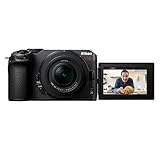
- 20.9MP CMOS sensor and EXPEED 6 image processing. This kit includes the NIKKOR Z DX 16-50mm f/3.5-6.3 VR lens.
- Beautiful image quality without noise even indoors or at night, thanks to standard sensitivity range of ISO 100-51200 ( Standard sensitivity of up to ISO 25600 is available for video recording.)
- Worry free Autofocus. Focus automatically repositions when you hold something up to the camera in Auto Area AF mode.
- Eye-Detection AF. Maintains sharp focus on the eyes of people, dogs, and cats even while tracking them.
- Selfie controls. Tap the Vari-angle screen to change focus positions and adjust brightness. Red REC lamp. Always know that you're recording video. Over 2 hours recording time. Crisp audio. Built-in stereo mic and external mic ready. Live streaming. Stream up to 1080/60p or 4K/30p through HDMI port. The smallest and lightest mirrorless camera in the Z series. (As of June 29, 2022)
For an extended shoot, a spare EN-EL25 may help with battery changes, and an external microphone can use the camera’s 3.5 mm input. Nikon’s published specifications do not establish a specific recommended card speed, microphone model or accessory kit, so choose accessories for the recording workflow and verify compatibility before purchase.
How does the Z 30 compare with the Nikon Z50II?
The Z50II is a newer, different DX body and offers a useful feature comparison for buyers deciding whether the Z 30’s simpler video ceiling is enough. Nikon lists an electronic viewfinder, subject detection for nine subject types and 4K UHD at 60p, 50p, 30p, 25p and 24p on the Z50II. See Nikon’s Z50II specifications. These published feature lists are not a controlled side-by-side test; compare crop behavior, recording duration, audio needs, lenses and total kit cost before choosing.
Who should buy the Nikon Z 30?
The Z 30 is worth shortlisting if a flip-out screen, interchangeable Nikon Z lenses, direct microphone input and 4K recording up to 30p fit the way you create. It is less suitable if an eye-level finder or 4K 60p is essential. Nikon’s published feature list also cannot answer practical questions such as how the autofocus performs in a particular scene, how the footage looks in low light or how long a battery lasts in your workflow; those require independent testing or hands-on evaluation.
Quick Recap
Product prices and availability are accurate as of the date/time indicated and are subject to change. Any price and availability information displayed on Amazon at the time of purchase will apply.

