Windows Errors? Fix Them Before They Spread
Repair common Windows errors and clear accumulated junk for a smoother, more stable PC - no reinstall needed.Free scan · no reinstallOutdated Drivers Are Slowing You Down
One free scan finds every outdated or missing driver and matches the right update for your exact hardware.Free scan · exact hardware matchnefuOS is presented by its author as a broad, from-scratch operating-system project: it includes a custom kernel, a browser with claimed WebGL2 support, a package manager, shell, games and a local language model. The project author, nefu-dev, says one developer built it in a month with AI supplying implementation details for much of the work. Those capabilities and code totals are the author’s claims, not independently verified results.
What nefuOS includes, according to its author
In a DEV Community post displayed as published on October 2, 2026, nefu-dev describes nefuOS as a collection of custom systems rather than just a kernel. The post names these components:
As an Amazon Associate I earn from qualifying purchases.
- Ncore: a custom kernel that the author says boots through BIOS using El Torito and through UEFI using GRUB multiboot2.
- Nbrower: spelled this way in the post, a custom browser described as supporting HTML, CSS, JavaScript and WebGL2, with its own TLS 1.3 stack.
- nefucpp: a compiler from C++ to the
.nefudformat. - NPKG: an HTTPS package manager that the author describes as installing packages in a .deb-like style.
- Nshell: a shell with more than 60 Unix-like commands.
- Ngame: a collection of 34 built-in games.
- NAI: a fine-tuned Qwen2.5-1.5B model that the author says can call tools, including writing files and running commands.
The author also lists a Chinese input method editor, TrueType font rendering and 107 built-in apps. These figures and feature descriptions come from nefu-dev’s post; they do not establish how the systems behave across different hardware or workloads. Source: nefu-dev on DEV Community.
Recommended Free Tools
What the browser and WebGL claims mean
The browser is one of the project’s most ambitious advertised components. The author says it supports HTML, CSS, JavaScript and WebGL2, and that nefuOS includes a software graphics implementation called SWGL. The stated purpose of SWGL is to make WebGL2 available without a GPU driver.
#1 Best Overall

- Raspberry Pi 5 with 8GB RAM: Model SC1112 featuring a quad-core ARM Cortex-A76 processor running at 2.4GHz. Enhanced Connectivity: Includes dual 4K micro HDMI ports, USB-C power input, and high-speed USB 3.0 ports. PCIe Expansion Support: FPC connector enables M.2 NVMe SSDs when using compatible adapters. Fast Storage Options: Works with microSD cards for booting, or optional NVMe storage for advanced projects. Built for Projects & Learning: Ideal for programming, home labs, DIY electronics, automation, and Linux-based development.
That is a different claim from broad compatibility with commercial browsers or graphics hardware. The post does not provide a standards-compliance test, browser compatibility matrix, performance measurements, or independently reproducible demonstration. It also identifies browser work that remains incomplete: better CSS support—including flexbox and descendant selectors—and fully wired DeepSeek login.
In a follow-up included with the post, the author says a canvas pipeline for bloxd.io was the last piece needed before that game could render. This describes a specific development milestone, not proof of general support for the site or other web applications.
Rank #2
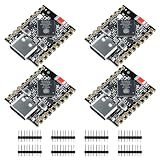
- ESP32-S3 Dual-Core: Powered by ESP32-S3 dual-core processor running up to 240MHz, suitable for IoT applications, embedded systems, real-time control, and edge computing tasks with low power consumption.
- A I and Vector Processing Support: Includes vector instruction support and an optimized architecture, providing compatibility with AIoT-related applications such as voice processing, sensor data handling, and basic image processing scenarios.
- WiFi and BT 5.0: Supports 2.4GHz WiFi and Bluetooth 5.0 Low Energy (BLE), enabling wireless communication for IoT devices, smart home applications, sensors, and cloud-based systems.
- USB-C Port: Features a USB-C port with native USB capability for power supply, firmware flashing, and serial communication, simplifying development setup and standard debugging processes.
- Compact Design with Flexible Integration (No Header): Compact ESP32-S3 mini development board without pre-soldered pin headers, allowing direct soldering or custom PCB integration for embedded system design and space-limited applications.
How the author says nefuOS was built in a month
Ne fu-dev describes a one-developer, AI-assisted process. The author says they hand-wrote the first approximately 120,000 lines for the kernel, virtual file system, inter-process communication and core architecture, then used AI to fill in implementation details for roughly 80% of the rest. The author’s summary is: “Architecture, decisions, and debugging are mine. AI just made the typing faster.” —nefu-dev, project author, October 2, 2026.
The Tool Desk
Outbyte Driver Updater FREEScan for outdated or missing drivers - takes under a minuteDriver Scan →Outbyte PC Repair FREERepair Windows errors before they cause bigger problemsFix Now →The same post reports about 215,000 self-developed lines—roughly 192,000 in C/C++ and 24,000 in Python—and about 1.04 million lines when third-party code is included. It also puts SWGL at about 9,000 lines. These are project-reported totals; the post does not describe an independent audit or line-counting method. The self-developed language subtotals are approximate, so they should not be read as a precise breakdown.
Rank #3

- ESP32-C3 is equipped with a single-core 32-bit RISC-V processor, with a four-level pipeline architecture, with a main frequency of up to 160 MHz. ESP32-C3 has 400 KB of built-in SRAM and 384 KB of ROM storage space. ESP32-C3 is the industry-leading Wi-Fi+Bluetooth LE integrated solution
- ESP32 C3 Mini is positioned as a high-performance, low-power, cost-effective iot mini development board for low-power iot applications and wireless wearable applications.
- EPS32-C3 is a cost-effective and low-power dual-mode Wi-Fi and Bluetooth chip. The ESP32-C3 uses a RISC-V processor, a single-core processor with a main frequency of 150 MHz, which integrates Wi-Fi 4 and Bluetooth 5.0 wireless communication.
- ESP32-C3 is a system-level chip (SoC) MCU with very low power consumption and high integration, which integrates 2.4Ghz Wi-Fi and Bluetooth (Bluttooth) low-end dual-mode wireless communication. consumption.
- If external power supply is required, just connect the + level of the external power supply to the position of 5V, GND connects to the negative terminal. (Support 3.3 ~ 6V power supply). Remember that when connecting the external power supply, you cannot access USB, USB and external power supply can only choose one.
The author’s account suggests a division of work in which a human established the architecture and handled decisions and debugging, while AI accelerated implementation. The claim that AI supplied details for roughly 80% of the remaining work does not mean AI independently designed or validated 80% of the system; the author specifically retains responsibility for architecture, decisions and debugging.
What the author says was hardest—and what remains unfinished
The author identifies BIOS/UEFI dual boot, implementing TLS 1.3, a QuickJS 2021 issue involving a second JS_Eval in the same runtime, and the SWGL software renderer as difficult parts of development. In the included follow-up, the author says dual boot took the longest.
Rank #4

- High Performance CIX SoC - OrangePi 6 8GB adopts CIX CD8180 SoC, built-in 12-core 64-bit processor + NPU processor, integrated graphics processor, equipped with 16GB/32GB /64GB LPDDR5, and provides two M.2 KEY-M interfaces 2280 for NVMe SSD,as well as SPI FLASH and TF slots to meet the needs of fast read/write and high-capacity storage; It is equipped with 45 Tops computing power to support a variety of end-side large-model applications and a rich end-side AI scene.
- 45TOPS AI Computing Power - AI acceleration performance reaches 45TOPS, significantly enhancing AI development and deployment efficiency. It supports multiple mainstream AI models and meets the application needs of generative AI in diverse edge scenarios, such as chatbots and AI-assisted programming. At the same time, relying on its graphics acceleration algorithm and graphics engine, it can support desktop 3D graphics applications such as games and industrial design software.
- Rich Ports - OrangePi 6 8G offers extensive connectivity, including USB, Type-C 3.0, HDMI, MIPI CSI, dual 2.5GbE Ethernet, a 3.5mm audio jack, 40-pin GPIO header, fan connector, and RTC interface, enabling seamless integration with peripherals and sensors.
- Wide Range of Application Scenarios - With powerful computing performance, Orange Pi 6 8gb can be widely used in smart office, edge computing scenarios, smart security, industrial automation control, smart retail, home servers, AI development workstations, high-performance personal computing and other
- Excellent Software Compatibility - Supports multiple operating systems including Debian, Ubuntu, Android, Windows, ROS2, providing comprehensive technical documentation and resources to help developers get started and explore the system in depth. It meets the needs of different users and developers, expanding application scenarios.
The project post also distinguishes advertised capabilities from work still underway. Better CSS coverage and fully wired DeepSeek login are listed as future work. These caveats matter when interpreting the broad browser feature list: the post does not establish complete CSS support or a finished login integration.
Do these 3 things before closing this tab:
1Scan for outdated or missing drivers - takes under a minute2Repair Windows errors before they cause bigger problems3Fix the driver behind crashes, sound loss and screen glitchesWhat is—and is not—verified about nefuOS
The available account is a project-author description, not an independent technical evaluation. The post links to a GitHub repository, but its contents could not be inspected for this article. That means the boot process, hardware compatibility, installation steps, code totals, standards support, and behavior of the listed features have not been independently confirmed here.
Best Value

- [Alder Lake-N N100 X86 CPU Processor] youyeetoo K1 x86 Single Board Computer uses the latest Alder Lake-N N100 CPU(4 cores, 4 threads / 3.4 GHz Turbo Boost), base speed of 750Mhz with a burst speed up to 3.4GHz. Ideal for AI IoT Edge computing, industrial control device, industrial Gateway, Embedded Development, office work and home entertainment device and so on, which is more convenient than traditional sbc.
- [Large Capacity Memory & Storage] youyeetoo K1 x86 Single Board Computer SBC is prebuilt with 4GB/8GB/16GB LPDDR5 RAM, 0GB/64GB/128GB/256GB eMMC. You can optional external PCIe 3.0 M.2 2280 NVMe SSD or SATA3.0 SSD Hard Drive. Youyeetoo K1 x86 sbc boots up in seconds, work on multiple browser tabs, software applications and quickly transfers files.
- [Core Board Independent Operation] youyeetoo K1 x86 Alder Lake-N N100 CPU Core Board measures only 82×71 mm(card size), integrating power, display, and communication interfaces, it can operate independently without a baseboard. It can connect directly to peripherals via an adapter board, or achieve dual network ports, multiple USB ports, M.2 SSD expansion, and other functions through an extended baseboard, meeting different size and functional requirements.
- [Rich Interface Expand] youyeetoo K1 x86 Windows 10 11 Single Board Computer is equipped with USB 3.0*2, USB2.0*2, HDMI(4K 60Hz)×2, MIPl/eDP multi-display x1. 3.5mm Audio Jack. Supports WiFi 6 & BT 5.2, 2x Gigabit Ethernet RJ45 network connectivity. This Mini PC supports multiple device connection and can be used with servers, monitoring equipment, office equipment, displays, projectors, televisions, etc.
- [Industrial-Grade Expansion Capabilities] youyeetoo K1 x86 single board computer features extensive interface options and powerful industrial-grade expansion capabilities. In addition, it offers 12 types of IoT industrial interfaces such as GPIO, I2C, SPI, MIPI,USB SPK, PWM and UART, which can directly connect to and control various hardware devices like lidar sensors and servos.
For a reader considering trying the OS, the post alone is not enough to establish which machines are supported or how to install it safely. Treat the feature list and scale figures as claims to verify against the project’s current repository and documentation before relying on them. No ranking against other hobby operating systems is warranted without comparable evidence about hardware support, standards coverage, reproducibility and incomplete features.
Quick Recap
Product prices and availability are accurate as of the date/time indicated and are subject to change. Any price and availability information displayed on Amazon at the time of purchase will apply.

