Do these 3 things before closing this tab:
1Repair Windows errors before they cause bigger problems2Scan for outdated or missing drivers - takes under a minute3Clear out junk files and repair common Windows errorsMy four-year-old Nothing Phone 1 had reached the end of its software-update support, its battery struggled to last a day, and everyday use was beginning to feel less dependable. I’ve kept using it by replacing the battery, trimming app and storage burdens, and adjusting a few settings. Those steps reflect my experience with this model—not a diagnosis or a guaranteed fix for every aging Android phone.
If your phone is slowing down, first check its exact update status and battery condition. Then make changes that address what you actually see: remove unwanted files and apps, consider a model-compatible battery repair if the battery is failing, and weigh security support and app compatibility alongside speed before deciding whether to keep or replace the device.
As an Amazon Associate I earn from qualifying purchases.
Start by finding out what is actually aging
A phone’s age alone doesn’t explain a slowdown. Battery wear, app workload, storage, software support, and manufacturer-specific changes can all be relevant, and their effects vary by device and use. A study of Android software aging likewise found that effects differed with workload, Android version, and vendor customization; it does not diagnose any particular phone or show that a cleanup step will fix one. The study is useful context, not a substitute for checking your own device.
- Check updates: Look in Settings for the system and software update page. Android’s general guidance gives the path as Settings > System > Software Update, but steps and labels vary by manufacturer. The device maker—and sometimes the carrier—determines whether and when a particular update is available. Android’s update guidance was published on 2026-02-05.
- Check battery symptoms: Note whether runtime has fallen, the phone shuts down unexpectedly, or performance changes when the battery is low or the device is warm. Use the manufacturer’s diagnostic or support route for your exact model rather than assuming age proves the battery is bad.
- Check what is consuming resources: Review battery usage and storage on the phone. Look for apps you no longer need, large files you can remove, and downloads you have forgotten about.
Updates are more than a speed fix: they can include security patches, bug fixes, stability and performance improvements, and compatibility benefits. Android warns that going without updates can raise security risk and may contribute to slower performance or app-compatibility problems. Those are risks, not proof that unsupported software is the cause of a particular phone’s lag. The same guidance notes that update eligibility and timing depend on the manufacturer and, in some cases, the carrier.
#1 Best Overall

- 1. Applicable Models:Compatible with BLU C5L C050,Please carefully check your mobile phone model before purchasing to avoid purchasing the wrong model and damaging your product
- 2. Product Parameters: Battery Model:C775443200L,Capacity parameter:2000 mAh / 7.6 Wh,3.8 V,Please use a charger that is compatible with the battery or the original charger that came with the phone to extend the battery life
- 3.Excellent Performance: Features A+ grade battery cells, ensuring more than 900 charging cycles. Multi-layer protection design ensures safe use for users and devices, with a built-in microchip that prevents overcharging, over-discharging, and overheating.
- 4. Maintenance Instructions: Before using the battery for the first time, please fully discharge it three times and then charge it once to achieve optimal performance. Please note that optimal performance and service life can only be achieved after completing 3 to 5 full charge and discharge cycles.
- 5.After-sales service: If you have any questions after receiving the product, please contact us immediately. We will provide you with a solution, which will resolve your issue more efficiently. Thank you for contacting us
Replace the battery if its condition warrants it
In my Nothing Phone 1, the original battery was below 75% health, struggled to last a day, and seemed to be contributing to performance throttling. I had it replaced at an officially licensed service center. That figure and my impression of the performance effect are my experience with one phone, not a universal replacement threshold or a controlled test.
Lithium-ion batteries lose capacity with use, but diagnostic thresholds and service options are specific to a manufacturer and model. For example, Google recommends replacing batteries below 80% remaining capacity for specified Pixel models, with cycle-count recommendations that vary by model. Those Pixel criteria should not be applied automatically to a Nothing, Samsung, or other Android phone. Google’s Pixel battery guidance also describes battery health features and heat-related advice for supported Pixel devices.
For Galaxy phones, Samsung identifies short runtime and unexpected shutdowns as common signs of battery aging and recommends checking Samsung Members diagnostics or contacting a service center as appropriate. Menu names and warranty or payment terms vary. Samsung’s battery guidance applies to Galaxy devices, not every Android model.
The Tool Desk
Outbyte PC Repair FREEClear out junk files and repair common Windows errorsFree Scan →Outbyte Driver Updater FREEFix the driver behind crashes, sound loss and screen glitchesFind Drivers →Before authorizing a repair, check whether a service provider can work on your exact model, what the repair will cost, and whether the phone’s remaining software support and performance make continued use worthwhile. There is no universal repair-versus-replacement price break-even point.
Reduce app load and adjust the experience
I reviewed battery usage, switched some heavier apps for alternatives, and used web versions for some social sites. I also chose AntennaPod for podcasts and replaced the default launcher with Before Launcher. These were choices that suited my routine; an app or browser’s resource use depends on its version, settings, workload, and the phone itself. Check your own battery-usage screen before changing apps, and keep the functions you rely on.
Rank #2

- 1. Applicable Models:Compatible with Galaxy S8+ SM-G955F, SM-G955FD, SM-G955W, SM-G955A, SM-G955P, SM-G955T, SM-G955V, SM-G955R4, SM-G955U, SM-G955S,Please carefully check your mobile phone model before purchasing to avoid purchasing the wrong model and damaging your product
- 2. Product Parameters: Battery Model:EB-BG955ABE,Capacity parameter:3500mAh/13.48Wh,4.4V,Please use a charger that is compatible with the battery or the original charger that came with the phone to extend the battery life
- 3.Excellent Performance: Features A+ grade battery cells, ensuring more than 900 charging cycles. Multi-layer protection design ensures safe use for users and devices, with a built-in microchip that prevents overcharging, over-discharging, and overheating.
- 4. Maintenance Instructions: Before using the battery for the first time, please fully discharge it three times and then charge it once to achieve optimal performance. Please note that optimal performance and service life can only be achieved after completing 3 to 5 full charge and discharge cycles.
- 5.After-sales service: If you have any questions after receiving the product, please contact us immediately. We will provide you with a solution, which will resolve your issue more efficiently. Thank you for contacting us
I also made several interface and charging changes. Each involves a tradeoff, and the relevant controls may not be available under the same names—or at all—on another device.
- Animation scale: I set animation scales to 0.5x. Shorter animations can make transitions feel quicker, but they don’t repair a hardware or software problem.
- Refresh rate: I lowered the screen from 120Hz to 60Hz, trading some visual smoothness for the experience I preferred.
- Maximum charge: I set the maximum charge to 80–90% where the phone’s controls allowed it. Whether this option exists and how it behaves depends on the model.
- Charging setup and case: I switched from a fast charger to an 18W charging brick and replaced a heavy-duty case with a thinner one. These are my personal choices, not requirements or evidence that a particular charger or case will extend another phone’s battery life.
Android’s Private DNS setting is another option I use: I chose AdGuard DNS and found that it blocked some unwanted ads for me. That is my personal report, not a guarantee of ad blocking, privacy, or suitability on every network or device.
Outdated Drivers Are Slowing You Down
One free scan finds every outdated or missing driver and matches the right update for your exact hardware.Free scan · exact hardware matchPC Slower Than It Used to Be?
A free scan shows the junk files, broken settings and background clutter dragging Windows down - then fixes them in one click.Free scan · Windows 10 & 11Clear files carefully; don’t assume a memory card will speed things up
I delete large files and forgotten downloads when I need room. Very full internal storage seemed to coincide with lag on my phone, but there is no universal free-space percentage established here that guarantees better performance. Start with files you recognize and no longer need, and review before deleting anything important.
Adding a card is not a general speed remedy. Android’s documentation says only apps that declare support can be placed on adopted storage; the platform also benchmarks adopted media against internal storage and warns if it is significantly slower. External media needs to remain in a stable location to reduce the risk of data loss or corruption, and Android specifically says not to adopt USB devices as internal storage on phones or tablets. Android’s adopted-storage documentation, last updated 2024-08-26, describes technical conditions—not a blanket recommendation to expand storage.
Before considering removable storage, confirm that your exact phone has a suitable card slot and supports the intended use. If it does, treat speed, app support, and the risk of removing or disrupting the media as part of the decision.
Rank #3
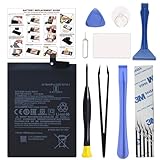
- COMPATIBILITY: This battery BM4Y only fits for Poco F3 and Redmi K40 (Not for Gaming Edition), Please carefully confirm your phone model before purchase.
- NEW 0 CYCLE Battery: This battery supports up to 800+ charging cycles, built with original high quality battery cell. It has the same size as original battery, perfect fit for your Poco F3 and Redmi K40.
- Included Toolkit: The kit comes with all the tools you need for repairing, helps you to complete the repair process effortlessly.
- Easy Installation with Detailed Instruction: The comprehensive repair tools and included instruction manual make the replacement process smoother and more efficient.
- Adhesive Included: The pre-installed battery adhesive and included back cover sticker make the replacement process smoother and more efficient.
Weigh support and compatibility before committing to a custom ROM
I have not flashed a custom ROM. It might be an option for some owners, but installing one is not a simple substitute for official updates: whether it works well depends on the phone and ROM. I’m concerned about losing current optimizations or access to features and apps I use, including banking apps, Google Wallet, and Nothing’s Glyph features. Those are personal concerns, not guaranteed outcomes for every ROM or device.
Quick wins for a faster PC:
Repair Windows errors before they cause bigger problemsFix Now →Fix the driver behind crashes, sound loss and screen glitchesFind Drivers →If official support has ended, look up the exact model’s current update status and consider whether your essential apps still work as expected. A custom ROM, continued use of the existing software, and replacement each involve different compatibility and security tradeoffs; this experience does not establish which choice is right for another model.
Decide whether keeping the phone still makes sense
I may eventually replace my phone with one that has longer update support. Some devices are advertised with support of up to seven years, but verify the current promise for the exact model and region before buying; update eligibility and timing still depend on the manufacturer and sometimes the carrier.
For a practical decision, compare the factors that matter on your own device:
- Battery: Are runtime or shutdown symptoms disruptive, and is a model-compatible repair available?
- Repair: What is the actual service cost and availability for your exact model? No general price or break-even point applies to every phone.
- Security support: Does the manufacturer still provide updates for this model, and when is its next update expected, if any?
- App compatibility: Do the apps you depend on continue to work reliably on the software version the phone can run?
- Everyday performance: After reviewing battery use, apps, and unwanted files, does the phone handle your normal tasks well enough?
If a repair addresses the problem and the phone remains secure enough for your needs, keeping it can be reasonable. If support, app compatibility, or performance no longer meets your needs—or a repair is not worthwhile for you—replacement may make more sense. The answer depends on the exact model and your priorities, not its age alone.
What’s actually slowing this PC down?
Pick the symptom - the matching free tool is one click away.
Quick Recap
Product prices and availability are accurate as of the date/time indicated and are subject to change. Any price and availability information displayed on Amazon at the time of purchase will apply.

