Music file identification determines which recording or release an audio file contains and connects it to descriptive metadata or a database record. You can begin with tags already stored in the file, identify the audio by matching an acoustic fingerprint against reference data, or use both methods. These approaches answer related but different questions: tags describe a file, fingerprints help match its sound, and database identifiers point to specific catalog entries.
What music file identification means
Identification is the process of working out what recording or release an audio file contains. The result may include readable details such as the track title and artist, as well as an identifier that points to a particular entity in a music database.
As an Amazon Associate I earn from qualifying purchases.
Identification does not necessarily mean that the filename is correct or that the file already contains useful information. A file can have missing or inaccurate tags, while its audio may still be compared with a database of known recordings.
Three ways to identify a music file
Embedded tags describe the file
Tags are non-audio information stored with a music file. Common fields include title, artist, album, year, genre, and track number. ID3.org describes adding this kind of information as tagging; ID3 was designed for MP3, while other formats have their own conventions. A tag that works in one format or application may not be interpreted consistently by another. ID3.org’s introduction to tagging explains the format’s role.
#1 Best Overall

- Smart piano with open sound choices: PartyKeys works as an open MIDI instrument instead of limiting you to a fixed set of onboard tones. Choose compatible MIDI software, a DAW, or PartyStudio as your sound and creative environment.
- RGB-guided play and music games: Each of the 36 keys has individually addressable RGB lighting. Explore PartyKeys games in a compatible browser, or use chord, scale, and custom-color tools. No install or login is required for the Game Center.
- Official Anything Piano integration: Use PartyKeys with Anything Piano for interactive piano-roll practice and synchronized RGB key lighting. Anything Piano is optional and available separately.
- Modular design that grows with your setup: Start with 36 keys, then align additional PartyKeys units through PartyStudio. The system supports up to three units as a 108-key layout; additional keyboards and PartyStudio are sold separately
- Open protocol, more ways to play: Published MIDI and SysEx documentation supports custom per-key lighting, visualizers, chord and scale tools, browser games, and developer-built experiences, with examples for JavaScript, Python, Node.js, and Swift.
Acoustic fingerprints identify audio by its sound
An acoustic fingerprint is a signature calculated from the audio signal. Software can submit that signature to a service for comparison with reference fingerprints. If a match is found, it can be associated with a database recording and used to retrieve metadata. This process analyzes the sound rather than simply trusting the filename or reading the existing title tag. MusicBrainz defines a fingerprint as “a digital summary of an audio signal, that can be used to quickly identify the audio.” MusicBrainz’s fingerprinting documentation describes the matching concept.
Database identifiers point to catalog entities
A MusicBrainz Identifier, or MBID, is a 36-character UUID assigned to a MusicBrainz entity, such as an artist, release, or recording. An MBID stored in a tagged file can help software refer to that specific database entity instead of relying only on text that may be ambiguous. MusicBrainz also documents AcoustID, ISRC, ISWC, and Disc ID, which serve different identification contexts and are not interchangeable. See MusicBrainz’s identifier documentation and its AcoustID documentation.
Rank #2
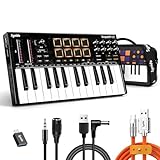
- ✔️[Premium Build That Stands Out & Lasts Longer] Designed with a sleek semi-transparent high-gloss finish, this 25-key MIDI keyboard controller delivers a modern studio look while standing up to daily use. The reinforced PC+ABS housing offers stronger resistance to drops and pressure than standard ABS plastic, making it reliable for both home studios and live setups. UV-coated keys and shell resist scratches, fingerprints, and yellowing over time, so your controller keeps its clean, premium appearance session after session
- ✔️[Built-In Arpeggiator for Faster Creative Flow] Turn simple chords into inspiring melodies instantly with the built-in arpeggiator. Easily adjust tempo, direction, swing, and LATCH settings to create dynamic rhythmic patterns without interrupting your workflow. Combined with 4 selectable velocity curves and responsive velocity-sensitive keys and pads, it adapts naturally to your playing style for more expressive performances and smoother music production
- ✔️[OLED Display & Smart Encoder for Faster Control] No more digging through complicated software menus during production. The clear OLED display and 360° push encoder let you quickly edit MIDI parameters directly from the keyboard, including Notes, CC, Program Changes, and MIDI Channels. Simply press and turn the main knob for fast control mapping and streamlined workflow. Fully compatible with major DAWs for effortless studio integration
- ✔️[Expressive Pads & Hands-On Performance Controls] Create beats, trigger samples, and control your music with confidence using 8 velocity-sensitive RGB backlit pads with dual drum banks. Features like note repeat, full MIDI mapping, and customizable lighting make live performance and beat-making more intuitive. Two touch bars provide smooth real-time pitch bend and modulation with instant visual feedback, while 8 assignable knobs and 6 transport buttons give you hands-on control over your DAW for faster, more creative production sessions
- ✔️[Flexible Connectivity for Studio & Mobile Setups] Easily connect to synthesizers, drum machines, sustain pedals, computers, tablets, and phones. The 1/8" MIDI Out and 1/4" sustain pedal input expand your setup possibilities, while the USB-C connection provides stable power and fast, reliable data transmission. The additional DC 5V input supports uninterrupted long-session performance. Plug-and-play compatibility helps you get creating faster with minimal setup
How the methods differ
| Method | What it uses | What it can tell you | Main dependency |
|---|---|---|---|
| Embedded tags | Metadata stored with the file | Descriptive details such as title, artist, or album, if present and accurate | The tags must exist, be correct, and be readable by the application |
| Acoustic fingerprint | A signature calculated from the audio | Whether the sound matches a recording in reference data | A fingerprinting service and its reference collection |
| Database identifier | An identifier associated with a database entity | Which specific catalog entity the identifier represents | The identifier must be present and understood by the software or service |
In short, a fingerprint supports a match; an MBID identifies a MusicBrainz entity. AcoustID belongs to the fingerprinting system, while an MBID is a database identifier. They are related in a typical identification workflow, but they do not mean the same thing.
Do these 3 things before closing this tab:
1Fix the driver behind crashes, sound loss and screen glitches2Clear out junk files and repair common Windows errors3Scan for outdated or missing drivers - takes under a minuteA practical identification workflow
- Inspect the existing tags. Check the title, artist, album, track number, and any database identifiers. Treat them as clues, not proof: tags can be absent, incomplete, or wrong.
- Fingerprint the audio if the tags are inconclusive. Use a tagger that supports the file format and can submit fingerprints for matching. In MusicBrainz Picard,
fpcalccalculates the fingerprint, AcoustID looks it up, and a result may match a linked MusicBrainz recording. The Picard guide to acoustic fingerprints and AcoustIDs explains that workflow. - Review the proposed match before saving. Compare the match with the actual recording and release. A different edit, version, or release may require judgment; a database match is not a guarantee that the selected entry is the one you intended.
- Check the saved tags in your destination software. Confirm that the fields appear as expected in the player or editor where you will use the file. Tagging support can vary by format and application.
Why format compatibility matters
Tagging conventions are not uniform across audio formats, and player support can differ even when a tagging application can write metadata. MusicBrainz Picard documentation lists support for MP3, MP4 audio, WMA, WAVE, FLAC, AIFF, Ogg-family audio, and other formats; that software support does not guarantee that every tag field will behave identically in every player. Picard’s file-format documentation specifically notes that WAVE has no standard for proper tagging and that its ID3v2 tags are not supported by all software.
Rank #3

- Note-for-Note Keyboard Transcriptions
- Pages: 112
- Instrumentation: Piano/Keyboard
For that reason, a successful identification scan and a portable, consistently readable set of tags are separate outcomes. Verify the result in the application you actually plan to use.
Quick Recap
Rank #4

- Studio One New Color Editing Labels Keyboard
- Keyboard Labels Shortcut for Studio One are laminated and made with typographical method on high-quality Matt Vinyl using non-toxic materials. Thickness - 80mkn. Made in USA.
- High quality sticker for keyboard! Once you apply the stickers, you can start editing right away.Stickers help all types of users, from beginner to professional.
- Shortcut will help improve your productivity by 15-40%, saving you time, while helping you enjoy your work
- Keyboard Shortcut Studio One . KEYBOARD NOT INCLUDED
What identification can and cannot establish
- Tags can establish what metadata is stored, but not that the information is true or complete.
- A fingerprint can find a likely match from the audio, but the result depends on available reference data and may need review when versions or releases differ.
- An MBID can identify a MusicBrainz entity, but it is not itself an audio fingerprint or a universal identifier for every music database.
- Format support can help software read or write tags, but it does not ensure uniform handling by every player.
Product prices and availability are accurate as of the date/time indicated and are subject to change. Any price and availability information displayed on Amazon at the time of purchase will apply.

