Short answer: MagSafe 3 is Apple’s built-in magnetic charging connector on compatible MacBooks. A magnetic USB-C adapter is a third-party accessory that adds a detachable magnetic joint to an ordinary USB-C connection. They may feel similar when they separate under tension, but they are different systems. Choose MagSafe 3 when your Mac has the port; otherwise use a properly rated USB-C cable and USB-C Power Delivery (PD) charger. Treat a magnetic USB-C plug adapter as an unverified, product-specific option rather than a documented MagSafe replacement.
Magnetic USB-C adapters and MagSafe 3 at a glance
| Option | Where the magnetic joint is | What it connects to | Compatibility basis | What is documented |
|---|---|---|---|---|
| MacBook MagSafe 3 | Built into the MacBook’s dedicated MagSafe 3 port and its matching cable | A USB-C power adapter through a USB-C to MagSafe 3 cable | MacBook Air models introduced in 2022 or later; MacBook Pro models introduced in 2021 or later, except the 13-inch M2 MacBook Pro introduced in 2022 | Apple documents the connector, cable arrangement, charging behavior and troubleshooting |
| Standard USB-C charging | No magnetic joint unless an accessory is added | A USB-C charging cable and a USB-C PD power adapter, or a powered USB-C/Thunderbolt display | MacBook Pro models introduced in 2016 or later; MacBook Air models introduced in 2018 or later; MacBook models introduced in 2015 or later; MacBook Neo | Apple documents model support, cable requirements and USB-C PD safety guidance |
| Magnetic USB-C plug adapter | An added third-party joint between the computer’s USB-C port and a USB-C cable | A conventional USB-C cable and power source, passing through the accessory | Depends on the exact adapter, Mac, cable, charger and intended functions | The Apple guidance reviewed does not test or certify third-party magnetic USB-C plug adapters |
What a magnetic USB-C adapter actually changes
A magnetic USB-C adapter normally consists of two small pieces. One remains in the computer’s USB-C port; the cable end attaches to it magnetically. A pull on the cable can separate the two pieces instead of dragging the laptop or stressing the cable.
As an Amazon Associate I earn from qualifying purchases.
The accessory changes the physical connection point. It does not turn the Mac’s USB-C port into a MagSafe port, and the Mac does not gain Apple’s dedicated MagSafe charging circuitry or connector detection simply because a magnet is present. Charging, data transfer, display output and other USB-C functions still depend on the adapter’s design and on the cable, port and power source behind it.
PC Slower Than It Used to Be?
A free scan shows the junk files, broken settings and background clutter dragging Windows down - then fixes them in one click.Free scan · Windows 10 & 11Crashes, No Sound, or Screen Glitches?
Random freezes, missing sound and display glitches usually trace back to one bad driver. Find and replace yours safely.Free scan · under a minuteThat distinction matters because product listings may use “MagSafe-like” or “magnetic charging” language for a wide range of designs. The available Apple documentation does not provide comparative tests of these adapters. It does not establish that a particular adapter preserves USB-C PD negotiation, maximum charging power, data transfer, display support, connector durability or electrical safety compliance. Those are questions for the individual manufacturer’s specifications and testing, not assumptions based on the presence of a magnet.
#1 Best Overall

- This 2-meter charge cable features a magnetic MagSafe 3 connector that helps guide the plug to the charging port of your Mac notebook.
- Pair it with a compatible USB-C power adapter to conveniently charge your notebook from a wall outlet and take advantage of fast-charging capabilities.
- The magnetic connection is strong enough to resist most unintended disconnects, but if someone trips on the cable,
- it releases so your Mac notebook stays put. An LED turns amber when the battery is charging and green when it’s fully charged. Made with a woven design for long-lasting durability.
- USB-C Power Adapter sold separately.
What MagSafe 3 is on a MacBook
MacBook MagSafe 3 is a dedicated magnetic power connector built into supported Macs. The documented cable is a USB-C to MagSafe 3 Cable: its USB-C end plugs into a USB-C power adapter, while its MagSafe 3 end attaches to the Mac’s MagSafe 3 port.
The magnetic separation point is therefore part of the computer-and-cable system, not an add-on inserted into a USB-C port. Apple provides model-specific compatibility information and troubleshooting for this connector. A MacBook with MagSafe 3 can also have USB-C ports and can charge through them, so MagSafe 3 is an additional charging route rather than the only route.
MagSafe 3 should not be confused with the MagSafe name used for iPhone accessories. Apple describes iPhone MagSafe as magnetic alignment for wireless charging. MacBook MagSafe 3 is a wired connector that carries power through a physical cable. The shared name refers to magnetic attachment, not to identical hardware or charging behavior.
Quick wins for a faster PC:
Repair Windows errors before they cause bigger problemsFix Now →Fix the driver behind crashes, sound loss and screen glitchesFind Drivers →Check your exact Mac model before choosing a connector
Connector generations are not interchangeable. Apple says the following model groupings support the relevant charging methods:
| Mac family | USB-C charging support | MagSafe 3 support |
|---|---|---|
| MacBook Pro | Models introduced in 2016 or later | Models introduced in 2021 or later, except the 13-inch M2 MacBook Pro introduced in 2022 |
| MacBook Air | Models introduced in 2018 or later | Models introduced in 2022 or later |
| MacBook | Models introduced in 2015 or later | MagSafe 3 is not listed for this family in the cited compatibility guidance |
| MacBook Neo | Listed by Apple as able to charge over USB-C | MagSafe 3 is not listed for this model in the cited compatibility guidance |
Some older Macs use the original MagSafe or MagSafe 2 connector. Apple states that older MagSafe and MagSafe 2 accessories are not compatible with MagSafe 3. Check the model name and year in macOS or on Apple’s current support page before buying a cable. “MacBook Pro” or “MacBook Air” alone is not precise enough when several generations use different connectors.
Rank #2

- Please Check Your Macbook Model Before Purch: USB-C to Magnetic 3 Cable Only the following 10 models are supported: MacBook Pro 14-in (M1,2021), MacBook Pro 16-in (M1,2021), MacBook Pro 14-in (M2,2023), MacBook Pro 16-in (M2,2023), MacBook Air 13-in (M2,2022), MacBook Air 15-in (M2,2023), MacBook Air 13-in (M3,2024), MacBook Air 15-in (M3,2024), MacBook Pro 14-in (M4,2024), MacBook Pro 16-in (M4,2024) NOTE: This is USB-C Connector, NOT USB-A Connector
- HIGH-SPEED 140W POWER DELIVERY SUPPORT: Engineered to support up to 140W Power Delivery, this magnetic usb c charging cable delivers fast and efficient charging for compatible MacBook Air and Pro models. When paired with a 96W or higher USB-C PD adapter, it ensures stable performance during work, gaming, or creative tasks. This charging cable for MacBook balances speed, safety, and reliability in one solution.
- EFFORTLESS MAGNETIC CONNECTION FOR DAILY CHARGING: This magnetic 3 cable features an original-style magnetic connector that aligns automatically for a secure and stable connection. Simply bring the usb c to magnetic 3 cable close to your device and it snaps into place instantly, helping prevent accidental disconnections. Designed for smooth everyday use, this magnetic charging cable offers both convenience and peace of mind for MacBook users.
- BUILT TO WITHSTAND DAILY WEAR AND BENDING: Featuring a high-strength double-braided nylon exterior, this magnetic charging cable is tested to endure over 20,000 bends. The reinforced structure resists fraying, tangling, and everyday stress, making it ideal for home, office, or travel use. A long-lasting solution for users who rely on their MacBook daily.
- CLEAR VISUAL CHARGING INDICATOR: The built-in LED light shows amber while charging and turns green once fully charged, allowing you to easily monitor charging status at a glance. This thoughtful detail enhances user experience, especially in low-light environments, making this magnetic 3 cable both functional and user-friendly.
Can you charge a MacBook through USB-C instead of MagSafe?
Yes, when the model supports USB-C charging. Apple says a supported Mac can charge through a USB-C port, through its MagSafe port where available, or from a connected USB-C or Thunderbolt display that provides power.
If you connect both MagSafe 3 and USB-C power at the same time, the Mac does not charge faster by combining them. Apple’s stated behavior is: “Your Mac charges over only one port at a time, using the source that provides the most power.” The computer selects one source rather than adding the wattages together.
Do these 3 things before closing this tab:
1Fix the driver behind crashes, sound loss and screen glitches2Repair Windows errors before they cause bigger problems3Scan for outdated or missing drivers - takes under a minuteUSB-C charging has three practical requirements:
- A charging-capable cable. Some USB-C cables carry data only and do not charge. A cable that fits physically is not automatically a charging cable.
- A suitable power adapter. For third-party equipment, Apple advises using a USB-C PD-compatible adapter that meets applicable international and regional regulations and safety standards.
- A compatible Mac and port. Model support and the port’s capabilities determine whether charging works. A magnetic accessory cannot override a port or model that does not support the required function.
Safety: what is known and what remains product-specific
There is no basis in the cited Apple material for calling every magnetic USB-C adapter safe or every one unsafe. The available guidance does not test this accessory category as a whole, and it does not show whether a given design maintains USB-C PD behavior, data integrity, temperature limits or regulatory compliance.
Evaluate any third-party adapter against the same fundamentals as any other charging accessory:
- Look for explicit USB-C PD support when you need charging rather than a data-only connection.
- Confirm the manufacturer states the supported power, voltage and current ranges for your Mac and charger.
- Check that the product is intended for the function you need. A charging-only magnetic tip may not support USB data, displays or Thunderbolt features.
- Use a cable and adapter that comply with applicable safety standards and regional regulations.
- Do not use damaged cables, bent contacts or a loose magnetic joint. Stop using the accessory if it becomes unusually hot, smells burnt, sparks or repeatedly disconnects.
- Keep liquid away from the connector and allow equipment to cool if it overheats. Apple’s safety guidance treats moisture, damage and overheating as reasons to stop and inspect the setup.
MagSafe 3 itself is not risk-free: Apple warns that the Mac’s MagSafe connector and port contain a magnet that can potentially erase data on credit cards or other magnetic devices. Keep magnetic media away from the connector and port. The same precaution is sensible around any strong magnetic accessory.
Rank #3

- Powerfully Fast Charging: Compatible with MacBook Pro with M1 Pro and M1 Max (2021, 14-inch and 16-inch), MacBook Air with M2 (2022), and MacBook Pro with M2 (2023, 14-inch and 16-inch). This cable supports up to 140W power delivery for rapid and efficient charging, featuring an LED indicator to monitor status.
- Effortless Magnetic Connection: Designed with a magnetic tip for seamless attachment, this cable ensures a secure connection to your MacBook, preventing accidental disconnections during use. Say goodbye to fumbling with connectors—plugging in and out is now intuitive and hassle-free
- Flexible Length and Unmatched Durability: With a generous 2-meter (6.6ft) length, this cable offers freedom to charge from a distance. The braided design enhances durability, resisting tangles and wear for long-lasting performance in any setting
- Safety First Protection: Built-in safeguards include overvoltage, overcurrent, and short circuit protection to prevent damage during charging. A slight 15-20 second delay may occur with certain adapters due to the magnetic safety mechanism, ensuring your device's security.
- Designed for the Future: Combining style and functionality, this cable features a silicone sheath for extra durability. Ideal for professionals and tech enthusiasts, it delivers reliable charging while maintaining aesthetics for daily MacBook use.
Which option should you use?
Choose MagSafe 3 when your Mac has the port
For a compatible MacBook Air or MacBook Pro, the USB-C to MagSafe 3 Cable is the clearest choice when you want a detachable magnetic charging connection. It uses the built-in port, has documented model support and leaves the Mac’s USB-C ports available for displays, storage and other devices.
MagSafe 3 is especially practical if the charging cable crosses a desk or walkway and you want the connector to separate when pulled. It also gives you a straightforward troubleshooting path: verify the correct cable, power adapter, port cleanliness and model compatibility using Apple’s instructions.
Choose ordinary USB-C charging when flexibility matters more
Use a charging-capable USB-C cable with a USB-C PD power adapter when your Mac lacks MagSafe 3, when you want one charger for several USB-C devices, or when a powered USB-C/Thunderbolt display is your preferred power source. This is the documented alternative for Macs that support USB-C charging.
USB-C also avoids occupying the MagSafe port, but the cable remains physically latched in the port until you unplug it. Select the cable and adapter by their specifications, not only by the connector shape.
Consider a magnetic USB-C adapter only for a specific, verified need
An added magnetic joint may appeal if your Mac has no MagSafe 3 port or if you want a breakaway connection on a particular USB-C cable. Before buying, verify the exact functions you need and accept that the Apple sources do not establish equivalent safety or performance.
Rank #4
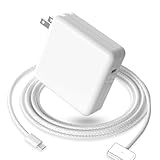
- 【Full Compatibility】 Works with Mac Book Pro 14"/16" (2021-2026) & Mac Book Air 13"/15" (2022-2026) including M1/M2/M3/M4/M5 chip models.
- 【Fast Charging】 Experience lightning-fast charging with the Power Adapter - Fully rejuvenate your 14-inch MacBook Pro in just 90 minutes! Our intelligent power-boost technology keeps your creative flow uninterrupted, transforming charging time into creating time.
- 【Strong magnetic】 This USB C Magnetic 3-cable has a strong magnetic attraction during use, which can keep the charger firmly in place when charging your MacBook.This can help protect your MacBook and prevent the charger from disconnecting or falling off during use.
- 【Ultra-Durable Armor Weave】 Lab-proven endurance: 3,0000 bend tests (3x industry average) with HD nylon fibersStain-resistant surface sheds coffee spills ("Wipe clean with a napkin - good as new!")
- 【365-Day Stress-Free Warranty】 Your satisfaction is our driving force! Enjoy 12-month hassle-free return/replacement for any quality concerns. Our dedicated team responds within 24 hours with personalized solutions.
Do not select one solely because a listing says “MagSafe.” That name does not make a third-party USB-C accessory part of Apple’s MagSafe 3 system, and it does not prove compatibility with a particular Mac, charger or cable.
Independent reader supportYour contribution helps us test, update, and keep practical guides available for everyone.How to set up each charging method
Set up MagSafe 3
- Confirm that your Mac model is a MagSafe 3 model, not an older MagSafe or MagSafe 2 design.
- Connect the USB-C end of the USB-C to MagSafe 3 Cable to a USB-C power adapter with adequate output for the Mac.
- Attach the MagSafe 3 end to the Mac’s MagSafe 3 port. The magnetic connector should align and seat without force.
- Check the Mac’s charging indicator and battery status. If it does not charge, disconnect and inspect the cable, adapter and port for damage or debris.
Set up USB-C charging
- Confirm that your Mac supports USB-C charging.
- Use a USB-C cable that explicitly supports charging; data-only cables will not supply power.
- Connect the cable to a USB-C PD power adapter that meets the applicable safety requirements and the Mac’s power needs.
- Plug the cable into a USB-C port on the Mac and check the battery status.
- If a powered USB-C or Thunderbolt display is the source, connect the display’s power-capable cable and verify that the display is actually delivering power.
If you install a magnetic USB-C adapter
- Read the adapter’s specifications for charging, USB-C PD, data, display and Thunderbolt support. Do not infer these functions from the connector shape.
- Confirm that the adapter’s stated electrical limits match the charger, cable and Mac.
- Insert the computer-side piece carefully and keep the contacts clean and dry.
- Connect the matching cable end and test charging before relying on the setup.
- Test any other function you need, such as data transfer or display output, independently. A charging test does not prove those functions work.
- Remove the accessory if it becomes hot, disconnects unexpectedly or shows physical damage.
Troubleshooting common charging problems
The Mac does not charge over USB-C
- Try a different USB-C cable known to support charging; a data-only cable is a common cause.
- Verify that the adapter is USB-C PD-compatible and connected to power.
- Try another USB-C port on the Mac if the model has more than one.
- Disconnect a second power source. The Mac uses only one source at a time, selecting the one that provides more power.
- Inspect the cable and ports for damage, debris or moisture. Do not continue using damaged or wet equipment.
MagSafe 3 does not connect
- Confirm that the Mac has MagSafe 3 rather than an older MagSafe generation.
- Use a USB-C to MagSafe 3 Cable, not an older MagSafe or MagSafe 2 cable.
- Check both ends of the cable and the MagSafe port for debris or damage.
- Test with a known-compatible USB-C power adapter.
A magnetic USB-C adapter disconnects or charges intermittently
- Check whether the magnetic pieces are fully aligned and whether the cable is pulling sideways on the joint.
- Inspect the contacts for dirt, wear or bent parts.
- Test the Mac with a conventional charging cable to separate a computer or charger problem from an adapter problem.
- Stop using the adapter if it overheats, sparks, smells unusual or repeatedly loses contact. The available Apple guidance does not provide a universal repair or safety threshold for third-party magnetic adapters.
The computer charges but a peripheral or display does not work
Charging capability does not demonstrate data, display or Thunderbolt capability. A magnetic USB-C adapter may be designed only for power, or it may not support the signaling required by your device. Remove it and test a direct, correctly rated USB-C or Thunderbolt cable. Check the adapter maker’s specifications for the exact function rather than assuming pass-through.
Questions to ask before purchasing
- What is the exact Mac model and introduction year?
- Does it have MagSafe 3, an older MagSafe generation, USB-C charging, or more than one of these?
- Do you need charging only, or also USB data, display output or Thunderbolt?
- Does the cable support charging and does the adapter support USB-C PD?
- What power range does the adapter claim, and does it match the Mac’s requirements?
- Are safety certifications and regional compliance information stated clearly?
- Can you return the accessory if it fails to charge or does not support the function you need?
The practical verdict
MagSafe 3 is the documented magnetic charging system for compatible MacBooks; use the USB-C to MagSafe 3 Cable with a suitable USB-C power adapter when your Mac has that port. USB-C charging is the documented alternative for supported models, provided the cable carries power and the adapter supports USB-C PD and applicable safety requirements.
A magnetic USB-C plug adapter is a different, third-party mechanical accessory. It may provide the breakaway behavior you want, but its charging, data, durability and safety characteristics must be verified for the specific product. Do not treat it as automatically equivalent to MagSafe 3, and do not buy it without first checking your Mac model and the functions you require.
The Tool Desk
Outbyte Driver Updater FREEFix the driver behind crashes, sound loss and screen glitchesFind Drivers →Outbyte PC Repair FREEClear out junk files and repair common Windows errorsFree Scan →Quick Recap
Product prices and availability are accurate as of the date/time indicated and are subject to change. Any price and availability information displayed on Amazon at the time of purchase will apply.

