Choose the MacBook Neo if you want macOS, prefer a smaller laptop, or rely on Apple apps and device continuity. Choose HP’s 14-inch OmniBook 5 OLED if you need Windows and value a larger OLED screen—especially if the configuration you can actually buy has 16GB of RAM and 512GB of storage. Their reported US starting prices are close: $699 for the Neo and $699.99 for the HP. Neither is a clear universal winner, and the HP’s exact US launch configuration should be verified before buying.
Which laptops are being compared?
The HP in this comparison is the 14-inch HP OmniBook 5 OLED, not an unspecified HP laptop. Tom’s Hardware reported its US launch and $699.99 starting price on October 1, 2026. Apple’s MacBook Neo launched earlier in 2026; its original launch price was lower than the current price reported by Tom’s Guide.
As an Amazon Associate I earn from qualifying purchases.
The prices below are reported figures, not a guarantee of today’s checkout price. Check the live Apple store or retailer listing and the exact HP SKU, since prices, stock, and HP configurations can vary.
Do these 3 things before closing this tab:
1Scan for outdated or missing drivers - takes under a minute2Repair Windows errors before they cause bigger problems3Fix the driver behind crashes, sound loss and screen glitches| At a glance | MacBook Neo | HP OmniBook 5 14-inch OLED |
|---|---|---|
| Operating system | macOS | Windows |
| Reported US starting price | $699 current base price; $599 education price, as reported by Tom’s Guide in September 2026 | $699.99 reported US starting price, per Tom’s Hardware on October 1, 2026; exact US launch SKU not established by HP’s cited pages |
| Starting memory and storage | 8GB RAM and 256GB storage, per Tom’s Guide’s September 2026 guide | 8GB RAM and 256GB SSD in the launch configuration reported by Tom’s Hardware |
| Display | 13-inch, 2408×1506 Liquid Retina | 14-inch, 1920×1200 OLED in the reported entry configuration; touch or non-touch versions, rated at 300 nits |
| Reported weight | 2.7 pounds, per Tom’s Guide | 2.56 pounds, per Tom’s Hardware |
| Battery figure | 13 hours 28 minutes in Tom’s Guide’s test | HP claim of up to 42 hours of local video playback, reported by Tom’s Hardware |
How do the current prices and configurations compare?
MacBook Neo: current price is not launch price
Apple announced the Neo at $599 in the US, or $499 for education, in March 2026. Those were launch prices, not the current figures in Tom’s Guide’s September 28, 2026 guide, which lists $699 for the base model and $599 for education. That guide lists the base configuration as 8GB of RAM and 256GB of storage.
#1 Best Overall

- Next-Gen AI Performance: Powered by the Intel Core Ultra 5 processor 125H with integrated AI acceleration (NPU), this Intel Evo Edition laptop optimizes workloads for creators and professionals, delivering smarter multitasking and longer battery efficiency.
- Stunning 3.2K OLED Visuals: Immerse yourself in a 16-inch WQXGA+ (3200x2000) OLED display featuring VESA Certified DisplayHDR True Black 500. Experience 100% DCI-P3 color gamut and ultra-deep contrast for professional-grade photo and video editing.
- Eye Comfort Certified: Work longer without fatigue thanks to the TUV Rheinland Eyesafe Certification, designed to reduce harmful blue light emissions while maintaining vivid color accuracy and visual integrity.
- Ultra-Fast Connectivity: Equipped with Killer Wireless Wi-Fi 6E for high-speed, low-latency networking. Features dual USB Type-C ports with Thunderbolt 4 and USB4 support for 40Gbps data transfers, power delivery, and multi-monitor output.
- Premium Security & Mobility: A sleek aluminum chassis houses a secure Fingerprint Reader for instant Windows Hello login and a back-lit keyboard for productivity in low-light environments. Includes a high-definition webcam for crystal-clear video conferencing.
Tom’s Guide reported in June 2026 that the $799 model added Touch ID and a 512GB SSD, but did not increase RAM beyond 8GB. Treat these prices and configurations as time-sensitive and check Apple’s live listing before purchase. Apple’s March 2026 announcement documents the original launch, while Tom’s Guide’s September 2026 guide reports later pricing.
HP: check the exact OmniBook 5 SKU
Tom’s Hardware reports a $699.99 US starting price for the OmniBook 5 14-inch OLED, with 8GB/256GB as the entry configuration and 16GB/512GB also offered at launch. The memory is soldered, so choose capacity carefully; confirm that the higher configuration is actually available at the price shown. Tom’s Hardware’s October 1, 2026 report is the source for the launch details.
HP’s support page describes the broader 14-kf0000 family and warns that configurations vary by country and region. It is not proof that a particular configuration is the US model at the reported starting price. HP Philippines lists one regional 14-kf0068TU with Core 5 320, 16GB RAM, 512GB SSD, and a 1920×1200 OLED touchscreen rated at 300 nits; that regional listing does not establish US pricing or availability. See HP’s 14-kf0000 family support page and the Philippines 14-kf0068TU listing.
Rank #2

- Ready, Set Go!: Say hi to the all-new Swift Go—your AI ready laptop featuring the latest Intel Core Ultra 5 Processor and verified as an Intel Evo Edition thin and light laptop. A visually brilliant 14" 2.8K OLED display and designed in an eye-catching, thin-and-light body with Windows 11 that’s great on the go!
- Indulge Your Eyes: Be thoroughly amazed by the brilliance of 2.8K OLED—offering vivid color accuracy and remarkably deep blacks—for exceptional color grading and image quality on a 16:10 display that’s made for makers.
- Next-Gen Performance: Featuring the next-gen Intel Core Ultra 5 processor 125H - with 14 cores and 18 threads-and dedicated Intel ARC graphics – for superior performance where you need it most.
- Intelligent Assistance at Your Fingertips: Create, make, and communicate. This Windows 11 PC powered by an Intel Core Ultra processor powers the AI experiences you need with speed and ease. This Intel Evo Edition laptop is thin, light and equipped with the hardware you need to effortlessly breeze through the most demanding of tasks without a hitch.
- Brand New Ways to Create: With new AI features in Windows 11 editing your stories, photos and videos gets easier. With Intel Core Ultra processors, your creative flow will never be slow. New background removal in Paint makes it easy to switch up the scene.
What matters most when choosing?
Operating system and software
The Neo runs macOS; the OmniBook runs Windows. Start with the programs, school or work requirements, and peripherals you actually use. If a required application is available only for one operating system, that outweighs a small difference in screen size or starting price. The Neo may also suit someone already invested in Mac apps or Apple-device continuity; that is a personal compatibility benefit, not a measured advantage for every buyer.
Screen size, OLED, and touch
The Neo’s 13-inch 2408×1506 display is smaller and higher-resolution than the reported entry OmniBook panel, which is 14 inches at 1920×1200. The HP’s OLED and optional touch are its clearest hardware distinctions on paper, but touch status depends on configuration, and the 300-nit rating applies to the reported entry panel—not necessarily every OmniBook 5 display.
Consider whether you value OLED contrast and a larger workspace more than the Neo’s higher pixel count in a smaller screen. If you work in a bright room, check brightness and reflections in person or look for independent measurements; the reported HP entry panel’s 300-nit rating may be limiting in bright conditions.
Rank #3
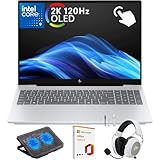
- What's In The Box: HP OmniBook 7 16 inch Laptop, 100W USB Type-C power adapter, Mytrix 2.4GHz Wireless Headset ($40 value), Mytrix Laptop Cooling Pad ($40 value), Lifetime Microsoft Office 2019 Professional Plus Product Key ($99 value; can only be activated on this device)
- Powerful Intel Core 9 Performance for Work & AI Tasks: Powered by the Intel Core 9 270H 14-core processor (up to 5.8GHz with Turbo Boost) and 32GB DDR5-5600 RAM, this HP laptop delivers fast performance for multitasking, business productivity, AI tools, programming, and content creation.
- Stunning 16" 2K OLED Touch Display: Experience vibrant visuals on the 16-inch 2K (2048×1280) OLED touchscreen with 120Hz refresh rate, 0.2ms response time, HDR 500 nits brightness, edge-to-edge glass, and Low Blue Light technology—ideal for streaming, design work, and everyday productivity.
- Fast 1TB PCIe Gen4 SSD Storage: The 1TB PCIe Gen4 NVMe M.2 SSD provides ultra-fast boot times, quick file transfers, and plenty of storage for documents, creative projects, software, and large media libraries.
- Advanced Connectivity & Modern Ports: Stay connected with Wi-Fi 7, Bluetooth 5.4, Thunderbolt 4, HDMI 2.1, USB-C with Power Delivery, and multiple USB-A ports—perfect for docking stations, external displays, and high-speed accessories.
Memory and storage
Both reported base configurations start at 8GB of RAM and 256GB of storage. That can be enough for everyday browsing, schoolwork, and office tasks, but buyers who keep many applications open or hold large files locally should compare higher capacities and their prices before choosing.
Free tools Windows power users keep installed
One-click scans. No signup required.
The Neo’s reported $799 tier adds 512GB storage and Touch ID, but remains at 8GB RAM. The HP was reported with 16GB/512GB launch configurations as well as its 8GB/256GB entry option. Because HP’s RAM is soldered, and regional availability varies, confirm capacity at checkout rather than assuming an upgrade will be possible later.
Portability, keyboard, and ports
The reported weights are close: 2.7 pounds for the Neo and 2.56 pounds for the HP. The HP is larger, so weight alone does not tell the whole story about how either fits in a bag.
Rank #4

- The Ultimate Premium Laptop Experience: Don’t sacrifice performance, graphics or battery life…Enjoy superior performance with the Acer Swift 3, based on the Intel Evo platform, it charges fast and lasts and wakes instantly and is super thin and light.
- Kick-Start Your Productivity: Now featuring 12th Gen Intel Core i7-12700H processor with dedicated Intel Iris Xe graphics delivering superior performance where you need it most. With Turbo Boost Technology, get up to 4.7GHz for your high-demand applications
- OLED is Everything: Feast your eyes on the brilliance of the 16:10, 2.8K WQXGA (2880 x 1800) OLED (Organic Light-Emitting Diode) display and prepare yourself to thoroughly enjoy this new screen. 90Hz Refresh Rate | 1ms Response Time | High-Brightness (400 nits) | 16:10 aspect ratio | Color Gamut DCI-P3 100percentage | Certified True Black HDR500
- Internal Specifications: 16GB LPDDR5 memory (maximum 16GB); 1TB PCIe Gen 4 SSD; Killer Wireless Wi-Fi 6E AX1675 supports dual-stream Wi-Fi in the 2.4GHz, 5GHz and 6GHz bands, including 2x2 MU-MIMO Technology; Bluetooth 5.2
- Made to Move: At just 3.09 lbs, this Acer Swift 3 laptop is ready to go where you go. The Swift 3 is thin and light aluminum, but packs up to 8 hours of battery life with fast charging capability
The Neo does not have a backlit keyboard. Apple specifies two USB-C ports with different capabilities: one supports USB 3 and the other USB 2; external displays connect through the USB 3 port. The Neo also lacks Thunderbolt. The cited HP launch report does not establish all port and keyboard details, so check the exact SKU’s specifications if you rely on a particular connection, keyboard feature, or external-display setup.
Battery claims are not an apples-to-apples comparison
Tom’s Guide measured 13 hours and 28 minutes for the Neo in its own test. The HP’s “up to 42 hours” figure is HP’s local-video-playback claim as reported by Tom’s Hardware. These figures use different methods and conditions, so they do not show that one laptop lasts longer in comparable everyday use. No direct independent test of the exact new HP model against the Neo is established here.
The Tool Desk
Outbyte Driver Updater FREEFix the driver behind crashes, sound loss and screen glitchesFind Drivers →Outbyte PC Repair FREEClear out junk files and repair common Windows errorsFree Scan →Quick Recap
Which one should you buy?
Choose the MacBook Neo if…
- You want macOS, use Mac apps, or value working within an existing Apple setup.
- You prefer a 13-inch laptop and are comfortable with the reported 8GB/256GB base configuration.
- Your work is mainly everyday productivity, browsing, or school tasks. Tom’s Guide recommends the Neo as its overall budget pick and reports reliable everyday performance, but that is the publication’s assessment—not a guarantee for every workload.
- You can live without a backlit keyboard, Thunderbolt, and more than 8GB of RAM.
Choose the HP OmniBook 5 OLED if…
- You need Windows or prefer it for your software and peripherals.
- You want a larger OLED display, and the specific SKU offers the touch option you want.
- You can buy the 16GB/512GB configuration at a price that fits your budget, rather than assuming those capacities are included in the $699.99 entry price.
- You have checked the exact model’s brightness, ports, keyboard, and availability in your region.
How to make the final call
- Confirm which operating system supports the apps and devices you need.
- Compare the exact models for screen resolution, OLED, touch, brightness, RAM, and storage—not just the product-family names.
- Check the live price, stock, and education eligibility. The cited figures are reported US prices and may change.
- Check the keyboard and ports against your everyday setup, especially if you need a backlight, a particular USB connection, or external displays.
- Use battery results only when the test protocol is comparable; do not treat HP’s local-video claim as equivalent to a review test of the Neo.
Product prices and availability are accurate as of the date/time indicated and are subject to change. Any price and availability information displayed on Amazon at the time of purchase will apply.

