Free tools Windows power users keep installed
One-click scans. No signup required.
To download the right Logitech racing-wheel software, identify the exact model first, then use that model’s Logitech Support page and its Downloads tab. Logitech’s documented path for the G29 Driving Force and G920 Driving Force is Logitech Gaming Software (LGS) 8.70 or later; the older-wheel compatibility table generally lists LGS 5.10.127 or later. Installing a package for a different wheel can leave buttons, pedals or force feedback unavailable.
This guide covers the Windows 7, Windows 8/8.1 and Windows 10 combinations documented by Logitech, installation, configuration and the most common detection failures. Download inventories can change, so confirm the exact model page immediately before installing.
As an Amazon Associate I earn from qualifying purchases.
Which Logitech wheel do you have?
Look for the product label on the wheel base, not just the name printed on a game box. Logitech uses separate software branches for different generations and for some accessories. Record the complete model name before opening a download page.
The Tool Desk
Outbyte Driver Updater FREEFix the driver behind crashes, sound loss and screen glitchesFind Drivers →Outbyte PC Repair FREEClear out junk files and repair common Windows errorsFree Scan →| Model | Windows coverage documented by Logitech | Logitech software noted in the compatibility material |
|---|---|---|
| G29 Driving Force Racing Wheel | Windows 10, 8.1, 8, 7 and Vista at release | LGS 8.70.315 or later in the Windows 8/10 table; LGS 8.70 or later for full functionality |
| G920 Driving Force Racing Wheel | Windows 10, 8.1, 8, 7 and Vista at release | LGS 8.70.315 or later in the Windows 8/10 table; LGS 8.70 or later for full functionality |
| Driving Force Shifter | Windows 8 and Windows 10 in the compatibility table | LGS 8.70.315 or later |
| Driving Force GT | Windows 8 and Windows 10 in the compatibility table | LGS 5.10.127 or later |
| Driving Force Pro | Windows 8 and Windows 10 in the compatibility table | LGS 5.10.127 or later |
| G25 Racing Wheel | Windows 8 and Windows 10 in the compatibility table | LGS 5.10.127 or later |
| G27 Racing Wheel | Windows 8 and Windows 10 in the compatibility table | LGS 5.10.127 or later |
| MOMO Force | Windows 8 and Windows 10 in the compatibility table | LGS 5.10.127 or later |
| MOMO Racing Force Feedback Wheel | Windows 8 and Windows 10 in the compatibility table | LGS 5.10.127 or later |
| NASCAR Racing Wheel (PC) | Windows 8 and Windows 10 in the compatibility table | LGS 5.10.127 or later |
The table is a record of Logitech’s cited compatibility material, not a promise that every old download remains hosted forever. The G29 and G920 have the clearest Windows 7 path in the official operating-system article. For an older wheel, use the model-specific page rather than inferring support from a newer product.
#1 Best Overall

- Immersive Gaming Experience: Perfect for PlayStation 5, PS4 and PC gaming titles, the Driving Force simulates the feeling of driving a real car with precision steering and pressure-sensitive pedals
- Premium Control: The Driving Force feedback racing wheel provides a detailed simulation of driving a real car, with helical gearing delivering smooth, quiet steering and a hand-stitched leather cover
- Customizable Pedals: These pressure-sensitive nonlinear brake pedals provide a responsive, accurate braking feel on a sturdy base - with adjustable pedal faces for finer control
- 900-Degree Rotation: Lock-to-lock rotation of the Driving Force means you can turn the wheel around two and a half times, hand over hand on wide turns - just like a real F1 race car
- Up Your Game: Take your racing simulation to the next level with Driving Force accessories like the Driving Force Shifter or desk and rig mounts
What counts as the “driver” for a Logitech wheel?
For these products, the practical Windows installation is usually Logitech Gaming Software. LGS supplies the device profile and the controls needed to adjust steering, pedals and force feedback. The G29/G920 support article specifically says LGS 8.70 or later is required for full functionality. A wheel can appear as a USB device while still missing configuration controls if the correct LGS branch is not installed.
Firmware is a separate matter. Logitech’s G920 firmware page records Software Version 43, a 4.42 MB file and a last update of September 21, 2015. The same page says its Firmware Update Tool is no longer supported or maintained. Treat that updater as a historical reference, not as the first step in a new installation.
Before you download
- Write down the exact model: G29, G920, G27, G25, Driving Force GT, Driving Force Pro, MOMO or another name on the base.
- Check whether you have a separate Driving Force Shifter; it has its own listing beside the wheel family.
- Confirm whether Windows is 7, 8, 8.1 or 10. Do not choose a package solely because the connector looks the same.
- Disconnect the wheel’s USB cable while removing an old Logitech installation, then reconnect it only when the installer or the steps below call for it.
- Close games and other wheel-control utilities so they cannot keep the old driver profile open during setup.
Download and install the correct Logitech software
- Open Logitech Support for the exact model. Search for the full product name printed on the wheel base and open that product’s support page. Select the Downloads tab; do not use a generic G29 page for a G920 or an older wheel.
- Select your installed Windows version. Choose Windows 7, Windows 8, Windows 8.1 or Windows 10 as appropriate. If the page offers multiple packages, read the model and operating-system labels before downloading.
- Choose the documented LGS branch. For a G29 or G920, use LGS 8.70 or later for the documented full-functionality path. Logitech’s compatibility table identifies 8.70.315 or later for those two wheels and the Driving Force Shifter. For the older wheels listed above, the table generally identifies LGS 5.10.127 or later.
- Run the installer with the wheel disconnected. Start the downloaded installer, accept the license terms and allow Windows to install the Logitech components. If an earlier LGS version is present and the installer asks to remove or update it, let that process finish before launching the new version.
- Restart if Windows requests it. A restart lets the Logitech service and device profile load cleanly. Save work in other applications first.
- Connect the wheel after installation. Plug in the wheel’s power supply, then connect its USB cable directly to the computer. Give Windows time to finish its device notification before opening a game.
- Open LGS and confirm the model. The wheel should appear by its own product name. If LGS opens but shows a different model, stop and reinstall from the correct product page rather than forcing that profile onto the device.
- Test in a game that supports Logitech force feedback. Verify at least one button, the steering axis and both pedal axes. Force feedback cannot be judged in a title that does not support Logitech force feedback.
Configure steering, pedals and force feedback
Logitech’s configuration guide states that steering-wheel and pedal response on the G29 and G920 can be adjusted in LGS. Make changes one control at a time so you can identify which setting affects a symptom.
What’s actually slowing this PC down?
Pick the symptom - the matching free tool is one click away.
Rank #2

- REALISTIC RACING SIMULATION DUO: Feel what is like to drive a real race car with G29 Driving Force Racing Wheel & Pedals and Driving Force Shifter
- PAIRED FOR PRECISION: Take full control of the race with G29 Driving Force Racing Wheel & Pedals and Driving Force Shifter
- PRECISE CONTROL: Helical transmission gears reduce noise and vibration with anti-backlash keeping wheel and pedals tight. The six-speed “H” shifter helps you execute smooth, accurate gear transitions
- FORCE FEEDBACK: The dual motor force-feedback realistically simulates the feel of tires on a turn, understeer, oversteer, drifting and more
- PREMIUM BUILT: Look, feel and durability of a real race car wheel, pedals and shifter. Wheel cover, knob and boot are covered in high-quality, hand-stitched leather with a solid steel gear shaft and polished metal pedals
Set the operating range
The G29 guide documents a maximum lock-to-lock rotation of 900 degrees. LGS lets you choose an operating range from 40 to 900 degrees in 10-degree increments. A small range makes the in-game steering react more quickly; a larger range gives a wider physical turn. Select a value supported by the game and then calibrate the in-game wheel to match.
Check pedal response
In LGS, move the accelerator, brake and clutch (where fitted) through their full travel and watch the corresponding axes. If an axis remains at rest, jumps or reaches 100 percent early, save the profile only after checking the physical connection and repeating the Windows test described below.
Keep profiles consistent
Some games load their own wheel settings after LGS starts. Set the desired range and response in LGS, then check the game’s controller menu for a second steering, dead-zone or force-feedback setting that could override it.
Rank #3

- Immersive gaming: Driving Force is perfect for games on PlayStation 5, PS4 and PC and simulates the driving experience of real vehicles thanks to precise steering and pressure-sensitive pedals
- Premium control: the racing steering wheel with driving force feedback simulates in detail the driving feel of real vehicles with helical teeth for a fluid, quiet steering, hand-stitched leather cover
- CUSTOMIZABLE PEDALS: Pressure-sensitive non-linear brake pedals provide precise braking feel with fast response, durable base, adjustable pedal surfaces for even more precise control.
- 900° steering range. Two and a half turns of the steering wheel between stops, hand-over-hand in wide turns, just like a real F1 racing car
- Play even better: The next level for your racing simulation with Driving Force accessories such as the Driving Force gear lever or holders for desk and rig
Verify the wheel in Windows before troubleshooting a game
- Press Windows key + R, type
joy.cpland press Enter. - Select the Logitech wheel in Game Controllers and choose Properties.
- On the test page, turn the wheel and press every button and pedal. Confirm that the axes move smoothly and return to center.
- If the wheel is absent, open Device Manager and check Human Interface Devices, Sound, video and game controllers and Universal Serial Bus controllers for a warning icon.
- If Windows sees the device but LGS does not, close LGS, unplug the USB cable, restart Windows and reconnect the wheel directly to another USB port. Avoid testing through a hub until detection works.
A successful joy.cpl test separates a Windows installation problem from a game-specific mapping problem. When the axes work there but not in one title, recreate the game’s wheel profile and confirm that the title is configured for a wheel rather than a gamepad.
PC Slower Than It Used to Be?
A free scan shows the junk files, broken settings and background clutter dragging Windows down - then fixes them in one click.Free scan · Windows 10 & 11Outdated Drivers Are Slowing You Down
One free scan finds every outdated or missing driver and matches the right update for your exact hardware.Free scan · exact hardware matchFixes for common Logitech wheel problems
“Logitech wheel not detected”
- Confirm the power adapter is connected and the wheel completes its startup movement, if your model performs one.
- Disconnect USB, close LGS, restart Windows and reconnect directly to the PC.
- Run
joy.cpl. If no controller appears, inspect Device Manager for an error icon and remove the failed device entry before reconnecting. - Uninstall the wrong LGS branch from Control Panel > Programs and Features (Windows 7/8) or Settings > Apps (Windows 10), restart, and install the package for the exact model.
- Do not install G29/G920 software on an older wheel, or an older-wheel package on a G29/G920, just because both use USB.
Buttons work but pedals or steering do not
Open joy.cpl and watch each axis. Reseat the pedal connector at the wheel base, then test again. In LGS, check that the correct wheel profile is active and that the operating range has not been set to an unexpectedly small value. If Windows shows no movement at all, the issue is below the game’s control mapping and should be diagnosed as a connection, profile or hardware fault.
Force feedback is missing
First verify that the game supports Logitech force feedback and that force feedback is enabled in its controller options. Confirm that steering and pedals work in joy.cpl, then reopen LGS and the game. Do not use a firmware updater as a routine fix: Logitech says the G920 Firmware Update Tool is no longer supported or maintained.
Rank #4
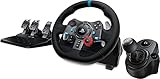
- Racing Wheel: A definitive sim racing wheel for PlayStation 4 and PlayStation 3: Realistic steering and pedal action for the latest racing titles
- Racing Wheel: Easy-access game controls: On-wheel D-pad, console buttons, paddle shifters and LED indicator lights
- Racing Wheel: Built to last: Durable solid steel ball bearings, stainless steel shifter and pedals and hand-stitched leather wheel grip
- Shifter: The sim racing shifter for G29 and G920 Driving Force Racing Wheels: Adds realistic shifting to your racing rig
The installer refuses to run
Check that the download matches the selected Windows edition and the exact model. Remove a partially installed Logitech Gaming Software entry, restart, and run the model-specific installer again. Keep the wheel disconnected until installation completes. If Windows reports that a component is already in use, close games and any other wheel utilities before retrying.
The wheel worked before a Windows change
Record the model and LGS version currently installed, then return to the Logitech product page and select the same Windows version shown on the computer. Reinstalling the documented package is safer than applying a random driver from a third-party download site. If only one game changed, test in joy.cpl first; a working Windows axis points to that game’s profile rather than the base installation.
Recommended Free Tools
Legacy software and support limits
The G29/G920 operating-system statement is historical wording: Logitech says those wheels were supported on Windows 10, 8.1, 8, 7 and Vista “at the time of release.” The older-wheel table specifically lists Windows 8 and Windows 10 for its models. Current download pages, file availability and maintenance status can change, so read the exact model page’s notes before installing on an old Windows image.
Best Value
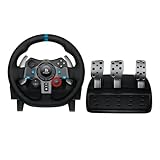
- Immersive Gaming Experience: Perfect for PlayStation 5, PS4 and PC gaming titles, the Driving Force simulates the feeling of driving a real car with precision steering and pressure-sensitive pedals
- Premium Control: The Driving Force feedback racing wheel provides a detailed simulation of driving a real car, with helical gearing delivering smooth, quiet steering and a hand-stitched leather cover
- Customizable Pedals: These pressure-sensitive nonlinear brake pedals provide a responsive, accurate braking feel on a sturdy base - with adjustable pedal faces for finer control
- 900-Degree Rotation: Lock-to-lock rotation of the Driving Force means you can turn the wheel around two and a half times, hand over hand on wide turns - just like a real F1 race car
- Up Your Game: Take your racing simulation to the next level with Driving Force accessories like the Driving Force Shifter or desk and rig mounts
Do not confuse an archived firmware file with a maintained driver. For the G920, Software Version 43 was last updated on September 21, 2015, and Logitech explicitly says the Firmware Update Tool is no longer supported or maintained. Use LGS for normal configuration and only consider legacy firmware material when Logitech’s current model instructions require it.
Optional shortcut after the manual steps
If Windows still reports missing, outdated or corrupted device drivers after these checks, Outbyte Driver Updater can scan more than 100 devices, identify driver problems, install only official drivers and provide driver backup, restore and scheduled scans. It runs on Windows 11, 10, 8 and 7 and includes a 2-day free trial with no credit card before a subscription; results vary, and it is an optional shortcut rather than a guarantee that every wheel problem will be repaired.
Bottom line
Model identification is the decisive step. Use the exact Logitech Support Downloads page, install LGS 8.70 or later for documented full G29/G920 functionality, use the older branch listed for legacy wheels, connect the hardware only after installation, and verify it with joy.cpl before changing game settings. Keep the G920 firmware updater in its historical context because Logitech no longer maintains it.
Do these 3 things before closing this tab:
1Scan for outdated or missing drivers - takes under a minute2Repair Windows errors before they cause bigger problems3Fix the driver behind crashes, sound loss and screen glitchesQuick Recap
Product prices and availability are accurate as of the date/time indicated and are subject to change. Any price and availability information displayed on Amazon at the time of purchase will apply.

