Free tools Windows power users keep installed
One-click scans. No signup required.
Short answer: the official guidance doesn’t show that Windows decays on its own just because you stop doing routine cleanup. Microsoft instead points to specific, identifiable causes of slowdowns: limited storage, too many startup apps, outdated software and hardware that no longer fits the workload. This article doesn’t report a personal long-term experiment, and no controlled study of “cleanup versus no cleanup” turned up. What follows is what the evidence supports and a method for testing the question on your own machine.
What the evidence does and doesn’t establish
Microsoft’s support article “Tips to improve PC performance in Windows” covers Windows 10 and Windows 11. It lists several contributors to slow performance and advises trying multiple fixes, because more than one factor can be at work at once. It also says that older hardware may not improve much from these steps, in which case upgrading the device may be the better long-term answer.
As an Amazon Associate I earn from qualifying purchases.
That is a different claim from “an aging install always rots.” A system that slows over months usually accumulated something specific: a full drive, new startup items, a software conflict or a heavier workload than the hardware suits. Each of those can be found and measured.
- No controlled long-term study found. The sources reviewed contain no study that measures performance loss caused by stopping routine cleanup, and no reliable general statistic for “Windows rot.”
- Microsoft Research, “Why Did My PC Suddenly Slow Down?” describes preliminary results from several weeks of PC usage. It argues that perceived unresponsiveness often has a simple explanation and discusses using performance counters and models to spot anomalous processes. That supports diagnosing slowdowns, not blaming age. It is not a cleanup-versus-no-cleanup comparison.
- Forum anecdotes, such as threads asking how often people reinstall Windows 11, show what people do and feel, not what causes slowdowns.
The four explanations worth separating
| Cause | What it affects | How to check |
|---|---|---|
| Storage pressure | Updates, temporary files, general headroom | Settings > System > Storage; Windows Security > Device performance & health |
| Startup and background software | Boot time, and CPU and disk use after sign-in | Task Manager > Startup apps; clean boot comparison |
| Updates or software conflicts | Responsiveness, crashes, odd behavior after a change | Change log of installs, updates and driver changes; clean boot |
| Hardware limits | Everything, especially under heavier modern workloads | Repeatable workload timings that stay poor after the other three are ruled out |
Microsoft’s technical startup guidance on Microsoft Learn (“Delivering a great startup and shutdown experience”) says processes started at boot consume CPU and disk resources and can delay app launches or make apps run slowly. It also says fast startup represents about 50% of overall boot time in the context it describes. That figure applies only to that fast-startup scenario. It doesn’t measure how much startup apps, or skipped cleanup, slow a PC overall.
#1 Best Overall

- 【UPGRADED LAPTOP CLEANING KIT 】 The macbook cleaning kit computer screen cleaner comes with a number of accessories including a retractable large brush, polishing cleaning cloth X 2, keycap puller, metal pen tip, flocking sponge, thin soft brush, soft plastic lens cleaning pen, 5 replacing cloth, large cleaning microfiber cloth. You deserve the comprehensive computer cleaning kit keyboard vacuum at a low cost
- 【PROFESSIONAL KEYBOARD CLEANING KIT】 The laptop screen cleaner keyboard cleaner can pull out the keycaps of gaming keyboards and mechanical keyboards. A retractable keyboard brush works on laptops and keyboards, while the mini high-density brush is great for deep cleaning between keys for cleaning between flatter keys on a laptop, the metal pin tip gently removes any stains. This electronic cleaning kit macbook cleaner totally meets professional cleaning needs
- 【OFFICE DESK ACCESSORIES】This keyboard cleaner kit is easy to use and can clean your keyboard and electronic screen with just one swipe. Wiping with the 2mm thicken widen polishing cleaning cloth designed at a right angle for better fitting screen corners of computers with our recyclable cleaning spray, The laptop cleaner kit for macbook effectively absorbs stubborn stains, leaves no discoloration, no streaks, and no fiber shedding on the screens
- 【MULTIFUNCTIONAL TOOLS 】Mini soft brush and soft plastic lens cleaning pen are specially designed for DSLR camera screen, lens, and other delicate surfaces. 5 more cleaning cloths of it supplied for replacement. The flocking sponge is an excellent tool for cleaning earbuds charging cases, And the earbud cleaning kit is ideal. This electronics for college students is equivalent to 10 other electronic cleaning kit
- 【PORTABLE DESIGN & CLEANER TOOL】 The office supplies is compact in design, easy to carry, and you can easily take it anywhere. It's convenient to keep one in a drawer, one in your car, or in your bag and dorm. It is easy to use and can clean your keyboard and electronic screen with just one swipe. Is the college essentials cleaning tool for your friends, family, colleagues and students
Software changes matter too. In its March 20, 2026 Windows Insider Blog post “Our commitment to Windows quality,” Microsoft said it plans work on performance and app responsiveness. That shows the Windows version itself can influence perceived speed, which is one more variable to log. It says nothing about a specific change on your PC.
How to run the experiment properly
1. Define “cleaning up”
“Cleaning” bundles different actions: deleting temporary files, uninstalling unused apps, trimming startup items, and running a third-party cleaner. They affect different variables. Pick which ones you will stop, and keep the others fixed. Otherwise a result can’t be traced to anything.
Rank #2

- Reusable Cordless Air Duster: Replace disposable compressed air cans with a rechargeable electric blower for keyboards, PC towers, car interiors and home devices
- 100000RPM Motor, 3 Adjustable Speeds: Choose lower airflow for gentle dusting or stronger airflow for keyboard gaps, PC fans, car vents and tight corners
- Smart LED Display: Check speed mode and battery level at a glance, helping you adjust cleaning power and avoid unexpected power loss
- 5 Nozzles & 3 Brushes: Detail attachments help clean laptop ports, keyboard gaps, vents, camera gear and other hard-to-reach spaces
- LED Light & Portable Safety Design: Built-in light reveals dust in dark areas; lightweight handheld body with safety protections supports daily use
2. Record a baseline
- Device model and Windows version and build (Settings > System > About).
- Free storage on the system drive.
- The list of enabled startup apps (Task Manager > Startup apps).
- Boot time, from power-on to a usable desktop, timed the same way each run.
- A fixed workload with a stopwatch: for example, launching the same three apps, opening the same large file, or running the same export. Boot time and app responsiveness are different outcomes; track them separately.
3. Repeat under comparable conditions
Take several runs rather than one, at similar times and with the same apps open, and note when Windows is mid-update or indexing. One slow run proves little.
4. Log everything that changes
Write down installs, Windows and driver updates, new startup items and hardware changes during the observation period. These are the usual confounders, and they are also the likeliest real causes of any slowdown.
Rank #3
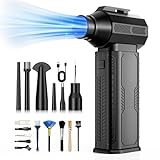
- [130K RPM Cleaning Storm] Our air duster features a 2X ultra-powerful brushless motor, delivering 52 m/s airflow, to blast even 3-year dust from keyboards in 10 seconds.
- [Cost-Effective & Reusable] The rechargeable electric air duster replaces 1,000+ disposable canned air. Only dry, stable airflow, shielding your devices from damage, blending eco-friendliness with high-tech precision.
- [4-Gear Adjustable Wind Speeds] Conquer every cleaning challenge. Level 1 for gentle dusting; Level 2 for precision clean; Gear 3 for daily clean; Gear 4 for heavy-duty clean (PS: long-press to activate storm mode.)
- [6 Versatile Nozzles & 10 Detail Brushes] Offer tailored solutions for every cleaning task, from delicate computer keyboards and sensitive electronics to car detailing, home deep cleans, and even outdoor inflation tasks. One tool, infinite mastery.
- [Safe & 2.5-Hour Fast Charge] Fully recharge via Type-C in 2.5 hours. The 8000mAh battery delivers 120 minutes of runtime on Speed 1, 2X longer than others. The upgraded AI Chip with overcharge & overheat protection.
5. Re-measure and report modestly
Compare against the baseline. One machine’s result is that machine’s result. It becomes a general claim only with more machines and a repeatable method. This is an editorial testing method built on the documented performance factors, not a Microsoft test standard.
If the PC does get slower
Diagnose before you reset or buy anything.
- Open Windows Security > Device performance & health. It reports common storage, battery and system issues and gives recommendations.
- Review startup apps. Compare the current list with your baseline and disable what’s new and unnecessary.
- Try a clean boot. Microsoft’s “How to perform a clean boot in Windows” guide explains how to start with only essential services and drivers. If the slowdown vanishes, a nonessential startup program or service is the culprit, and you can re-enable items in groups to find it.
- Re-test your fixed workload. If it’s still slow with storage free, startup trimmed and no conflicts, hardware limits become the likeliest explanation, and an upgrade may be the sensible fix.
Where a reset fits
Microsoft’s “Recovery options in Windows” page lists reset and reinstall options for troubleshooting. A reset is a recovery tool for a system you can’t diagnose, not evidence that routine cleaning is required. If you reinstall, note that a manufacturer recovery image may include device-specific drivers and factory apps that generic Microsoft installation media lacks.
Rank #4

- 10-PACK VALUE SET FOR LONG-TERM & MULTI-SCENE USE: Includes 10 mini anti-static keyboard brush, sufficient quantity for daily cleaning, backup, multi-device use, or sharing; great cost-effectiveness for cleaning keyboards, electronics, and small spaces—no frequent repurchases needed.
- ANTI-STATIC DESIGN PROTECTS ELECTRONIC DEVICES: Built-in anti-static function effectively eliminates static electricity, The Laptop Cleaning Kit arepreventing dust adsorption and protecting sensitive electronic components (computer motherboard, camera, fans) from static damage—safe for all your valuable devices.
- SOFT NYLON BRISTLES FOR GENTLE & EFFICIENT CLEANING: The Laptop Cleaning Kit are Equipped with high-quality soft nylon bristles that are dense yet flexible—easily removes dust, crumbs, and debris from keyboard gaps, motherboard crevices, camera lenses, and small spaces without scratching surfaces or damaging delicate parts.
- MINI PORTABLE SIZE FOR HARD-TO-REACH AREAS: Compact mini design (easy to hold and maneuver) allows access to narrow gaps, tight corners, and small spaces that regular brushes can’t reach—The keyboard brush is perfect for cleaning keyboard keys, fan blades, camera ports, and computer motherboard details.
- MULTI-PURPOSE CLEANING FOR ELECTRONIC DEVICES: Versatile Keyboard Cleaner cleaning tool compatible with keyboards, computers, motherboards, fans, cameras, printers, headphones, and other electronic devices; The laptop cleaner is ideal for home, office, workshop, and travel use—an essential tool for electronics enthusiasts and professionals.
Do you need a cleaner app?
Nothing in the official guidance supports that. Windows’ built-in storage settings, startup list, Device performance & health and clean-boot tools cover the documented causes. A storage upgrade or installation USB becomes relevant only when a specific diagnosis or recovery need calls for it.
Do these 3 things before closing this tab:
1Scan for outdated or missing drivers - takes under a minute2Repair Windows errors before they cause bigger problems3Fix the driver behind crashes, sound loss and screen glitchesQuick Recap
Best Value

- This set of keyboard cleaning brushes is well made, comes in a variety of shapes and sizes for cleaning deep and hard-to-clean areas, enough to meet your daily needs.
- Made of PP handle and nylon bristles, it is durable, the bristles are not easy to fall off or break, and will not generate static electricity during use, preventing damage to your device.
- The computer brush kit is small in size and light in weight, making it easy to carry and use. This is a great tool kit for use at home or at work.
- Mini electronic cleaning brush is suitable for cleaning computer keyboards, home appliances, car interiors, vents, circuit boards, mobile phones, cameras, electronic devices, etc.
- Packaging: 5 different types of anti-static cleaning brushes.
Product prices and availability are accurate as of the date/time indicated and are subject to change. Any price and availability information displayed on Amazon at the time of purchase will apply.

